Cosy
Cosy automates Slack community growth with smart onboarding and member connections.
About Cosy
Cosy is a powerful, Slack-native automation platform designed to transform your Slack workspace from a simple communication tool into a thriving, self-sustaining community. It is built for community managers, founders, and team leaders who understand that growth hinges on engagement, connection, and member experience, but who are constrained by limited time and resources. Cosy directly addresses this by automating the most time-consuming and critical aspects of community management directly within the environment where your members already are: Slack. Its core value proposition is to save you hours of manual effort every week while systematically fostering a more connected, engaged, and valuable community. By automating personalized onboarding sequences, facilitating meaningful 1:1 introductions between members, building a searchable member directory without ever leaving Slack, and instantly surfacing top content or potential issues, Cosy empowers you to scale your community's warmth and value. It allows you to progress from manually herding conversations to strategically nurturing a vibrant ecosystem that grows and engages on autopilot, turning your Slack into the central, lively hub your community deserves.
Features
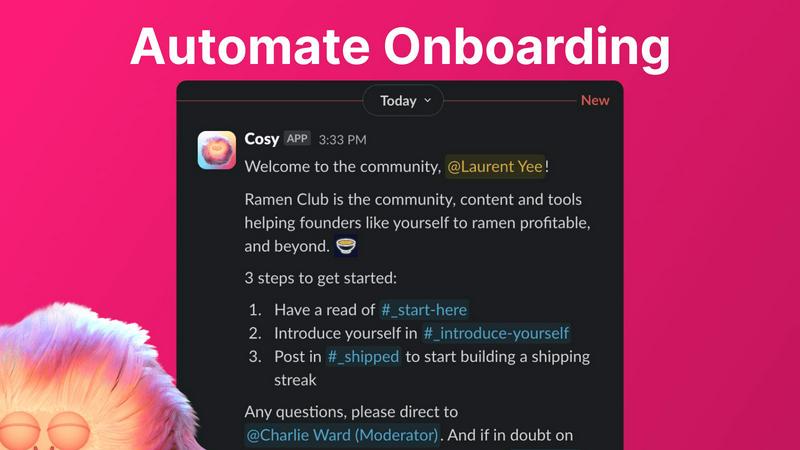
Automated Onboarding Sequences
Create and automate up to 10 distinct welcome DM sequences to greet new members, triggered the moment they join your Slack. Fully customize messages with member names, links, and emojis, and schedule them to send immediately or on a delay of minutes, hours, or even months. This ensures every new member feels personally welcomed, even outside of business hours, saving you countless hours of manual outreach and follow-up while ensuring no one slips through the cracks.
Member Introductions & Connections
Grow engagement by automatically introducing opted-in community members to each other via direct messages on a regular cadence you set. Introductions happen in a 3-person DM with the Cosy bot, and you can customize the intro message, frequency (every 1-4 weeks), and timing. This feature fosters serendipitous connections, randomly matching members while avoiding recent matches, to build a highly engaged network where relationships form on autopilot.
Searchable Member Directory
Build a rich, searchable directory of all your community members without anyone ever leaving Slack. Create custom profile fields for members to fill out, then notify everyone to build their profiles. Members can search by keywords and filter for completed profiles using a slash command or the Cosy app. This transforms your Slack into a powerful networking hub, helping members find the right people and resources effortlessly.
Content Highlights & Moderation
Instantly surface the most valuable conversations and identify potential issues with powerful slash commands. Discover the top 10 most engaged posts in a specific channel or across all public channels. Alternatively, quickly find all public messages that have gone unreplied to, allowing you to jump in and re-engage the discussion or spot members who may need support, ensuring your community's content remains vibrant and inclusive.
Use Cases
Scaling a New Community from Day One
For founders and new community managers, Cosy automates the foundational work of welcoming and integrating every new member from the moment they join. By setting up automated onboarding DMs, you ensure consistent, warm first impressions that scale effortlessly with your growth, freeing you to focus on strategy and content instead of manual greetings.
Reigniting Engagement in a Stagnant Community
If your Slack workspace has grown quiet, Cosy's automated member introductions and content highlighting tools can jumpstart activity. By systematically connecting members and surfacing past high-value conversations, you create new discussion points and relationships, moving the community from a passive information channel back to an active, engaging hub.
Building a Professional Network within a Company or Group
For internal teams or professional groups, the searchable Member Directory turns Slack into a powerful internal knowledge and networking platform. Members can easily find colleagues with specific skills, interests, or experience, fostering cross-functional collaboration and making the collective expertise of the community transparent and accessible.
Proactive Community Health Monitoring
Community managers can use the content highlight and unreplied message features to proactively monitor the health of the community. Quickly identifying highly engaged content allows you to recognize and reward active contributors, while spotting unreplied messages helps you intervene to support isolated members or spark conversation in dormant threads, maintaining a positive and inclusive environment.
Frequently Asked Questions
How does the automated onboarding work?
When a new member joins your Slack workspace, Cosy can automatically send them a sequence of up to 10 welcome direct messages. You fully control the message content, including personalization with the member's name, and the timing—messages can be sent immediately or scheduled with delays of minutes, hours, or months. This happens reliably, 24/7, ensuring every member is welcomed.
Are member introductions opt-in?
Yes, member introductions are completely opt-in. Community members must choose to participate in the connection program. For those who opt-in, Cosy will randomly introduce them to another opted-in member on the cadence you configure (e.g., every week), while avoiding matching the same people together in a short timeframe.
How do members access the Member Directory?
Members can access the searchable directory in two ways: by opening the Cosy app within Slack, or by using the /member-directory slash command in any public channel, which provides a quick link. They can then search by keywords and filter to find other members based on the profile information shared.
What does Cosy cost?
Cosy offers a free plan for communities with up to 250 members. For unlimited members, a 30-day free trial is available for the paid plan. After the trial, you can continue with a paid subscription to access all features for communities of any size. Specific pricing tiers for the paid plan are available on the Cosy website.
Similar to Cosy
DebutPin
Indie product playground — ship, and collect pins

Egmatic
No-code 2D game editor: visual node logic, drag-and-drop scenes, live preview. Exports to Windows, macOS, Linux, Android, iOS, Web.

Product Launch Checklist
A free launch checklist for SaaS, apps, AI tools and more. Every step says why it matters and when you can skip it.
Kody Tools
Free collection of online developer utilities, code formatters, and digital converters designed to streamline your daily workflow.
Forms Plugin
The #1 Native Form Builder Plugin for Framer - No Code, No Embeds, No External Platforms.