

ResponseHub
ResponseHub automates security questionnaires with AI, saving time and ensuring accurate, compliant answers.
About ResponseHub
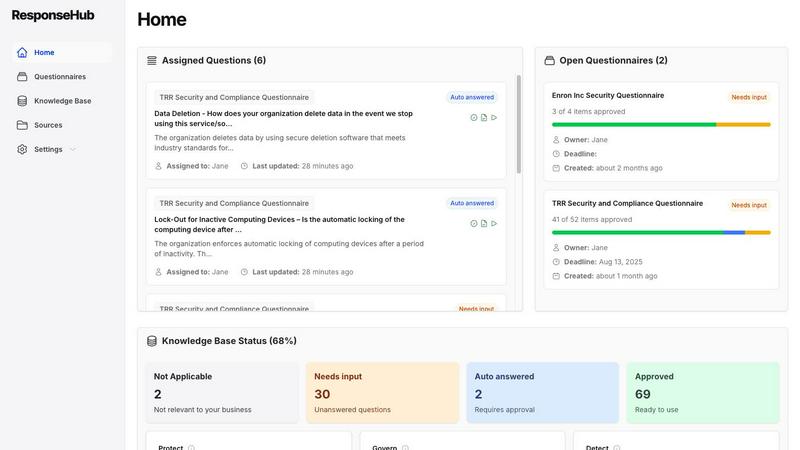
ResponseHub is the ultimate solution for automating security questionnaires, specifically designed to liberate growing organizations from the tedious and intricate process of vendor security assessments. Aimed primarily at startups and scale-ups, ResponseHub addresses the challenge of slow sales cycles caused by the time-consuming nature of compliance questionnaires. By utilizing advanced AI technology, ResponseHub streamlines this essential yet burdensome task, allowing users to effortlessly upload their security questionnaires—often in convoluted Excel formats—along with their policy documents, standard operating procedures, and product descriptions. The platform's AI intelligently analyzes the inquiries, cross-references them with the uploaded materials, and generates accurate, fully-cited responses. This innovation dramatically reduces completion time from days to mere hours, instilling users with complete confidence in every answer. As organizations evolve, ResponseHub adapts with them, maintaining a dynamic, automated knowledge base that continuously learns from completed assessments. This ensures compliance intelligence becomes a scalable asset rather than an ongoing headache. Ultimately, ResponseHub empowers technical leaders and security teams to accelerate deal cycles, mitigate risk, and redirect their focus towards core business growth.
Features
Unlimited Source Documents
ResponseHub allows users to upload an unlimited number of source documents, including policy documents, product descriptions, and standard operating procedures. This flexibility ensures that all relevant materials are considered during the questionnaire automation process, making it easier to generate comprehensive and accurate responses.
Automated Knowledge Base
The platform features an automated knowledge base that is consistently updated with AI-suggested additions derived from completed questionnaires. This dynamic knowledge base ensures that your compliance information remains current and relevant, adapting to new insights and changes in requirements seamlessly.
Advanced AI-Powered Parsing
ResponseHub’s AI-powered parser is capable of handling even the most complex spreadsheets, regardless of cover sheets, multiple sheets, or ambiguous column headers. This intelligence ensures that users can upload any security questionnaire without worrying about format issues, streamlining the entire process.
Clear Citations and Confidence Ratings
Every answer generated by ResponseHub includes clear citations, referencing the exact policy, section, page, and sentence. Additionally, the platform provides a finely-tuned answer-confidence rating, allowing users to understand the reliability of each response and ensuring they have complete confidence in their submissions.
Use Cases
Accelerating Sales Cycles
Sales teams often face delays due to lengthy security questionnaires. With ResponseHub, organizations can complete these assessments in hours instead of days, allowing sales leaders to close deals faster and maintain momentum in their sales cycles.
Simplifying Compliance Processes
Compliance can be a labyrinthine process, especially for startups without dedicated legal teams. ResponseHub simplifies this by automating the response generation for security questionnaires, helping organizations stay compliant without the associated headaches.
Enhancing Team Collaboration
ResponseHub allows teams to assign questions to relevant subject matter experts and delegate final approvals. This collaborative approach fosters accountability and ensures that every response is thoroughly vetted before submission.
Building a Scalable Knowledge Asset
As organizations grow, their compliance needs evolve. ResponseHub’s automated knowledge base becomes a scalable asset that learns from each completed assessment, enabling organizations to build a robust repository of compliance intelligence over time.
Frequently Asked Questions
How does ResponseHub ensure the accuracy of the generated answers?
ResponseHub’s AI analyzes the uploaded questionnaires alongside relevant source documents to generate accurate responses. Each answer is fully cited, referencing the exact policy, section, and page, allowing users to verify the information easily.
Can I use ResponseHub if I have existing security policies?
Absolutely! Users can upload existing policy documents and standard operating procedures. Additionally, if you lack policies, ResponseHub provides a free policy generator to create them quickly.
How quickly can I get started with ResponseHub?
Getting started with ResponseHub is incredibly quick and straightforward. Users can sign up for a self-serve trial and begin uploading their documents in under five minutes, allowing for immediate access to the platform's capabilities.
Is there support available if I encounter issues during onboarding?
Yes, ResponseHub offers premium onboarding services. If you encounter challenges or need assistance with your old questionnaires, you can provide a dump of your documents, and the ResponseHub team will help streamline the process for you.
Similar to ResponseHub

Emailyy
Free email tools for signatures, subject lines, HTML previews, word counts, and email headers. Browser-based, simple to use, and no signup required.

LaunchIntel
Your AI agent picks relevant directories, submits your product in your browser and tracks every step. One-time purchase.
Todowing
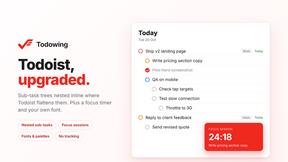
Chrome extension that nests sub-tasks inline in Todoist's Today, Upcoming, Filter and Label views, with a focus timer and themes.

GenX
All-in-one AI workspace to generate images, videos, and audio with multiple leading AI models.
Foreman
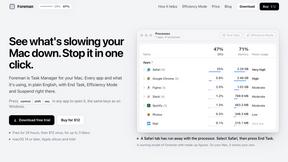
See every app and what it's using in plain English, and end or slow down the one that's hogging your Mac.

Uniclip
Clip pages, take full-page screenshots and batch-capture list data to Notion, Feishu, Obsidian, Markdown, CSV or JSON.

TroveKey
Search tabs, Chrome bookmarks and history, run browser commands, and save webpages and social posts locally—no account.
Typebar
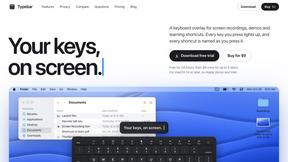
Every key you press lights up on an on-screen keyboard, and each shortcut is named as you press it.