
AI Detector vs Hush Touch | Voice-to-Text for MacOS
Side-by-side comparison to help you choose the right tool.

AI Detector
Evolve your writing with our trusted AI detector for verifying ChatGPT and Gemini content.
Last updated: March 1, 2026

Hush Touch | Voice-to-Text for MacOS
Hush Touch evolves your Mac dictation with smarter, on-device voice-to-text that learns your vocabulary.
Last updated: February 28, 2026
Visual Comparison
AI Detector
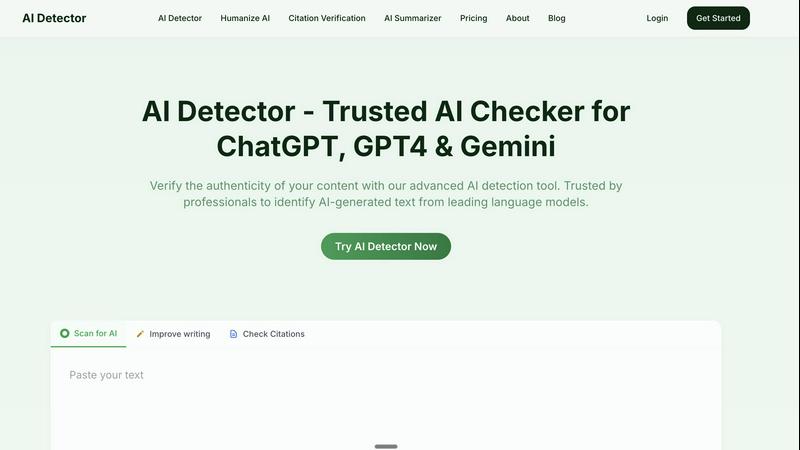
Hush Touch | Voice-to-Text for MacOS

Feature Comparison
AI Detector
Highlighted Sentence Analysis
AI Detector provides unparalleled clarity by highlighting every sentence suspected of being AI-generated within your text. Each highlighted section is accompanied by a visual gauge that shows the percentage probability of AI content, allowing for precise, targeted review and revision. This granular insight transforms the editing process from guesswork into a strategic, step-by-step improvement of your document's originality.
Advanced Multi-Model Detection
Utilizing state-of-the-art detection technology, the tool is specifically trained to identify content from a wide array of the most advanced language models, including ChatGPT, GPT-4, Gemini, and Claude. This ensures comprehensive coverage and high accuracy regardless of which AI tool may have been used to generate the text, keeping pace with the rapid evolution of generative AI.
Detailed Analytics & Reporting
Go beyond a simple score with comprehensive reports that include sentence-level analysis, overall confidence scores, and detailed AI probability metrics. These analytics provide a deep understanding of the text's composition, empowering users to make informed decisions about necessary revisions and to confidently verify the work's authenticity for stakeholders or grading systems.
Privacy-Focused & Secure Processing
Your content's security is paramount. AI Detector operates with a strict privacy-first approach. Your submitted text is never stored on our servers, shared with third parties, or made available online. This ensures complete confidentiality, allowing professionals and students to verify sensitive documents, including unpublished research and proprietary business content, with absolute peace of mind.
Hush Touch | Voice-to-Text for MacOS
Dual-Engine Recognition & AI Polish
Hush Touch leverages a sophisticated dual-engine architecture for unmatched accuracy. It simultaneously uses Apple's DictationTranscriber for natural flow and punctuation and SFSpeechRecognizer to spot custom vocabulary and technical terms. These outputs are then merged and refined with a final Apple Intelligence pass, all processed on your Mac. This multi-stage, on-device approach ensures your transcriptions are not only accurate but also contextually aware and polished, eliminating the lag and privacy concerns of cloud-based alternatives.
Custom Vocabulary with Adaptive Learning
The application evolves with your language. You can manually add up to 500 terms, but the true power lies in its adaptive learning. When you correct a transcription, Hush Touch automatically detects this and adds the right word to your personal vocabulary. It employs frequency-weighted language models and can even create per-app profiles, meaning it learns the specific jargon you use in your email client versus your coding environment, becoming more precise with every use.
Smart Text Processing & Hands-Free Commands
Beyond simple transcription, Hush Touch acts as an intelligent writing assistant. It automatically removes filler words ("um," "like"), applies auto-correction for common slips, and can format numbered lists from your speech. For ultimate workflow integration, it supports fully hands-free operation via Siri and includes customizable voice commands. You can set it to auto-insert text after a pause and use phrases like "okay send message" to execute actions, streamlining your process from thought to final action.
100% On-Device Privacy & Lightweight Design
Privacy isn't a premium feature; it's the foundation. Every aspect of Hush Touch, from voice capture to the final AI polish, happens locally on your Mac. No audio or data ever leaves your device. This commitment is paired with an incredibly lightweight 5.5 MB application that launches instantly and runs efficiently in the background, ensuring robust performance without compromising your system's resources or your personal data security.
Use Cases
AI Detector
Academic Research & Paper Submission
Students and researchers can evolve their writing process by using AI Detector as a final checkpoint before submission. It ensures that essays, theses, and research papers meet strict institutional authenticity requirements, safeguarding academic integrity and allowing the student's original voice and critical analysis to shine through without penalty.
Professional Content & Business Communication
Professionals can progress in building trust and authority by verifying that reports, client communications, marketing copy, and proposals are authentically human. This prevents the submission of AI-generated work to bosses or clients, maintains brand voice, and avoids potential penalties from search algorithms that may demote AI-saturated content.
Editorial Oversight & Publishing
Editors, publishers, and blog managers can advance their quality assurance protocols by screening submitted articles and manuscripts. This tool helps maintain publication standards, ensures contributor originality, and builds reader trust by guaranteeing that published content carries a genuine human perspective and expertise.
Personal Writing Development
Writers and non-native English speakers can use the detector as a growth tool to understand the "footprint" of AI-assisted writing. By analyzing which parts of their text are flagged, they can learn to better blend research with their unique expression, refining their skills while ethically using assistive tools for paraphrasing and grammar without crossing into full AI generation.
Hush Touch | Voice-to-Text for MacOS
Drafting Long-Form Content and Documents
For writers, researchers, and content creators, Hush Touch unlocks a fluid drafting process. Speak your thoughts naturally to overcome writer's block and capture ideas at the speed of speech. The smart punctuation, filler word removal, and adaptive vocabulary learning ensure the initial transcript is remarkably clean, significantly reducing editing time and helping you maintain a clear, consistent tone throughout lengthy documents.
Technical and Medical Documentation
Professionals with specialized lexicons, such as software engineers dictating code snippets with terms like "Kubernetes" or physicians documenting patient notes with complex medical terminology, find immense value. Hush Touch's custom vocabulary and per-app learning profiles ensure niche jargon is recognized accurately from the start, improving documentation efficiency and accuracy where other generic dictation tools fail.
Managing Communication and Email
Transform your inbox management by dictating emails and messages hands-free. The dedicated Email context mode optimizes transcription for correspondence, and the ability to send a message directly with a voice command like "send it" creates a seamless, efficient workflow. This is ideal for busy professionals looking to clear their communication queue quickly without ever touching the keyboard.
Capturing Ideas and Meeting Notes
Use Hush Touch as a digital thought partner. Quickly launch it with a hotkey to capture fleeting ideas, brainstorm project plans, or take real-time notes during meetings. The app's speed and offline capability mean you can rely on it anywhere, ensuring no insight is lost. The Notes context mode helps format these captures cleanly for later review and action.
Overview
About AI Detector
AI Detector marks a pivotal evolution in the journey toward transparent and trustworthy digital communication. As artificial intelligence writing tools become more sophisticated and integrated into our workflows, the line between human and machine-generated content has blurred, creating a new challenge for professionals, educators, and creators. This advanced tool is engineered for those committed to the next stage of content integrity, providing a powerful, reliable checkpoint. It meticulously analyzes text to identify content generated by leading AI models like ChatGPT, GPT-4, and Gemini, moving beyond simple "yes or no" detection. Its core mission is to empower users with detailed, sentence-level insights, revealing not just if content is AI-generated, but precisely where and to what degree. This fosters a more nuanced, informed, and progressive approach to content creation and review, ensuring your unique human voice remains distinct and your work meets the highest standards of authenticity. Trusted by leading academic institutions, AI Detector is more than a checker; it's an essential partner in evolving and safeguarding the human element in all professional and academic discourse.
About Hush Touch | Voice-to-Text for MacOS
Hush Touch represents the next stage in the evolution of personal computing: a move away from cloud-dependent services towards powerful, private, and intelligent on-device tools. It is a sophisticated voice-to-text application built exclusively for macOS, designed to transform spoken word into polished written text with remarkable accuracy and speed. At its core, Hush Touch is for anyone who writes—be it emails, messages, notes, documents, or code—and seeks a more natural, efficient, and hands-free workflow. Its primary value proposition is a powerful trifecta: superior AI-driven transcription that learns and adapts to you, complete privacy through 100% on-device processing, and a simple, one-time payment that liberates users from subscription fatigue. By intelligently blending two native Apple transcription engines and applying a final Apple Intelligence pass, Hush Touch delivers cleaner text, learns your unique vocabulary, and removes verbal filler words, all while operating entirely offline. This isn't just another dictation tool; it's a commitment to building a smarter, more private, and more autonomous way of working that grows alongside you.
Frequently Asked Questions
AI Detector FAQ
How Does AI Detector work?
AI Detector employs advanced machine learning models that have been meticulously trained on massive datasets containing both human-written text and content generated by various AI models like ChatGPT and Gemini. It analyzes linguistic patterns, stylistic markers, and structural elements that are characteristic of AI generation, comparing your submitted text against these learned patterns to calculate a probability score for each sentence and the overall document.
What is the accuracy rate of AI Detector?
AI Detector boasts a verified accuracy rate of 99.9%+ in identifying AI-generated content. This high level of precision is achieved through continuous training on the latest AI models and is third-party verified, providing users with reliable and trustworthy results that they can depend on for critical academic and professional assessments.
Who Benefits from AI Detector's AI content detector?
The tool is designed for anyone committed to content authenticity. Primary users include students and academics ensuring original work, educators and institutions upholding integrity standards, content creators and marketers maintaining a genuine brand voice, professionals verifying business documents, and editors screening submissions for publication.
Will my text get plagiarized or be available online, if I check it on AI Detector?
No, absolutely not. We operate with a strict privacy-focused policy. Your text is processed securely for the sole purpose of analysis and is never stored in our database, shared with any third parties, or indexed online. Your documents and their content remain completely confidential and private throughout the detection process.
Hush Touch | Voice-to-Text for MacOS FAQ
How does Hush Touch's accuracy compare to cloud-based services?
Hush Touch achieves superior accuracy for many users by leveraging two local Apple engines and an AI final pass, specifically optimized for on-device processing. While cloud services have vast datasets, Hush Touch's strength is its personalized, adaptive learning. It gets smarter the more you use it, learning your voice, accent, and unique vocabulary without ever sending your data to a server, offering a perfect balance of high accuracy and absolute privacy.
Can I use Hush Touch completely offline?
Yes, absolutely. This is a core design principle. Hush Touch requires no internet connection to function. All voice processing, transcription, vocabulary learning, and text polishing occur 100% on your Mac's hardware. This makes it reliable in any situation, from flights to areas with poor connectivity, while guaranteeing your data never traverses the web.
What is included in the one-time $20 license?
The one-time $20 payment grants you a lifetime license for Hush Touch on macOS. This includes all current features—dual-engine transcription, custom vocabulary, adaptive learning, smart text processing, and all privacy guarantees—as well as future updates. There are no subscriptions, monthly fees, or tiered plans, representing a significant long-term saving compared to other dictation software.
How does the adaptive vocabulary learning work?
The learning is automatic and context-aware. When you manually correct a word in the transcribed text, Hush Touch detects this correction and adds the right spelling/term to your personal vocabulary list. It also uses frequency weighting, prioritizing words you use often. You can create different vocabulary profiles for different applications (e.g., Xcode vs. Mail), and the app will boost the relevant terms when you switch to that app.
Alternatives
AI Detector Alternatives
AI Detector is a specialized tool within the AI Assistants category, designed to verify the authenticity of content by identifying text generated by models like ChatGPT, GPT-4, and Gemini. It represents a significant step forward for professionals and creators who prioritize maintaining a distinct human voice and upholding integrity in their digital communications. Users often explore alternatives for various practical reasons. Needs evolve, and factors like specific budget constraints, the desire for different feature sets, or integration with other platforms can prompt a search for different solutions. The landscape of content verification tools is growing, offering a range of approaches to a common challenge. When evaluating other options, consider the core principles that define this stage of content evolution. Look for tools that provide not just a binary result but detailed, actionable insights. The most effective partners in this space will offer transparency in their analysis, helping you understand the "why" behind the detection to foster genuine growth in your authentic writing practice.
Hush Touch | Voice-to-Text for MacOS Alternatives
Hush Touch | Voice-to-Text for MacOS is a specialized AI assistant that elevates dictation by operating entirely on your device. It represents a significant step forward in personal productivity tools, focusing on privacy and seamless integration into the MacOS writing workflow. Users often seek tools that match their specific stage of growth, whether they are just beginning to explore voice commands or are seasoned professionals needing advanced, offline-capable solutions. The search for alternatives is a natural part of evolving your toolkit. Needs change; perhaps a project demands real-time collaboration features, a different pricing model like a subscription fits a budget better, or support for multiple operating systems becomes essential. The core desire, however, remains constant: to communicate ideas fluidly without being hindered by the keyboard. When evaluating options, consider your current priorities. Key differentiators often include the processing location for privacy, the accuracy and contextual understanding of the transcription, the cost structure, and how intuitively the tool fits into your existing applications. The right choice is the one that aligns with your immediate workflow needs while supporting your next phase of productivity.