
AI Formatter vs Never Drop
Side-by-side comparison to help you choose the right tool.
AI Formatter
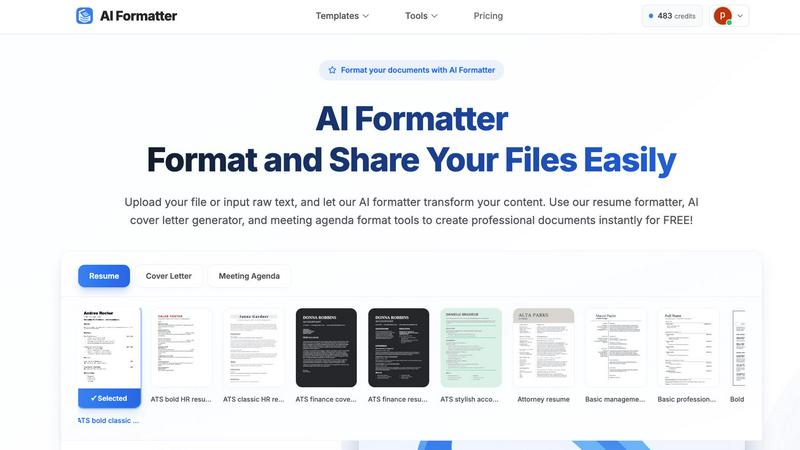
Transform your raw text into professional documents effortlessly with AI Formatter's expert templates and intuitive.
Last updated: March 1, 2026

Never Drop
NeverDrop captures contacts and crafts personalized follow-ups instantly, turning every handshake into a deal.
Last updated: February 28, 2026
Visual Comparison
AI Formatter
Never Drop

Feature Comparison
AI Formatter
Template Library
AI Formatter boasts an extensive library of over 162 professional templates, specifically designed for ATS optimization. This feature ensures that your resumes and cover letters are formatted to meet the stringent criteria of automated screening systems, helping you stand out in a competitive job market.
Real-Time Editing
The platform provides a powerful real-time editor that allows users to customize their documents after formatting. This flexibility enables users to make necessary adjustments, enhance content, and ensure that every document meets their individual style and requirements.
Multi-Format Support
With support for various file formats, including PDF, DOC, DOCX, and TXT, AI Formatter allows users to easily upload existing documents or input raw text. This versatility ensures that no matter the source of your content, it can be transformed into a polished final product.
Rapid Formatting
AI Formatter significantly reduces the time spent on document preparation by providing instant formatting. Users can expect to receive a fully formatted document within seconds, saving over two hours of manual work per document, which translates to increased efficiency and productivity.
Never Drop
Instant Business Card Scanning
Never Drop allows users to snap a photo of any business card, utilizing AI-powered Optical Character Recognition (OCR) to extract critical information like name, company, title, phone number, and email in real-time. This feature eliminates manual entry, ensuring that no detail is lost in the hustle of event environments.
Automatic Email Enrichment
One common challenge in lead management is encountering generic email addresses on business cards. Never Drop addresses this issue by automatically finding verified work emails based on the contact's name and company. This feature enriches your contact profiles, enabling more effective follow-ups without the hassle of manual searches.
AI-Driven Follow-Up Drafting
Never Drop's intelligent system generates personalized follow-up emails based on your voice notes and the context of your conversation. This feature ensures that your follow-ups are not generic templates but tailored responses that reflect your unique conversation style, allowing you to engage with leads meaningfully.
Team Collaboration and Organization
Never Drop is designed for collaborative environments, allowing teams to organize scanned leads by event, reassign contacts between team members, and track overall activity via a centralized dashboard. This feature keeps everyone aligned, ensuring that no lead falls through the cracks in the busy atmosphere of sales events.
Use Cases
AI Formatter
Job Seekers
Job seekers can leverage AI Formatter to create compelling, ATS-optimized resumes and cover letters. By utilizing the platform, they can present their qualifications effectively and increase their chances of landing interviews in a competitive job market.
Businesses
Organizations can standardize their communications with AI Formatter by creating professional documents, such as reports, proposals, and internal memos. This helps maintain consistency in branding and messaging across all corporate documents.
Academics
Researchers and academics can benefit from AI Formatter by transforming their raw research notes and drafts into polished documents, including research papers and presentations. This ensures their work is presented professionally, enhancing its impact and reception.
Event Planners
Event planners can utilize the meeting agenda format tools to create structured agendas from raw notes. AI Formatter facilitates the quick turnaround of meeting materials, enabling planners to focus on orchestrating successful events while maintaining professionalism in documentation.
Never Drop
Networking at Trade Shows
Sales teams can utilize Never Drop during trade shows to capture leads swiftly. The ability to scan business cards and instantly enrich contact information ensures that team members can follow up promptly, harnessing the momentum of their conversations.
Conference Engagement
At conferences, where numerous interactions occur, Never Drop helps sales reps efficiently manage potential leads. By scanning business cards and drafting follow-ups on the spot, teams can maximize their networking efforts and foster relationships with potential clients.
Post-Event Follow-Up
After events, sales teams can leverage Never Drop to maintain the momentum built during face-to-face interactions. With enriched contact profiles and personalized follow-up emails generated quickly, teams can turn initial conversations into business opportunities.
Team Performance Tracking
Never Drop provides a robust dashboard for sales managers to monitor team performance in real-time. By organizing leads by event and tracking follow-up activities, managers can identify strengths and areas for improvement, fostering a culture of accountability and growth.
Overview
About AI Formatter
AI Formatter is the cutting-edge solution for professionals seeking to streamline their document formatting process. Developed by Sun Sky LLC, this cloud-based platform eliminates the time-consuming and often frustrating task of manual formatting, allowing users to focus on what truly matters: growth and quality presentation. Tailored for a diverse audience, including job seekers, businesses, and academics, AI Formatter enables users to upload raw text or existing files in various formats like Word, PDF, and TXT, and receive a polished, ATS-optimized document in seconds. With a remarkable 95%+ success rate on Applicant Tracking Systems, it addresses a crucial barrier in career advancement. The platform offers over 100 professional templates and a powerful real-time editor, ensuring that whether you are crafting a resume, a cover letter, or a meeting agenda, your content not only meets but exceeds professional standards. AI Formatter empowers users to invest their time in strategy, creativity, and personal growth instead of administrative overhead.
About Never Drop
Never Drop is a revolutionary lead-capture application tailored for sales teams navigating the dynamic landscapes of trade shows, conferences, and networking events. This innovative tool streamlines the often chaotic process of collecting and managing leads, empowering users to efficiently scan business cards right from their smartphones. Upon scanning, users can enrich the data with voice notes or text to retain crucial details about their interactions, ensuring that no lead is forgotten or overlooked. The application leverages advanced artificial intelligence to generate personalized follow-up emails within just two minutes, significantly reducing the likelihood of leads slipping through the cracks. Integrated seamlessly with popular CRMs like HubSpot, Never Drop guarantees that your sales pipeline remains organized, actionable, and primed for conversion. In short, Never Drop transforms every business encounter into a tangible opportunity, enabling sales professionals to follow up with precision and speed, ultimately driving more closed deals.
Frequently Asked Questions
AI Formatter FAQ
How does AI Formatter ensure ATS compatibility?
AI Formatter uses templates specifically designed to meet the criteria of Applicant Tracking Systems. By following best practices in formatting, the tool ensures that your documents are easily readable by automated systems used by employers.
What file formats are supported by AI Formatter?
AI Formatter supports several file formats, including PDF, DOC, DOCX, and TXT. This flexibility allows users to upload existing documents or input raw text for formatting.
Can I customize my documents after formatting?
Yes, AI Formatter includes a powerful real-time editor that enables users to review, edit, and customize their documents post-formatting. You can make adjustments to ensure the final product meets your desired standards.
Is AI Formatter free to use?
Yes, AI Formatter offers its core features for free, allowing users to format their documents, create resumes, and generate cover letters without any cost.
Never Drop FAQ
What is Never Drop?
Never Drop is a lead-capture app designed for sales teams at events. It enables users to scan business cards, add voice or text context, and generate personalized follow-up emails in under two minutes, while also enriching contacts with verified work emails.
How does business card scanning work?
To scan a business card, users simply take a photo with the Never Drop mobile app. The app's AI-powered OCR technology extracts essential details such as the contact's name, company, title, phone number, and email within seconds, streamlining the lead capture process.
What types of events is Never Drop suitable for?
Never Drop is ideal for various events, including trade shows, conferences, networking events, meetups, and business dinners. Its organizational features help sales teams track leads effectively across different events, ensuring timely follow-ups.
Do I need the mobile app to use Never Drop?
Yes, the mobile app is essential for scanning business cards, recording voice context, and triggering follow-ups on the go. The web dashboard complements the mobile app, allowing users to manage their team, review scans, and configure settings seamlessly.
Alternatives
AI Formatter Alternatives
AI Formatter is an advanced cloud-based platform designed for professionals seeking to transform their raw text into polished, ATS-optimized documents. It falls within the category of productivity and management tools, particularly focusing on document formatting and presentation. Users often seek alternatives to AI Formatter for various reasons, including pricing concerns, specific feature requirements, or compatibility with different platforms. When selecting an alternative, it is essential to consider factors such as the variety of templates offered, the effectiveness of the formatting engine, user-friendliness, and the ability to enhance content quality while saving valuable time. --- [{"question": "What is AI Formatter?", "answer": "AI Formatter is a cloud-based platform that transforms raw text into professional documents using AI and expert templates."},{"question": "Who is AI Formatter for?", "answer": "AI Formatter is designed for professionals, including job seekers, businesses, and academics, who want to enhance their document presentation."},{"question": "Is AI Formatter free?", "answer": "AI Formatter is not free; it offers various pricing plans to cater to different user needs."},{"question": "What are the main features of AI Formatter?", "answer": "The main features include an AI-powered formatting engine, an extensive template library, and real-time editing capabilities."}]
Never Drop Alternatives
Never Drop is a cutting-edge lead-capture app tailored for sales teams working in dynamic environments such as trade shows and networking events. It falls under the Productivity & Management category and is designed to streamline the process of collecting and managing leads efficiently. Users often seek alternatives to Never Drop due to various reasons including pricing, specific feature sets, or compatibility with their existing platforms. When searching for an alternative, it's essential to consider factors such as ease of use, integration capabilities with current systems, and the ability to automate follow-ups. A good alternative should provide similar functionalities, empower users to capture and manage leads effectively, and offer robust support for different sales processes.