
AI Formatter vs CleanPaste.org
Side-by-side comparison to help you choose the right tool.
Transform your raw text into professional documents effortlessly with AI Formatter's expert templates and intuitive.
Last updated: March 1, 2026

CleanPaste.org
Evolve your text by instantly removing AI watermarks and hidden characters for free.
Last updated: February 28, 2026
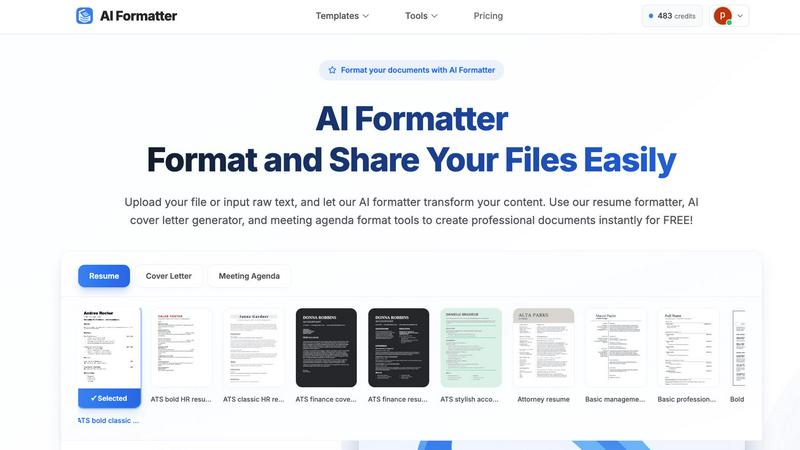
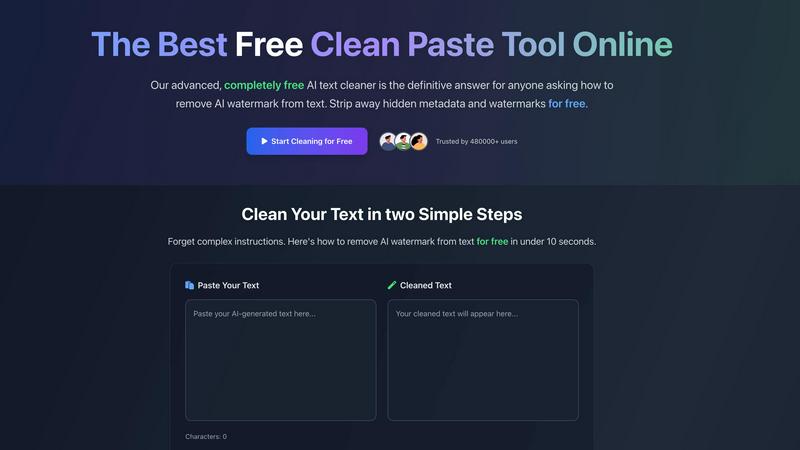
Visual Comparison
AI Formatter
CleanPaste.org
Feature Comparison
AI Formatter
Template Library
AI Formatter boasts an extensive library of over 162 professional templates, specifically designed for ATS optimization. This feature ensures that your resumes and cover letters are formatted to meet the stringent criteria of automated screening systems, helping you stand out in a competitive job market.
Real-Time Editing
The platform provides a powerful real-time editor that allows users to customize their documents after formatting. This flexibility enables users to make necessary adjustments, enhance content, and ensure that every document meets their individual style and requirements.
Multi-Format Support
With support for various file formats, including PDF, DOC, DOCX, and TXT, AI Formatter allows users to easily upload existing documents or input raw text. This versatility ensures that no matter the source of your content, it can be transformed into a polished final product.
Rapid Formatting
AI Formatter significantly reduces the time spent on document preparation by providing instant formatting. Users can expect to receive a fully formatted document within seconds, saving over two hours of manual work per document, which translates to increased efficiency and productivity.
CleanPaste.org
Instant AI Watermark Removal
This core feature is engineered to detect and strip the subtle statistical patterns and watermarks embedded by AI text generators. It goes beyond simple paraphrasing, targeting the underlying code that detection algorithms seek. By removing these fingerprints, the tool ensures your content maintains its original message and quality while passing as human-written, a critical evolution for content that needs to withstand scrutiny from advanced AI detectors used by institutions and platforms.
Deep-Scan for Invisible Characters & Metadata
CleanPaste.org employs an advanced algorithm that performs a deep scan of your text, rooting out not just common invisible characters but also zero-width spaces, hidden formatting metadata, and non-printable artifacts that are invisible to the naked eye. This thorough cleansing process ensures that the text is pristine at a code level, removing any trace elements that could compromise the professionalism or authenticity of your final document, blog post, or submission.
Real-Time Processing with Auto-Paste
The tool is built for speed and efficiency in a fast-paced workflow. Featuring a real-time processing engine and an optional auto-paste function, it delivers cleaned text in under 10 seconds. This immediate feedback loop allows users to iterate quickly, pasting content and receiving a humanized version almost instantly, which dramatically accelerates the final stage of content refinement without any friction or delay.
100% Free & Unlimited Access
In a landscape of freemium models and restrictive trials, CleanPaste.org's commitment to being completely free represents a significant progression in accessible tooling. There are no usage limits, no required registrations, and no premium features locked behind a paywall. Every user, from a first-time student to a professional agency, gets access to the full power of the tool, fostering trust and enabling growth at any scale without financial barrier.
Use Cases
AI Formatter
Job Seekers
Job seekers can leverage AI Formatter to create compelling, ATS-optimized resumes and cover letters. By utilizing the platform, they can present their qualifications effectively and increase their chances of landing interviews in a competitive job market.
Businesses
Organizations can standardize their communications with AI Formatter by creating professional documents, such as reports, proposals, and internal memos. This helps maintain consistency in branding and messaging across all corporate documents.
Academics
Researchers and academics can benefit from AI Formatter by transforming their raw research notes and drafts into polished documents, including research papers and presentations. This ensures their work is presented professionally, enhancing its impact and reception.
Event Planners
Event planners can utilize the meeting agenda format tools to create structured agendas from raw notes. AI Formatter facilitates the quick turnaround of meeting materials, enabling planners to focus on orchestrating successful events while maintaining professionalism in documentation.
CleanPaste.org
For Students Submitting Academic Work
Students leveraging AI for research assistance or draft structuring can use CleanPaste.org as the final safeguard before submission. It removes hidden characters and AI watermarks from essays and reports, ensuring the work presents as their own original analysis and writing. This allows students to utilize modern tools for learning while confidently meeting academic integrity standards and avoiding potential flags from institutional plagiarism and AI detection software.
For Content Creators & SEO Professionals
Bloggers, copywriters, and SEO specialists can integrate CleanPaste.org into their editing workflow to protect their brand's authentic voice. The tool scrubs AI-assisted drafts of detectable artifacts, ensuring content resonates naturally with human readers and ranks favorably. This progression from AI-generated draft to human-polished final copy is crucial for maintaining audience trust, achieving better engagement, and ensuring content passes the stringent quality checks of search engines and savvy readers.
For Professionals Drafting Business Communications
Professionals, including non-native English speakers, who use AI to draft emails, reports, proposals, and client communications can rely on CleanPaste.org to add a final layer of polish. It humanizes the text, removing any robotic or formulaic tone left by AI and erasing invisible metadata. This results in communications that sound natural, professional, and personally crafted, which is essential for building genuine business relationships and maintaining a credible professional image.
For Researchers and Publishers
Individuals and organizations preparing manuscripts, whitepapers, or articles for publication can use the tool to ensure their submitted text is free from any embedded formatting or metadata that might originate from AI-assisted writing or complex document editing software. This clean, artifact-free text is often a requirement for formal submission systems and helps maintain the purity and focus of the intellectual work without technical distractions.
Overview
About AI Formatter
AI Formatter is the cutting-edge solution for professionals seeking to streamline their document formatting process. Developed by Sun Sky LLC, this cloud-based platform eliminates the time-consuming and often frustrating task of manual formatting, allowing users to focus on what truly matters: growth and quality presentation. Tailored for a diverse audience, including job seekers, businesses, and academics, AI Formatter enables users to upload raw text or existing files in various formats like Word, PDF, and TXT, and receive a polished, ATS-optimized document in seconds. With a remarkable 95%+ success rate on Applicant Tracking Systems, it addresses a crucial barrier in career advancement. The platform offers over 100 professional templates and a powerful real-time editor, ensuring that whether you are crafting a resume, a cover letter, or a meeting agenda, your content not only meets but exceeds professional standards. AI Formatter empowers users to invest their time in strategy, creativity, and personal growth instead of administrative overhead.
About CleanPaste.org
CleanPaste.org represents the essential final stage in the modern content creation lifecycle. It was born from a critical need in the AI era: the gap between efficient, machine-assisted drafting and the final, polished work that requires a genuinely human touch. As AI tools became indispensable for generating initial drafts, they inadvertently introduced a new problem—statistical watermarks, hidden metadata, and invisible formatting artifacts that could flag content as non-original or artificial. CleanPaste.org is the definitive solution to this challenge, evolving the workflow from creation to credible completion. It is a powerful, entirely free online utility designed to instantly and thoroughly scrub text of all AI fingerprints and hidden artifacts. This process empowers users—from students to CEOs—to seamlessly progress from a rough, machine-generated draft to polished, human-passing content in mere seconds. Its core value proposition is unmatched: providing a robust, no-cost service that ensures text is undetectable by AI scanners and plagiarism checkers, without imposing usage limits, requiring sign-ups, or hiding features behind a paywall. Trusted by a community of over 480,000 users, CleanPaste.org has established itself as the non-negotiable final step for anyone committed to presenting their work with ultimate confidence and authentic authority.
Frequently Asked Questions
AI Formatter FAQ
How does AI Formatter ensure ATS compatibility?
AI Formatter uses templates specifically designed to meet the criteria of Applicant Tracking Systems. By following best practices in formatting, the tool ensures that your documents are easily readable by automated systems used by employers.
What file formats are supported by AI Formatter?
AI Formatter supports several file formats, including PDF, DOC, DOCX, and TXT. This flexibility allows users to upload existing documents or input raw text for formatting.
Can I customize my documents after formatting?
Yes, AI Formatter includes a powerful real-time editor that enables users to review, edit, and customize their documents post-formatting. You can make adjustments to ensure the final product meets your desired standards.
Is AI Formatter free to use?
Yes, AI Formatter offers its core features for free, allowing users to format their documents, create resumes, and generate cover letters without any cost.
CleanPaste.org FAQ
How does CleanPaste.org remove invisible characters and AI watermarks?
CleanPaste.org uses sophisticated, proprietary algorithms designed to perform a deep structural analysis of your pasted text. It identifies and strips out a wide array of non-visible elements, including zero-width spaces, hidden formatting metadata, and the unique statistical patterns that act as AI watermarks. The process happens locally in your browser in real-time, ensuring your content is cleaned instantly while the original meaning and quality are perfectly preserved.
Is CleanPaste.org truly free with no hidden limits?
Yes, absolutely. CleanPaste.org is 100% free with no hidden catches. We do not impose usage limits, require user accounts or sign-ups, or lock advanced features behind a premium paywall. Our mission is to provide a universally accessible tool that solves a modern problem, and we are committed to keeping it completely free for all users, from students to enterprise professionals, forever.
What specific types of hidden artifacts does the tool remove?
The tool is engineered to remove a comprehensive range of hidden artifacts. This includes AI model watermarks (statistical fingerprints), zero-width spaces and joiner/non-joiner characters, hidden formatting metadata from rich text editors, non-printable control characters, and other invisible Unicode elements that can be inadvertently copied from web pages, AI chatbots, or word processors.
Will using CleanPaste.org guarantee my content passes all AI detectors?
While CleanPaste.org is highly effective at removing the technical fingerprints and watermarks that AI detectors look for, no tool can provide a 100% guarantee for all detectors, as the algorithms are constantly evolving. However, the tool is specifically designed to significantly reduce detectability, and as evidenced by user testimonials, content processed through CleanPaste.org consistently passes major AI detection services, representing a major step forward in content authenticity.
Alternatives
AI Formatter Alternatives
AI Formatter is an advanced cloud-based platform designed for professionals seeking to transform their raw text into polished, ATS-optimized documents. It falls within the category of productivity and management tools, particularly focusing on document formatting and presentation. Users often seek alternatives to AI Formatter for various reasons, including pricing concerns, specific feature requirements, or compatibility with different platforms. When selecting an alternative, it is essential to consider factors such as the variety of templates offered, the effectiveness of the formatting engine, user-friendliness, and the ability to enhance content quality while saving valuable time. --- [{"question": "What is AI Formatter?", "answer": "AI Formatter is a cloud-based platform that transforms raw text into professional documents using AI and expert templates."},{"question": "Who is AI Formatter for?", "answer": "AI Formatter is designed for professionals, including job seekers, businesses, and academics, who want to enhance their document presentation."},{"question": "Is AI Formatter free?", "answer": "AI Formatter is not free; it offers various pricing plans to cater to different user needs."},{"question": "What are the main features of AI Formatter?", "answer": "The main features include an AI-powered formatting engine, an extensive template library, and real-time editing capabilities."}]
CleanPaste.org Alternatives
CleanPaste.org is a pivotal tool in the AI Assistants category, representing the final evolution in content refinement. It instantly scrubs text of AI watermarks and hidden artifacts, transforming machine-generated drafts into authentic, human-passing content. This step is essential for anyone looking to present work with confidence and bypass modern detection systems. Users often explore alternatives to find a solution that aligns with their specific growth stage. Some may seek advanced features beyond basic cleaning, require integration with other platforms, or need a different approach to privacy and data handling. The search for the right tool is a natural part of evolving one's content creation workflow. When evaluating options, consider the core value proposition. Look for a tool that effectively removes both statistical watermarks and deep metadata, operates without restrictive usage limits, and maintains the integrity of your original message. The goal is to find a reliable partner that supports your progression from draft to polished, credible final content.