
Coloring Book Engine vs SimpleDraw
Side-by-side comparison to help you choose the right tool.

Coloring Book Engine
Transform your coloring book idea into a finished, publish-ready product with one streamlined local workflow.
Last updated: February 28, 2026

SimpleDraw
Evolve your home project from idea to precise scale drawing with our free, intuitive online tool.
Last updated: March 1, 2026
Visual Comparison
Coloring Book Engine

SimpleDraw
Feature Comparison
Coloring Book Engine
BYOK (Bring Your Own Key) AI Integration
This core feature embodies the philosophy of creator control. Instead of locking you into a proprietary, subscription-based AI, Coloring Book Engine allows you to integrate your own API keys from services like OpenAI or Anthropic. This means you pay only for the AI usage you need, avoid monthly fees, and most importantly, keep your data and creative process private. It provides the power of AI-assisted ideation and sketching without the vendor lock-in, putting you firmly in the driver's seat of your technological toolkit.
Six-Step Guided Production Pipeline
The application structures the entire book creation process into a clear, logical workflow: Plan, Sketch, Book, Coloring, Assets, and Video. This step-by-step pipeline eliminates guesswork and technical overwhelm, guiding you from a rough concept through to finalized, packaged products. Each stage is optimized within the single application, so you no longer need to juggle between disparate tools for layout, editing, and marketing asset creation, ensuring a smooth and focused journey to completion.
KDP-Ready Formatting & Batch Processing
Coloring Book Engine handles all the intricate technical specifications required for platforms like Amazon KDP. It automatically manages trim sizes, bleed areas, and margins, exporting print-ready PDFs that meet all professional standards. Furthermore, its highly optimized batch workflow allows you to generate, process, and format entire book pages or series of books efficiently. This scalability is crucial for creators looking to build a catalog or publish series without manual, repetitive work on each page.
Local GPU-Accelerated Video & Asset Generation
Move beyond static pages. The engine can transform your coloring book pages into engaging marketing content. Using your computer's local GPU power, it generates full coloring videos and short, social-media-ready clips perfect for YouTube Shorts, TikTok, and Instagram Reels. This feature runs locally (not in the cloud), keeping your projects secure and giving you high-quality video assets directly from your book files to promote your work effectively.
SimpleDraw
Dedicated Floor Plan Mode
This specialized mode marks a significant step forward in focused tooling. It provides a curated environment for architectural sketching, allowing users to draw walls and add pre-made symbols for doors, windows, and a vast library of interior fixtures with a single click. As you work, real-time measurements update dynamically, ensuring every element from kitchen cabinets to bathroom fittings is placed with spatial accuracy, streamlining the creation of detailed and professional-looking layouts.
Intelligent Smart Alignment System
SimpleDraw's smart alignment is the cornerstone of its user-friendly precision. This adaptive system intelligently snaps points and lines to logical positions, offering clear visual guides for perfect angles and connections. It learns from your zoom level, providing broader assistance for general layout and finer control when you zoom in for detail. For ultimate control, keyboard shortcuts let you lock movements to strict horizontal or vertical axes, making precise drafting effortless.
Non-Destructive Editing & Full Control
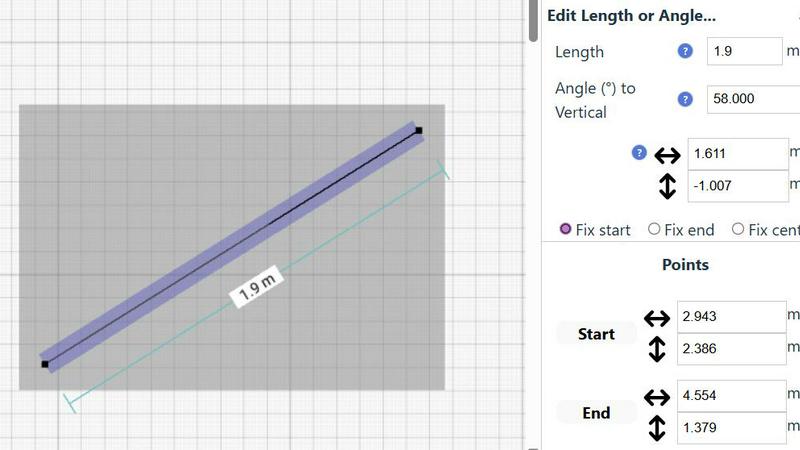
Embodying a flexible, progress-oriented workflow, SimpleDraw ensures no decision is permanent. Every element, from a single line to grouped furniture sets, can be modified, moved, or adjusted at any stage. Robust undo/redo functions and copy-paste capabilities for element groups streamline experimentation. Crucially, you can input exact dimensions, lengths, and angles directly via keyboard, allowing for meticulous refinement of plans based on real-world measurements.
Adaptive Zoom & Comprehensive Measurement
This feature duo provides unparalleled control over your drawing's scope and specificity. Zoom fluidly to any area, with the tool's precision adapting intuitively to your view. This is complemented by a comprehensive measurement system that displays contextual dimensions as you work. You have full control over which measurements are shown and can toggle between metric and US standard units, ensuring clarity and accuracy for any project, anywhere.
Use Cases
Coloring Book Engine
The Aspiring Solo Publisher
An independent artist or illustrator can use Coloring Book Engine to systematically turn their portfolio of drawings into a professionally formatted, market-ready coloring book series for Amazon KDP. The guided workflow and BYOK AI help overcome creative blocks and technical hurdles, enabling a single creator to manage the entire production and initial marketing asset creation from one cohesive platform, launching their publishing side-hustle with confidence.
The Established Art Studio or Small Publisher
For a small team or studio producing multiple titles, the batch processing and organizational licensing are game-changers. The "Organization" license allows multiple team members to collaborate, while the engine's efficiency lets them scale production from a single book to an entire catalog. They can maintain brand consistency, ensure all outputs are KDP-ready, and rapidly generate promotional videos for each new release, streamlining their entire business operation.
The Educator or Content Creator
Teachers, homeschool coordinators, or educational content creators can utilize the tool to produce custom, themed coloring books for their classrooms or online followers. The AI-assisted sketching can help rapidly generate educational themes (like dinosaurs or planets), while the local processing ensures student or project data remains private. They can create bespoke materials and accompanying time-lapse videos to demonstrate techniques or promote their educational resources.
The AI-Assisted Traditional Artist
An artist who prefers to create all core artwork by hand but wants to leverage technology for production can follow the optional AI-free workflow. They can import their hand-drawn sketches, and Coloring Book Engine will then handle the technical bridging: cleaning up lines for print, formatting the pages into a professional book layout, and generating the coloring videos and social media assets needed for commercial promotion, all without AI touching their original art.
SimpleDraw
Home Renovation & Remodel Planning
Plan your kitchen overhaul or bathroom remodel with confidence. Visualize new layouts, experiment with fixture placements, and create accurate scale drawings that ensure your new cabinets, island, or shower will fit perfectly before you make a single purchase or swing a hammer, preventing costly measurement errors.
Real Estate & Rental Listing Visualization
Create clear, professional floor plans for apartments, houses, or rental properties. These accurate drawings provide potential buyers or tenants with a superior understanding of the space's flow and proportions, enhancing listing quality and setting realistic expectations for room sizes and layout.
Interior Design & Furniture Arrangement
Experiment with endless furniture layouts for your living room, bedroom, or office. Test if your sofa will fit, plan the optimal desk placement, or design a new bedroom suite layout. This virtual staging allows for perfect planning, ensuring new pieces harmonize with your space.
DIY Project & Workshop Design
Move beyond mental sketches for your shed, workshop, or garden project. Draft precise plans to optimize material usage and spatial efficiency. Plan workbench locations, tool storage, and equipment placement to create a functional and well-organized space from the outset.
Overview
About Coloring Book Engine
Coloring Book Engine represents the definitive evolution for the modern creative entrepreneur. It is a comprehensive, standalone desktop application designed for artists, illustrators, and publishers who are ready to graduate from creating simple PDFs to running a full-fledged, scalable coloring book business. This tool is built for the ambitious creator who understands that professional success requires a professional workflow. It transforms the traditionally chaotic and fragmented process of book creation into a streamlined, six-step journey that takes you from your initial spark of an idea all the way to a publish-ready product and the promotional content needed to market it. By automating the complex technicalities of print-ready formatting, asset generation, and video creation, Coloring Book Engine empowers you to focus on your core strengths: your art and your business strategy. Its pioneering BYOK (Bring Your Own Key) AI integration philosophy ensures you maintain complete control, allowing you to leverage powerful AI tools for ideation without being locked into costly subscriptions or surrendering your data. This is more than just software; it's a complete production engine engineered to turn your creative vision into a commercial reality with unprecedented efficiency and professional polish.
About SimpleDraw
SimpleDraw represents the evolution of accessible design, transforming from a basic sketching concept into a powerful, browser-based scale drawing tool. It was born from a clear need: to bridge the gap between the intimidating complexity of professional CAD software and the oversimplification of basic drawing apps. Today, it serves a growing community of visual planners, from first-time DIYers sketching their dream garden to seasoned interior designers iterating on client layouts. Its core value proposition is unwavering: delivering professional-grade precision through an interface so intuitive that anyone can start creating accurate, to-scale drawings within seconds, directly from their web browser. This journey from a simple idea to a community-driven platform underscores its commitment to progressive, user-focused development, constantly integrating feedback to refine its tools and expand its capabilities for planning everything from a single room to an entire property.
Frequently Asked Questions
Coloring Book Engine FAQ
Is Coloring Book Engine a subscription service?
No, Coloring Book Engine is not a subscription. It is a standalone desktop application offered with a one-time, lifetime purchase license. You pay once for the software and own it forever, including free bug-fix updates. The only potential ongoing costs are for your own AI API usage if you choose to leverage the BYOK (Bring Your Own Key) integration, which operates on a pay-as-you-go model you control.
Can I use Coloring Book Engine without any AI at all?
Absolutely. The software supports a complete AI-free workflow. You can bring your own hand-crafted artwork, import it into the engine, and use all its other powerful features: cleaning up lines, formatting your book for KDP, batch processing pages, and generating coloring videos using your local GPU. The AI features are optional tools for ideation and sketching, not a requirement for the core production pipeline.
Do I own the content I create with Coloring Book Engine?
Yes, you retain full ownership of all the content you create. The tool's BYOK model means you are using your own AI services under their terms, and any artwork you generate or import is yours. Coloring Book Engine acts as a production assistant, helping you format and package your creations, but it does not claim any rights to the final books, images, or videos you produce and publish.
What are the system requirements for optimal performance?
For best performance, especially for features like local GPU colorization and video generation, a modern system is recommended. This includes a CPU like an AMD Ryzen 5 2600 or Intel Core i5-8500, at least 16 GB of RAM, and a modern GPU with 4 GB of VRAM or more (e.g., NVIDIA GTX 1050 Ti). For experimental local AI features, a more powerful DirectML-compatible GPU with 8+ GB VRAM (like an NVIDIA RTX 3060) is suggested.
SimpleDraw FAQ
Is SimpleDraw really free to use?
Yes, SimpleDraw is completely free to use. You can access all its core drawing tools, including the Floor Plan Mode, smart alignment, and measurement systems, directly in your web browser without any cost, account creation, or software download required.
Do I need any experience with CAD or design software?
No prior experience is needed. SimpleDraw is specifically designed to be intuitive for beginners. Its user-friendly interface and smart tools guide you through the process, allowing anyone to start creating accurate drawings immediately, without a steep learning curve.
Can I use SimpleDraw on any device?
SimpleDraw is a web-based application that runs directly in your internet browser. This means you can use it on any device with a modern browser, including desktop computers, laptops, and tablets, providing flexibility to work on your plans wherever you are.
How do I provide feedback or suggest new features?
User feedback is central to SimpleDraw's evolution. You are invited to join the active Discord community where you can share ideas, report issues, and request new features directly. This community-driven approach helps shape the tool's ongoing development.
Alternatives
Coloring Book Engine Alternatives
Coloring Book Engine is a comprehensive desktop application for design and publishing, representing a significant leap for creators aiming to build a professional coloring book business. It automates the complex technical workflow from concept to print-ready files and marketing materials, all managed locally on your computer. Users often explore alternatives for various reasons, such as budget constraints, a preference for subscription-based web tools, or a need for a simpler solution that doesn't encompass the full business production cycle. Some may seek software focused solely on illustration or basic page layout, rather than an end-to-end commercial publishing engine. When evaluating other options, consider your current growth stage. Look at the scope of features, the total cost of ownership, data privacy policies, and whether the tool can scale with your ambitions from a single project to a full product line. The right fit should align with your technical comfort and long-term business goals.
SimpleDraw Alternatives
SimpleDraw is an intuitive online design tool that empowers users to create precise scale drawings and floor plans without the steep learning curve of professional CAD software. It belongs to the category of accessible design tools, perfect for those in the early stages of planning a project who need clarity and accuracy without complexity. Users often explore alternatives as their needs evolve. This might be driven by a requirement for more advanced 3D modeling, specific industry-standard features, different pricing models, or the need for offline desktop software. The search for a new tool is a natural step in a project's growth, signaling a move from initial concept to detailed execution. When evaluating other options, consider your project's next stage. Key factors include the complexity of features you now require, collaboration capabilities for team projects, integration with other software in your workflow, and the overall value relative to cost. The right tool should match your current skill level while offering a clear path for your developing expertise.