
conceptviz vs vaethat
Side-by-side comparison to help you choose the right tool.

conceptviz
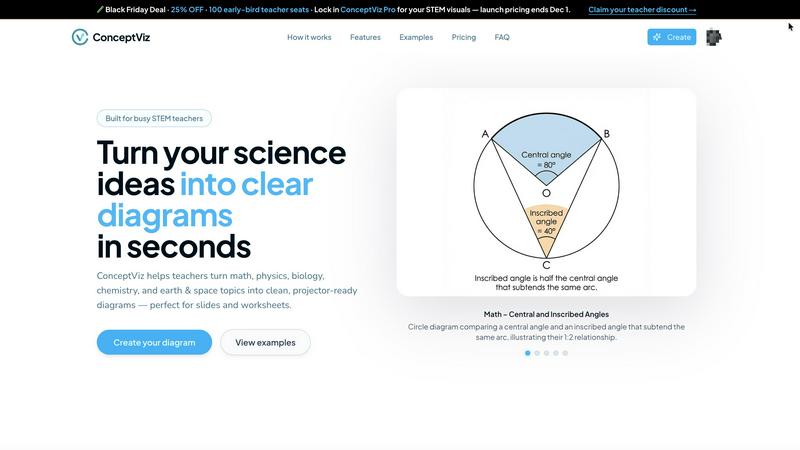
ConceptViz simplifies complex science and math concepts into clear, classroom-ready diagrams for effective learning.
Last updated: February 28, 2026

vaethat
Vaethat evolves your archviz renders with specialized AI for effortless, high-quality enhancement.
Last updated: February 28, 2026
Visual Comparison
conceptviz
vaethat

Feature Comparison
conceptviz
User-Friendly Interface
ConceptViz boasts a straightforward interface that allows users to create diagrams with ease. Users can sign in for free, select their subject and educational level, and begin generating visuals within minutes, making it accessible for anyone, regardless of their technical skill.
Custom Diagram Generation
With ConceptViz, users can describe the diagram they need in simple, plain language. The tool can interpret these descriptions to create tailored diagrams, whether it is a complex physics concept or a basic biology illustration, ensuring relevance to the specific educational context.
Projector-Ready Quality
The diagrams produced by ConceptViz are designed with clarity in mind. They feature thick, legible lines and minimal background noise, ensuring that visuals remain sharp and easily readable from any distance in a classroom setting, making them perfect for presentations.
Subject and Grade Presets
ConceptViz offers a variety of presets tailored to different subjects and grade levels, including physics, biology, chemistry, and math. This feature allows educators to start with a solid foundation that aligns with their teaching needs, saving time and effort in the diagram creation process.
vaethat
Specialized Archviz AI Engine
Unlike general AI models, vaethat's core technology is trained exclusively on high-quality architectural visualization. This deep, domain-specific understanding allows it to expertly enhance materials like wood and concrete, refine complex vegetation, and balance architectural lighting without distorting the original design intent or introducing unrealistic artifacts common in other enhancers.
Multi-Image Workspace & Batch Processing
Evolve from enhancing single images to managing entire projects. The Multi-Image Workspace lets you drag and drop entire folders of renders, save sessions, and process batches of images simultaneously. This feature streamlines the workflow for full architectural sets, ensuring consistent enhancement across all views and saving significant time compared to one-by-one processing.
No-Prompt, Preset-Based Enhancement
vaethat eliminates the complexity and trial-and-error of manual AI prompting. The platform operates on a simple upload, select, and enhance principle. Users choose from tailored presets designed for architectural imagery, delivering optimized results instantly without wasting credits on multiple test generations, making advanced AI accessible at every skill level.
Intelligent Detail & Artifact Management
The AI goes beyond simple upscaling to perform intelligent detail refinement. It sharpens fine edges, enhances texture clarity on materials, and meticulously cleans up rendering noise and artifacts like fireflies. This process adds perceived realism and polish, producing cleaner, sharper, and more professional final images ready for client delivery.
Use Cases
conceptviz
Classroom Teaching
Educators can use ConceptViz to create engaging and accurate diagrams that enhance lesson delivery. By visualizing scientific concepts, teachers can foster a deeper understanding among students, making lessons more interactive and impactful.
Student Projects
Students can leverage ConceptViz to produce professional-quality diagrams for their science projects and presentations. This tool empowers them to illustrate their ideas clearly and effectively, enhancing their overall project quality and comprehension.
Research Visualization
Researchers can utilize ConceptViz to create detailed diagrams for academic papers or presentations. By transforming complex information into clear visuals, researchers can communicate their findings more effectively to both academic and non-academic audiences.
Exam Preparation
ConceptViz can be an invaluable resource for students preparing for exams, as they can create study aids in the form of diagrams. Visualizing key concepts helps reinforce learning and improves memory retention, ultimately leading to better exam performance.
vaethat
Accelerating Client Presentation Workflows
Visualization studios can drastically reduce iteration times. By rendering at lower, faster settings and using vaethat for final upscaling and enhancement, artists can produce high-resolution, artifact-free images for client reviews and approval decks much more rapidly, accommodating tight deadlines without compromising on final quality.
Elevating Portfolio and Marketing Materials
Individual artists and architects use vaethat to give their portfolio pieces a competitive edge. The tool's ability to enhance material definition, lighting balance, and fine details like foliage and decals adds a layer of depth and realism that makes images stand out, showcasing work at its absolute best for job applications or marketing campaigns.
Achieving Consistency Across Project Visuals
For large projects requiring dozens of renderings, maintaining a consistent look and feel is crucial. vaethat's batch processing ensures that every image—from exterior shots to interior details—receives the same enhancement treatment, preserving stylistic coherence and professional polish across the entire visual narrative.
Salvaging and Refining Rushed or Noisy Renders
When time is limited and a render must be delivered with higher noise levels or slightly lower resolution than desired, vaethat acts as a powerful recovery tool. It can clean up the image, enhance details, and upscale it to a usable size, saving the project and avoiding the need for a complete, time-consuming re-render.
Overview
About conceptviz
ConceptViz is a revolutionary tool designed to bridge the gap between complex scientific concepts and clear visual representation. It caters to the educational needs of teachers, students, and researchers by enabling them to create high-quality diagrams quickly and efficiently. The platform is particularly valuable for STEM educators, as it transforms intricate ideas into easily digestible visuals, helping learners grasp essential concepts with clarity and engagement. ConceptViz supports a variety of educational levels, from K-12 to advanced university courses, making it an accessible resource for all. By focusing on visual learning, ConceptViz empowers users to produce projector-ready diagrams suitable for lesson plans, lab activities, and assessments. The tool's user-friendly interface allows educators to generate customized visuals in just three simple steps, ensuring that teaching materials are not only informative but also captivating. In an era where visual aids significantly enhance the learning experience, ConceptViz stands out as a must-have resource for anyone involved in the science education landscape.
About vaethat
vaethat represents a pivotal evolution in the architectural visualization workflow, moving beyond generic AI tools to offer a purpose-built solution for archviz professionals. It is an AI-powered render enhancer designed specifically to upscale and refine 3D architectural images, transforming them from good to presentation-perfect. The tool addresses the core challenge of balancing render time with output quality, allowing artists to render at lower resolutions and faster speeds, then intelligently upscale and enhance the results. Its specialized AI is trained exclusively on architectural visualization imagery, ensuring it understands the unique nuances of materials, lighting, geometry, and vegetation that define professional archviz. This focus eliminates the guesswork, prompts, and endless slider adjustments required by general-purpose AI models. vaethat is for architects, 3D artists, and visualization studios who demand the highest fidelity for client presentations, portfolio pieces, and marketing materials, enabling them to achieve a new stage of efficiency and polish in their post-production process.
Frequently Asked Questions
conceptviz FAQ
How does ConceptViz generate diagrams?
ConceptViz generates diagrams based on simple, plain-English descriptions provided by users. After selecting their subject and educational level, users can describe the specific diagram they need, and the tool creates a customized visual accordingly.
Is ConceptViz suitable for all educational levels?
Yes, ConceptViz is designed to cater to a wide range of educational levels, from K-12 to advanced university courses. It supports various subjects, making it a versatile resource for educators and learners alike.
Can I use ConceptViz for subjects other than science?
While ConceptViz primarily focuses on STEM subjects, its capabilities can be adapted for general educational purposes. The clear visual representation of concepts can benefit a variety of disciplines, depending on how users approach their diagram descriptions.
What file formats does ConceptViz support for downloads?
ConceptViz allows users to download their generated diagrams in high-resolution PNG format, ensuring that visuals are crisp and clear for both digital presentations and printed materials.
vaethat FAQ
How does the AI render enhancer calculate credits?
Credits are consumed based on the output resolution of your enhanced image. Each plan details how many megapixels of output are included. The system calculates the total megapixels of your final, enhanced image(s), and deducts credits accordingly, allowing you to manage usage predictably whether you're upscaling a single large image or a batch of smaller ones.
Can I use the archviz AI upscaler with V-Ray, Lumion, Enscape, 3ds Max, and SketchUp?
Absolutely. vaethat is renderer-agnostic. It works with any 3D visualization software, including V-Ray, Corona, Lumion, Enscape, Twinmotion, 3ds Max, SketchUp, Blender, and more. You simply export your final render as a standard image file (like PNG or JPG) from your software of choice, then upload it to vaethat for enhancement.
What makes this AI post-production tool different from manual editing?
While manual editing in Photoshop requires skill, time, and can be inconsistent, vaethat automates complex enhancement tasks with AI precision trained on archviz. It uniformly enhances textures, lighting, and details across an entire image or project batch in seconds, achieving results that would take hours manually, and with greater consistency.
Does Vaethat use my architectural renders to train AI models?
No. Your uploaded images and data are not used to train vaethat's AI models. The company is committed to user privacy and intellectual property protection. Your architectural renders remain confidential and are processed solely for the purpose of delivering your enhanced results, as outlined in their privacy policy.
Alternatives
conceptviz Alternatives
ConceptViz is a powerful tool that transforms complex scientific and mathematical concepts into clear, classroom-ready diagrams. As a member of the AI Assistants and Content Creation categories, it empowers educators, students, and researchers alike by making visual learning more accessible. Users often seek alternatives to ConceptViz due to various reasons such as pricing, specific feature sets, or compatibility with different platforms. When exploring alternatives, it is essential to consider factors like ease of use, quality of visuals, educational scope, and how well the tool aligns with specific teaching or learning needs.
vaethat Alternatives
Vaethat is an AI-powered tool in the design software category, specifically built for architectural visualization professionals. It focuses on upscaling and enhancing 3D renders to improve clarity, detail, and realism for final presentations and client approvals. Users often explore alternatives for various practical reasons. These can include budget considerations, the need for different or more specialized feature sets, compatibility with existing software pipelines, or a preference for a different user interface and workflow. The search for the right tool is a natural part of a professional's growth as their project demands and technical requirements evolve. When evaluating alternatives, key considerations should align with your current workflow stage. Look for core capabilities in image upscaling and detail refinement, but also assess how well a tool integrates into your process, its output consistency, and its ability to preserve your original creative intent without introducing unwanted artifacts.