
Fallom vs Mod
Side-by-side comparison to help you choose the right tool.

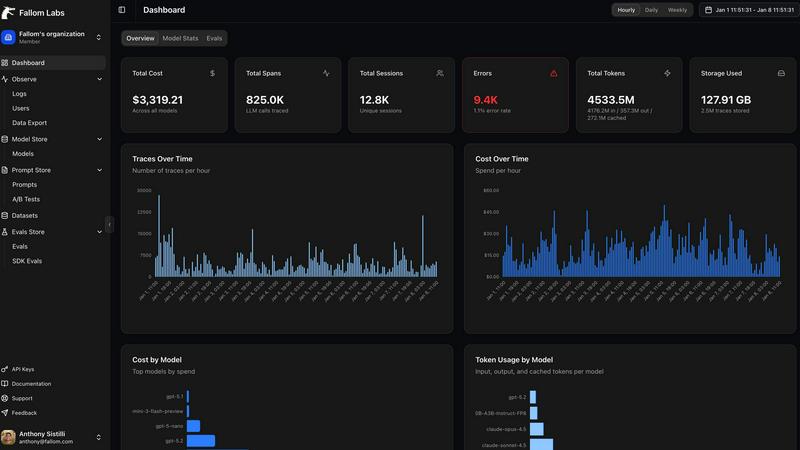
Fallom provides real-time observability and cost tracking for your LLM applications.
Last updated: February 28, 2026

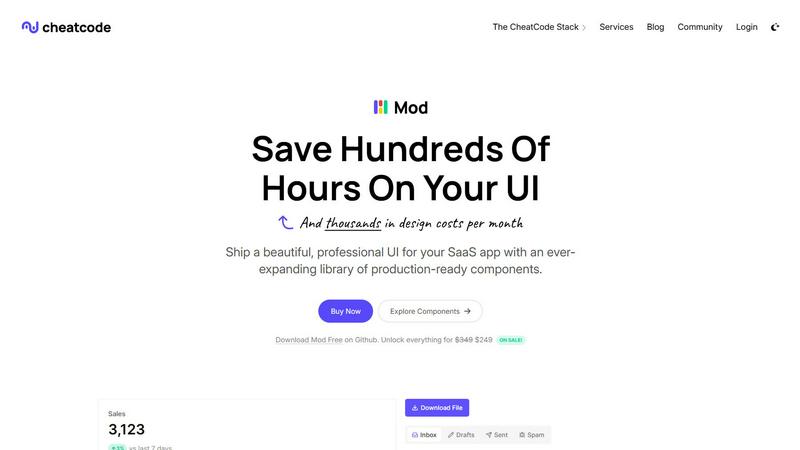
Mod evolves from a CSS framework into a complete component library for shipping SaaS UI faster.
Visual Comparison
Fallom
Mod
Feature Comparison
Fallom
End-to-End LLM Tracing
Fallom provides complete, OpenTelemetry-native tracing for every LLM call and agent action. This goes beyond simple logging to deliver a visual, interconnected map of your AI workflows. You can see the exact sequence of events, from the initial user prompt through intermediate tool calls and reasoning steps to the final response. This granular visibility is essential for debugging complex issues, understanding the "why" behind an agent's behavior, and optimizing the entire chain for performance and cost-efficiency.
Real-Time Cost Attribution & Analytics
Gain precise financial control over your AI spend with Fallom's detailed cost attribution engine. The platform automatically breaks down expenses by model, individual API call, user, team, or even specific customer sessions. This transparency is crucial for teams progressing from project-based budgets to company-wide AI rollouts, enabling accurate chargebacks, forecasting, and identifying optimization opportunities to ensure your AI investment delivers maximum return.
Compliance-Ready Audit Trails
Built for regulated industries, Fallom ensures your AI operations evolve without compliance risk. It maintains immutable, detailed audit logs of every interaction, including full input/output logging, model versioning, and user consent tracking. These features are foundational for adhering to frameworks like the EU AI Act, GDPR, and SOC 2, providing the evidence and control needed to scale AI responsibly and with full accountability.
Advanced Debugging with Tool & Session Context
Debugging agents requires understanding context. Fallom groups related traces into user or customer sessions, providing a holistic view of interactions over time. Furthermore, it offers deep visibility into every tool and function your agents call, displaying arguments and results in detail. This combination of session-level context and tool call visibility turns debugging from a frustrating hunt into a streamlined, efficient process.
Mod
Expansive Component Library
Mod provides an extensive collection of over 88 meticulously designed components that form the building blocks of any SaaS application. This includes everything from complex data tables, modals, and navigation bars to form elements, alerts, and pricing cards. Each component is built with accessibility and semantic HTML in mind, ensuring a solid foundation. This library allows developers to assemble sophisticated user interfaces without starting from scratch, ensuring consistency and professional polish across every page and feature of your application.
Deep Customization with Design Tokens
Beyond pre-built components, Mod offers profound customization through 168 distinct styles and a comprehensive system of design tokens. This includes spacing scales, color palettes, typography rules, and shadow elevations. You can theme your entire application by modifying these central tokens, and changes propagate automatically across all components. This system provides the flexibility to match your brand identity perfectly while maintaining the underlying consistency and quality of the Mod framework, scaling your design system as your product grows.
Framework-Agnostic & Lightweight Integration
Mod is engineered to work seamlessly within any modern tech stack. It delivers pure, utility-first CSS that can be imported into projects using Next.js, Nuxt, Vite, Svelte, Ruby on Rails, Django, and more. There is no heavy JavaScript runtime or proprietary syntax to learn; it integrates like any other CSS framework. This agnostic approach future-proofs your investment, allowing you to adopt Mod today and change your underlying application framework tomorrow without rewriting your entire UI layer.
Production-Ready Themes & Icons
The library ships with two complete, professional themes (light and dark) and includes built-in, easy-to-implement dark mode support. Furthermore, it comes bundled with a suite of over 1,500 crisp icons, covering a vast range of common SaaS needs. Having a cohesive icon set and pre-configured themes eliminates the time-consuming search for matching assets and ensures visual harmony. Every element is built with a mobile-first, responsive design philosophy, guaranteeing your application looks and works flawlessly on all devices from the start.
Use Cases
Fallom
Scaling Enterprise AI Agent Deployments
For enterprises transitioning AI agents from pilot programs to core business operations, Fallom provides the operational backbone. It allows platform teams to monitor the health, performance, and cost of hundreds of concurrent agent workflows, ensuring reliability for end-users and providing the data needed to justify further investment and expansion of AI capabilities across the organization.
Optimizing Cost and Performance of LLM Workloads
Development teams use Fallom to move from a "set and forget" model deployment to a continuous optimization cycle. By analyzing latency waterfalls, token usage patterns, and cost-per-call data, engineers can experiment with different models, prompt structures, and architectures. This data-driven approach leads to faster, cheaper, and more reliable AI features, directly improving the product's bottom line and user experience.
Ensuring Regulatory Compliance for AI Applications
Companies in finance, healthcare, or legal services use Fallom to build and audit compliant AI applications. The platform's detailed audit trails, consent tracking, and privacy controls provide the necessary documentation for internal reviews and external regulators. This enables these companies to innovate with AI while systematically managing risk and upholding their legal and ethical obligations.
Improving Customer Support with AI Analytics
Product and customer success teams leverage Fallom's session tracking and customer analytics to understand how users interact with AI features. They can identify power users, spot common failure points in conversations, and attribute support costs to specific clients. These insights guide product improvements, training data collection, and customer-specific model fine-tuning, evolving the AI from a generic tool to a tailored asset.
Mod
Rapid Prototyping and MVP Development
For solo developers and startups, speed is everything. Mod is the perfect tool for rapidly transforming a concept into a tangible, investor-ready minimum viable product (MVP). By leveraging the pre-built components and layouts, you can construct a fully functional, visually compelling prototype in days instead of weeks. This allows you to validate your business idea with real users quickly, gather feedback, and iterate without being blocked by UI development hurdles.
Standardizing UI Across Development Teams
In growing teams, inconsistent UI implementation can slow down development and harm product quality. Mod acts as a single source of truth for the user interface. By adopting Mod, teams ensure that every developer is using the same components, spacing, and colors. This standardization streamlines collaboration, reduces code review time for visual aspects, and ensures that new features feel like a natural part of the existing application, maintaining a professional and unified user experience.
Modernizing Legacy Application UIs
Many established SaaS products suffer from outdated, inconsistent front-end code that is expensive to maintain. Mod provides a strategic path for gradual UI modernization. Teams can incrementally replace old, brittle CSS with Mod's components and utility classes, one section or feature at a time. This approach minimizes risk, allows for continuous deployment, and progressively delivers a fresh, modern, and responsive interface to users without a costly full rewrite.
Building Consistent Internal Tools and Admin Panels
SaaS companies often need to build robust internal dashboards, admin panels, and customer portals. These projects are critical for operations but rarely justify a large design investment. Mod is ideal for this use case, enabling small teams or even a single developer to build powerful, intuitive internal tools that maintain the same level of polish and usability as the customer-facing product, all while staying on budget and schedule.
Overview
About Fallom
Fallom represents the next evolutionary stage in AI operations, an observability platform built from the ground up for the age of intelligent agents. It is designed for AI developers and enterprise teams who have moved beyond initial experimentation and are now scaling complex LLM and agent workloads in production. As these systems grow from simple prompts to intricate, multi-step workflows involving tools, databases, and conditional logic, traditional monitoring tools fall short. Fallom fills this critical gap by providing a comprehensive, real-time window into every LLM interaction. It captures the full spectrum of data—prompts, outputs, tool calls, token usage, latency, and costs—transforming opaque AI operations into a transparent, manageable, and optimizable system. Its core value proposition is enabling businesses to progress from merely deploying AI to mastering it, ensuring reliability, controlling spend, and maintaining compliance as their AI initiatives mature and evolve.
About Mod
Mod represents a pivotal evolution in the journey of a SaaS developer, transitioning from wrestling with inconsistent, time-consuming UI code to shipping polished, professional applications with confidence and speed. It is a comprehensive CSS framework and component library meticulously crafted for the specific demands of building modern software-as-a-service user interfaces. Designed for solo founders, indie hackers, and development teams, Mod eliminates the traditional design bottleneck. Its core value proposition is acceleration: by providing a vast, production-ready system of visual styles and interactive components, it allows developers to bypass the repetitive groundwork of UI construction. This means you can invest your energy into your unique application logic and user experience, dramatically reducing time-to-market and the costs associated with custom design work. Framework-agnostic by design, Mod seamlessly integrates into your existing workflow, whether you're building with Next.js, SvelteKit, Rails, Django, or any other modern stack. It's not just a set of tools; it's a growth catalyst for your project, enabling you to present a mature, visually cohesive product from the very first commit.
Frequently Asked Questions
Fallom FAQ
How quickly can I integrate Fallom into my existing application?
Integration is designed for rapid progression from setup to insight. With its single, OpenTelemetry-native SDK, you can typically instrument your LLM calls and start seeing traces in your Fallom dashboard in under five minutes. The platform works alongside your existing code, requiring minimal changes to begin collecting comprehensive observability data.
Does Fallom support all major LLM providers?
Yes, Fallom is built on open standards to prevent vendor lock-in and support your AI evolution. It is compatible with all major LLM providers, including OpenAI, Anthropic, Google Gemini, and open-source models. This means you can use a unified observability platform regardless of how your model strategy changes or expands over time.
How does Fallom handle sensitive or private user data?
Fallom includes enterprise-grade privacy controls for regulated environments. You can enable Privacy Mode, which allows you to capture full telemetry and trace data while redacting or disabling the logging of actual prompt and response content. This lets you maintain operational visibility and compliance auditing without storing sensitive information.
Can I use Fallom for testing and evaluating my LLM prompts?
Absolutely. Fallom includes features for running evaluations on LLM outputs, allowing you to track metrics like accuracy, relevance, and hallucination rates. Coupled with its Prompt Store for version control and A/B testing, it creates a robust framework for continuously improving your prompts and catching regressions before they impact production users.
Mod FAQ
Is Mod a JavaScript library or a CSS framework?
Mod is primarily a CSS framework. It delivers its functionality through CSS classes and design tokens. While its components are demonstrated with HTML structure, there is no bundled JavaScript behavior; you implement interactivity (like opening a modal) using your chosen front-end framework (React, Vue, Svelte, etc.) or vanilla JavaScript. This keeps it lightweight and gives you full control over component logic.
How does Mod handle responsiveness and mobile design?
Mod is built from the ground up with a mobile-first, responsive design philosophy. All components, layout grids, and spacing utilities are designed to adapt gracefully from small mobile screens to large desktop displays. You use responsive modifier classes (e.g., for different breakpoints) to control how elements behave across screen sizes, ensuring your SaaS application delivers an optimal experience on every device without requiring custom media queries for common patterns.
Can I use Mod with my existing project's CSS or other frameworks?
Yes, absolutely. Mod is designed to be incrementally adoptable. You can import its CSS alongside your existing stylesheets. It uses specific, semantic class names to minimize conflicts. A recommended approach is to start using Mod for new features or during a redesign, allowing you to gradually transition your project without disrupting currently working parts of your application.
What is included in the yearly updates mentioned?
The yearly updates ensure your license provides access to new components, features, and improvements released for Mod over a 12-month period. This includes additions to the component library, expansions of the icon set, new theme variations, updates to the design token system, and compatibility enhancements for new versions of major web frameworks. It's a commitment to keeping your toolset current and growing alongside modern web development standards.