
Nano Banana Pro vs SimpleDraw
Side-by-side comparison to help you choose the right tool.

Nano Banana Pro evolves your creative vision into stunning, consistent 4K AI images with professional-grade editing.
Last updated: February 28, 2026
SimpleDraw
Evolve your home project from idea to precise scale drawing with our free, intuitive online tool.
Last updated: March 1, 2026
Visual Comparison
Nano Banana Pro

SimpleDraw
Feature Comparison
Nano Banana Pro
Professional Character Consistency
Nano Banana Pro excels at maintaining perfect character continuity across multiple images, a critical feature for professional series creation. Built on advanced multi-image understanding technology, it ensures that character designs, facial features, and stylistic elements remain coherent from one scene to the next. This solves a fundamental challenge in AI art, enabling creators to build consistent storyboards, character sheets, and visual narratives without manual correction, saving immense time and preserving artistic integrity.
Advanced Image-to-Image Editing (Nano Banana Edit)
Move beyond simple generation with the transformative power of Nano Banana Edit. This feature allows you to upload up to 10 existing images and reimagine them using AI prompts. You can turn photographs into artwork, add or remove elements, change styles, or completely alter scenes while intelligently preserving key features and composition. It provides a powerful canvas for iteration and refinement, offering professional-level control over your visual assets.
High-Fidelity Text Rendering
Nano Banana Pro delivers crystal-clear, legible text within generated images, a capability where many AI tools fail. Its advanced text engine is engineered for high-fidelity typography, making it perfect for creating posters, logos, social media graphics, book covers, and any project requiring integrated text. This feature eliminates the frustration of garbled letters and unlocks new possibilities for designers needing precise textual elements in their AI-generated artwork.
Flexible Format & Aspect Ratio Support
The platform supports 11 different aspect ratios, from a standard square (1:1) to cinematic ultrawide (21:9), plus an auto-detect function. This flexibility ensures your creations are perfectly formatted for any platform or purpose, be it Instagram posts, YouTube thumbnails, presentation slides, desktop wallpapers, or mobile banners. The model intelligently adapts to your chosen format, providing professional-grade composition for every output.
SimpleDraw
Dedicated Floor Plan Mode
This specialized mode marks a significant step forward in focused tooling. It provides a curated environment for architectural sketching, allowing users to draw walls and add pre-made symbols for doors, windows, and a vast library of interior fixtures with a single click. As you work, real-time measurements update dynamically, ensuring every element from kitchen cabinets to bathroom fittings is placed with spatial accuracy, streamlining the creation of detailed and professional-looking layouts.
Intelligent Smart Alignment System
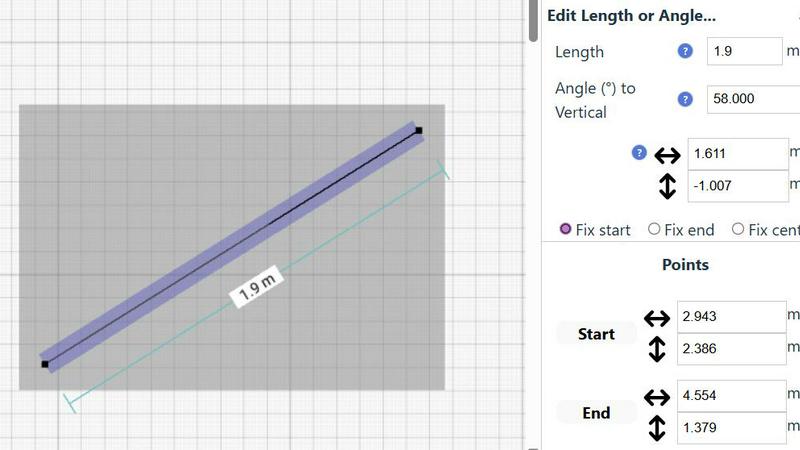
SimpleDraw's smart alignment is the cornerstone of its user-friendly precision. This adaptive system intelligently snaps points and lines to logical positions, offering clear visual guides for perfect angles and connections. It learns from your zoom level, providing broader assistance for general layout and finer control when you zoom in for detail. For ultimate control, keyboard shortcuts let you lock movements to strict horizontal or vertical axes, making precise drafting effortless.
Non-Destructive Editing & Full Control
Embodying a flexible, progress-oriented workflow, SimpleDraw ensures no decision is permanent. Every element, from a single line to grouped furniture sets, can be modified, moved, or adjusted at any stage. Robust undo/redo functions and copy-paste capabilities for element groups streamline experimentation. Crucially, you can input exact dimensions, lengths, and angles directly via keyboard, allowing for meticulous refinement of plans based on real-world measurements.
Adaptive Zoom & Comprehensive Measurement
This feature duo provides unparalleled control over your drawing's scope and specificity. Zoom fluidly to any area, with the tool's precision adapting intuitively to your view. This is complemented by a comprehensive measurement system that displays contextual dimensions as you work. You have full control over which measurements are shown and can toggle between metric and US standard units, ensuring clarity and accuracy for any project, anywhere.
Use Cases
Nano Banana Pro
Serialized Content & Storyboarding
For comic artists, authors, and game developers, Nano Banana Pro is indispensable for creating consistent visual narratives. Its character consistency feature allows for the generation of a series of images featuring the same protagonist or cast in different actions, settings, and emotional states. This enables rapid prototyping of storyboards, concept art for game characters, and illustrated scenes for books, ensuring visual coherence throughout the entire project.
Branding & Marketing Material Design
Marketing professionals and brand designers can leverage Nano Banana Pro to produce high-quality, on-brand visual assets at scale. From generating unique product mockups and ad creatives in various formats to designing posters with perfectly rendered logos and text, the tool accelerates content creation. The ability to maintain a consistent style and character across a campaign strengthens brand identity and delivers professional results quickly.
Conceptual Art & Creative Exploration
Artists and concept designers use Nano Banana Pro as a powerful brainstorming and ideation partner. The Image-to-Image editing feature allows them to upload rough sketches or mood boards and transform them into polished artwork in different styles. They can rapidly explore variations on a theme, experiment with hyper-realistic or cartoon effects, and push creative boundaries without starting from scratch each time.
Social Media Content Creation
Content creators and influencers can generate a steady stream of engaging, platform-optimized visuals. Whether it's creating a cohesive set of profile pictures and banners, designing eye-catching post graphics with readable text, or producing unique artwork for videos and stories, Nano Banana Pro's speed and format flexibility make it ideal for maintaining a dynamic and professional social media presence.
SimpleDraw
Home Renovation & Remodel Planning
Plan your kitchen overhaul or bathroom remodel with confidence. Visualize new layouts, experiment with fixture placements, and create accurate scale drawings that ensure your new cabinets, island, or shower will fit perfectly before you make a single purchase or swing a hammer, preventing costly measurement errors.
Real Estate & Rental Listing Visualization
Create clear, professional floor plans for apartments, houses, or rental properties. These accurate drawings provide potential buyers or tenants with a superior understanding of the space's flow and proportions, enhancing listing quality and setting realistic expectations for room sizes and layout.
Interior Design & Furniture Arrangement
Experiment with endless furniture layouts for your living room, bedroom, or office. Test if your sofa will fit, plan the optimal desk placement, or design a new bedroom suite layout. This virtual staging allows for perfect planning, ensuring new pieces harmonize with your space.
DIY Project & Workshop Design
Move beyond mental sketches for your shed, workshop, or garden project. Draft precise plans to optimize material usage and spatial efficiency. Plan workbench locations, tool storage, and equipment placement to create a functional and well-organized space from the outset.
Overview
About Nano Banana Pro
Nano Banana Pro marks the definitive next stage in a creator's journey from AI experimentation to professional execution. It is a professional-grade AI image generation platform engineered for designers, marketers, storytellers, and developers who have outgrown the limitations of basic generators. This evolution is powered by cutting-edge technology like the gemini 3 pro image preview, delivering 4K-ready images with a 15% speed increase. The platform's core mission is to solve the persistent pain points that hinder professional workflows: inconsistent characters across a series, illegible text within images, and rigid formatting constraints. Nano Banana Pro empowers users with both sophisticated Text-to-Image generation and transformative Image-to-Image editing via Nano Banana Edit, offering unparalleled precision and creative control. Trusted by over 10,000 creators, it represents the maturation of AI art tools, providing the reliability, consistency, and high-fidelity output necessary for commercial projects, branding, and serialized content. It's not just another tool; it's the upgrade for those ready to produce stunning, consistent visual content at scale, bridging the gap between creative vision and professional-grade results.
About SimpleDraw
SimpleDraw represents the evolution of accessible design, transforming from a basic sketching concept into a powerful, browser-based scale drawing tool. It was born from a clear need: to bridge the gap between the intimidating complexity of professional CAD software and the oversimplification of basic drawing apps. Today, it serves a growing community of visual planners, from first-time DIYers sketching their dream garden to seasoned interior designers iterating on client layouts. Its core value proposition is unwavering: delivering professional-grade precision through an interface so intuitive that anyone can start creating accurate, to-scale drawings within seconds, directly from their web browser. This journey from a simple idea to a community-driven platform underscores its commitment to progressive, user-focused development, constantly integrating feedback to refine its tools and expand its capabilities for planning everything from a single room to an entire property.
Frequently Asked Questions
Nano Banana Pro FAQ
What makes Nano Banana Pro different from free AI image generators?
Nano Banana Pro is designed as the professional evolution from basic, often inconsistent, free tools. Its key differentiators are industrial-grade features like reliable character consistency across images, advanced text rendering for legible typography, and sophisticated Image-to-Image editing control. It offers higher resolution (4K-ready), faster generation speeds, and support for 11 professional aspect ratios, making it suitable for commercial and serialized projects where quality and reliability are paramount.
How does the Character Consistency feature work?
The feature is built on a sophisticated multi-image understanding technology that learns and locks in the defining characteristics of a subject—such as facial structure, hairstyle, clothing details, and artistic style—from your initial prompts or uploaded references. When you generate subsequent images specifying that same character, the AI references this learned model to maintain continuity, ensuring the character looks like the same individual or entity in every scene you create.
Can I edit my own photos with Nano Banana Pro?
Yes, absolutely. Through the Nano Banana Edit feature, you can upload your own photographs (up to 10 at a time) and use text prompts to transform them. You can apply artistic filters, change the setting or style, add or remove elements, or completely reimagine the scene while the AI works to preserve key elements of the original composition, offering a powerful bridge between real-world photography and AI-generated art.
What formats and resolutions does Nano Banana Pro support?
Nano Banana Pro generates high-quality images suitable for professional use. It supports output in PNG format and offers a wide range of 11 aspect ratios including 1:1 (Square), 16:9 (Widescreen), 9:16 (Portrait), and up to 21:9 (Ultrawide). The images are generated at high resolution, optimized to be 4K-ready, ensuring they look crisp and detailed whether used online or in print materials.
SimpleDraw FAQ
Is SimpleDraw really free to use?
Yes, SimpleDraw is completely free to use. You can access all its core drawing tools, including the Floor Plan Mode, smart alignment, and measurement systems, directly in your web browser without any cost, account creation, or software download required.
Do I need any experience with CAD or design software?
No prior experience is needed. SimpleDraw is specifically designed to be intuitive for beginners. Its user-friendly interface and smart tools guide you through the process, allowing anyone to start creating accurate drawings immediately, without a steep learning curve.
Can I use SimpleDraw on any device?
SimpleDraw is a web-based application that runs directly in your internet browser. This means you can use it on any device with a modern browser, including desktop computers, laptops, and tablets, providing flexibility to work on your plans wherever you are.
How do I provide feedback or suggest new features?
User feedback is central to SimpleDraw's evolution. You are invited to join the active Discord community where you can share ideas, report issues, and request new features directly. This community-driven approach helps shape the tool's ongoing development.
Alternatives
Nano Banana Pro Alternatives
Nano Banana Pro is a professional-grade AI image generation and editing tool, representing a significant evolution for creators in the design and visual content space. It moves beyond basic experimentation, offering powerful features like character consistency and 4K output for those ready to produce high-fidelity work. Users often explore alternatives at different stages of their creative growth. This search can be driven by budget considerations, a need for different feature sets, or platform compatibility requirements. Some may seek tools with a stronger focus on 3D modeling, vector graphics, or a different pricing model that aligns with their current project scale. When evaluating an alternative, consider your specific stage of evolution. Look for a tool that not only matches your immediate technical needs for resolution and control but also supports your long-term creative trajectory. The right platform should feel like a natural progression, offering the precision to execute your vision today while providing room to grow and explore more complex projects tomorrow.
SimpleDraw Alternatives
SimpleDraw is an intuitive online design tool that empowers users to create precise scale drawings and floor plans without the steep learning curve of professional CAD software. It belongs to the category of accessible design tools, perfect for those in the early stages of planning a project who need clarity and accuracy without complexity. Users often explore alternatives as their needs evolve. This might be driven by a requirement for more advanced 3D modeling, specific industry-standard features, different pricing models, or the need for offline desktop software. The search for a new tool is a natural step in a project's growth, signaling a move from initial concept to detailed execution. When evaluating other options, consider your project's next stage. Key factors include the complexity of features you now require, collaboration capabilities for team projects, integration with other software in your workflow, and the overall value relative to cost. The right tool should match your current skill level while offering a clear path for your developing expertise.