
Hush Touch | Voice-to-Text for MacOS vs Ultra Face Swap
Side-by-side comparison to help you choose the right tool.

Hush Touch | Voice-to-Text for MacOS
Hush Touch evolves your Mac dictation with smarter, on-device voice-to-text that learns your vocabulary.
Last updated: February 28, 2026

Ultra Face Swap
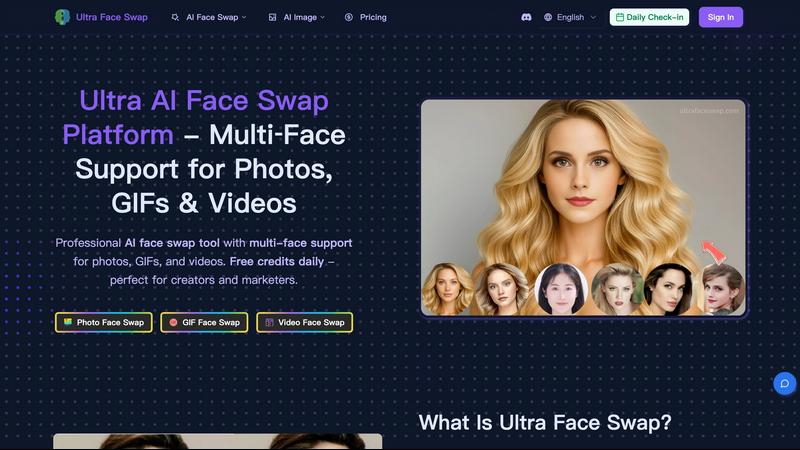
Ultra Face Swap evolves your content with AI, swapping multiple faces in photos, videos, and GIFs for stunning realism.
Last updated: February 28, 2026
Visual Comparison
Hush Touch | Voice-to-Text for MacOS

Ultra Face Swap
Feature Comparison
Hush Touch | Voice-to-Text for MacOS
Dual-Engine Recognition & AI Polish
Hush Touch leverages a sophisticated dual-engine architecture for unmatched accuracy. It simultaneously uses Apple's DictationTranscriber for natural flow and punctuation and SFSpeechRecognizer to spot custom vocabulary and technical terms. These outputs are then merged and refined with a final Apple Intelligence pass, all processed on your Mac. This multi-stage, on-device approach ensures your transcriptions are not only accurate but also contextually aware and polished, eliminating the lag and privacy concerns of cloud-based alternatives.
Custom Vocabulary with Adaptive Learning
The application evolves with your language. You can manually add up to 500 terms, but the true power lies in its adaptive learning. When you correct a transcription, Hush Touch automatically detects this and adds the right word to your personal vocabulary. It employs frequency-weighted language models and can even create per-app profiles, meaning it learns the specific jargon you use in your email client versus your coding environment, becoming more precise with every use.
Smart Text Processing & Hands-Free Commands
Beyond simple transcription, Hush Touch acts as an intelligent writing assistant. It automatically removes filler words ("um," "like"), applies auto-correction for common slips, and can format numbered lists from your speech. For ultimate workflow integration, it supports fully hands-free operation via Siri and includes customizable voice commands. You can set it to auto-insert text after a pause and use phrases like "okay send message" to execute actions, streamlining your process from thought to final action.
100% On-Device Privacy & Lightweight Design
Privacy isn't a premium feature; it's the foundation. Every aspect of Hush Touch, from voice capture to the final AI polish, happens locally on your Mac. No audio or data ever leaves your device. This commitment is paired with an incredibly lightweight 5.5 MB application that launches instantly and runs efficiently in the background, ensuring robust performance without compromising your system's resources or your personal data security.
Ultra Face Swap
Unified Multi-Scenario Processing Pipeline
Ultra Face Swap has evolved beyond single-format tools by developing one streamlined, intelligent pipeline that handles photos, GIFs, and videos with equal proficiency. This unified architecture means users progress from novice to proficient creator without learning different systems for different media. Whether swapping a single face in a portrait or multiple faces in a complex group video, the process remains a simple, one-click operation, accelerating the creative workflow from concept to final output.
Stable Multi-Face Detection & Tracking
The platform's AI has been meticulously trained to intelligently detect and maintain a stable lock on multiple faces within dynamic scenes. This advanced tracking ensures that as expressions change and perspectives shift in videos and GIFs, the swapped faces align perfectly without awkward drift, blurring, or visible artifacts. This stability in complex, multi-person scenarios is a key milestone in achieving professional, broadcast-ready results that were once only possible with high-end studio software.
High-Fidelity Natural Blending Engine
Ultra Face Swap prioritizes realistic integration through a sophisticated blending engine that analyzes and matches lighting conditions, skin tones, textures, and fine facial details. This deep fusion technology significantly reduces common pitfalls like unnatural edge halos, color mismatches, and texture artifacts. The result is a seamlessly blended face that respects the original image's environment, producing production-ready outputs that stand up to close scrutiny and mark a leap forward in output quality.
Watermark-Free Output & Daily Credits
To support creator growth and experimentation, Ultra Face Swap provides all users with free daily credits to generate content. More importantly, every output is delivered without any proprietary watermark, empowering users to freely use their creations for personal branding, commercial projects, or social media virality. This policy removes a significant barrier to professional use and reflects a commitment to the creator's ownership and progression in their content journey.
Use Cases
Hush Touch | Voice-to-Text for MacOS
Drafting Long-Form Content and Documents
For writers, researchers, and content creators, Hush Touch unlocks a fluid drafting process. Speak your thoughts naturally to overcome writer's block and capture ideas at the speed of speech. The smart punctuation, filler word removal, and adaptive vocabulary learning ensure the initial transcript is remarkably clean, significantly reducing editing time and helping you maintain a clear, consistent tone throughout lengthy documents.
Technical and Medical Documentation
Professionals with specialized lexicons, such as software engineers dictating code snippets with terms like "Kubernetes" or physicians documenting patient notes with complex medical terminology, find immense value. Hush Touch's custom vocabulary and per-app learning profiles ensure niche jargon is recognized accurately from the start, improving documentation efficiency and accuracy where other generic dictation tools fail.
Managing Communication and Email
Transform your inbox management by dictating emails and messages hands-free. The dedicated Email context mode optimizes transcription for correspondence, and the ability to send a message directly with a voice command like "send it" creates a seamless, efficient workflow. This is ideal for busy professionals looking to clear their communication queue quickly without ever touching the keyboard.
Capturing Ideas and Meeting Notes
Use Hush Touch as a digital thought partner. Quickly launch it with a hotkey to capture fleeting ideas, brainstorm project plans, or take real-time notes during meetings. The app's speed and offline capability mean you can rely on it anywhere, ensuring no insight is lost. The Notes context mode helps format these captures cleanly for later review and action.
Ultra Face Swap
Elevating Social Media & Viral Content Creation
Creators are leveraging Ultra Face Swap to rapidly produce engaging, shareable content for platforms like TikTok, Instagram Reels, and YouTube Shorts. By seamlessly inserting themselves or friends into trending memes, celebrity interviews, or popular movie scenes, they craft hilarious and relatable videos that drive millions of views. This tool accelerates the content lifecycle, allowing creators to consistently participate in trends and grow their audience with a seemingly endless stream of creative ideas.
Professional Headshot & Brand Asset Generation
Professionals and marketers use Ultra Face Swap to efficiently create high-quality, consistent headshots and branded imagery without the cost and time of multiple photoshoots. By swapping a clear portrait onto various professional backgrounds or stock images, users can generate a portfolio of LinkedIn photos, team page headshots, or marketing materials that present a polished, cohesive brand image. This streamlines personal and corporate branding efforts.
Enhancing Group Photos & Event Memories
The tool is perfect for salvaging and perfecting group photos from weddings, reunions, or parties where someone may have blinked or had an unflattering expression. Users can swap in better expressions from other shots, ensuring every group picture is picture-perfect. This application transforms casual photography, allowing everyone to look their best in shared memories, evolving simple snapshots into cherished, flawless keepsakes.
Creative Exploration & Entertainment
Users explore fun and imaginative scenarios, such as "meeting" a celebrity crush by swapping faces into a photo with them, visualizing historical figures in modern settings, or creating humorous GIFs with friends and family. This use case highlights the tool's role in personal entertainment and creative storytelling, providing a safe, easy outlet for digital play and the exploration of identity in the AI age.
Overview
About Hush Touch | Voice-to-Text for MacOS
Hush Touch represents the next stage in the evolution of personal computing: a move away from cloud-dependent services towards powerful, private, and intelligent on-device tools. It is a sophisticated voice-to-text application built exclusively for macOS, designed to transform spoken word into polished written text with remarkable accuracy and speed. At its core, Hush Touch is for anyone who writes—be it emails, messages, notes, documents, or code—and seeks a more natural, efficient, and hands-free workflow. Its primary value proposition is a powerful trifecta: superior AI-driven transcription that learns and adapts to you, complete privacy through 100% on-device processing, and a simple, one-time payment that liberates users from subscription fatigue. By intelligently blending two native Apple transcription engines and applying a final Apple Intelligence pass, Hush Touch delivers cleaner text, learns your unique vocabulary, and removes verbal filler words, all while operating entirely offline. This isn't just another dictation tool; it's a commitment to building a smarter, more private, and more autonomous way of working that grows alongside you.
About Ultra Face Swap
Ultra Face Swap represents the next evolutionary stage in accessible, AI-powered visual creativity. It has grown from a simple novelty tool into a comprehensive, professional-grade platform designed for creators at every level of their journey. This online tool leverages advanced deep learning to facilitate seamless, high-fidelity face replacement across photos, GIFs, and videos, supporting the transformation of up to eight faces simultaneously. It is engineered for the modern content creator's lifecycle: from the initial spark of a viral idea to the polished delivery of professional marketing assets. By removing technical barriers like complex software and intrusive watermarks, and providing free daily credits, Ultra Face Swap empowers users to experiment, iterate, and scale their visual content production. It serves a diverse ecosystem including social media influencers crafting the next trending meme, marketers generating personalized ad variations, professionals needing instant headshots, and anyone looking to explore digital identity with unprecedented ease and quality.
Frequently Asked Questions
Hush Touch | Voice-to-Text for MacOS FAQ
How does Hush Touch's accuracy compare to cloud-based services?
Hush Touch achieves superior accuracy for many users by leveraging two local Apple engines and an AI final pass, specifically optimized for on-device processing. While cloud services have vast datasets, Hush Touch's strength is its personalized, adaptive learning. It gets smarter the more you use it, learning your voice, accent, and unique vocabulary without ever sending your data to a server, offering a perfect balance of high accuracy and absolute privacy.
Can I use Hush Touch completely offline?
Yes, absolutely. This is a core design principle. Hush Touch requires no internet connection to function. All voice processing, transcription, vocabulary learning, and text polishing occur 100% on your Mac's hardware. This makes it reliable in any situation, from flights to areas with poor connectivity, while guaranteeing your data never traverses the web.
What is included in the one-time $20 license?
The one-time $20 payment grants you a lifetime license for Hush Touch on macOS. This includes all current features—dual-engine transcription, custom vocabulary, adaptive learning, smart text processing, and all privacy guarantees—as well as future updates. There are no subscriptions, monthly fees, or tiered plans, representing a significant long-term saving compared to other dictation software.
How does the adaptive vocabulary learning work?
The learning is automatic and context-aware. When you manually correct a word in the transcribed text, Hush Touch detects this correction and adds the right spelling/term to your personal vocabulary list. It also uses frequency weighting, prioritizing words you use often. You can create different vocabulary profiles for different applications (e.g., Xcode vs. Mail), and the app will boost the relevant terms when you switch to that app.
Ultra Face Swap FAQ
What types of files does Ultra Face Swap support?
Ultra Face Swap supports a wide range of visual media formats to accommodate various creative projects. You can upload standard image files (like JPG and PNG) for photo face swaps, animated GIFs, and common video formats (like MP4 and MOV). The platform's unified processing pipeline is designed to handle all these formats with high fidelity, making it a versatile tool for all your face-swapping needs.
Is there a limit to how many faces I can swap in one image or video?
Yes, Ultra Face Swap is engineered to handle complex multi-face scenarios and can detect and swap up to eight faces simultaneously within a single photo, GIF, or video. This advanced multi-face tracking capability makes it ideal for editing group photos, crowd scenes, or any content featuring several people, ensuring each face is replaced accurately and stably.
Are the face swap results from Ultra Face Swap free to use?
Absolutely. A core principle of Ultra Face Swap is to empower creators. All outputs generated by the platform are provided completely free of watermarks. You own the content you create and are free to download, share, and use it for personal projects, social media, and even commercial purposes, supporting your growth from hobbyist to professional creator.
How long does it take to generate a face swap?
Processing times are remarkably fast, typically taking between 20 to 40 seconds to generate a high-quality, realistic result. The speed may vary slightly depending on the complexity of the file (e.g., video length or number of faces) and server load. This quick turnaround is designed to fit seamlessly into a fast-paced creative workflow, allowing for rapid iteration and experimentation.
Alternatives
Hush Touch | Voice-to-Text for MacOS Alternatives
Hush Touch | Voice-to-Text for MacOS is a specialized AI assistant that elevates dictation by operating entirely on your device. It represents a significant step forward in personal productivity tools, focusing on privacy and seamless integration into the MacOS writing workflow. Users often seek tools that match their specific stage of growth, whether they are just beginning to explore voice commands or are seasoned professionals needing advanced, offline-capable solutions. The search for alternatives is a natural part of evolving your toolkit. Needs change; perhaps a project demands real-time collaboration features, a different pricing model like a subscription fits a budget better, or support for multiple operating systems becomes essential. The core desire, however, remains constant: to communicate ideas fluidly without being hindered by the keyboard. When evaluating options, consider your current priorities. Key differentiators often include the processing location for privacy, the accuracy and contextual understanding of the transcription, the cost structure, and how intuitively the tool fits into your existing applications. The right choice is the one that aligns with your immediate workflow needs while supporting your next phase of productivity.
Ultra Face Swap Alternatives
Ultra Face Swap is a leading AI-powered platform in the face swapping category, designed to transform photos, GIFs, and videos with high realism. It represents a significant evolution in creative AI tools, empowering users to effortlessly reimagine visual content. Users often explore alternatives at different stages of their creative journey. This search can be driven by the need for different pricing models, specific feature sets like offline functionality, or platform compatibility that better aligns with their evolving workflow and distribution channels. When evaluating other options, consider the core pillars of a mature creative tool: output quality and natural blending, support for your preferred media formats, a transparent approach to data privacy, and a pricing structure that scales with your project volume. The right alternative should support your growth from initial experimentation to professional content creation.