

ComicsMaker
ComicsMaker turns your scene prompts into structured comic strips, manga panels, and storyboards you can refine and export.
tool Details
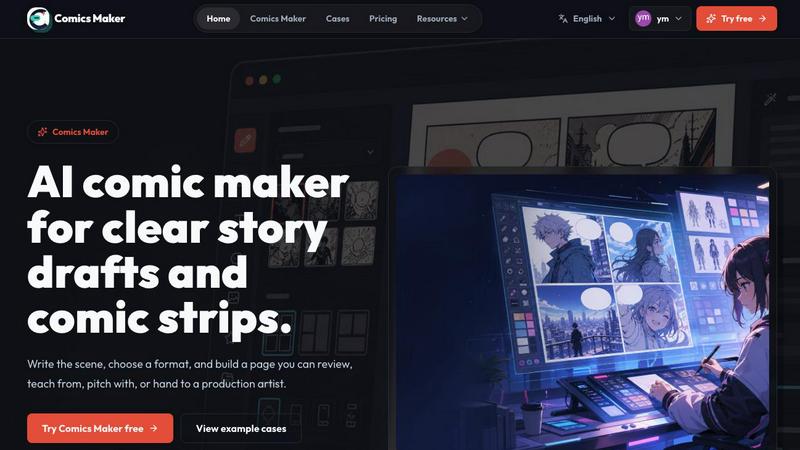
About ComicsMaker
ComicsMaker is an AI-powered comic maker and comic strip generator that transforms the way creators, educators, marketers, and teams approach visual storytelling. At its core, ComicsMaker is a progress-focused platform that takes you from a raw idea to a structured, editable comic draft without the intimidation of a blank canvas. The product turns simple text prompts into comic panels, manga-style drafts, storyboards, and social-ready comic pages, giving you clear control over layout, tone, reading flow, and visual style direction. Whether you are drafting a single scene or planning an entire campaign, ComicsMaker provides the scaffolding to move from a rough concept to a reviewable comic page. The workspace is built for iteration: you plan the beats, generate panels, add dialogue, and arrange the page directly in your browser. This makes it an ideal tool for drafting AI comic strips, prompt-to-panel scenes, character moments, explainer comics, classroom visuals, product storyboards, and campaign concepts. The platform supports multiple page formats including single panel, 3-panel strip, 2x2 page, and vertical flow, ensuring flexibility for any storytelling need. With features like style locking, character and environment notes, and JSON project export, ComicsMaker ensures every draft maintains consistency and can be handed off to artists or teammates. The journey from idea to comic is streamlined into three stages: Start with one scene, plan the beats, then generate and refine. ComicsMaker is not just a tool; it is a growth engine for your visual storytelling skills, helping you evolve from a beginner to a confident comic creator.
Features
Scene to Panel Planning
ComicsMaker allows you to start with a single scene described in plain language. You name the character, setting, visible action, and change, then the platform helps you shape that scene into a structured comic sequence. This feature ensures every panel has a clear job, pacing is established early, and the reading order is visible before you invest time in polish. It is the foundational step that turns a raw idea into a workable draft.
Flexible Layout and Format Options
The platform provides a clean middle panel for making layout decisions. You can choose from single panel, 3-panel strip, 2x2 page, and vertical flow formats. Simple controls for size, tone, and production notes keep the process intuitive. The empty canvas by default is ready for your next idea, and the studio keeps panel count, pacing, shot type, and reading order visible throughout your workflow.
Consistent Visual Style Management
ComicsMaker lets you lock the visual direction before generating any images. You can use style notes, character details, and reference language to ensure every panel belongs to the same world. This feature allows you to reuse character and environment notes across different scenes and export drafts that an artist or teammate can understand and continue working with. Consistency is built into the workflow, not added as an afterthought.
Dialogue and Caption Integration
After generating panels, you can add dialogue and captions directly within the browser-based editor. The system keeps captions and dialogue close to the panel plan, making it easy to refine the story without switching between tools. This feature supports the evolution of your comic from a visual draft to a complete narrative with clear character voices and narrative flow.
Use Cases
Educational Comic Creation for Classrooms
Teachers and educators can use ComicsMaker to create explainer comics, lesson visuals, and classroom materials that engage students through visual storytelling. By turning complex topics into simple, paced comic sequences, educators can improve comprehension and retention. The platform allows for quick iteration, so teachers can test different narrative approaches before finalizing a lesson comic.
Marketing Campaign Storyboarding
Marketers and brand teams can draft product storyboards, campaign concepts, and social-ready comic pages using ComicsMaker. The platform enables rapid prototyping of visual narratives that explain product benefits, demonstrate use cases, or tell brand stories. The ability to review pacing and dialogue before generating more images makes it a cost-effective tool for campaign development.
Manga and Comic Drafting for Creators
Independent comic artists and manga creators can use ComicsMaker to move from a rough idea to a structured draft. The platform supports shonen-style layouts, dramatic moods, and multiple panel formats, allowing creators to experiment with different storytelling approaches. The JSON project export feature ensures that drafts can be handed off to professional artists or refined further in other tools.
Team Collaboration on Visual Projects
Teams producing brand comics, internal communications, or training materials can use ComicsMaker as a shared workspace. The platform allows multiple stakeholders to review story clarity, panel order, and visual direction before committing to a longer production pass. This use case reduces miscommunication and speeds up the approval process for visual content.
Pricing
ComicsMaker offers three pricing tiers. The Free plan includes 10 starter credits for testing image generation and allows you to try the editor workflow. The Creator plan is $15 per month and is designed for creators making comic strips, lessons, and social campaigns every week. The Studio plan is $39 per month and is built for teams producing brand comics, campaigns, and classroom content. Paid plans mainly increase monthly credits, while the current editor and JSON project export follow the same workflow across all plans.
Frequently Asked Questions
How does ComicsMaker turn a scene into a comic?
You start by describing a single scene in plain language, including the character, setting, visible action, and change. ComicsMaker then helps you plan the beats, generate panels, add dialogue, and arrange the page in your browser. The platform guides you from a raw idea to a structured, editable comic draft without requiring artistic skills.
What formats and layouts does ComicsMaker support?
ComicsMaker supports single panel, 3-panel strip, 2x2 page, and vertical flow formats. The studio keeps panel count, pacing, shot type, and reading order visible before you generate images. You can also control size, tone, and production notes through simple controls.
Can I maintain consistent visual style across my comic?
Yes. ComicsMaker allows you to lock the visual direction before generating images. You can add style notes, character details, and reference language to ensure every panel belongs to the same world. This feature supports reusing character and environment notes across different scenes.
Is ComicsMaker suitable for team projects?
Absolutely. ComicsMaker is built for teams producing brand comics, campaigns, and classroom content. The platform supports JSON project export, allowing you to hand off prompts, notes, and panels as project data. This makes it easy for teammates or artists to continue working on the draft.