

CustomTattoo AI
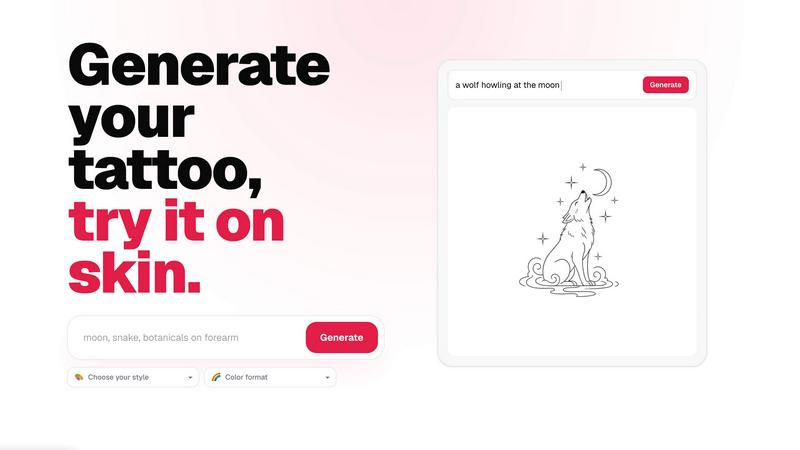
Transform your tattoo idea from vague concept to skin-ready design with AI generation and realistic on-body previews.
tool Details
Explore More
Alternatives
About CustomTattoo AI
CustomTattoo AI is a purpose-built, AI-powered platform designed to transform how people plan, visualize, and commit to their next tattoo. It serves as a complete creative studio for anyone considering permanent ink, from first-time clients feeling uncertain about their idea to seasoned tattoo enthusiasts exploring new styles and placements. The core mission is simple: make the result obvious before you book. Users begin by describing their tattoo idea in natural language, specifying the subject, placement, and desired mood. The platform then generates custom tattoo concepts across a wide range of artistic directions, allowing users to refine their vision without guesswork. Each design can be previewed directly on a photo of the user's own skin, offering a realistic sense of scale, proportion, and placement. This try-on feature eliminates the anxiety of imagining a design in isolation and provides confidence before any permanent commitment. Beyond generation and preview, CustomTattoo AI acts as a collaborative tool between the user and their tattoo artist. Users can save their favorite designs to a personal library, compare different styles side by side, and export a clear, artist-ready reference that communicates their exact visual direction. The platform is especially valuable for those who struggle to articulate their ideas or want to explore multiple aesthetics before settling on one. By bridging the gap between imagination and reality, CustomTattoo AI empowers users to walk into a studio with clarity, reducing back-and-forth and ensuring the final tattoo matches the original vision. It is a progress-focused tool that guides users through the stages of ideation, refinement, visualization, and preparation, making the entire journey from concept to skin more informed and less intimidating.
Features
AI-Powered Tattoo Generator
The core engine of CustomTattoo AI allows users to describe their tattoo idea in plain language and instantly receive custom-generated concepts. Whether the prompt is a detailed scene like a gothic dragon with wide wings or a simple motif like a crescent moon with botanicals, the AI interprets the subject, placement, and mood to produce unique, high-quality designs. Users can iterate quickly by adjusting their description, refining the visual direction with each generation, and exploring multiple creative possibilities without any artistic skill required.
On-Skin Preview
One of the most transformative features is the ability to preview any generated tattoo design directly on a photo of your own skin. This try-on capability goes beyond simple overlays by accurately mapping the design to the contours of your body, whether it is on an arm, leg, chest, or back. Users can see exactly how the tattoo will look in terms of size, placement, and proportion, helping them make informed decisions about positioning and scale before committing to a permanent piece.
Diverse Style and Color Selection
CustomTattoo AI offers an extensive library of tattoo styles and color formats to match any aesthetic preference. Users can choose from directions like Gothic blackwork, traditional American, watercolor, geometric, neo-traditional, and many more. Additionally, color formats such as Black and Grey, Full Color, or Sepia allow for further customization. This feature enables users to compare how the same idea looks in different artistic languages, expanding their creative horizons and ensuring the final style aligns with their personal taste.
Personal Library and Artist-Ready Export
Every generated design is automatically saved to a personal library within the user's account. This organized space allows for easy browsing, comparing, and managing of favorite concepts. When a final design is selected, the platform provides an artist-ready reference that clearly communicates the visual direction, style, placement, and any specific details. This export eliminates ambiguity, reduces the need for lengthy consultations, and gives tattoo artists a precise blueprint to work from, saving time and improving the final outcome.
Use Cases
First-Time Tattoo Planning
For individuals getting their first tattoo, the process can be overwhelming and filled with uncertainty. CustomTattoo AI provides a safe, low-pressure environment to explore ideas without commitment. A user can start with a vague concept like a small flower on the wrist, generate multiple style variations, and preview each one on their own skin. This iterative process builds confidence, helps them understand what looks good on their body, and ensures they arrive at the studio with a clear, well-considered design they are excited about.
Exploring Multiple Artistic Directions
Tattoo enthusiasts often have a core idea but are unsure which artistic style will best bring it to life. CustomTattoo AI allows them to generate the same concept in several different aesthetics simultaneously. For example, a user wanting a dragon tattoo can see it rendered in Japanese traditional, American traditional, and illustrative blackwork. By comparing these versions side by side, they can identify which style resonates most deeply, making the creative decision an informed exploration rather than a blind guess.
Refining Placement and Scale
Choosing the right placement and size for a tattoo is critical, as it affects visibility, longevity, and overall aesthetic balance. Using the on-skin preview feature, a user can test a design on different body parts, such as the forearm, shoulder, or calf. They can also adjust the scale to see how a small, delicate piece compares to a larger, more detailed composition. This use case is vital for ensuring the tattoo fits the body's natural lines and looks harmonious from every angle.
Preparing for a Tattoo Artist Consultation
Walking into a tattoo studio with a vague description often leads to long consultations, multiple redraws, and potential disappointment. CustomTattoo AI empowers users to bring a concrete, visual reference to their artist. By generating a design that captures the desired style, mood, and placement, the user can communicate their vision with precision. The artist-ready export provides a clear starting point for the professional's own artistic input, streamlining the collaboration and ensuring the final tattoo meets the client's expectations.
Frequently Asked Questions
Is CustomTattoo AI free to try?
Yes, CustomTattoo AI offers a free trial with 3 credits provided at signup. These credits allow you to generate tattoo designs and use the on-skin preview feature without any payment. This no-risk introduction lets you test the generator, explore different styles, and see how the platform works before deciding to purchase additional credits. No credit card is required to start.
How does the on-skin preview work?
The on-skin preview feature uses advanced AI to map a generated tattoo design onto a photo of your own skin. You upload or take a picture of the body part where you want the tattoo, and the platform accurately places the design, adjusting for contours, lighting, and perspective. This gives you a realistic, high-fidelity visualization of how the tattoo will look in terms of size, placement, and proportion, helping you make a confident decision.
Will there be hidden subscriptions?
No, CustomTattoo AI operates on a transparent, credit-based system with no hidden subscriptions or recurring charges. You start with 3 free credits, and when you need more, you can purchase additional credit packs as needed. There are no automatic renewals or surprise fees. You have full control over your spending, and you only pay for the generations and previews you actually use.
Can I take the design to my tattoo artist?
Absolutely. CustomTattoo AI is designed to be a collaborative tool between you and your tattoo artist. Once you have generated and refined a design you love, you can export it as a clear, artist-ready reference. This reference includes the visual direction, style, placement, and any specific details. Your artist can then use this as a starting point, adding their own professional expertise and adjustments to create a final, unique piece.
Similar to CustomTattoo AI
Qwen Image Edit
Prompt-based Qwen Image editing and generation for backgrounds, text, products, posters, outpainting, and creative styles.

Presentation Intelligence
AI-native presentation and visual content platform that turns prompts, documents, images, videos, and data into polished, shareable decks.
Text Logo
Create a custom text logo, wordmark logo, or typography logo with editable fonts, colors, icons, shapes, and flexible export formats.



IsThisAIImage
Free AI image checker: upload a photo for AI-generated and deepfake scores, a clear verdict, and optional generator hints.
Merge Two Photos
Merge two photos free in your browser: side by side, stacked, overlay, or AI. Download a clean PNG, no watermark.
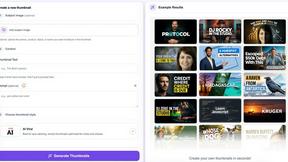
StopScroll
StopScroll is an AI thumbnail maker that generates YouTube thumbnail concepts from a URL, title, or prompt.