

KPI Studio
KPI Studio evolves your raw data into polished video animations in under 60 seconds without timelines or keyframes.
tool Details
Explore More
Alternatives
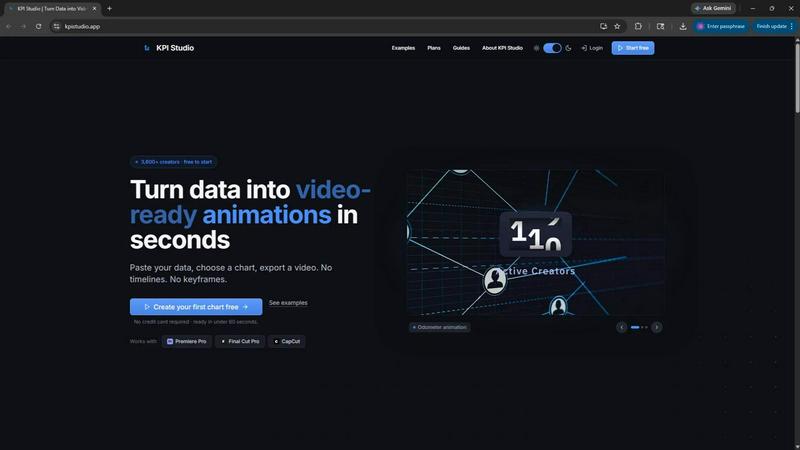
About KPI Studio
KPI Studio is a specialized tool built for data-driven video creators who need animated charts and metrics in every video but lack the time or skills for motion design. It solves a common workflow problem: screenshots look amateur, Canva templates lack flexibility, After Effects takes hours to learn and execute, and hiring freelancers is slow and expensive. AI video tools generate visuals, but they are unpredictable and not built for precise data representation. KPI Studio removes that entire broken process by offering a streamlined, three-step workflow. You simply paste your data, choose a chart type, and export a fully animated, video-ready visual in under 60 seconds. There are no timelines, no keyframes, and no complex setup. The tool is designed for creators operating on a publish schedule who need a chart ready today, not tomorrow. It supports exports with transparent backgrounds, allowing charts to drop directly into Premiere Pro, Final Cut Pro, or CapCut with no additional editing. For advanced users, JSON export enables deeper customization and integration into custom pipelines. KPI Studio represents an evolution in content creation, moving from static, time-consuming design work to a fast, repeatable, and predictable animation process. It is the fast path for any creator who wants to turn raw numbers into engaging, professional motion graphics without becoming a motion designer.
Features
Instant Video Export from Data
Paste your raw data directly into the interface, choose from a library of chart types, and export a fully animated video in under 60 seconds. This feature eliminates the need for any design software or animation skills. You can create count-up numbers, growing bar charts, or drawing line charts without touching a keyframe or timeline. The process is repeatable, so when your data changes, you simply re-paste and re-export. This speed transforms your workflow from a multi-hour project into a quick, predictable step in your video production pipeline.
Video-Ready Export Formats
KPI Studio provides a full range of export formats designed for seamless integration into professional video editing workflows. You can export as MP4, GIF, MOV with transparency, or PNG sequences. The transparent background option is critical, as it allows your animated chart to be dropped directly onto any video timeline in Premiere Pro, Final Cut Pro, or CapCut without requiring masking or additional compositing. This feature ensures your chart looks native to your video, saving significant post-production time and preserving the professional quality of your final content.
Multiple Aspect Ratios and Resolutions
The tool supports all major aspect ratios required for modern content distribution, including 16:9 for widescreen, 1:1 for square, 9:16 for stories, and 4:3 for standard presentations. You can also export at resolutions up to 4K with the Pro plan. This flexibility ensures your animated data is perfectly framed for YouTube, Instagram, TikTok, PowerPoint, Google Slides, or any other platform. You no longer need to manually resize or reformat your charts for different channels, which streamlines your content repurposing strategy.
Advanced JSON Export for Custom Pipelines
For creators with advanced workflows, KPI Studio offers JSON export. This feature allows you to export the underlying data and animation parameters as a structured file. You can then import this JSON into custom pipelines, integrate it with other software, or perform deeper editing. This capability bridges the gap between a simple, fast tool and the needs of technical creators who require programmatic control over their animations. It represents the evolution from a standalone tool to a component within a larger, automated content production system.
Use Cases
YouTube Channel Performance Reviews
You can quickly animate your channel's monthly growth metrics, such as subscriber count, total views, and watch time. Instead of showing a static screenshot from YouTube Studio, you create a dynamic count-up animation that visually demonstrates your progress. This makes your review videos more engaging and professional. When new data comes in, you simply update the numbers and re-export, keeping your content current without redoing any animation work. This use case is perfect for creators who publish regular update videos and need a consistent, high-quality visual for their KPIs.
Social Media Shorts and Stories
For platforms like Instagram, TikTok, and YouTube Shorts, you can generate animated charts in the 9:16 vertical format. Use a growing bar chart to compare two metrics, or a count-up number to reveal a milestone achievement. The transparent background export allows you to overlay the animation directly onto your video footage. This creates a polished, data-rich short that stands out in a crowded feed. The speed of KPI Studio means you can produce these visuals in the same time it takes to write a caption, enabling you to post more frequently with high-quality data visuals.
Client Reporting and Presentations
When presenting results to clients or stakeholders, replace static slides with animated data reveals. Export your charts as MP4 files and embed them directly into PowerPoint or Google Slides. The animation draws attention to key metrics, making your presentation more memorable and impactful. You can show revenue growth, user acquisition, or any other KPI as a self-drawing line chart. This professional touch differentiates your reporting and demonstrates a commitment to clear, engaging communication. The process is fast enough to create custom reports for multiple clients without significant time investment.
Educational and eLearning Content
Instructors and course creators can use animated charts to explain data trends, historical changes, or comparative analysis. A drawing line chart is perfect for showing a concept like stock market trends or population growth over time. The visual motion helps learners grasp the direction and magnitude of change more effectively than a static image. You can export in standard 16:9 or 4:3 aspect ratios for compatibility with most learning management systems. The JSON export also allows for integration into interactive modules or custom educational software, providing a scalable solution for data visualization in learning environments.
Pricing
KPI Studio offers three pricing tiers to accommodate different usage levels. The Free plan is available at $0 per month and includes unlimited PNG exports, 3 free animated exports, access to all chart types, and real-time preview. The Creator Pack is a one-time purchase for $11.99 and includes everything in the Free plan, plus 10 video exports (GIF, MP4, WebM, and MOV), no watermark, and 1080p export resolution with no expiry on credits. The Pro plan is $19.99 per month and is the most popular option for creators who publish weekly. It includes everything in the Free plan, plus unlimited video exports, no watermark, 4K export resolution, and the ability to cancel anytime.
Frequently Asked Questions
What is KPI Studio and who is it for?
KPI Studio is a web-based tool that turns raw data into animated, video-ready charts in under 60 seconds. It is designed for data-driven video creators, YouTubers, social media managers, marketers, and anyone who needs to present metrics in video format. You do not need any motion design or animation skills to use it. The tool is built for creators on a publish schedule who need professional, animated data visuals without the time commitment of After Effects or the cost of hiring a freelancer.
How do I use KPI Studio to create an animated chart?
The process is a simple three-step workflow. First, you paste your raw data into the provided input field. Second, you choose a chart type from the available options, such as a count-up number, growing bar chart, or drawing line chart. You can customize the appearance in real-time. Third, you select your desired export format (MP4, GIF, MOV, PNG) and aspect ratio, then click export. The tool generates a fully animated video file that is ready to drop into your video editing timeline.
What export formats and resolutions are supported?
KPI Studio supports multiple export formats including MP4, GIF, MOV with transparency, and PNG sequences. You can also export with an alpha channel (transparent background) for MOV, GIF, and PNG formats, which allows the chart to be overlaid directly onto video footage. Supported aspect ratios include 16:9, 1:1, 9:16, and 4:3. The Free plan exports at standard resolution, while the Pro plan supports 4K exports. The Creator Pack offers 1080p exports.
Can I use KPI Studio with my existing video editing software?
Yes, KPI Studio is built for seamless integration with professional video editors. You can export your animated chart with a transparent background (MOV with alpha) and drop it directly into Premiere Pro, Final Cut Pro, CapCut, or any other editing software that supports alpha channels. No additional editing, masking, or keying is required. The chart is ready to use the moment you export it, saving you significant time in post-production.
Similar to KPI Studio
ViduAI
Create consistent ViduAI videos from text, images, references, or first-and-last frames with Vidu Q3 workflows.

AI UGC Video Generator
Create ready-to-test AI UGC video ads from product URLs, images, or scripts with lifelike creators, voices, captions, and calls to action.

Motion Control AI
Create motion-controlled character videos by transferring dance, gestures, timing, and camera rhythm from a reference video to a character image.


CloutStack
Curated directory of tools for influencers engaged with the creator economy

VioCine AI
Create AI video, image, and music assets in one model-aware workspace.

Photo to Excel
Turn table photos and screenshots into editable Excel files. Merge images, remove duplicates, preview, download free—no login.