

URL to Any
Effortlessly convert any URL into multiple formats like PDF, Markdown, and images with URL to Any, your ultimate.
tool Details
Explore More
Alternatives
About URL to Any
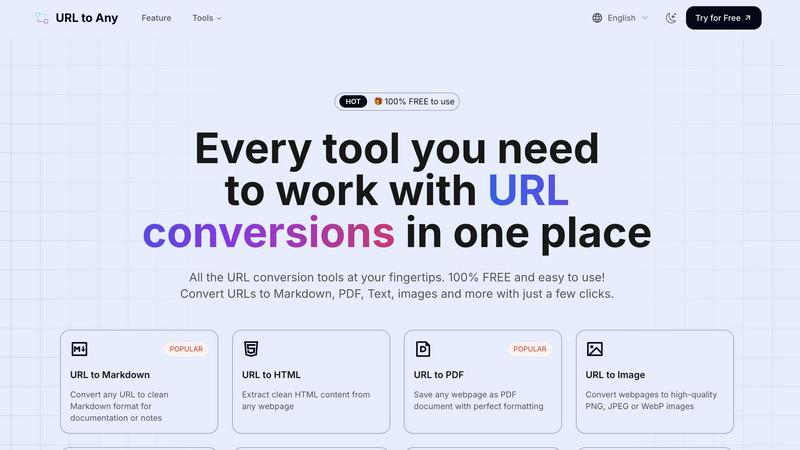
URL to Any is an innovative web content conversion tool designed to revolutionize how users interact with online content. It provides a seamless and intuitive interface that allows content creators, developers, and document managers to convert web pages into various formats effortlessly. Whether you need to transform a webpage into Markdown, PDF, HTML, images, or QR codes, URL to Any offers a comprehensive suite of conversion tools that cater to diverse needs. The main value proposition of this tool is its commitment to accessibility, providing 100% free services without the necessity for registration. In an increasingly fast-paced digital world, URL to Any stands out by delivering rapid conversions, facilitating productivity and enhancing workflow efficiency. With its user-friendly design and robust functionality, it empowers users to save, share, and reference online content quickly, making it an essential tool for anyone who frequently engages with digital information.
Features
URL to Markdown
This feature allows users to convert any URL into clean Markdown format quickly. Markdown is a lightweight markup language commonly used for documentation and notes. With just a few clicks, users can extract essential content from any webpage and format it neatly, making it ideal for developers and writers who need structured text.
URL to PDF
With this feature, users can save any webpage as a PDF document while preserving its formatting perfectly. This is especially useful for those who wish to retain the visual integrity of a webpage for offline reading, sharing, or archiving. The PDF output ensures that all elements of the webpage, including images and text, are captured accurately.
URL to Image
Users can easily convert webpages into high-quality images, including formats such as PNG, JPEG, or WebP. This feature is beneficial for designers and marketers who need visual representations of content for presentations or social media sharing. The resulting images maintain clarity and detail, making them suitable for various applications.
URL to QR Code
This feature generates QR codes from any URL, making it incredibly easy to share links with others. Users can create scannable codes for quick access to websites, enhancing marketing materials, business cards, and event promotions. The QR code output streamlines the sharing process, allowing for immediate engagement from audiences.
Use Cases
Content Creation
Writers and bloggers can utilize URL to Any to convert web articles into Markdown or PDF formats. This allows for easy integration of researched material into their own work, simplifying the process of gathering references and composing content.
Web Development
Developers can leverage the URL to HTML feature to extract clean HTML from various webpages, aiding in the creation of templates or components for their projects. This functionality saves time and enhances productivity by providing ready-to-use code snippets.
Digital Marketing
Marketers can convert webpages into QR codes to facilitate quick sharing of promotions or content. By generating QR codes, they can enhance their marketing campaigns, allowing customers to access information effortlessly through their mobile devices.
Educational Use
Students and educators can convert web content into PDF format for easy sharing and offline access. This is especially beneficial for research purposes, enabling the collection of relevant information into a single, organized document for study or presentations.
Frequently Asked Questions
How does URL to Any work?
URL to Any functions by allowing users to paste a URL into the tool, select their desired conversion format, and click convert. The system processes the request and provides the converted content instantly.
Is URL to Any really free to use?
Yes, URL to Any offers all its conversion tools for free. Users do not need to create an account or register to access the services, ensuring a hassle-free experience.
What formats can I convert web content into?
URL to Any supports multiple formats, including Markdown, PDF, HTML, images (PNG, JPEG, WebP), QR codes, text, JSON, XML, and more, catering to various user needs.
Is my data safe when using URL to Any?
Absolutely. URL to Any processes your data securely and does not store any information on its servers, ensuring privacy and security for all users during content conversion.
Similar to URL to Any

subtitlegenerator.net
Free AI subtitle generator that auto-creates subtitles and flags AI mistakes for quick review.
benchmark.directory
AI tools written up by the people who paid for them. Pricing, integrations, data policy and the limit we hit in a week of use.
saasgrow.ai
Get your SaaS tool discovered. Free listing, honest screening, a dofollow link — and no way for anyone to outbid you.

Tools Network
New AI tools drop every day — Tools Network makes sure you never miss the ones that matter.


Built2Win AI Indexing
AI‑ready websites, WebAgentScan SaaS, and Indexing Pack. MCP, A2A, llms.txt — hand‑coded PHP, complete ownership, flat‑fee, free quote.