

Alternatives to QuickTextTools
QuickTextTools empowers writers and creators with 76+ free online utilities to streamline text processing and boost productivity effortlessly.
Explore 20 alternatives to QuickTextTools. Compare features, pricing, and find the best fit for your needs.

Egmatic
No-code 2D game editor: visual node logic, drag-and-drop scenes, live preview. Exports to Windows, macOS, Linux, Android, iOS, Web.

Product Launch Checklist
A free launch checklist for SaaS, apps, AI tools and more. Every step says why it matters and when you can skip it.

Kody Tools
Free collection of online developer utilities, code formatters, and digital converters designed to streamline your daily workflow.
Forms Plugin
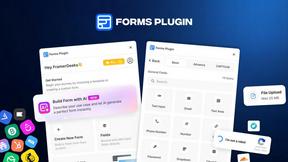
The #1 Native Form Builder Plugin for Framer - No Code, No Embeds, No External Platforms.




PerPageFax
PerPageFax lets you send a fax online from any browser for a flat $0.50 per page — no account, no subscription, no fax machine.



Glanced
Follow news, blogs, newsletters, and podcasts in a free RSS reader, with AI summaries, top stories, full-text search, saved searches, and a catalog.



Postqued
Schedule and publish social content across 10 platforms with one dashboard, API, and MCP built for teams and AI agents.

Reassign.ai
Your whole grind on one 24-hour dial. Drag to time-block, lock your deep-work hour, let Claude replan the rest over MCP. For builders. Free, no card.


Luffy
AI employee in Slack that connects your tools and gets work done using your workspace context.

ConnectMachine
AI-powered digital business cards with QR sharing, card scanning, and smart contact management.

About QuickTextTools Alternatives
QuickTextTools is a robust online platform specifically designed for writers, marketers, developers, students, SEO professionals, and content creators. It offers an impressive suite of over 76 free browser-based utilities that streamline various tasks, enhancing productivity and optimizing text without the need for complicated setups or software downloads. Users appreciate its user-friendly interface and the ability to access tools directly in their browsers, making it a convenient resource for managing and improving their writing processes. Despite the strengths of QuickTextTools, many users seek alternatives for various reasons, such as the need for more specialized features, pricing considerations, or compatibility with different platforms. When exploring alternatives, it is essential to assess factors such as the range of tools offered, user experience, security measures, and how well the platform aligns with specific needs and workflows. By carefully evaluating these aspects, users can find solutions that not only meet their current requirements but also support their growth and evolution in their respective fields.
FAQs about QuickTextTools Alternatives
What is QuickTextTools?
QuickTextTools is a free, user-friendly online platform that provides over 76 browser-based utilities designed to enhance productivity for various users, including writers, marketers, developers, and SEO professionals. The platform aims to simplify workflows and optimize text effortlessly, making it a valuable resource for anyone involved in content creation or management.
Who is QuickTextTools for?
QuickTextTools is ideal for a diverse range of users, including writers looking to improve their writing process, marketers seeking to analyze SEO elements, developers needing tools for code management, and students wanting to streamline their academic tasks. Its comprehensive toolkit caters to anyone who values efficiency and productivity in text-related activities.
Is QuickTextTools free?
Yes, QuickTextTools is entirely free to use. Users can access its extensive collection of utilities without any cost, making it an attractive option for individuals and professionals who want to enhance their productivity without incurring additional expenses.
What are the main features of QuickTextTools?
QuickTextTools features a variety of utilities including text formatting tools, SEO analysis utilities, writing assistants, and keyword management tools. These tools are designed to help users clean up keyword lists, analyze SEO meta tags, convert text case formatting, and optimize their writing, all while operating directly in the browser for ease of use.