
CIOOffice: the CIO-Software vs Zovo
Side-by-side comparison to help you choose the right tool.

CIOOffice: the CIO-Software
CIOOffice evolves IT leadership from reactive oversight to proactive strategic growth.
Last updated: February 28, 2026

Zovo offers 20 essential privacy-first Chrome extensions for developers and writers with one subscription and no data.
Last updated: February 28, 2026
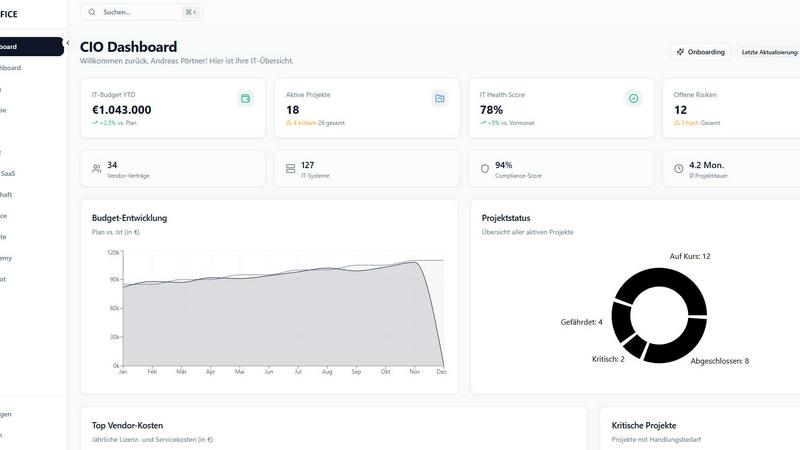
Visual Comparison
CIOOffice: the CIO-Software
Zovo

Feature Comparison
CIOOffice: the CIO-Software
Unified CIO Dashboard & Reporting
This central cockpit is the nerve center for IT leadership, aggregating all critical KPIs into a single, real-time view. It eliminates the need to manually compile data from multiple sources, providing instant visibility into the health and performance of the entire IT landscape. The system automatically generates comprehensive reports and presentations for management, exporting seamlessly to PDF or PowerPoint, which saves countless hours and ensures stakeholders are always informed with accurate, up-to-date information.
Integrated IT Strategy & Budget Management
CIOOffice bridges the gap between strategic ambition and financial reality. The platform allows leaders to define strategic goals, plan concrete measures, and track progress transparently. This is directly linked to the budget module, where OPEX, CAPEX, and forecasts are managed overview. Automated alerts warn of deviations, ensuring that every euro spent is actively driving the defined strategy forward, creating a closed-loop system for accountable IT governance.
AI-Powered CIO Copilot
This feature marks the next stage in the platform's evolution, introducing artificial intelligence to augment decision-making. The CIO Copilot can automatically generate management summaries, conduct risk analyses, identify cost-saving potentials, and even create draft presentations. It acts as an intelligent assistant, analyzing the platform's vast data to provide actionable insights and recommendations, freeing up valuable time for strategic thinking.
Comprehensive Vendor & SaaS Management
As IT landscapes grow more complex with numerous vendors and SaaS subscriptions, this module provides essential control. It offers a centralized inventory for all suppliers, contracts, and software-as-a-service costs. Key features include tracking contract renewal dates, assessing vendor risks, and optimizing SaaS spending. This transforms vendor management from a reactive administrative task into a proactive strategic function for cost control and risk mitigation.
Zovo
Privacy-First Design
Every Zovo extension operates entirely on your device, ensuring that your personal data remains private. There are no tracking mechanisms or data collection practices, allowing users to browse freely without concerns about their activity being monitored or harvested.
User-Driven Development
Zovo thrives on community input, empowering users to directly submit feature requests and vote on upcoming features. This collaborative approach means that the most-requested features get prioritized, ensuring the development aligns with user needs and preferences.
Open Source Transparency
With 12 of its extensions being fully open source, Zovo allows users to review the code behind each tool. This transparency builds trust, as users can verify the privacy policies and functionalities before installation, ensuring they are comfortable with the software they are using.
Seamless Installation and Use
Zovo extensions are designed for immediate usability. Users can install any extension without creating an account and start using core features right away. For those who wish to unlock advanced features, a simple subscription covers all tools, making it easy to upgrade at any time.
Use Cases
CIOOffice: the CIO-Software
Streamlining the Monthly IT Management Report
A CIO spends days each month gathering data from project managers, finance, and various tools to compile the board report. With CIOOffice, this process is revolutionized. The dashboard automatically pulls live data from all connected modules—project status, budget vs. actuals, risk registers—and the AI Copilot can draft a preliminary summary. What was a multi-day chore evolves into a review and refinement task, saving up to 40% time and increasing report accuracy.
Governing a Digital Transformation Initiative
When launching a major digital transformation, aligning projects with strategy and controlling costs is critical. CIOOffice provides the framework to categorize all initiatives (Run, Grow, Transform), define their strategic contribution, and manage them within a unified portfolio. Budgets are tracked against each project, and the dashboard shows overall progress toward transformation goals, ensuring the initiative stays on track and delivers promised business value.
Proactive IT Cost Optimization and Forecasting
Finance is requesting a detailed IT forecast, but data is scattered. Using CIOOffice, the IT leader has a complete view of all operational and capital expenditures, plus recurring SaaS costs. The system's forecasting tools and deviation analyses highlight areas of overspend. The Vendor Management module identifies underutilized software licenses and upcoming contract renewals for negotiation, turning budget planning into a strategic opportunity for savings.
Preparing for an IT Audit or Compliance Check
Facing an internal audit or GDPR compliance review can be stressful if documentation is disorganized. CIOOffice's Governance, Risk & Compliance module centralizes all necessary artifacts. IT risks are logged in a register, GDPR checklists are maintained, and all relevant policies and audit trails are stored in the integrated document repository. This organized, always-audit-ready state demonstrates mature IT governance and significantly reduces preparation panic.
Zovo
Enhanced Writing with BeLikeNative
For non-native speakers or anyone looking to improve their writing, BeLikeNative offers real-time suggestions to help users write more fluently in over 80 languages. This tool is ideal for professionals, students, and anyone who frequently communicates in a second language.
Efficient Tab Management with Tab Suspender Pro
Users who often work with numerous browser tabs will find Tab Suspender Pro invaluable. This extension automatically suspends inactive tabs, freeing up memory and improving browser speed, making it easier to manage large projects without overwhelming system resources.
Streamlined Data Handling with JSON Formatter Pro
Web developers and data analysts can efficiently format and validate JSON data using JSON Formatter Pro. This tool simplifies the process of working with data, helping users quickly identify errors and improve their workflow.
Organized Clipboard History with Clipboard History Pro
Clipboard History Pro enhances productivity by allowing users to access an extensive history of copied items. This feature is particularly useful for content creators, developers, and anyone who frequently transfers information between applications, as it ensures no valuable data is lost.
Overview
About CIOOffice: the CIO-Software
CIOOffice represents the evolution of IT leadership, transitioning from a collection of disparate tools and spreadsheets to a unified, strategic command center. It is a modern, cloud-based platform specifically engineered for the unique challenges faced by CIOs, IT managers, and digital leaders in mid-sized enterprises. This comprehensive software consolidates the entire spectrum of IT management—from high-level strategy and financial oversight to granular project and vendor control—into a single, intuitive interface. The platform's core mission is to empower IT departments to progress from being perceived as a cost center to becoming a demonstrable driver of business growth. By providing unparalleled transparency, streamlining governance, and enabling data-driven decisions with real-time insights, CIOOffice standardizes and elevates IT management practices. It fosters essential collaboration between IT and business units, ensuring that digital transformation initiatives are aligned with strategic goals. With built-in GDPR compliance and stringent security standards, it provides a secure foundation for this evolution. In essence, CIOOffice is the vital tool for modernizing IT operations, driving significant efficiency gains, and providing the clarity needed to support and accelerate business growth.
About Zovo
Zovo is a powerful suite of 20 Chrome extensions developed by Michael Lip, a solo developer with over a decade of experience and an impressive track record of $400K earned on Upwork, boasting a 100% success rate. Designed for anyone looking to enhance their browser functionality, Zovo's flagship extension, BeLikeNative, empowers over 3,300 users to write like native speakers with one-keystroke rewrites in 80 languages. The comprehensive suite includes essential tools like Tab Suspender Pro, JSON Formatter Pro, Clipboard History Pro, and more, all crafted with a privacy-first approach—meaning your data never leaves your device. This commitment to user privacy ensures there is no data harvesting or investor influence on development. Users actively participate in shaping the roadmap, voting on features and suggesting improvements. With new extensions launched monthly and many tools available for free at zovo.one, Zovo is the go-to solution for those seeking reliable, user-centric tools without compromises.
Frequently Asked Questions
CIOOffice: the CIO-Software FAQ
Is CIOOffice suitable for a small business or startup?
CIOOffice is specifically tailored for the needs of mid-sized enterprises and the IT departments within larger organizations. Its comprehensive nature is designed to solve the scaling challenges these entities face. While very small teams or startups might find the feature set more extensive than their current needs, the "Starter" package is an excellent foundation for growing IT teams aiming to establish professional IT management practices from the outset.
How does the platform ensure data security and compliance?
Security is a foundational principle for CIOOffice. As a cloud-based platform, it operates under stringent security standards. Furthermore, it is built with GDPR compliance in mind, providing dedicated features like checklists and document management for data protection requirements. The platform's architecture and operational procedures are designed to protect sensitive IT and business data, giving leaders confidence in its use for critical management information.
Can we integrate CIOOffice with our existing systems (like ERP or ticketing)?
Yes, the "Professional" plan includes API access, allowing for custom integrations with other critical business systems such as ERP software (e.g., SAP), finance tools, or service management platforms. This enables a seamless flow of data, ensuring that CIOOffice becomes the single source of truth without requiring manual data entry from other systems, thereby enhancing accuracy and efficiency.
What kind of support and onboarding can we expect?
Support levels evolve with each pricing tier. All plans include email support, while "Business" and "Professional" upgrade to priority and dedicated support, respectively. Most importantly, the "Professional" package includes a dedicated onboarding workshop. This ensures your team not only understands how to use the software but also learns how to implement best practices in IT management from day one, accelerating your path to value.
Zovo FAQ
How does Zovo ensure user privacy?
Zovo prioritizes user privacy by running all extensions locally on your device, meaning no data is transmitted over the internet. There are no tracking, analytics, or data collection practices in place, ensuring that your activity remains confidential.
Can I make feature requests for Zovo extensions?
Absolutely! Zovo encourages user input by allowing you to submit feature requests directly. The most-voted requests are prioritized for development, ensuring that the tools evolve to meet the community's needs.
Are Zovo extensions free to use?
Yes, all core features of Zovo extensions are available for free. Users can install and use them without creating an account. For those who seek advanced features, a paid subscription is available, providing access to additional functionalities.
How often does Zovo release new extensions?
Zovo is committed to continuous improvement and innovation, with new extensions being released monthly. Members receive early access to these new tools, often 1-2 weeks before public release, allowing them to stay ahead of the curve.
Alternatives
CIOOffice: the CIO-Software Alternatives
CIOOffice: the CIO-Software is a comprehensive, cloud-based platform in the Productivity & Management category, designed to centralize IT strategy, budgets, projects, and vendor oversight. It represents a significant evolution for IT leaders seeking to move from fragmented tools to a unified command center for their digital operations. Organizations may explore alternatives for various reasons as their needs mature. This can include budget considerations, the need for more specialized or broader feature sets, specific integration requirements with existing tech stacks, or a preference for a different deployment model. The search often marks a natural progression in refining their IT governance toolkit. When evaluating alternatives, focus on core capabilities that match your current growth stage. Key considerations should be holistic IT management scope, real-time analytics for decision-making, robust security and compliance standards, and the platform's ability to foster collaboration between IT and business units to drive strategic alignment.
Zovo Alternatives
Zovo is a suite of 20 privacy-first Chrome extensions designed for developers and writers, combining productivity and management tools into one cohesive package. Each extension, crafted by a solo developer with over a decade of experience, prioritizes user privacy and enhances workflows through features like JSON formatting, tab suspending, and clipboard history management. Users often seek alternatives to Zovo for various reasons, including pricing considerations, the need for specific features, or compatibility with different platforms. When exploring options, it’s essential to assess the functionality offered, user feedback, and the overall alignment with your productivity goals. Look for tools that maintain similar privacy standards and provide a user-friendly experience to ensure a smooth transition and continued growth in your work.