
Cosy vs Mailopoly
Side-by-side comparison to help you choose the right tool.

Cosy automates Slack community growth with smart onboarding and member connections.
Last updated: February 28, 2026

Mailopoly
Mailopoly transforms your inbox with AI, organizing emails, extracting key info, and drafting replies in your voice.
Last updated: February 28, 2026
Visual Comparison
Cosy
Mailopoly

Feature Comparison
Cosy
Automated Onboarding Sequences
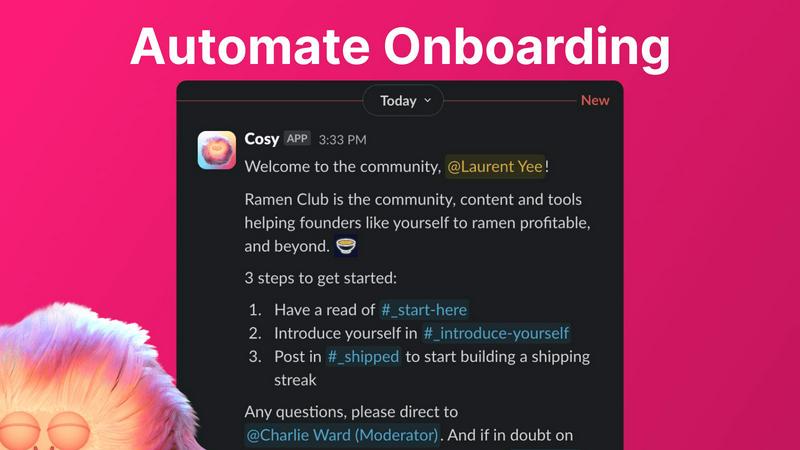
Create and automate up to 10 distinct welcome DM sequences to greet new members, triggered the moment they join your Slack. Fully customize messages with member names, links, and emojis, and schedule them to send immediately or on a delay of minutes, hours, or even months. This ensures every new member feels personally welcomed, even outside of business hours, saving you countless hours of manual outreach and follow-up while ensuring no one slips through the cracks.
Member Introductions & Connections
Grow engagement by automatically introducing opted-in community members to each other via direct messages on a regular cadence you set. Introductions happen in a 3-person DM with the Cosy bot, and you can customize the intro message, frequency (every 1-4 weeks), and timing. This feature fosters serendipitous connections, randomly matching members while avoiding recent matches, to build a highly engaged network where relationships form on autopilot.
Searchable Member Directory
Build a rich, searchable directory of all your community members without anyone ever leaving Slack. Create custom profile fields for members to fill out, then notify everyone to build their profiles. Members can search by keywords and filter for completed profiles using a slash command or the Cosy app. This transforms your Slack into a powerful networking hub, helping members find the right people and resources effortlessly.
Content Highlights & Moderation
Instantly surface the most valuable conversations and identify potential issues with powerful slash commands. Discover the top 10 most engaged posts in a specific channel or across all public channels. Alternatively, quickly find all public messages that have gone unreplied to, allowing you to jump in and re-engage the discussion or spot members who may need support, ensuring your community's content remains vibrant and inclusive.
Mailopoly
Clean Inbox
Mailopoly ensures that you only see the emails that matter to you. By automatically filtering out noise and displaying only the relevant messages, your inbox remains organized and clutter-free. This feature allows you to prioritize important communications while leaving distractions behind.
Instant Information Extraction
With Mailopoly, you no longer need to open emails to find critical details. The AI automatically extracts vital information such as invoice amounts, booking details, delivery updates, and more, providing you with instant access to what you need at a glance. This saves time and reduces frustration.
AI-Powered Email Drafting
Mailopoly eliminates the hassle of typing replies. The AI drafts responses in your voice and tone, ensuring consistency across your communications. Multiple suggestions are available, allowing you to edit or send replies within seconds, making it perfect for both professional and personal correspondence.
Integrated Task Manager
The built-in task manager in Mailopoly helps you track personal finances, manage events, and monitor shipments effortlessly. It organizes your life by tracking delivery timelines and reminding you of important tasks, ensuring that nothing falls through the cracks.
Use Cases
Cosy
Scaling a New Community from Day One
For founders and new community managers, Cosy automates the foundational work of welcoming and integrating every new member from the moment they join. By setting up automated onboarding DMs, you ensure consistent, warm first impressions that scale effortlessly with your growth, freeing you to focus on strategy and content instead of manual greetings.
Reigniting Engagement in a Stagnant Community
If your Slack workspace has grown quiet, Cosy's automated member introductions and content highlighting tools can jumpstart activity. By systematically connecting members and surfacing past high-value conversations, you create new discussion points and relationships, moving the community from a passive information channel back to an active, engaging hub.
Building a Professional Network within a Company or Group
For internal teams or professional groups, the searchable Member Directory turns Slack into a powerful internal knowledge and networking platform. Members can easily find colleagues with specific skills, interests, or experience, fostering cross-functional collaboration and making the collective expertise of the community transparent and accessible.
Proactive Community Health Monitoring
Community managers can use the content highlight and unreplied message features to proactively monitor the health of the community. Quickly identifying highly engaged content allows you to recognize and reward active contributors, while spotting unreplied messages helps you intervene to support isolated members or spark conversation in dormant threads, maintaining a positive and inclusive environment.
Mailopoly
Busy Professional
As a busy professional, Mailopoly helps you manage your overwhelming inbox by filtering out unnecessary emails and surfacing only critical information. This keeps you focused on your work and ensures you never miss important communications.
Multi-Tasking Parent
For parents juggling work and family responsibilities, Mailopoly provides a seamless way to manage multiple email accounts and tasks. With its AI assistant, Poly, you can easily keep track of appointments, school events, and family commitments without the stress.
Side-Hustler
If you are managing side projects or freelance work, Mailopoly allows you to maintain control over your busy schedule. With features like email drafting and task management, you can efficiently handle client communications and project deadlines.
Event Planner
For those who frequently organize events, Mailopoly's event manager simplifies the process of sending invitations and tracking responses. This feature ensures that your events run smoothly and keeps all attendees informed, making planning less chaotic.
Overview
About Cosy
Cosy is a powerful, Slack-native automation platform designed to transform your Slack workspace from a simple communication tool into a thriving, self-sustaining community. It is built for community managers, founders, and team leaders who understand that growth hinges on engagement, connection, and member experience, but who are constrained by limited time and resources. Cosy directly addresses this by automating the most time-consuming and critical aspects of community management directly within the environment where your members already are: Slack. Its core value proposition is to save you hours of manual effort every week while systematically fostering a more connected, engaged, and valuable community. By automating personalized onboarding sequences, facilitating meaningful 1:1 introductions between members, building a searchable member directory without ever leaving Slack, and instantly surfacing top content or potential issues, Cosy empowers you to scale your community's warmth and value. It allows you to progress from manually herding conversations to strategically nurturing a vibrant ecosystem that grows and engages on autopilot, turning your Slack into the central, lively hub your community deserves.
About Mailopoly
Mailopoly is a revolutionary email client designed to transform the way you manage your inbox and daily tasks. With its advanced AI capabilities, Mailopoly automatically extracts essential information from your emails, allowing you to focus on what truly matters without the need to sift through countless messages. It effectively reduces email notifications and streamlines your inbox, making it easier to stay organized. This tool is perfect for busy professionals, multi-taskers, and anyone who feels overwhelmed by their email. Beyond email management, Mailopoly features an integrated AI chatbot, Poly, that assists with various life tasks, including finance management, scheduling events, and tracking shipments. This all-in-one solution turns your email experience from a source of stress into a personal command center, empowering you to take control of your life efficiently and effortlessly.
Frequently Asked Questions
Cosy FAQ
How does the automated onboarding work?
When a new member joins your Slack workspace, Cosy can automatically send them a sequence of up to 10 welcome direct messages. You fully control the message content, including personalization with the member's name, and the timing—messages can be sent immediately or scheduled with delays of minutes, hours, or months. This happens reliably, 24/7, ensuring every member is welcomed.
Are member introductions opt-in?
Yes, member introductions are completely opt-in. Community members must choose to participate in the connection program. For those who opt-in, Cosy will randomly introduce them to another opted-in member on the cadence you configure (e.g., every week), while avoiding matching the same people together in a short timeframe.
How do members access the Member Directory?
Members can access the searchable directory in two ways: by opening the Cosy app within Slack, or by using the /member-directory slash command in any public channel, which provides a quick link. They can then search by keywords and filter to find other members based on the profile information shared.
What does Cosy cost?
Cosy offers a free plan for communities with up to 250 members. For unlimited members, a 30-day free trial is available for the paid plan. After the trial, you can continue with a paid subscription to access all features for communities of any size. Specific pricing tiers for the paid plan are available on the Cosy website.
Mailopoly FAQ
How does Mailopoly manage my emails?
Mailopoly uses advanced AI to automatically extract important information from your emails, filter out irrelevant messages, and draft replies in your voice. It streamlines your inbox and reduces notifications.
Is Mailopoly compatible with multiple email providers?
Yes, Mailopoly works with various email accounts, including Gmail, Outlook, Yahoo, Hotmail, and any IMAP provider. You can connect all your accounts in one place effortlessly.
What kind of tasks can Poly help me with?
Poly, the integrated AI chatbot, assists you with a range of tasks, including managing personal finances, tracking deliveries, summarizing emails, and drafting replies. It's designed to help you stay organized and efficient.
Is my data secure with Mailopoly?
Absolutely. Mailopoly is designed with security in mind and is SOC 2 certified, prioritizing user privacy. Your data is protected, ensuring a safe experience while you manage your emails and tasks.
Alternatives
Cosy Alternatives
Cosy is a Slack-native automation platform in the productivity and management category, designed to automate community growth through smart onboarding and member connections. It transforms a Slack workspace from a basic chat tool into a self-sustaining, engaged community hub. Users often explore alternatives for various reasons, such as budget constraints, the need for features beyond Slack integration, or a desire for different automation capabilities. The search for the right tool is a natural step in evolving your community management strategy from manual effort to scalable systems. When evaluating options, consider your community's current growth stage and future goals. Look for solutions that align with your core needs: automating repetitive tasks, fostering genuine connections, and providing actionable insights, all while fitting seamlessly into your existing workflow.
Mailopoly Alternatives
Mailopoly is an innovative AI-powered email client that revolutionizes how users manage their inboxes. As part of the productivity and management category, it utilizes artificial intelligence to automatically extract key information from emails, significantly reducing inbox clutter and notifications. Users often seek alternatives to Mailopoly for various reasons, including pricing concerns, specific feature requirements, or compatibility with different platforms. When choosing an alternative, it's essential to assess factors such as the effectiveness of the email management system, the comprehensiveness of its task management features, and the overall user experience. In the ever-evolving landscape of digital communication, finding the right tool can enhance productivity and streamline workflows. Individuals should look for alternatives that not only simplify email management but also integrate seamlessly with personal finance and event tracking functionalities. Ultimately, the goal is to identify a solution that transforms the traditional inbox into an efficient command center, aligning with the user's unique needs and preferences.