
HuntingPad vs Zovo
Side-by-side comparison to help you choose the right tool.

HuntingPad
HuntingPad evolves your job hunt with AI to capture roles and match your resume instantly.
Last updated: March 1, 2026

Zovo offers 20 essential privacy-first Chrome extensions for developers and writers with one subscription and no data.
Last updated: February 28, 2026
Visual Comparison
HuntingPad
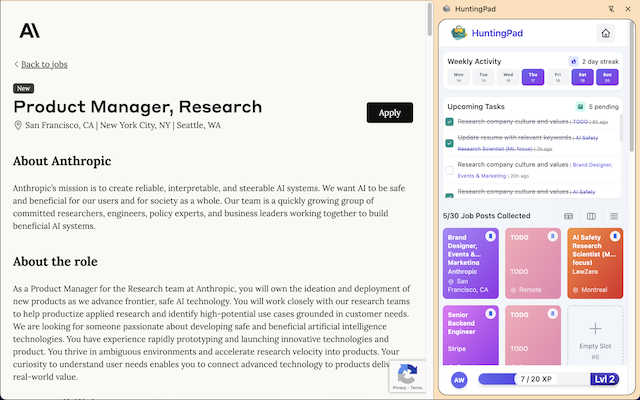
Zovo

Feature Comparison
HuntingPad
One-Click Job Capture & Organization
Effortlessly save any job posting from any career website directly into your organized HuntingPad dashboard with a single click. This instantly eliminates the tab explosion and forgotten bookmarks, creating a centralized, searchable command center for your entire job search. All relevant details—company, role, link, and date—are captured automatically, ensuring you never lose track of an opportunity again.
AI-Powered Application Insights
Move beyond generic applications with intelligent, AI-driven suggestions. HuntingPad analyzes job descriptions and matches them against your resume to provide tailored recommendations for customization. It highlights key skills to emphasize and suggests tweaks to help your application stand out in a crowded field, transforming application fatigue into a strategic advantage.
Smart Autofill & Deadline Tracking
Dramatically reduce repetitive manual entry during applications. HuntingPad's smart autofill populates common form fields with your saved information. Furthermore, it automatically tracks application deadlines and sets intelligent reminders for follow-ups, ensuring you never miss a critical touchpoint and stay proactively engaged with potential employers.
Integrated Browser Command Center
HuntingPad works where you already work, eliminating the need to juggle separate apps or constant logins. As a Chrome extension, it sits discreetly in your browser, providing instant access to your saved jobs, insights, and tools without disrupting your workflow. This seamless integration makes systematic job hunting a natural part of your daily browsing.
Zovo
Privacy-First Design
Every Zovo extension operates entirely on your device, ensuring that your personal data remains private. There are no tracking mechanisms or data collection practices, allowing users to browse freely without concerns about their activity being monitored or harvested.
User-Driven Development
Zovo thrives on community input, empowering users to directly submit feature requests and vote on upcoming features. This collaborative approach means that the most-requested features get prioritized, ensuring the development aligns with user needs and preferences.
Open Source Transparency
With 12 of its extensions being fully open source, Zovo allows users to review the code behind each tool. This transparency builds trust, as users can verify the privacy policies and functionalities before installation, ensuring they are comfortable with the software they are using.
Seamless Installation and Use
Zovo extensions are designed for immediate usability. Users can install any extension without creating an account and start using core features right away. For those who wish to unlock advanced features, a simple subscription covers all tools, making it easy to upgrade at any time.
Use Cases
HuntingPad
The High-Volume Applicant
For professionals targeting competitive industries where sending 100-150 applications is the norm, HuntingPad is indispensable. It provides the scalable system needed to manage this volume without chaos, ensuring every application is tracked, customized, and followed up on, turning a numbers game into a structured campaign.
The Career Transitioner
When moving into a new field or role, you often apply to diverse positions requiring different resume versions. HuntingPad helps you organize these variations, match them to specific jobs with AI insights, and keep clear records of which resume was sent where, simplifying a complex cross-functional search.
The Organized Professional Reclaiming Time
For those who naturally rely on spreadsheets and systems but find them crumbling under the scale of a modern job search, HuntingPad is the upgrade. It automates the manual tracking and data entry you hate, freeing up hours each week to focus on networking, interview prep, and skill development instead of administrative overhead.
The Passive Job Seeker
Even if you're casually browsing opportunities while employed, HuntingPad allows you to efficiently save and evaluate interesting roles over time. It helps you build a curated pipeline of potential opportunities, so when you're ready to make a move, you have an organized list of targets and history at your fingertips.
Zovo
Enhanced Writing with BeLikeNative
For non-native speakers or anyone looking to improve their writing, BeLikeNative offers real-time suggestions to help users write more fluently in over 80 languages. This tool is ideal for professionals, students, and anyone who frequently communicates in a second language.
Efficient Tab Management with Tab Suspender Pro
Users who often work with numerous browser tabs will find Tab Suspender Pro invaluable. This extension automatically suspends inactive tabs, freeing up memory and improving browser speed, making it easier to manage large projects without overwhelming system resources.
Streamlined Data Handling with JSON Formatter Pro
Web developers and data analysts can efficiently format and validate JSON data using JSON Formatter Pro. This tool simplifies the process of working with data, helping users quickly identify errors and improve their workflow.
Organized Clipboard History with Clipboard History Pro
Clipboard History Pro enhances productivity by allowing users to access an extensive history of copied items. This feature is particularly useful for content creators, developers, and anyone who frequently transfers information between applications, as it ensures no valuable data is lost.
Overview
About HuntingPad
HuntingPad is the essential evolution in the modern job search, transforming a chaotic, high-volume process into a streamlined, strategic campaign. It is a Chrome extension designed for ambitious, high-achieving professionals who understand that landing a top role today requires systematically managing 100+ applications. Instead of wrestling with a patchwork of spreadsheets, bookmarks, and memory, HuntingPad integrates directly into your browser, right where you search on LinkedIn, Indeed, Glassdoor, and any career site. Its core mission is to give you back your most valuable asset: time. By capturing job posts with a single click, providing AI-powered insights for customization, and tracking every detail automatically, HuntingPad eliminates the administrative nightmare. It turns your job hunt from a disorganized, memory-reliant chore into a data-driven system, empowering you to apply more effectively, follow up intelligently, and ultimately get more interviews with less effort. This tool is built for the professional who refuses to let their exceptional skills be wasted on manual data entry and tab management.
About Zovo
Zovo is a powerful suite of 20 Chrome extensions developed by Michael Lip, a solo developer with over a decade of experience and an impressive track record of $400K earned on Upwork, boasting a 100% success rate. Designed for anyone looking to enhance their browser functionality, Zovo's flagship extension, BeLikeNative, empowers over 3,300 users to write like native speakers with one-keystroke rewrites in 80 languages. The comprehensive suite includes essential tools like Tab Suspender Pro, JSON Formatter Pro, Clipboard History Pro, and more, all crafted with a privacy-first approach—meaning your data never leaves your device. This commitment to user privacy ensures there is no data harvesting or investor influence on development. Users actively participate in shaping the roadmap, voting on features and suggesting improvements. With new extensions launched monthly and many tools available for free at zovo.one, Zovo is the go-to solution for those seeking reliable, user-centric tools without compromises.
Frequently Asked Questions
HuntingPad FAQ
How does HuntingPad work with different job sites?
HuntingPad is designed as a universal tool. Once installed, the extension's "Save Job" button appears on virtually any career website, including LinkedIn, Indeed, Glassdoor, and company career pages. It captures the job details directly from the page you are viewing, making it compatible with your entire job search ecosystem.
Is my data and resume information secure?
Yes. HuntingPad takes data security seriously. Your personal information, resume data, and saved job details are stored securely. The tool is designed to be your private job search command center, and your data is not shared with recruiters or employers without your explicit action.
Do I need to switch between HuntingPad and other apps?
No, and that's a key benefit. HuntingPad operates entirely within your Chrome browser as an extension. There is no separate app to log into or window to manage. Your dashboard, saved jobs, and tools are accessible from a small icon in your browser toolbar, creating a seamless, integrated workflow.
Can HuntingPad help me write cover letters?
Yes. While the primary focus is on organization and resume matching, HuntingPad's AI-powered insights extend to application strategy. It can provide guidance and suggestions for personalizing your cover letter based on the specific job description, helping you craft more compelling and relevant narratives to accompany your application.
Zovo FAQ
How does Zovo ensure user privacy?
Zovo prioritizes user privacy by running all extensions locally on your device, meaning no data is transmitted over the internet. There are no tracking, analytics, or data collection practices in place, ensuring that your activity remains confidential.
Can I make feature requests for Zovo extensions?
Absolutely! Zovo encourages user input by allowing you to submit feature requests directly. The most-voted requests are prioritized for development, ensuring that the tools evolve to meet the community's needs.
Are Zovo extensions free to use?
Yes, all core features of Zovo extensions are available for free. Users can install and use them without creating an account. For those who seek advanced features, a paid subscription is available, providing access to additional functionalities.
How often does Zovo release new extensions?
Zovo is committed to continuous improvement and innovation, with new extensions being released monthly. Members receive early access to these new tools, often 1-2 weeks before public release, allowing them to stay ahead of the curve.
Alternatives
HuntingPad Alternatives
HuntingPad is a job search productivity tool, specifically a Chrome extension designed to streamline the modern job hunt. It helps ambitious professionals capture roles, gain AI-driven insights for customization, and track applications automatically, all from within their browser. This category focuses on transforming a chaotic process into a strategic, data-driven campaign. Users often explore alternatives for various reasons, such as budget constraints, a need for different feature sets, or compatibility with other platforms like mobile devices. Some may seek tools that integrate with specific applicant tracking systems or offer more advanced analytics. The search for the right tool is a natural part of evolving one's professional toolkit to match personal workflow and career stage. When evaluating an alternative, consider how it addresses the core challenges of job hunting: centralizing opportunities, reducing manual effort, and providing strategic guidance. Look for a solution that aligns with your preferred platforms, offers the right balance of automation and control, and ultimately gives you back the time and mental clarity to focus on what matters—landing your next role.
Zovo Alternatives
Zovo is a suite of 20 privacy-first Chrome extensions designed for developers and writers, combining productivity and management tools into one cohesive package. Each extension, crafted by a solo developer with over a decade of experience, prioritizes user privacy and enhances workflows through features like JSON formatting, tab suspending, and clipboard history management. Users often seek alternatives to Zovo for various reasons, including pricing considerations, the need for specific features, or compatibility with different platforms. When exploring options, it’s essential to assess the functionality offered, user feedback, and the overall alignment with your productivity goals. Look for tools that maintain similar privacy standards and provide a user-friendly experience to ensure a smooth transition and continued growth in your work.