
Learniverse vs Zovo
Side-by-side comparison to help you choose the right tool.

Learniverse
Learniverse evolves your scattered knowledge into automated, engaging training courses in minutes.
Last updated: February 28, 2026

Zovo offers 20 essential privacy-first Chrome extensions for developers and writers with one subscription and no data.
Last updated: February 28, 2026
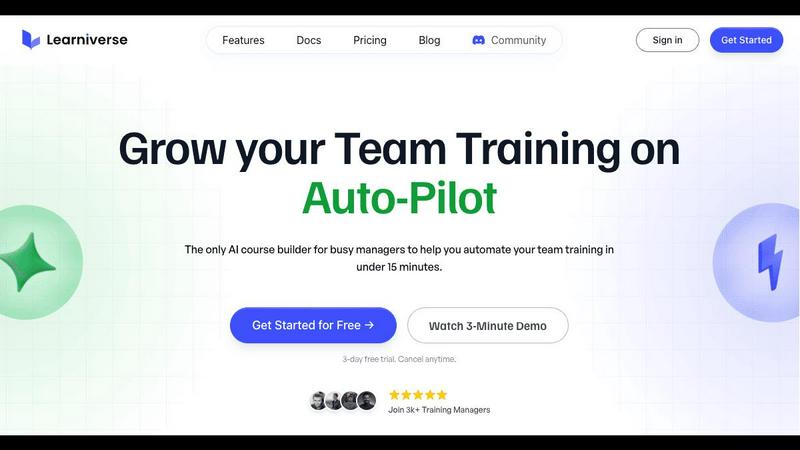
Visual Comparison
Learniverse
Zovo

Feature Comparison
Learniverse
AI-Powered Course Creation
This is the core engine of Learniverse's evolution. Instead of manually building slides and writing quizzes, you simply upload existing materials like PDFs, SOPs, video recordings, or documents. The AI then analyzes this content, understands the key concepts, and automatically structures it into a coherent, interactive course complete with lessons, knowledge checks, and progress tracking. This feature represents a leap from manual content assembly to intelligent, automated curriculum design, saving countless hours of effort.
Branded Academy Deployment
Learniverse understands that professional presentation builds credibility. This feature allows you to launch a fully customized training portal that reflects your company's identity. You can apply your logo, brand colors, and even use a custom domain, ensuring your team engages with a polished, cohesive learning environment that reinforces company culture, moving beyond the generic look of traditional, outdated LMS platforms.
Automated Progress & Analytics Dashboard
Progress tracking evolves from a manual spreadsheet nightmare into a clear, automated dashboard. Managers gain instant visibility into team-wide progress, completion rates, assessment scores, and areas where learners are getting stuck. This data-driven insight allows for proactive coaching and ensures training effectiveness is measurable, turning guesswork into strategic understanding of your team's development.
Integrated AI Training Assistant
Beyond initial course creation, Learniverse provides an always-available AI assistant. You can chat with it to build new modules on the fly, update existing content with new information, or transform meeting recordings into training material simply by describing what you need. This feature signifies the platform's growth into an active collaborative partner, continuously helping to refine and expand your knowledge base without constant manual intervention.
Zovo
Privacy-First Design
Every Zovo extension operates entirely on your device, ensuring that your personal data remains private. There are no tracking mechanisms or data collection practices, allowing users to browse freely without concerns about their activity being monitored or harvested.
User-Driven Development
Zovo thrives on community input, empowering users to directly submit feature requests and vote on upcoming features. This collaborative approach means that the most-requested features get prioritized, ensuring the development aligns with user needs and preferences.
Open Source Transparency
With 12 of its extensions being fully open source, Zovo allows users to review the code behind each tool. This transparency builds trust, as users can verify the privacy policies and functionalities before installation, ensuring they are comfortable with the software they are using.
Seamless Installation and Use
Zovo extensions are designed for immediate usability. Users can install any extension without creating an account and start using core features right away. For those who wish to unlock advanced features, a simple subscription covers all tools, making it easy to upgrade at any time.
Use Cases
Learniverse
Onboarding New Hires
Transform a disjointed onboarding process into a smooth, consistent journey. Upload all HR documents, process manuals, and product guides into Learniverse. The AI creates a structured onboarding course with quizzes, ensuring every new employee receives the same high-quality training, understands key information, and can be tracked to completion, drastically reducing time-to-productivity.
Standardizing Operational Procedures
For teams with critical SOPs scattered across drives and emails, Learniverse provides a single source of truth. Upload all procedure documents and videos; the AI consolidates them into standardized, interactive training modules. This ensures all team members follow the correct, up-to-date processes, improving quality, compliance, and reducing errors caused by outdated information.
Converting Live Sessions into Asynchronous Training
Capture the value of live events like all-hands meetings, workshop recordings, or expert presentations. Simply upload the video or audio recording to Learniverse. The AI assistant can identify key points and discussions, structuring them into digestible lessons with highlights and quizzes, allowing team members who missed the event to catch up and retaining institutional knowledge.
Maintaining Compliance & Certification Training
For industries requiring regular compliance updates or certification renewals, Learniverse automates the update cycle. When regulations change, you can update the source document or instruct the AI assistant, and the platform automatically regenerates the relevant course modules and quizzes. It then tracks and reports on mandatory completion across the organization, simplifying audit readiness.
Zovo
Enhanced Writing with BeLikeNative
For non-native speakers or anyone looking to improve their writing, BeLikeNative offers real-time suggestions to help users write more fluently in over 80 languages. This tool is ideal for professionals, students, and anyone who frequently communicates in a second language.
Efficient Tab Management with Tab Suspender Pro
Users who often work with numerous browser tabs will find Tab Suspender Pro invaluable. This extension automatically suspends inactive tabs, freeing up memory and improving browser speed, making it easier to manage large projects without overwhelming system resources.
Streamlined Data Handling with JSON Formatter Pro
Web developers and data analysts can efficiently format and validate JSON data using JSON Formatter Pro. This tool simplifies the process of working with data, helping users quickly identify errors and improve their workflow.
Organized Clipboard History with Clipboard History Pro
Clipboard History Pro enhances productivity by allowing users to access an extensive history of copied items. This feature is particularly useful for content creators, developers, and anyone who frequently transfers information between applications, as it ensures no valuable data is lost.
Overview
About Learniverse
Learniverse represents the next evolutionary stage in corporate training, transforming from a static repository into a dynamic, AI-powered learning ecosystem. It is a zero-effort training platform designed specifically for busy teams and training managers who are overwhelmed by the manual labor of creating, updating, and delivering consistent training. The core value proposition is profound simplicity: turning your organization's scattered, dormant knowledge—locked away in PDFs, documents, videos, and even raw ideas—into a fully functional, branded training academy in minutes. This eliminates the traditional weeks-long cycle of course design and platform setup. Learniverse automates the entire workflow, from content ingestion and interactive lesson creation to quiz generation and progress analytics. It empowers organizations to scale their training efforts seamlessly, ensuring teams have access to engaging, up-to-date knowledge without burdening managers. The platform's growth narrative is one of liberation, freeing teams from administrative chaos to focus on their real jobs and strategic growth, making effective training a natural byproduct of daily work rather than a disruptive, resource-intensive project.
About Zovo
Zovo is a powerful suite of 20 Chrome extensions developed by Michael Lip, a solo developer with over a decade of experience and an impressive track record of $400K earned on Upwork, boasting a 100% success rate. Designed for anyone looking to enhance their browser functionality, Zovo's flagship extension, BeLikeNative, empowers over 3,300 users to write like native speakers with one-keystroke rewrites in 80 languages. The comprehensive suite includes essential tools like Tab Suspender Pro, JSON Formatter Pro, Clipboard History Pro, and more, all crafted with a privacy-first approach—meaning your data never leaves your device. This commitment to user privacy ensures there is no data harvesting or investor influence on development. Users actively participate in shaping the roadmap, voting on features and suggesting improvements. With new extensions launched monthly and many tools available for free at zovo.one, Zovo is the go-to solution for those seeking reliable, user-centric tools without compromises.
Frequently Asked Questions
Learniverse FAQ
What types of content can I upload to create a course?
Learniverse is designed to work with the knowledge you already have. You can upload a wide variety of formats including PDF documents, Word files, PowerPoint presentations, video files (like recordings of meetings or presentations), and even plain text notes or ideas. The AI is built to analyze this content and extract the key information to build structured lessons.
How does the AI ensure the courses it creates are accurate?
The AI acts as a powerful structuring and drafting assistant based on the content you provide. It organizes information and generates quizzes from the material you upload. The accuracy and final approval of the content always remain with you, the subject matter expert. You can review, edit, and refine any course the AI generates before publishing it to your team, ensuring complete control.
Can I customize the look of our training academy?
Absolutely. A key feature of Learniverse is the ability to deploy a professionally branded academy. You can customize your training portal with your company logo, brand colors, and fonts. For a fully seamless experience, you can even connect a custom domain (e.g., training.yourcompany.com) so the academy feels like a native part of your company's digital ecosystem.
Is there a way to track my team's progress and engagement?
Yes, Learniverse includes a comprehensive analytics dashboard. You can track progress at both individual and team levels, see course completion rates, review assessment scores, and identify modules where learners may be struggling or spending extra time. This provides valuable insights into training effectiveness and helps you support your team's development proactively.
Zovo FAQ
How does Zovo ensure user privacy?
Zovo prioritizes user privacy by running all extensions locally on your device, meaning no data is transmitted over the internet. There are no tracking, analytics, or data collection practices in place, ensuring that your activity remains confidential.
Can I make feature requests for Zovo extensions?
Absolutely! Zovo encourages user input by allowing you to submit feature requests directly. The most-voted requests are prioritized for development, ensuring that the tools evolve to meet the community's needs.
Are Zovo extensions free to use?
Yes, all core features of Zovo extensions are available for free. Users can install and use them without creating an account. For those who seek advanced features, a paid subscription is available, providing access to additional functionalities.
How often does Zovo release new extensions?
Zovo is committed to continuous improvement and innovation, with new extensions being released monthly. Members receive early access to these new tools, often 1-2 weeks before public release, allowing them to stay ahead of the curve.
Alternatives
Learniverse Alternatives
Learniverse is an AI-powered Learning Management System (LMS) in the productivity and management category. It excels at transforming scattered documents and ideas into automated, branded training courses with minimal effort, making it a powerful tool for scaling internal training. Users often explore alternatives for various reasons. These can include budget constraints, the need for more specialized features, a desire for a different user interface, or requirements for deeper integrations with existing company software. The search for the right platform is a natural part of evolving a company's learning and development strategy. When evaluating alternatives, consider your organization's growth stage. Key factors include the platform's core automation capabilities, ease of content creation, scalability, analytics depth, and the ability to maintain a cohesive brand experience. The goal is to find a solution that not only meets current needs but also supports your team's future learning evolution.
Zovo Alternatives
Zovo is a suite of 20 privacy-first Chrome extensions designed for developers and writers, combining productivity and management tools into one cohesive package. Each extension, crafted by a solo developer with over a decade of experience, prioritizes user privacy and enhances workflows through features like JSON formatting, tab suspending, and clipboard history management. Users often seek alternatives to Zovo for various reasons, including pricing considerations, the need for specific features, or compatibility with different platforms. When exploring options, it’s essential to assess the functionality offered, user feedback, and the overall alignment with your productivity goals. Look for tools that maintain similar privacy standards and provide a user-friendly experience to ensure a smooth transition and continued growth in your work.