
NanoImg vs Shrinkpad
Side-by-side comparison to help you choose the right tool.
NanoImg
NanoImg evolves your ideas into stunning images using the best AI models in one platform.
Last updated: March 1, 2026

Shrinkpad
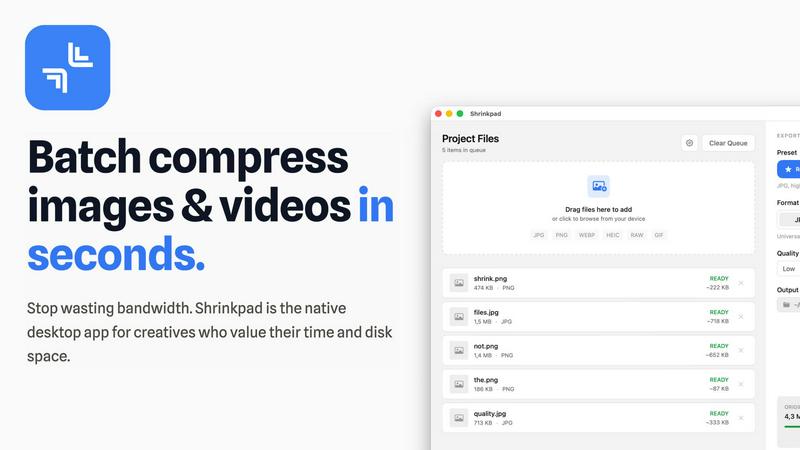
Shrinkpad quickly and effortlessly batch compresses images and videos on Mac, optimizing your assets with precision.
Last updated: February 28, 2026
Visual Comparison
NanoImg

Shrinkpad
Feature Comparison
NanoImg
Unified AI Model Platform
NanoImg consolidates access to over 80 top-tier AI tools and models in one place, eliminating the need to switch between different services. Users can leverage specialized models like Nano Banana for character consistency, Seedream 4.0 for 4K ultra-fast generation, GPT Image 1 for superior text rendering, and Sora 2 for cinematic video, all from a single dashboard. This integrated approach allows for a progressive workflow where you can generate, edit, and enhance images using the best model for each specific task, streamlining the entire creative process from concept to final asset.
Natural Language Image Generation & Editing
The platform's advanced LLM-vision technology understands plain English, allowing users to generate or modify images simply by typing what they want. You can describe a scene to create it from scratch in about 10 seconds or issue precise commands like "remove the reflection" or "add a personalized label" to edit existing uploads. This evolution from manual tool manipulation to intuitive conversation removes technical complexity, letting users focus purely on creative direction and iterative refinement without dealing with layers, masks, or complex software menus.
Character and Style Consistency
A key advancement in NanoImg's technology is its ability to maintain consistent characters, styles, and branding elements across multiple generated images and frames. This is crucial for evolving projects like storyboarding, brand campaign development, or creating a series of social media posts. The AI ensures that a character's appearance, clothing, and style remain coherent, and that brand colors and logos are preserved, enabling users to build cohesive visual narratives and professional portfolios without manual, painstaking adjustments.
One-Click AI Effects & Filters Library
Beyond generation, NanoImg offers a vast library of over 24 specialized AI-powered effects for instant transformation. Users can progress their basic photos into artistic renditions with one click, applying filters like Photo to Anime, Photo to Sketch, Glitch Effect, Vignette, or turning them into line drawings. This feature accelerates creative experimentation, allowing for rapid prototyping of visual concepts and enabling users to explore diverse artistic styles and trends quickly to find the perfect look for their project.
Shrinkpad
Smart Compression
Shrinkpad automatically analyzes the visual complexity of each file, applying the ideal compression ratio to ensure minimal loss of quality. This feature eliminates the guesswork, allowing users to achieve the best results effortlessly.
Unlimited Batching
With the ability to process thousands of files simultaneously, Shrinkpad can handle massive queues without crashing, unlike many web-based tools. Users can batch compress images and videos together, optimizing their workflow efficiently.
One-Drop Import
Users can simply drag and drop entire folders into Shrinkpad. The application automatically detects all supported media files within the folder, streamlining the process and saving time by avoiding manual file selection.
Privacy-First Approach
Shrinkpad prioritizes user privacy by performing all processing locally on the machine. This means that no files are uploaded to the cloud, ensuring that sensitive assets remain secure and under the user's control throughout the compression process.
Use Cases
NanoImg
Social Media Content Creation
For influencers, marketers, and small businesses, NanoImg enables the rapid production of viral-ready visual content. Users can evolve from struggling with design tools to generating eye-catching posts, stories, and ads in seconds. The platform's templates and AI effects help create trending formats like memes, aesthetic filters, and branded graphics, ensuring a consistent and professional feed that boosts engagement and grows an online audience efficiently.
E-commerce Product Visualization
E-commerce managers and shop owners can transform their product presentation without expensive photoshoots. NanoImg allows for the generation of high-quality product photos, lifestyle mockups, and various scene variations from simple descriptions. This progression from limited imagery to unlimited visual assets helps showcase products in multiple contexts, improving conversion rates and reducing marketing production costs by significant margins.
Creative Storyboarding & Concept Art
Filmmakers, writers, and game developers can use NanoImg to rapidly visualize concepts and maintain character consistency across hundreds of storyboard frames. The AI's understanding of natural language allows for precise adjustments to scenes, characters, and moods during the pre-production phase. This evolution in workflow accelerates the creative development process, enabling teams to iterate on visual narratives and present compelling concepts to stakeholders faster than ever before.
Brand Marketing & Advertising Campaigns
Marketing teams can leverage NanoImg to produce a full suite of visual assets for campaigns, from digital ads and banner images to social media visuals and presentation graphics. The platform's style consistency ensures all materials align perfectly with brand guidelines. This allows teams to progress from a slow, asset-limited rollout to dynamically generating and testing a wide variety of professional, on-brand visuals to optimize campaign performance and audience reach.
Shrinkpad
Photographers
Professional photographers can utilize Shrinkpad to batch compress large collections of images from shoots, significantly reducing file sizes for easier storage and faster uploads to galleries or websites.
Designers
Graphic designers can benefit from Shrinkpad by quickly optimizing assets exported from software like Figma or Photoshop. This allows them to maintain high visual quality while minimizing the impact on disk space and loading times.
Content Creators
Content creators, including vloggers and social media influencers, can use Shrinkpad to compress videos for faster uploads and improved website performance. This tool helps in managing large multimedia files efficiently.
Marketing Teams
Marketing teams can leverage Shrinkpad to ensure that all digital assets, from promotional videos to product images, are optimized for web use. This enhances user experience by reducing website load times and improving engagement metrics.
Overview
About NanoImg
NanoImg represents the next evolutionary stage in AI-powered visual creation, moving beyond isolated tools to a unified, intelligent platform. It is designed for a new generation of creators, marketers, and businesses who demand professional-quality visuals without the traditional barriers of complex software, steep learning curves, or high costs. At its core, NanoImg is an all-in-one browser-based suite that consolidates the best AI image generation and editing models—like Nano Banana, Seedream, Flux AI, and Sora 2—into a single, seamless workflow. This progression from fragmented tools to a centralized ecosystem empowers users to evolve from simple experimentation to producing consistent, brand-aligned visual content at scale. Whether you're generating a stunning product mockup from a text description, editing photos with natural language commands, or animating images, NanoImg provides the intuitive interface and advanced technology to bring any vision to life in seconds. It democratizes high-end visual production, enabling anyone to start their creative journey and continuously grow their capabilities as the platform itself evolves with cutting-edge AI models.
About Shrinkpad
Shrinkpad is an innovative desktop application tailored for macOS users seeking to efficiently batch compress images and videos. This powerful tool empowers photographers, designers, content creators, and anyone handling large media files to streamline their workflows. By allowing users to drop hundreds of files or entire folders, Shrinkpad simplifies the compression process, enabling significant reductions in file sizes within seconds. With a focus on privacy, all processing occurs locally on the user's device, eliminating the need for internet connections and safeguarding sensitive files. Supporting over 50 file formats, including JPG, PNG, MP4, and MOV, Shrinkpad integrates seamlessly into diverse workflows, offering both preset quality options and customizable settings for optimal results. In a world where disk space and loading times are increasingly critical, Shrinkpad becomes an indispensable asset for those looking to optimize their digital content without compromising quality.
Frequently Asked Questions
NanoImg FAQ
Is NanoImg free to use?
Yes, NanoImg offers free access to its platform, allowing users to generate and edit images online at no cost. This free tier is designed to lower the barrier to entry, enabling anyone to start their creative evolution with AI. The platform may also offer premium features or models for advanced needs, but a robust set of tools is available for free to explore and create.
What AI models are available on NanoImg?
NanoImg provides access to a curated selection of best-in-class AI models, all within one platform. This includes Nano Banana for best overall generation and character consistency, Seedream 4.0 for ultra-fast 4K images, GPT Image 1 for superior text rendering, Flux Kontext for advanced editing, and Sora 2 for AI video generation. This collection evolves regularly, giving users access to the latest advancements in AI visual technology.
How does the character consistency feature work?
The character consistency feature uses advanced AI to understand and replicate the specific visual attributes of a character or subject across multiple images. When you generate or edit an image featuring a character, the AI remembers details like facial features, hairstyle, clothing, and style. As you progress through creating a series, it applies this understanding to new generations, ensuring the character remains coherent and recognizable in every frame, which is essential for storytelling and branding.
Do I need design experience to use NanoImg?
No, you do not need any prior design experience. NanoImg is built to democratize professional visual creation. Its intuitive, text-based interface and plug-and-play templates are designed for a user-friendly experience. This allows complete novices to start creating immediately and evolve their skills naturally, while also providing powerful features that seasoned designers can use to accelerate and enhance their sophisticated workflows.
Shrinkpad FAQ
Can I use Shrinkpad for free?
Yes, Shrinkpad offers a Free Starter plan that includes essential tools for casual use, allowing users to batch compress images with limitations on file counts and formats.
What file formats does Shrinkpad support?
Shrinkpad supports over 50 file formats, including common image formats like JPG and PNG, as well as video formats such as MP4 and MOV, ensuring versatility for various media types.
Does Shrinkpad support video compression?
Absolutely, Shrinkpad includes robust video compression features, allowing users to efficiently reduce the file sizes of videos alongside images in a single batch process.
How many files can I process at once?
With Shrinkpad, users can batch process thousands of files at once, making it a powerful tool for handling large media libraries without compromising performance.
Alternatives
NanoImg Alternatives
NanoImg is a powerful AI image generator and editor in the browser, designed to make professional visual creation accessible to everyone. It belongs to the rapidly evolving category of AI-powered creative tools that are transforming how individuals and businesses produce content. Users often explore alternatives at different stages of their creative growth. This can be driven by evolving needs like specialized features for a niche, budget considerations as project scale changes, or a desire to integrate with other platforms in their workflow. The search for a new tool is a natural part of progressing from initial experimentation to more sophisticated production. When evaluating other platforms, consider your current stage. Look at the core AI model quality, the depth of editing controls as your skills advance, and how the tool fits into your broader content ecosystem. The right choice should not only meet today's needs but also support your creative evolution tomorrow.
Shrinkpad Alternatives
Shrinkpad is a powerful desktop application designed specifically for macOS users, allowing them to batch compress images and videos quickly and efficiently. As an essential tool for photographers, designers, and content creators, it optimizes large media files, ensuring significant file size reductions without compromising visual quality. Users often seek alternatives to Shrinkpad for various reasons, such as pricing, feature sets, or compatibility with different operating systems. When searching for alternatives, it's important to consider several factors. Look for user-friendly interfaces, robust batch processing capabilities, customizable settings for compression, and local processing to maintain privacy. Additionally, ensure that the alternative supports a wide range of file formats to seamlessly integrate into your existing workflow.