

Shrinkpad
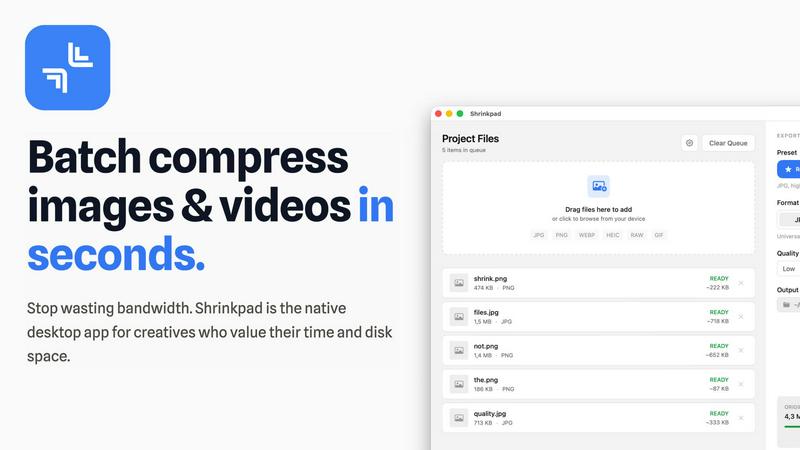
Shrinkpad quickly and effortlessly batch compresses images and videos on Mac, optimizing your assets with precision.
tool Details
Explore More
Alternatives
About Shrinkpad
Shrinkpad is an innovative desktop application tailored for macOS users seeking to efficiently batch compress images and videos. This powerful tool empowers photographers, designers, content creators, and anyone handling large media files to streamline their workflows. By allowing users to drop hundreds of files or entire folders, Shrinkpad simplifies the compression process, enabling significant reductions in file sizes within seconds. With a focus on privacy, all processing occurs locally on the user's device, eliminating the need for internet connections and safeguarding sensitive files. Supporting over 50 file formats, including JPG, PNG, MP4, and MOV, Shrinkpad integrates seamlessly into diverse workflows, offering both preset quality options and customizable settings for optimal results. In a world where disk space and loading times are increasingly critical, Shrinkpad becomes an indispensable asset for those looking to optimize their digital content without compromising quality.
Features
Smart Compression
Shrinkpad automatically analyzes the visual complexity of each file, applying the ideal compression ratio to ensure minimal loss of quality. This feature eliminates the guesswork, allowing users to achieve the best results effortlessly.
Unlimited Batching
With the ability to process thousands of files simultaneously, Shrinkpad can handle massive queues without crashing, unlike many web-based tools. Users can batch compress images and videos together, optimizing their workflow efficiently.
One-Drop Import
Users can simply drag and drop entire folders into Shrinkpad. The application automatically detects all supported media files within the folder, streamlining the process and saving time by avoiding manual file selection.
Privacy-First Approach
Shrinkpad prioritizes user privacy by performing all processing locally on the machine. This means that no files are uploaded to the cloud, ensuring that sensitive assets remain secure and under the user's control throughout the compression process.
Use Cases
Photographers
Professional photographers can utilize Shrinkpad to batch compress large collections of images from shoots, significantly reducing file sizes for easier storage and faster uploads to galleries or websites.
Designers
Graphic designers can benefit from Shrinkpad by quickly optimizing assets exported from software like Figma or Photoshop. This allows them to maintain high visual quality while minimizing the impact on disk space and loading times.
Content Creators
Content creators, including vloggers and social media influencers, can use Shrinkpad to compress videos for faster uploads and improved website performance. This tool helps in managing large multimedia files efficiently.
Marketing Teams
Marketing teams can leverage Shrinkpad to ensure that all digital assets, from promotional videos to product images, are optimized for web use. This enhances user experience by reducing website load times and improving engagement metrics.
Frequently Asked Questions
Can I use Shrinkpad for free?
Yes, Shrinkpad offers a Free Starter plan that includes essential tools for casual use, allowing users to batch compress images with limitations on file counts and formats.
What file formats does Shrinkpad support?
Shrinkpad supports over 50 file formats, including common image formats like JPG and PNG, as well as video formats such as MP4 and MOV, ensuring versatility for various media types.
Does Shrinkpad support video compression?
Absolutely, Shrinkpad includes robust video compression features, allowing users to efficiently reduce the file sizes of videos alongside images in a single batch process.
How many files can I process at once?
With Shrinkpad, users can batch process thousands of files at once, making it a powerful tool for handling large media libraries without compromising performance.
Similar to Shrinkpad

Qwen Image Edit
Prompt-based Qwen Image editing and generation for backgrounds, text, products, posters, outpainting, and creative styles.

Random Pokemon Generator
Free Pokémon tools: random team generator, shiny odds calculator, Nuzlocke mode, name generator, mega & shiny generators

IsThisAIImage
Free AI image checker: upload a photo for AI-generated and deepfake scores, a clear verdict, and optional generator hints.

StopScroll
StopScroll is an AI thumbnail maker that generates YouTube thumbnail concepts from a URL, title, or prompt.


CompressFast
CompressFast evolves your workflow from clunky uploads to lightning-fast, private batch compression directly in your browser.

Best Face Swap
Best Face Swap evolves from simple edits to advanced, frame-consistent AI face swapping for photos and videos.

HypeShare
HypeShare evolves file sharing from a basic task into a secure, controlled transfer experience without requiring an account.