
poseup vs Shrinkpad
Side-by-side comparison to help you choose the right tool.

poseup
Evolve from amateur to pro with one-click AI that perfects your posture and composition.
Last updated: March 1, 2026

Shrinkpad
Shrinkpad quickly and effortlessly batch compresses images and videos on Mac, optimizing your assets with precision.
Last updated: February 28, 2026
Visual Comparison
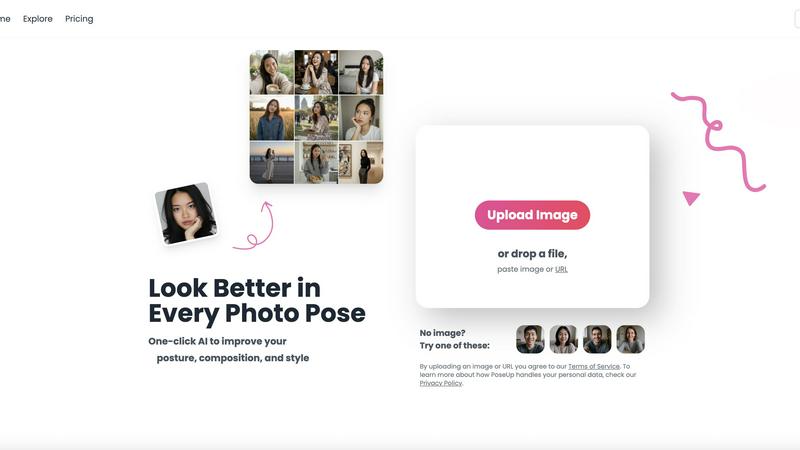
poseup
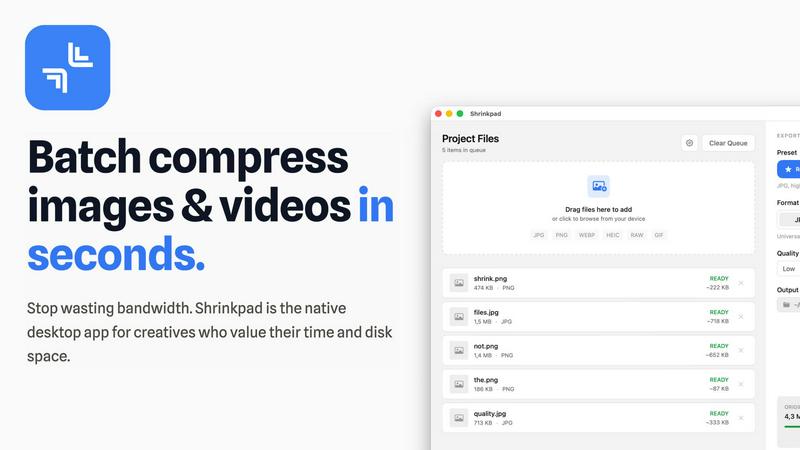
Shrinkpad
Feature Comparison
poseup
One-Click AI Pose Enhancement
With a single upload, PoseUp's advanced AI engine comprehensively analyzes your photo. It evaluates the subject's posture, body alignment, and positioning within the frame, then automatically applies subtle corrections to suggest a more confident, natural, and aesthetically pleasing pose. This removes the guesswork from posing, transforming stiff or awkward stances into photogenic ones instantly, without any manual editing required from the user.
Intelligent Composition & Lighting Optimization
Beyond posture, the AI examines the overall composition and lighting conditions of your image. It intelligently suggests optimizations to balance the scene, improve the rule-of-thirds alignment, and enhance lighting to highlight the subject appropriately. This feature ensures the technical quality of your photo matches the improved pose, resulting in a holistically professional image suitable for portfolios or social media.
Multi-Scene Adaptability
PoseUp is engineered to deliver professional results across a diverse range of scenarios. Whether it's a casual coffee shop work shot, an outdoor adventure photo, a professional headshot, a fitness snapshot, or a cozy lifestyle moment, the AI adapts its enhancement strategy. This versatility ensures users receive context-aware improvements that look natural and appropriate for the setting, making it a single tool for all your photographic needs.
Broad Format Support & Instant Processing
The platform is designed for effortless integration into any workflow, supporting popular image formats including JPG, PNG, WEBP, and HEIC, with files up to 5MB. Processing is near-instantaneous, delivering professional photographer-level results in seconds. This combination of compatibility and speed allows for rapid iteration and enhancement, perfect for users who need to prepare multiple images quickly.
Shrinkpad
Smart Compression
Shrinkpad automatically analyzes the visual complexity of each file, applying the ideal compression ratio to ensure minimal loss of quality. This feature eliminates the guesswork, allowing users to achieve the best results effortlessly.
Unlimited Batching
With the ability to process thousands of files simultaneously, Shrinkpad can handle massive queues without crashing, unlike many web-based tools. Users can batch compress images and videos together, optimizing their workflow efficiently.
One-Drop Import
Users can simply drag and drop entire folders into Shrinkpad. The application automatically detects all supported media files within the folder, streamlining the process and saving time by avoiding manual file selection.
Privacy-First Approach
Shrinkpad prioritizes user privacy by performing all processing locally on the machine. This means that no files are uploaded to the cloud, ensuring that sensitive assets remain secure and under the user's control throughout the compression process.
Use Cases
poseup
Elevating Social Media Presence
Content creators and influencers can use PoseUp to consistently ensure every post meets a high visual standard. By correcting slouches, improving selfie angles, and optimizing group shot compositions, users can maintain a cohesive and professional-looking feed that engages followers and enhances personal branding, all without the cost of a full-time photo editor.
Perfecting Professional & Personal Portraits
Individuals preparing for LinkedIn profile pictures, acting headshots, or even dating app photos can achieve a polished look effortlessly. PoseUp corrects posture to convey confidence, optimizes lighting on the face, and ensures the composition is flattering, helping users make a powerful first impression in both professional and personal spheres.
Rescuing & Enhancing Family & Group Photos
Transform cherished yet imperfect memories. PoseUp can analyze group dynamics in a photo and suggest subtle pose adjustments to create a more harmonious and engaging image. It's ideal for fixing photos where someone blinked, had poor posture, or where the overall composition feels unbalanced, turning a mediocre group shot into a frameworthy masterpiece.
Exploring Creative Pose Ideas
For couples, friends, or solo photographers looking for inspiration, PoseUp serves as a creative assistant. Users can experiment with their own photos to see how different pose enhancements affect the final look, generating beautiful couple pose ideas or dynamic solo shot concepts that they can then replicate or use as inspiration in future photoshoots.
Shrinkpad
Photographers
Professional photographers can utilize Shrinkpad to batch compress large collections of images from shoots, significantly reducing file sizes for easier storage and faster uploads to galleries or websites.
Designers
Graphic designers can benefit from Shrinkpad by quickly optimizing assets exported from software like Figma or Photoshop. This allows them to maintain high visual quality while minimizing the impact on disk space and loading times.
Content Creators
Content creators, including vloggers and social media influencers, can use Shrinkpad to compress videos for faster uploads and improved website performance. This tool helps in managing large multimedia files efficiently.
Marketing Teams
Marketing teams can leverage Shrinkpad to ensure that all digital assets, from promotional videos to product images, are optimized for web use. This enhances user experience by reducing website load times and improving engagement metrics.
Overview
About poseup
PoseUp represents a significant evolution in personal photography, moving beyond simple filters to offer intelligent, compositional enhancement. It is an AI-powered platform designed to democratize professional-grade photo quality by automatically improving posture, composition, and style with a single click. This tool is built for a world where every moment is captured and shared, catering to social media influencers seeking a flawless feed, photographers wanting to quickly refine client shots, and everyday individuals who wish their family photos or casual selfies carried more polish and impact. Its core value proposition lies in eliminating the technical barrier to great photography; no professional training, expensive equipment, or hours of editing are required. PoseUp analyzes the fundamental elements of a compelling image—lighting, stance, and framing—and intelligently optimizes them, allowing users to transform ordinary, awkward, or poorly composed shots into stunning visuals that command attention. It's not just about fixing mistakes; it's about accelerating your visual storytelling journey, enabling you to consistently present your best self in every captured scene.
About Shrinkpad
Shrinkpad is an innovative desktop application tailored for macOS users seeking to efficiently batch compress images and videos. This powerful tool empowers photographers, designers, content creators, and anyone handling large media files to streamline their workflows. By allowing users to drop hundreds of files or entire folders, Shrinkpad simplifies the compression process, enabling significant reductions in file sizes within seconds. With a focus on privacy, all processing occurs locally on the user's device, eliminating the need for internet connections and safeguarding sensitive files. Supporting over 50 file formats, including JPG, PNG, MP4, and MOV, Shrinkpad integrates seamlessly into diverse workflows, offering both preset quality options and customizable settings for optimal results. In a world where disk space and loading times are increasingly critical, Shrinkpad becomes an indispensable asset for those looking to optimize their digital content without compromising quality.
Frequently Asked Questions
poseup FAQ
How does PoseUp's AI work?
PoseUp's AI uses sophisticated computer vision models trained on vast datasets of professional photography. When you upload an image, it analyzes key points related to human posture, body geometry, facial expression, and the image's compositional elements like lighting and balance. It then applies a series of nuanced adjustments to these elements to suggest a more aesthetically optimal version, all while striving to keep the result looking natural and true to the original scene.
What image formats and sizes do you support?
PoseUp supports a wide range of common image formats to ensure compatibility, including JPG, PNG, WEBP, and HEIC (iPhone photos). The current maximum file size for upload is 5MB per image. This ensures quick processing and enhancement while maintaining accessibility for most high-quality photos directly from your phone or camera.
Is my data and privacy protected?
Yes. PoseUp states that by uploading an image, users agree to their Terms of Service, and they provide a Privacy Policy that details how personal data is handled. The platform is designed to process your images for the purpose of enhancement securely. For specific concerns, it is recommended to review their Privacy Policy directly on their website.
Do I need any photography skills to use PoseUp?
Absolutely not. PoseUp is specifically designed to require zero prior photography or editing skills. The entire process is automated: you upload a photo, and the AI provides the enhanced result. The platform's goal is to make professional-looking photo enhancements accessible to everyone, regardless of their technical background or training.
Shrinkpad FAQ
Can I use Shrinkpad for free?
Yes, Shrinkpad offers a Free Starter plan that includes essential tools for casual use, allowing users to batch compress images with limitations on file counts and formats.
What file formats does Shrinkpad support?
Shrinkpad supports over 50 file formats, including common image formats like JPG and PNG, as well as video formats such as MP4 and MOV, ensuring versatility for various media types.
Does Shrinkpad support video compression?
Absolutely, Shrinkpad includes robust video compression features, allowing users to efficiently reduce the file sizes of videos alongside images in a single batch process.
How many files can I process at once?
With Shrinkpad, users can batch process thousands of files at once, making it a powerful tool for handling large media libraries without compromising performance.
Alternatives
poseup Alternatives
PoseUp is an AI-powered tool in the image and photo enhancement category, designed to automatically improve posture, composition, and style in photographs with a single click. It simplifies achieving professional-looking results, making it popular among a wide audience from casual users to content creators. Users often explore alternatives for various reasons. Some may seek different pricing models, such as subscription-free options or one-time purchases. Others might need specific features not offered, require integration with certain platforms, or simply want to compare the capabilities of different AI technologies to find their perfect fit. When evaluating an alternative, consider the core value: how effectively it enhances your images. Look at the balance between automation and user control, the quality and realism of the AI edits, and the supported file formats and sizes. Also, assess the overall user experience, from the upload process to the final output, to ensure it aligns with your personal or professional workflow.
Shrinkpad Alternatives
Shrinkpad is a powerful desktop application designed specifically for macOS users, allowing them to batch compress images and videos quickly and efficiently. As an essential tool for photographers, designers, and content creators, it optimizes large media files, ensuring significant file size reductions without compromising visual quality. Users often seek alternatives to Shrinkpad for various reasons, such as pricing, feature sets, or compatibility with different operating systems. When searching for alternatives, it's important to consider several factors. Look for user-friendly interfaces, robust batch processing capabilities, customizable settings for compression, and local processing to maintain privacy. Additionally, ensure that the alternative supports a wide range of file formats to seamlessly integrate into your existing workflow.