
Decode This Text vs SupaSidebar
Side-by-side comparison to help you choose the right tool.

Decode This Text
Decode This Text delivers quick, human-like analyses of confusing conversations in just 30 seconds for clear.
Last updated: February 28, 2026

SupaSidebar
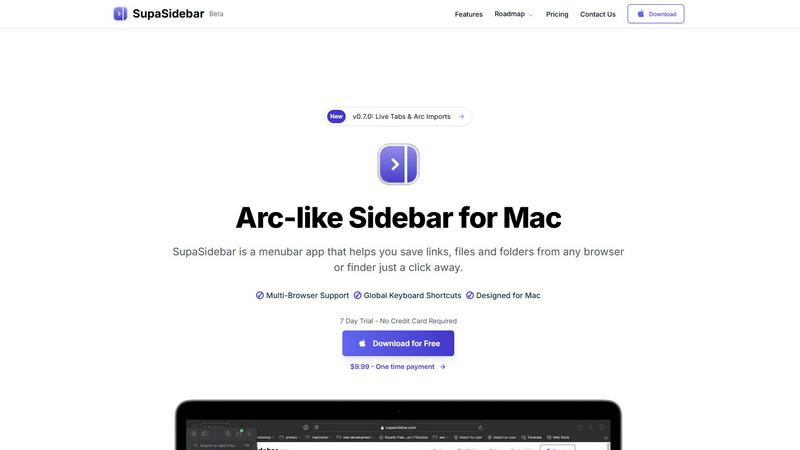
SupaSidebar streamlines your Mac experience with quick access to links, files, and folders from any browser or app.
Last updated: February 28, 2026
Visual Comparison
Decode This Text

SupaSidebar
Feature Comparison
Decode This Text
Easy Message Input
With Decode This Text, users can seamlessly share their messages by either pasting text or uploading screenshots. This feature allows for quick analysis without requiring extensive typing, making it user-friendly and efficient.
Emotional Tone Analysis
One of the standout features is the emotional tone analysis, which gauges the mood behind the words. Users can understand if the sender is being friendly, sarcastic, or indifferent, ensuring that responses are well-informed and appropriate.
Intent Detection
Decode This Text goes beyond surface-level communication by detecting the true intent behind messages. Users can find out if someone is genuinely interested, upset, or merely preoccupied, allowing for more tailored and meaningful responses.
Response Suggestions
The tool provides users with carefully curated response suggestions, including calm, direct, or firm options. This feature is particularly useful for those who struggle with how to reply, ensuring that they can respond confidently in any situation.
SupaSidebar
Seamless Browser Integration
SupaSidebar is designed to work flawlessly with all major browsers, including Safari, Chrome, Firefox, Arc, and Brave. This integration ensures that users can save and access their favorite links and files from any browsing environment, providing a unified experience across platforms.
Global Keyboard Shortcuts
The application features customizable global keyboard shortcuts that facilitate quick actions. Users can save URLs or copy links with simple keystrokes, such as ⌘ + ⌃ + S for saving and ⌘ + ⌃ + C for copying. This feature significantly enhances productivity by reducing the time spent navigating through menus.
Recents Tracking
SupaSidebar automatically tracks and displays recently visited websites for up to 48 hours. This feature allows users to easily revisit sites they have accessed in the recent past, eliminating the hassle of searching through bookmarks or browser history.
Favorites and Organization
Users can pin their most important links and files at the top of the sidebar for quick access. This organization feature makes it easy to prioritize frequently used resources, ensuring that essential information is always just a click away.
Use Cases
Decode This Text
Navigating Relationship Dynamics
Decode This Text is invaluable for individuals trying to understand complex dynamics in relationships. Whether it's a partner's ambiguous text or a friend's sudden silence, the tool helps users decipher underlying feelings and intentions.
Clarifying Professional Communication
In the workplace, misunderstandings can lead to significant issues. Decode This Text allows professionals to interpret brief or unclear emails and messages, enabling them to respond appropriately and maintain healthy workplace relationships.
Managing Family Communication
Family dynamics can be tricky, especially during sensitive discussions. Users can analyze family texts to decipher tones and intentions, helping to foster clearer communication and reduce tension during discussions.
Improving Social Interactions
For individuals who often find themselves questioning their social interactions, Decode This Text provides clarity. Whether it’s a friend's casual invitation or a group chat that has gone cold, users can gain insights that help them navigate social situations more effectively.
SupaSidebar
Efficient Resource Management
For busy professionals juggling multiple projects, SupaSidebar serves as a central hub for managing links, files, and folders. By organizing resources in one place, users can enhance their workflow and focus on their tasks without the distraction of a cluttered desktop.
Academic Research
Students conducting research can utilize SupaSidebar to save and organize links to academic articles, study materials, and important resources. The ability to quickly access these materials facilitates a more efficient study process, allowing students to concentrate on learning rather than searching.
Creative Projects
Content creators and designers can leverage SupaSidebar to manage inspiration sources, such as design references, articles, and tutorials. By keeping these resources organized, they can streamline their creative process and boost productivity when working on projects.
Collaborative Work
In team environments, SupaSidebar can be used to share links and resources among team members. By centralizing project-related materials, teams can improve communication and collaboration, ensuring everyone has access to the necessary information.
Overview
About Decode This Text
Decode This Text is a cutting-edge tool that serves as your personal communication consultant, designed to help you decode the often ambiguous messages we encounter in daily life. Whether you receive a perplexing email from your boss, a vague text from a friend, or a cryptic message from a client, this tool provides the clarity you need to navigate these communications effectively. Users can simply paste the conversation or describe the context, and within seconds, they receive a comprehensive analysis that reveals the underlying intentions and emotional tones. This product is perfect for individuals who wish to enhance their communication skills, foster better relationships, and eliminate misunderstandings that can lead to conflict. With an intuitive interface and rapid response time, Decode This Text empowers users to engage confidently, without the stress of overanalyzing every word or worrying about misinterpretations.
About SupaSidebar
SupaSidebar is an innovative sidebar application designed specifically for Mac users, drawing inspiration from the Arc browser to deliver a powerful productivity tool. Its primary purpose is to enhance organization, streamline browsing speed, and foster a seamless user experience. Ideal for professionals, students, and anyone managing a plethora of links, files, and folders, SupaSidebar simplifies the digital landscape by providing quick access to essential resources. With support for all major browsers—including Safari, Chrome, Arc, Firefox, and Brave—users can effortlessly save URLs and manage their online content. The application boasts an intuitive interface complemented by global keyboard shortcuts, empowering users to navigate their workspace effortlessly. For instance, with just a simple press of ⌘ + ⌃ + S, users can save their current webpage, while ⌘ + ⌃ + C allows for quick copying of links. SupaSidebar not only keeps crucial links at your fingertips but also helps maintain focus, making it an invaluable asset for anyone looking to optimize their productivity and workflow.
Frequently Asked Questions
Decode This Text FAQ
How does Decode This Text ensure my privacy?
Decode This Text prioritizes user privacy by ensuring that all analyses are 100% anonymous. No human reads your texts, and your information is not stored, giving you peace of mind.
Can I use Decode This Text for professional messages?
Absolutely! Decode This Text is designed to analyze both personal and professional communications. It helps users interpret emails, messages, and other forms of workplace communication effectively.
How quickly can I expect a response?
The tool is designed for quick analysis and typically provides results within 30 seconds. This rapid response time allows users to address their communication concerns promptly.
Is there a limit to how much text I can analyze?
While Decode This Text allows for extensive analyses, users should note that extremely long messages or multiple conversations may require separate submissions for the best results.
SupaSidebar FAQ
Is SupaSidebar a browser extension?
No, SupaSidebar is a standalone menubar application designed specifically for Mac users. It integrates seamlessly with multiple browsers but operates independently from them.
Which browsers does SupaSidebar work with?
SupaSidebar supports all major browsers, including Safari, Chrome, Firefox, Arc, and Brave, enabling users to save and access links from any of these platforms.
What macOS version do I need?
SupaSidebar requires macOS 13 or later to function effectively. Ensure your system meets this requirement for the best experience.
Where is my data stored?
All data managed by SupaSidebar remains on your Mac, ensuring privacy and security. The application does not store your information on external servers, providing peace of mind to users concerned about data privacy.
Alternatives
Decode This Text Alternatives
Decode This Text is an innovative tool that falls within the Productivity & Management category, designed to help individuals unravel the complexities of communication. With its quick, human-like analyses, it assists users in understanding the true meanings behind cryptic messages, be they from colleagues, friends, or clients. Users often seek alternatives to Decode This Text for various reasons, including pricing, specific features, or platform compatibility. When looking for an alternative, consider factors such as user experience, response time, and the comprehensiveness of the analysis provided. It's essential to find a tool that not only meets your immediate needs but also supports your growth in effective communication.
SupaSidebar Alternatives
SupaSidebar is a sophisticated sidebar application designed for Mac users, enhancing their digital experience by providing quick access to links, files, and folders from any browser. As a productivity and management tool, it helps streamline workflows, especially for professionals and students who juggle multiple resources and need to maintain focus while browsing. Users often seek alternatives to SupaSidebar for various reasons, such as pricing, specific feature sets, or compatibility with different platforms. When searching for an alternative, it’s essential to consider factors like user interface, ease of integration with existing workflows, and the extent of features offered, ensuring that the new tool aligns with individual productivity needs and preferences.