

EditTextImage
EditTextImage evolves your workflow by letting you replace text in any image online while preserving font, color, and perspective in seconds.
tool Details
Explore More
Alternatives
About EditTextImage
EditTextImage is an innovative online AI tool that transforms how you edit text in image files. It eliminates the need for complex software like Photoshop, expensive font files, or ongoing subscriptions. The core value proposition is simple: upload any image, type the existing text and the replacement, and the AI samples the typography directly from the pixels. This means the font, color, drop shadow, perspective, and background all remain pixel-perfect, even for paid fonts or hand-lettering you do not have installed. The process takes approximately 10 seconds and outputs at 2K resolution. This tool is designed for anyone who has ever needed to change one word on a finished poster, screenshot, or product photo but lost the original design file. It is for marketers running A/B tests on ad creative, designers fixing typos in final artwork, e-commerce managers updating product labels, and developers localizing app screenshots. The journey starts with a free credit, no credit card required, and progresses to a one-time payment for additional edits. EditTextImage represents a significant evolution in image editing, moving from complex, time-consuming manual processes to a fast, accessible, and intelligent solution that puts the power of professional text replacement into everyone's hands.
Features
Pixel-Perfect AI Typography Sampling
The core feature of EditTextImage is its ability to sample the typeface directly from the pixels of your uploaded image. Instead of guessing or using generic fonts, the AI analyzes the existing text to understand its exact font style, weight, size, color, and even effects like drop shadows or perspective distortions. When you replace the text, the new text is rendered with the same precise typography, ensuring the edit blends seamlessly into the original image. This works for standard fonts, premium paid fonts you do not own, and even unique hand-lettering, making it a versatile solution for any image.
Rapid Processing with High-Resolution Output
Time is a critical factor in modern workflows, and EditTextImage is built for speed and quality. The entire process, from upload to download, averages around 12 seconds. This rapid turnaround allows for quick fixes, iterative A/B testing, and efficient batch processing of multiple images. Despite the speed, there is no compromise on quality. The tool outputs the edited image at 2K resolution, ensuring the final result is crisp, clear, and suitable for professional use in print, web, or social media. This combination of speed and high resolution makes it a powerful tool for production workflows.
No Software, Fonts, or Subscriptions Required
EditTextImage removes all the traditional barriers to editing text in images. There is no need to install or learn complex software like Photoshop. You do not need to locate or purchase the original font files used in the image, as the AI handles typography sampling automatically. Furthermore, the tool operates on a simple, one-time credit system with no recurring subscriptions. You get one free credit to start, with no credit card required. Additional credits are purchased as a one-time pack, and they never expire, giving you complete control and flexibility over your usage and costs.
Intuitive Three-Step Workflow
The user experience is designed for simplicity and accessibility, regardless of design skill level. The process is broken down into three clear steps. First, you upload your image file in PNG, JPEG, or WebP format, up to 10 MB. Second, you enter the original text you want to replace and the new replacement text. Third, you click generate. The AI processes the image and delivers the edited result. This streamlined workflow eliminates guesswork and technical hurdles, allowing anyone to edit text in an image in under 30 seconds, from start to finish.
Use Cases
Document Fixes and Corrections
A common scenario is needing to update a document when the source file is lost. You might have a screenshot or a scanned PDF of a contract, invoice, or report with a typo, incorrect date, or wrong invoice number. EditTextImage allows you to edit the text directly on the image without needing the original design file. This is perfect for professionals who need to make quick corrections to official-looking documents, ensuring accuracy without the time and expense of recreating the entire document from scratch.
Marketing and Ad Creative A/B Testing
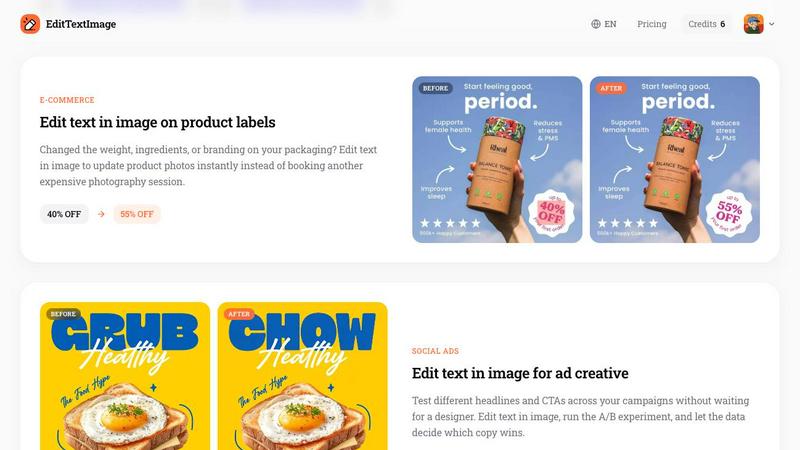
Marketers and social media managers constantly test different headlines, calls-to-action (CTAs), and promotional text to optimize campaign performance. EditTextImage enables rapid A/B testing on finished ad creative. Instead of waiting for a designer to recreate an ad with a new headline, you can edit the text in the image yourself. Upload the existing ad, swap the headline, and generate a new version in seconds. This allows you to run experiments, let data decide which copy wins, and iterate on your creative assets much faster.
E-commerce Product Photography Updates
E-commerce businesses frequently need to update product images due to changes in pricing, weight, ingredients, or branding. A new promotion might require a "40% OFF" sticker to be changed to "55% OFF," or a product label might need a new ingredient listed. EditTextImage provides an instant solution. Instead of booking an expensive new photography session or using complex photo editing software, you can edit the text on the existing product photo. This saves significant time and money, allowing for agile updates to product listings.
App Localization and Screenshot Management
App developers and product managers often need to create screenshots for app stores in multiple languages. Rebuilding every UI mockup for each language is a tedious and expensive process. EditTextImage simplifies this by allowing you to edit the text on existing screenshots. You can swap the language of buttons, labels, and descriptions directly on the image, pixel-perfect every time. This streamlines the localization workflow, enabling you to quickly generate screenshots for global app store listings without needing to access the original design files.
Frequently Asked Questions
What file types and sizes does EditTextImage support?
EditTextImage supports the most common image formats for web and design work: PNG, JPEG, and WebP. The maximum file size for upload is 10 MB. This covers the vast majority of use cases, from high-resolution product photos to compressed social media graphics.
Is my data and image privacy protected?
Yes, user privacy is a priority. However, it is important to understand the Acceptable Use Policy. EditTextImage explicitly prohibits processing IDs, passports, visa support letters, official seals, bank statements, or tampered receipts. Violations can result in account termination, and request logs may be preserved and shared with law enforcement. The tool is designed for legitimate creative and professional edits, not for deceptive purposes.
How do the credits work and do they expire?
The pricing model is simple and transparent. You receive one free credit to start, with no credit card required. After that, you can purchase a pack of 30 credits for a one-time fee of $9.90. These credits never expire, meaning you can use them at your own pace without the pressure of a monthly subscription. This is ideal for users who need the tool occasionally or for specific projects.
Can I edit text in an image with a complex background or perspective?
Yes, the AI is specifically designed to handle complex scenarios. It analyzes the surrounding pixels to understand the background, drop shadows, lighting, and perspective of the original text. When you replace the text, it is rendered to match these conditions, ensuring the edit looks natural and seamless. This makes it effective for editing text on curved surfaces, in signs, or on textured backgrounds.
Similar to EditTextImage


Qwen Image Edit
Prompt-based Qwen Image editing and generation for backgrounds, text, products, posters, outpainting, and creative styles.
GPT Image 2 API
API access to GPT Image 2 for programmatic image generation and editing.

RunwayAI
Independent AI video generator for creating videos from text prompts or reference images with task tracking, previews, downloads, and API resources.
Vismuse
Create polished AI images and videos from prompts or references for social posts, ads, flyers, album covers, and campaigns.

VioCine AI
Create AI video, image, and music assets in one model-aware workspace.
IsThisAIImage
Free AI image checker: upload a photo for AI-generated and deepfake scores, a clear verdict, and optional generator hints.
StopScroll
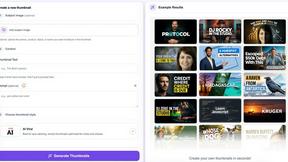
StopScroll is an AI thumbnail maker that generates YouTube thumbnail concepts from a URL, title, or prompt.