

Imgezy
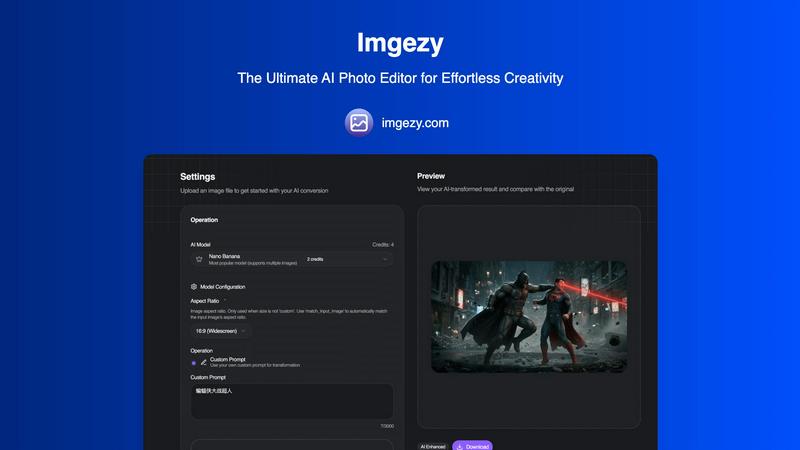
Imgezy is an AI photo editor that transforms images by removing objects and changing backgrounds effortlessly.
tool Details
Explore More
Alternatives
About Imgezy
Imgezy is the ultimate AI-powered photo editing tool that revolutionizes how users approach image enhancement. Whether you are an amateur enthusiast or a seasoned professional, Imgezy simplifies the photo editing journey, empowering you to create stunning visuals with just a few clicks. Its intuitive interface allows users to edit images using plain language commands, making it accessible for everyone, regardless of their design experience. The main value proposition of Imgezy lies in its ability to deliver professional-quality edits in mere seconds, eliminating the complexities often associated with traditional photo editing software. Trusted by over 200,000 users worldwide, Imgezy leverages advanced AI technology to perform tasks like object removal and background changes effortlessly. This innovative tool is designed to cater to a wide array of applications, from enhancing personal photos for social media to preparing high-quality images for commercial use. With Imgezy, everyone can unleash their creativity and achieve remarkable results.
Features
Object Removal
Imgezy's object removal feature allows users to eliminate unwanted elements from their photos seamlessly. Whether it's distracting tourists, power lines, or photobombers, the AI intelligently identifies and removes these objects while reconstructing the background with pixel-perfect accuracy. This ensures that your images look clean and professional without any noticeable traces of the edits.
Background Replacement
With Imgezy, changing the background of your images has never been easier. Users can replace backgrounds instantly, choosing from solid colors to breathtaking landscapes. This feature allows for creative freedom, enabling users to transform the context of their photos dramatically and enhance the overall aesthetic.
Photo Enhancement
Imgezy offers automatic photo enhancement capabilities that improve the overall quality of your images. The AI enhances colors, adjusts lighting, and sharpens details, ensuring that your photos pop with vibrancy. This feature is perfect for anyone looking to elevate their images without extensive manual adjustments.
Batch Processing
For users working on large projects, Imgezy provides a batch processing feature that allows you to edit multiple photos simultaneously. This saves significant time and effort, making it an essential tool for professionals who need to manage high volumes of images efficiently.
Use Cases
Social Media Content Creation
Imgezy is ideal for social media influencers and content creators looking to enhance their visual presence. With its quick editing capabilities, users can produce eye-catching images that attract more engagement and followers, making their profiles stand out.
E-commerce Product Photography
Online retailers can leverage Imgezy to enhance product images for their catalogs. By removing distracting backgrounds and improving image quality, e-commerce businesses can present their products in the best light, ultimately boosting sales and conversions.
Personal Photo Editing
For individuals wanting to enhance their personal photos, Imgezy makes it easy to edit vacation snapshots, family portraits, and more. Users can quickly remove unwanted objects or change backgrounds to create memorable keepsakes without the need for advanced editing skills.
Marketing and Advertising
Imgezy serves as a powerful tool for marketers who need to create compelling visuals for campaigns. With the ability to produce high-quality images quickly, marketers can save time and resources while ensuring that their promotional materials are visually appealing and effective.
Frequently Asked Questions
What types of images can I edit with Imgezy?
Imgezy supports all major image formats, including JPG, PNG, and WebP, allowing users to edit a wide variety of photos.
How long does it take to edit an image?
Imgezy's AI processes edits in seconds, enabling users to receive professional-quality results almost instantly without the need for extensive manual work.
Is there a limit to how many images I can edit?
The number of images you can edit depends on the plan you choose. Imgezy offers various subscription tiers that provide different credit limits for editing images.
Do I need any design skills to use Imgezy?
No, Imgezy is designed for users of all skill levels. You can edit your photos using simple language commands, making it accessible even for those without any design experience.
Similar to Imgezy
Qwen Image Edit
Prompt-based Qwen Image editing and generation for backgrounds, text, products, posters, outpainting, and creative styles.

IsThisAIImage
Free AI image checker: upload a photo for AI-generated and deepfake scores, a clear verdict, and optional generator hints.
StopScroll
StopScroll is an AI thumbnail maker that generates YouTube thumbnail concepts from a URL, title, or prompt.


CompressFast
CompressFast evolves your workflow from clunky uploads to lightning-fast, private batch compression directly in your browser.

Best Face Swap
Best Face Swap evolves from simple edits to advanced, frame-consistent AI face swapping for photos and videos.

Art & See Custom Oil Painting Portraits
Transform cherished photos into heirloom-quality custom oil portraits that capture your loved ones' essence through masterful artistry.

Nano Banana
Nano Banana evolves your creative process, letting you generate and edit stunning images through simple conversation with its advanced AI.