

Opal
Opal is a visual workspace that centralizes your projects and notes, ensuring you find everything instantly without wasting time searching.
tool Details
Explore More
Alternatives
About Opal
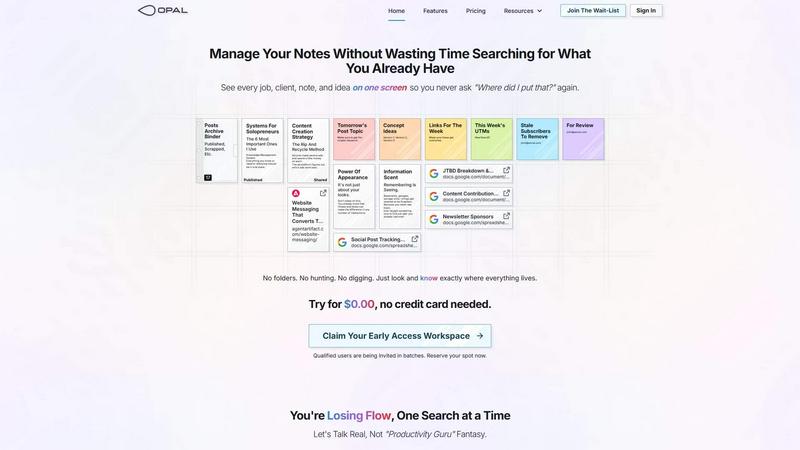
Opal is a revolutionary visual knowledge and project management workspace crafted for individuals who think spatially. It addresses the common frustrations of losing valuable notes in convoluted nested folders and forgetting brilliant ideas buried within traditional applications. Opal provides an infinite digital canvas, allowing users to drag and drop notes, documents, files, and links. This visual organization mimics the setup of a physical desk, helping users remember not just the content, but also the spatial location of their ideas. Tailored for solopreneurs, consultants, agency owners, and writers, Opal ensures that all active projects, client details, and creative ideas remain visible and top-of-mind. This way, users can eliminate the need for extensive searching and instead focus on doing their best work without disruption. By adopting Opal, professionals can reclaim their flow, enhance productivity, and ultimately achieve greater success in their endeavors.
Features
Infinite Digital Canvas
Opal offers an expansive digital workspace where users can organize their notes, documents, and ideas freely. This infinite canvas allows for flexibility, enabling users to drag and drop elements as they see fit, creating a personalized layout that enhances their workflow.
Visual Organization
Unlike traditional tools that require filing information, Opal allows users to visually place their information. This spatial memory approach makes it easier to remember where things are located, reducing the time spent searching for important notes or documents.
Real-Time Collaboration
Opal supports real-time collaboration, enabling teams to work together seamlessly. Users can share their workspace with colleagues, ensuring everyone is on the same page and can contribute to projects, ideas, and discussions instantly.
Customizable Workspaces
Users can customize their Opal workspace to suit their unique needs and preferences. By adjusting the layout and organization of their digital space, individuals can create an environment that fosters creativity and productivity tailored to their specific working style.
Use Cases
Project Management
For project managers, Opal serves as an ideal hub to oversee multiple projects simultaneously. Users can visualize timelines, tasks, and client details, ensuring that nothing falls through the cracks and that all team members are aligned on project goals.
Creative Brainstorming
Writers and creatives can use Opal to brainstorm ideas visually. By laying out concepts and notes on the infinite canvas, they can explore connections and develop narratives without the constraints of traditional text-based tools.
Client Relationship Management
Consultants and agency owners can leverage Opal to manage client relationships effectively. By organizing all relevant client information, notes from calls, and project details in one visible space, they can maintain strong communication and deliver exceptional service.
Content Planning
Content creators can utilize Opal to plan their content strategy. By visually mapping out topics, deadlines, and associated links, they can streamline their workflow and ensure that important content pieces are never overlooked.
Frequently Asked Questions
How does Opal improve productivity?
Opal enhances productivity by providing a visual workspace that eliminates the need for excessive searching. Users can see all their notes and projects at a glance, allowing them to quickly access information and stay focused on their tasks.
Is Opal suitable for team collaboration?
Yes, Opal is designed for both individual and team collaboration. Users can share their workspaces with team members, enabling real-time collaboration and ensuring that everyone can contribute effectively to projects.
Can I customize my Opal workspace?
Absolutely! Opal allows for extensive customization of your workspace. You can arrange notes, documents, and other elements according to your preferences, creating a layout that best supports your working style.
What types of professionals benefit from using Opal?
Opal is beneficial for a wide range of professionals, including solopreneurs, consultants, agency owners, and writers. Anyone who manages multiple projects, client relationships, or creative ideas can leverage Opal to enhance their workflow and productivity.
Similar to Opal

Egmatic
No-code 2D game editor: visual node logic, drag-and-drop scenes, live preview. Exports to Windows, macOS, Linux, Android, iOS, Web.

Product Launch Checklist
A free launch checklist for SaaS, apps, AI tools and more. Every step says why it matters and when you can skip it.
Kody Tools
Free collection of online developer utilities, code formatters, and digital converters designed to streamline your daily workflow.
Forms Plugin
The #1 Native Form Builder Plugin for Framer - No Code, No Embeds, No External Platforms.




PerPageFax
PerPageFax lets you send a fax online from any browser for a flat $0.50 per page — no account, no subscription, no fax machine.