Tool Journey logo

ClipMake vs Kling 5

Side-by-side comparison to help you choose the right tool.

Create stunning AI-generated video ads in under 3 minutes with ClipMake’s 300+ virtual actors starting at just $2.50 each.

Last updated: April 13, 2026

Kling 5 logo

Kling 5

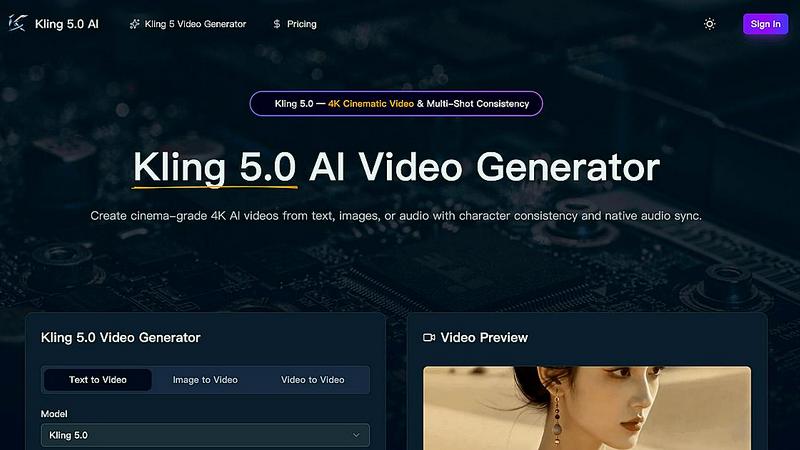
Kling 5.0 is an AI video generator that transforms text, images, or audio into stunning 4K cinematic videos with consistent characters and native.

Last updated: April 13, 2026

Visual Comparison

ClipMake

ClipMake screenshot

Kling 5

Kling 5 screenshot

Feature Comparison

ClipMake

AI Actor Selection

With a library of over 300 AI actors, users have the flexibility to choose an avatar that perfectly aligns with their brand's personality. This feature allows for the creation of diverse and engaging video content that resonates with different target audiences.

Natural Voice Dubbing

ClipMake offers voice-matched dubbing in over 20 languages, ensuring that each AI actor's voice sounds natural and authentic. This capability enhances viewer engagement by avoiding robotic text-to-speech outputs, making the ads feel more relatable and impactful.

Scene Templates

The platform includes 20+ customizable scene templates designed for various ad formats, such as unboxing, testimonials, tutorials, lifestyle shots, and before/after comparisons. This variety enables brands to select the perfect visual storytelling approach for their products.

Batch Generation

ClipMake allows users to create multiple variations of video ads in one session. This batch generation feature is ideal for testing different hooks, actors, and scripts, providing valuable insights into what resonates best with audiences without extensive time or resource commitments.

Kling 5

AI-Powered Video Generation

Kling 5.0 employs advanced AI algorithms to create high-quality videos directly from text prompts. This feature allows users to produce stunning visuals without prior video editing experience, democratizing video creation for all.

Cinematic Quality

With Kling 5.0, users can produce videos that exhibit a professional, cinematic look and feel. This quality is achieved through sophisticated rendering techniques that enhance realism and visual appeal, making every project stand out.

Easy to Use

The platform's user-friendly interface is designed to simplify the video creation process. Users can easily navigate through options and parameters, making it accessible for anyone, regardless of their technical background.

Multi-Shot Consistency

Kling 5.0 features an Omni Subject Library that ensures character consistency across multiple shots. This innovative capability is essential for creators working on episodic content or series, allowing for seamless storytelling and visual continuity.

Use Cases

ClipMake

E-commerce Product Launch

Brands can leverage ClipMake to rapidly create engaging video ads for new product launches, ensuring that they capture audience attention and drive conversions right from the start.

Performance Marketing Campaigns

Performance marketers can utilize ClipMake to generate high volumes of ad creative, enabling them to split test various approaches and optimize campaigns based on real-time performance data, significantly improving return on ad spend.

Social Media Engagement

Businesses can create eye-catching video content for social media platforms like TikTok and Meta, where UGC-style ads thrive. This enhances brand visibility and encourages user interaction, ultimately driving more traffic to their offerings.

Content Refresh Cycles

ClipMake helps brands maintain a dynamic ad presence by easily refreshing their creative content. By generating new video variations regularly, brands can keep their messaging fresh and relevant, which is crucial for retaining audience interest over time.

Kling 5

Marketing Campaigns

Businesses can leverage Kling 5.0 to create engaging promotional videos quickly. By utilizing text prompts, marketers can generate tailored video content that captures their brand's essence and resonates with their target audience.

Educational Content

Educators and trainers can use Kling 5.0 to produce informative and visually appealing educational videos. The platform enables the transformation of complex topics into engaging visual narratives, enhancing learning experiences for students.

Social Media Content

Content creators can harness Kling 5.0 to generate eye-catching videos for platforms like Instagram and TikTok. The ease of use and cinematic quality make it ideal for producing shareable content that stands out in crowded feeds.

Storytelling and Narrative Projects

Writers and filmmakers can use Kling 5.0 to visualize their scripts and concepts. By generating videos from text prompts, they can explore character developments and scene compositions, aiding in the creative process and project planning.

Overview

About ClipMake

ClipMake is an innovative AI-driven tool that revolutionizes the creation of user-generated content (UGC) style video ads, specifically designed for e-commerce brands and performance marketers. By eliminating the need for traditional creators, shoots, and editing, ClipMake provides a streamlined solution for generating high-volume ad creative. Users can select from over 300 AI actors, tailoring their video ads to meet specific branding needs. The platform simplifies the process by allowing users to input product details and receive a polished video ad complete with natural voiceover, engaging visuals, and proven ad structures. With ClipMake, businesses can produce effective video advertisements quickly, enabling them to increase their creative output and optimize their marketing strategies with ease.

About Kling 5

Kling 5.0 is a groundbreaking AI video generator that redefines video creation by enabling users to generate captivating cinematic videos effortlessly. Designed for creators of all skill levels, Kling 5.0 utilizes cutting-edge artificial intelligence to transform text prompts into high-quality videos in mere seconds. This innovative platform eliminates the need for complex editing software and time-consuming production processes. With a simple and intuitive interface, users can describe their desired scenes, characters, and styles, and Kling 5.0 will produce unique videos tailored to their specifications. Whether for personal projects, marketing campaigns, or storytelling, Kling 5.0 empowers users to bring their ideas to life with just a few clicks, making professional-grade video content accessible to everyone.

Frequently Asked Questions

ClipMake FAQ

How long does it take to generate a video ad with ClipMake?

Users can generate a finished video ad in under three minutes, allowing for rapid production and deployment of marketing content without delays.

Can I use my own product images in the videos?

Yes, ClipMake allows users to upload product images, which the AI actors can hold or interact with during the video, ensuring that the product is front and center in the ad.

Is there a limit to the number of videos I can create?

No, ClipMake supports batch generation, enabling users to create dozens of video variations in one session, allowing for extensive testing without restrictions on quantity.

What type of businesses benefit the most from ClipMake?

E-commerce brands and performance marketers are the primary users of ClipMake, but any business looking to enhance its video advertising capabilities can benefit from the platform's innovative features and ease of use.

Kling 5 FAQ

What is the maximum video length I can generate with Kling 5.0?

Kling 5.0 allows users to generate videos up to 15 seconds long. This duration is perfect for creating quick promotional clips or teasers, making it suitable for various applications.

Can I upload my images for video generation?

Yes, Kling 5.0 supports image-to-video conversion. Users can upload photos or concept art, and the AI will animate them, preserving the composition and fine details for a seamless output.

Is there a limit to the number of characters I can include in my prompt?

Prompts can contain up to 2500 characters, providing ample space for users to describe their desired scenes, characters, and styles in detail, resulting in more tailored video outputs.

What languages does Kling 5.0 support for lip-sync?

Kling 5.0 offers multilingual lip-sync capabilities in English, Chinese, Japanese, Korean, and Spanish, ensuring that characters can communicate naturally and effectively in diverse contexts.

Alternatives

ClipMake Alternatives

ClipMake is an AI-powered user-generated content (UGC) video generator designed for e-commerce brands and performance marketers. With its extensive library of over 300 AI actors, it facilitates the rapid creation of hyper-realistic video ads for platforms like Meta, TikTok, and YouTube, allowing users to produce engaging content in less than three minutes. As businesses evolve and seek to optimize their ad spending, many users explore alternatives due to various factors such as pricing structures, specific feature sets, and platform compatibility that better align with their unique needs. When searching for alternatives to ClipMake, it's essential to consider factors such as the quality of AI-generated content, user-friendliness, and the diversity of customizable options available. Users should also evaluate whether the platform supports multiple languages, offers robust script generation, and provides flexibility in video formats. Ultimately, an ideal alternative should enhance the creative process while ensuring that it meets the evolving demands of modern marketing strategies.

Kling 5 Alternatives

Kling 5 is an innovative AI video generator designed to simplify the video creation process, allowing users to produce high-quality, cinematic videos from text prompts effortlessly. As a powerful tool in the realm of video technology, it appeals to a wide range of creators, from marketers to educators, who seek engaging visual content. However, many users often explore alternatives due to factors such as pricing, specific feature sets, or compatibility with their preferred platforms, indicating a desire for options that may better suit their unique needs. When searching for a suitable alternative to Kling 5, it's essential to consider various aspects such as ease of use, video quality, and the range of styles offered. Users should also evaluate the customization options available, including the ability to add music and effects, as well as the resolution capabilities. By keeping these factors in mind, users can find a solution that not only meets their creative vision but also aligns with their operational requirements.

Continue exploring