
Coursebricks vs Playwriter
Side-by-side comparison to help you choose the right tool.

Coursebricks
Coursebricks evolves your training management into one unified, growth-focused platform.
Last updated: March 1, 2026

Playwriter
Playwriter empowers agents to control their existing Chrome browser with full Playwright capabilities without the limitations of headless instances.
Last updated: March 18, 2026
Visual Comparison
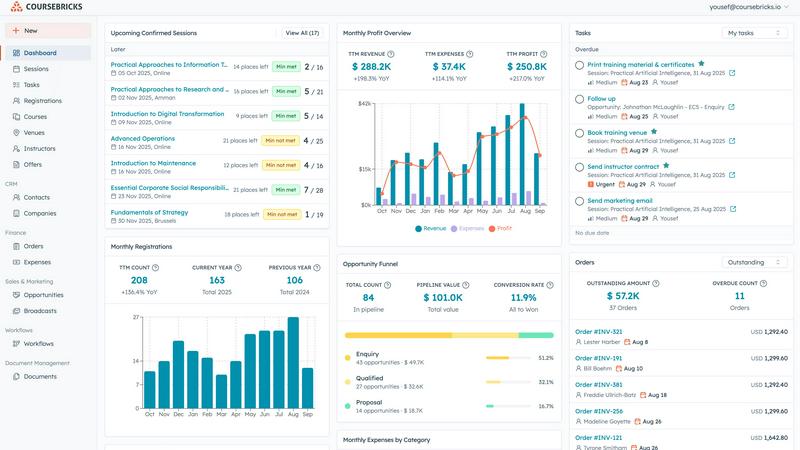
Coursebricks
Playwriter

Feature Comparison
Coursebricks
Unified Course Scheduling & Resource Management
Evolve from chaotic calendar management to a master command center. This feature provides a single, unified view of your entire course schedule. You can seamlessly assign instructors, book venues, and attach training materials to each session directly within the platform. It allows you to track resource availability in real-time, manage scheduling conflicts proactively, and keep your entire team synchronized. This eliminates the need to juggle multiple spreadsheets and tools, creating a single source of truth for your operational timeline and freeing you to optimize your schedule for maximum efficiency and capacity.
Integrated Website & Checkout
Progress from simply listing courses to owning a professional, revenue-generating storefront. Coursebricks enables you to display and sell your courses directly through your own website. The platform provides tools to create a seamless registration and checkout experience, capturing all customer information automatically into your built-in CRM. You can offer flexible payment options, including instant card payments via Stripe or invoice-based bookings, giving your clients choice while automating the data flow. This integration turns your website into a powerful sales engine, centralizing your marketing and transactional activities.
Automated Workflows & Communications
Advance from manual, repetitive tasks to intelligent, set-and-forget automation. This feature allows you to design custom workflows that trigger targeted communications at every stage of the learner journey. Automate sending confirmation emails upon registration, share pre-course materials, dispatch payment reminders, distribute feedback surveys, and deliver certificates upon completion. Each step is fully tracked, providing visibility into engagement and ensuring no administrative task falls through the cracks. This automation is the key to scaling your operations without linearly increasing your workload.
Targeted Email Marketing & Broadcasts
Move beyond generic blasts to strategic, conversion-focused campaigns. Built directly into the platform, this tool lets you segment your audience using advanced filters based on course history, interests, or behavior. You can then launch personalized email promotions and broadcasts to the right segments at the right time. This capability is designed to increase course enrollment, boost fill rates, and generate qualified leads by delivering relevant messages that resonate, transforming your CRM data into a direct growth lever.
Playwriter
Real Browser Interaction
Playwriter provides AI agents with access to your existing Chrome session, including all extensions, logins, and cookies. This eliminates the need for starting a fresh browser instance, which often leads to bot detection and a loss of context.
Full Playwright API Access
With Playwriter, agents gain the complete Playwright API through a single execute tool. This means no wrappers or schema bloat—just streamlined access to any Playwright code, allowing for low context usage and increased automation proficiency.
Collaboration in Real Time
Playwriter enables real-time collaboration between users and agents. As the agent performs tasks in your browser, you can monitor its actions live, intervene when necessary, and solve challenges like captchas or consent walls together.
Advanced Debugging and Snapshots
The integrated debugger allows users to set breakpoints and perform live code editing. Coupled with accessibility snapshots that are significantly smaller in size compared to traditional screenshots, this feature enhances both performance monitoring and troubleshooting.
Use Cases
Coursebricks
Scaling a Professional Training Provider
A growing corporate training company uses Coursebricks to transition from manual processes. They centralize scheduling for dozens of instructors across multiple venues, automate client invoicing and payment tracking with Xero, and use the integrated website to generate new leads. Targeted email campaigns based on past enrollments help them fill specialized courses, driving revenue growth while the automation handles confirmations and follow-ups, allowing the team to focus on course development and client relationships.
Modernizing a Traditional Educational Institution
A university extension program or professional development school adopts Coursebricks to digitize its offerings. They replace paper-based registrations and scattered files with a unified system. Instructors can access materials and rosters online, students register and pay through a branded portal, and certificates are auto-issued. The CRM helps manage student leads from inquiry to alumni, enabling targeted communications for continuing education, thus increasing student lifetime value and operational transparency.
Launching a New Training Business
An entrepreneur or expert starting a new training venture uses Coursebricks as their foundational operational platform from day one. They utilize the free website feature to establish a professional online presence quickly, schedule their first courses, and set up Stripe to accept payments without platform fees. Automated workflows handle all initial customer communications, making the business appear established and efficient from the outset, enabling the founder to concentrate on content creation and marketing.
Streamlining Enterprise Internal Training
A mid-to-large organization's L&D department implements Coursebricks to manage internal employee training. They schedule mandatory compliance sessions, track enrollments and completions across departments, and automate reminders to employees. Managers get visibility into their team's training status, and the system automatically generates and files completion certificates. This replaces disjointed email chains and spreadsheet trackers, ensuring compliance, saving administrative time, and providing clear audit trails.
Playwriter
Automated Web Testing
Quality assurance teams can utilize Playwriter to automate testing processes by allowing agents to interact with web applications as real users would, ensuring a higher level of test coverage and accuracy.
Data Collection and Analysis
Data analysts can leverage Playwriter to automate the extraction of data from web pages, streamlining the process of gathering insights and reducing the manual effort involved in data collection.
Customer Support Automation
Support teams can use Playwriter to automate routine inquiries and responses, allowing agents to handle multiple customer interactions simultaneously while freeing up human agents for more complex tasks.
Collaborative Development
Developers can work alongside Playwriter agents to simulate user interactions during the development phase, quickly identifying bugs and improving the overall quality of the application before deployment.
Overview
About Coursebricks
Coursebricks represents the next evolutionary stage for training providers and educational institutions seeking to scale their impact. It is a comprehensive, all-in-one training management system designed to consolidate the chaotic sprawl of spreadsheets, disparate software, and manual processes into a single, powerful platform. This software is built for the ambitious training organization that has outgrown basic tools and is ready to systematize its growth. It serves as the central nervous system for your entire operation, managing courses, instructors, venues, registrants, certificates, invoices, CRM, email marketing, and more. The core value proposition is profound simplicity and control: by providing a unified hub, Coursebricks eliminates administrative friction, allowing organizations to shift their focus from logistical overhead to delivering exceptional learning experiences. It empowers you to own your entire customer journey, from the first website visit to post-course certification, without platform fees eating into your revenue. For businesses poised to evolve from a reactive operation to a streamlined, scalable enterprise, Coursebricks is the foundational tool that makes that growth not just possible, but efficient and predictable.
About Playwriter
Playwriter is a revolutionary tool designed to enhance the capabilities of AI agents by providing them with real-time access to your actual browser session. Unlike traditional AI agents that either operate in isolated environments or face immediate bot detection, Playwriter allows agents to leverage your logged-in sessions, extensions, and cookies seamlessly. This powerful Chrome extension, combined with a full automation API, enables agents to interact with the web just as a human would, thereby improving their efficiency and effectiveness. Whether you are a developer looking to automate repetitive tasks, a QA engineer needing to test web applications, or a data analyst gathering insights, Playwriter is tailored to meet your needs. Its open-source, MIT licensed framework ensures that you have complete control over your automation processes, making it a valuable asset in any tech stack.
Frequently Asked Questions
Coursebricks FAQ
What is a training management system?
A training management system (TMS) is a centralized software platform designed to automate and streamline all administrative and operational aspects of running training programs. Unlike a simple scheduling tool or Learning Management System (LMS) focused on content delivery, a TMS like Coursebricks handles the entire business lifecycle. This includes course scheduling, resource management, registrations, payments, invoicing, customer relationship management (CRM), email marketing, and reporting. It's the operational backbone that allows training providers to scale efficiently.
Do I need technical knowledge to use Coursebricks?
No, Coursebricks is built with a user-friendly interface that requires no coding or advanced technical skills. The platform is designed for training professionals and business owners, not developers. Common tasks like setting up a course, creating an email campaign, or viewing a report are intuitive. For advanced integrations, tools like Zapier provide a no-code way to connect with thousands of other apps, and major integrations like Stripe, Xero, and WordPress are pre-built and configured through simple setup wizards.
Can I showcase my courses directly on my own website?
Absolutely. This is a core function of Coursebricks. You can seamlessly display your course catalog, schedule, and details on your existing website using integrated widgets or code snippets. Furthermore, Coursebricks offers a free, ready-to-use website feature with customizable templates and support for custom domains. This means you can have a fully functional, professional website where visitors can browse, register, and pay for courses without ever leaving your site, creating a cohesive brand experience.
Is my data secure?
Yes, data security is a top priority. Coursebricks employs robust security measures including encryption in transit and at rest. The platform is built on secure, reliable cloud infrastructure with regular backups. You maintain complete ownership of your data, including your customer list and financial information. Detailed privacy policies and data processing agreements (DPA) are available, and the integration with payment processors like Stripe means sensitive payment data is handled by PCI-DSS compliant specialists, not stored within Coursebricks itself.
Playwriter FAQ
How does Playwriter ensure security during sessions?
Playwriter operates entirely on your local machine through a WebSocket relay, ensuring that no data leaves your environment. Security is maintained by connecting directly to your existing browser session.
What happens if the agent encounters a captcha?
Playwriter is designed for collaboration. When the agent reaches a captcha, you can step in and solve it manually, allowing the agent to continue its tasks without interruption.
Can multiple agents work simultaneously with Playwriter?
Yes, Playwriter supports multiplexed sessions, allowing multiple agents or CLI instances to operate within the same browser session at the same time, enhancing productivity and efficiency.
Is Playwriter compatible with other MCP clients?
Absolutely! Playwriter works seamlessly with various MCP clients such as Cursor, Claude, and VS Code, providing flexibility and integration with your existing tools and workflows.
Alternatives
Coursebricks Alternatives
Coursebricks is a comprehensive training management software in the productivity and management category. It centralizes scheduling, registrations, payments, and reporting to help training providers streamline their operations and grow their business. Users often explore alternatives to find a solution that aligns perfectly with their growth stage. This search can be driven by specific budget constraints, the need for more advanced or niche features, or a requirement for deeper integration with their existing tech stack. The right platform should evolve with your organization's needs. When evaluating options, consider how a platform scales with your course volume and student base. Look for core functionality that automates administrative tasks, provides professional sales channels, and offers robust communication tools. The ideal solution should reduce complexity, allowing you to focus resources on delivering exceptional training.
Playwriter Alternatives
Playwriter is an innovative tool that allows users to control Chrome through AI, either via CLI or MCP. It belongs to the automation category and is designed to enhance browser interactions for AI agents, providing a more authentic browsing experience by utilizing the user's actual browser session. This unique capability sets it apart from traditional automation tools, which often lack access to browser extensions, logins, and face instant bot detection. Users often seek alternatives to Playwriter for various reasons, including budget constraints, feature requirements, or the need for specific platform compatibility. When searching for an alternative, it is essential to consider factors such as the breadth of features offered, ease of integration with existing tools, and overall cost versus value. Prioritizing these elements can help users find a solution that aligns with their specific needs and enhances their automation capabilities.