
Dokie AI vs Image3D AI
Side-by-side comparison to help you choose the right tool.

Dokie AI
Dokie AI transforms your ideas into stunning presentations in minutes, leveraging advanced AI to create and enhance professional PPT slides.
Last updated: March 19, 2026

Image3D AI
Transform any 2D image into high-quality 3D models in minutes, ready for printing or digital use, with no 3D skills.
Last updated: March 1, 2026
Visual Comparison
Dokie AI

Image3D AI
Feature Comparison
Dokie AI
AI Generate PPT
The AI Generate PPT feature allows users to describe their presentation topic in plain text, and in moments, receive a complete slide deck. This includes professional layouts, charts, and compelling content, all crafted to meet the user's specific needs. It eliminates the hassle of manual design work while ensuring high-quality results.
AI Beautify PPT
With the AI Beautify PPT feature, users can upload their existing presentations for enhancement. Dokie AI analyzes the content and automatically fixes layouts, applies professional styling, and enhances the overall design. This tool is perfect for those who want to elevate their slides without starting from scratch.
Speaker Notes Generation
Dokie AI offers a unique capability to automatically generate detailed speaker notes for each slide. This feature equips presenters with comprehensive talking points, ensuring they can deliver their presentations confidently and effectively. The notes generated are tailored to complement the content on each slide, enhancing the overall presentation experience.
Multi-format Conversion
Dokie AI supports a range of document-to-PPT conversions, including PDF to PPT, Word to PPT, HTML to PPT, and more. This extensive functionality allows users to seamlessly transform various types of documents into professional presentations, broadening the usability and versatility of the tool.
Image3D AI
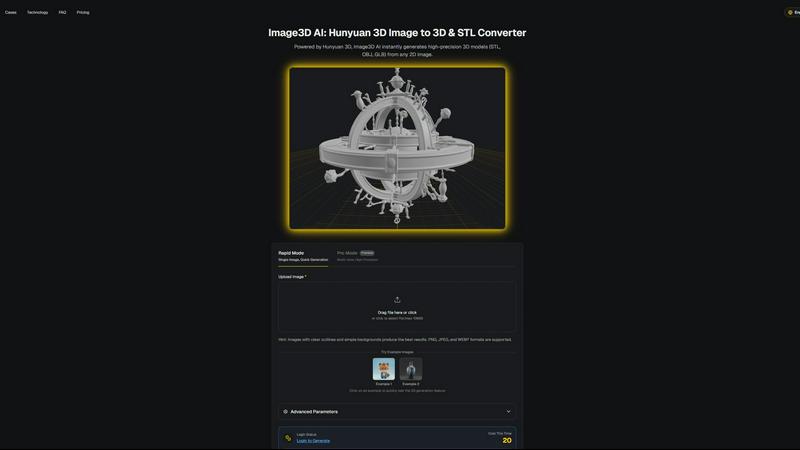
Rapid Mode
Rapid Mode allows users to generate 3D models from a single image quickly. This feature is perfect for users who need fast results without compromising quality. It is an excellent option for those who require quick prototypes or visualizations.
Pro Mode
Pro Mode is designed for users seeking high precision with multi-view images. By uploading several perspectives of an object, this mode ensures the AI captures intricate details, resulting in production-ready 3D models suitable for various applications.
Advanced Parameters
Image3D AI provides advanced parameters that allow users to customize their 3D modeling experience. Users can select different generation modes, such as Normal for balanced quality and speed or Geometry for pure mesh generation, tailoring the output to their specific needs.
Supported File Formats
The platform supports multiple file formats essential for diverse applications. Users can download their generated models as STL for 3D printing, OBJ for traditional 3D software, or GLB for modern web and AR applications, offering flexibility for various projects.
Use Cases
Dokie AI
Business Presentations
Business professionals can utilize Dokie AI to swiftly create impactful presentations for meetings, pitches, and reports. The AI-driven generation and beautification features enable them to focus on content while leaving the design complexities to the tool.
Educational Lectures
Educators can enhance their teaching materials by using Dokie AI to develop visually engaging lecture slides. The ability to generate speaker notes allows teachers to deliver their lectures with clarity and confidence, ensuring that key points are effectively communicated.
Marketing Campaigns
Marketers can take advantage of Dokie AI to create compelling presentations for campaigns and product launches. With the AI Generate PPT feature, they can quickly outline campaign strategies and visually represent data, making it easier to persuade stakeholders.
Startup Pitches
Startup founders can leverage Dokie AI to craft persuasive pitch decks that capture the essence of their business ideas. The platform's ability to produce polished presentations in a short time frame allows founders to focus on refining their business models and strategies.
Image3D AI
Game Development
For game developers, Image3D AI is a game-changer. It allows for rapid generation of game-ready 3D assets, enabling seamless integration with popular engines like Unity or Unreal Engine. This capability accelerates the development workflow, allowing teams to focus on creativity.
E-commerce
In the e-commerce sector, Image3D AI transforms product images into interactive 3D models that enhance online shopping experiences. Customers can engage with products in AR, leading to increased confidence in purchases and reduced return rates.
3D Printing
Image3D AI serves as an invaluable tool for 3D printing enthusiasts. The platform's image to STL conversion capability generates high-precision, print-ready files, enabling users to bring their digital designs into the physical world with ease.
Architectural Visualization
Architects and designers benefit greatly from Image3D AI by quickly generating architectural models. This efficiency reduces the time spent on modeling from scratch, allowing for more time to focus on design innovation and project execution.
Overview
About Dokie AI
Dokie AI is a cutting-edge AI presentation maker designed to revolutionize the way professionals create and deliver presentations. It empowers business professionals, educators, marketers, and startup founders by enabling them to produce polished and visually appealing presentations without requiring any design skills. Unlike traditional template-based tools, Dokie AI leverages the advanced capabilities of Claude Opus 4.6, allowing it to intelligently generate content structure, select appropriate layouts, and apply typography and visual design elements automatically. This innovative platform supports multiple modes including Generate for creating presentations from scratch, Beautify for enhancing existing slides, Speech for adding detailed speaker notes, and document-to-PPT conversions. With Dokie AI, users can effortlessly transform their ideas into compelling presentations, saving time and enhancing their communication effectiveness.
About Image3D AI
Image3D AI is an innovative, AI-powered tool that transforms the 3D modeling landscape by enabling users to create high-quality 3D assets from static 2D images in seconds. This powerful platform is ideal for a wide array of users, including 3D printing enthusiasts, game developers, and designers who seek to enhance their creative workflows. By harnessing Tencent's advanced Hunyuan 3D engine, Image3D AI effectively overcomes the traditional challenges associated with 3D modeling, making it accessible to everyone, regardless of their technical expertise. With its user-centric interface, creators can effortlessly generate stunning 3D models, turning their ideas into tangible assets with minimal effort. Whether the goal is to develop interactive game environments, create prototypes, or enrich product displays, Image3D AI serves as an essential tool in the modern digital design toolkit, streamlining processes and inspiring creativity.
Frequently Asked Questions
Dokie AI FAQ
What makes Dokie AI different from traditional presentation tools?
Dokie AI stands out by utilizing advanced AI technology to automatically generate and enhance presentations. Unlike template-based tools, it offers true AI-driven design and content creation, making it easier for users to achieve professional results without design expertise.
Can I convert existing documents into presentations?
Yes, Dokie AI supports multiple document-to-PPT conversions, including PDF, Word, and HTML. This feature allows users to seamlessly transform their existing documents into professional presentations with minimal effort.
How does the speaker notes generation work?
The speaker notes generation feature automatically creates detailed talking points for each slide based on the content. This helps presenters stay organized and ensures that essential information is communicated effectively during their presentations.
Is there a free trial available for Dokie AI?
While specific details about free trials are not mentioned, Dokie AI offers flexible pricing plans starting from pay-as-you-go options. Users can explore the tool's capabilities and decide which plan suits their needs best.
Image3D AI FAQ
How does Image3D AI convert 2D images to 3D models?
Image3D AI utilizes advanced algorithms powered by the Hunyuan 3D engine, analyzing the input 2D images to generate detailed 3D models. The platform supports both single images and multi-view perspectives for improved accuracy.
What types of images work best for conversion?
For optimal results, images should have clear outlines and simple backgrounds. High-contrast images without blurriness or occlusions yield the best 3D models, particularly for applications such as 3D printing.
Can I use Image3D AI for commercial purposes?
Yes, the 3D models generated via Image3D AI can be used for commercial purposes, including product displays, game assets, and architectural visualizations. Users should ensure they adhere to licensing agreements for any proprietary content.
What file formats can I export my models in?
Image3D AI offers several export options, including STL for 3D printing, OBJ for traditional 3D editing, and GLB for web and AR applications. This flexibility allows users to choose the format that best fits their project needs.
Alternatives
Dokie AI Alternatives
Dokie AI is a pioneering AI presentation maker designed to facilitate the creation of professional-quality slides in a matter of minutes. It caters to a wide array of users, including business professionals, educators, marketers, and startup founders, by leveraging advanced AI technology powered by Claude Opus 4.6. Users often seek alternatives to Dokie AI for various reasons, including pricing concerns, specific feature sets that may better suit their needs, or compatibility with different platforms. When exploring alternatives, it's crucial to consider factors such as the ease of use, customization options, pricing structures, and the overall effectiveness of the AI capabilities offered. Finding the right alternative involves assessing how well the tool aligns with your presentation goals and workflow. Look for features that enhance productivity, such as content generation and design automation, alongside user-friendly interfaces that require minimal design skills. Additionally, consider customer support, community resources, and integration with other tools you may already be using, ensuring a seamless transition to your new presentation solution.
Image3D AI Alternatives
Image3D AI is a cutting-edge, AI-driven tool that transforms 2D images into high-quality 3D models, catering to a wide range of users including designers, 3D printing enthusiasts, and game developers. As the demand for streamlined 3D modeling solutions grows, many users seek alternatives to Image3D AI due to factors such as pricing, specific feature sets, or compatibility with their existing platforms. When exploring alternatives, it's essential to consider aspects like ease of use, export formats, material generation capabilities, and the overall adaptability of the tool to fit various project requirements. --- [{"question": "What is Image3D AI?", "answer": "Image3D AI is an AI-powered tool that converts 2D images into detailed 3D models quickly and efficiently."}, {"question": "Who is Image3D AI for?", "answer": "Image3D AI is designed for a diverse audience, including 3D printing enthusiasts, game developers, and designers."}, {"question": "Is Image3D AI free?", "answer": "The pricing structure for Image3D AI may vary, so it's best to check the official website for the latest information."}, {"question": "What are the main features of Image3D AI?", "answer": "Key features include multi-format export options, automated PBR material generation, and dual modes of operation for quick or precise modeling."}]