
Dokta vs Fieldtics
Side-by-side comparison to help you choose the right tool.

Dokta automates document management for SMBs and freelancers, streamlining invoicing, cash flow, and client interactions effortlessly.
Last updated: April 4, 2026

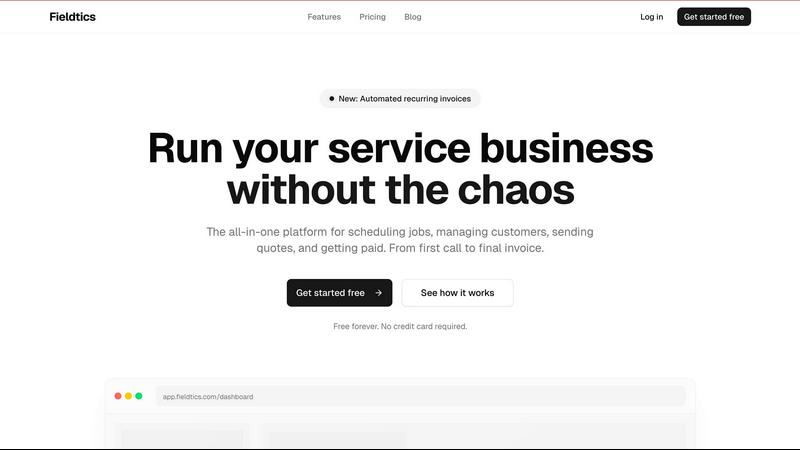
Fieldtics is an all-in-one platform that simplifies scheduling, customer management, invoicing, and payments for.
Last updated: February 28, 2026
Visual Comparison
Dokta

Fieldtics
Feature Comparison
Dokta
Automated Invoice Management
Dokta automates the entire invoice management process in just three simple steps. Users can upload a document via photo, scan, or PDF, and within 60 seconds, Dokta's AI analyzes the document, extracting vital information like type, amount, and deadlines. This feature saves time and minimizes manual entry errors.
Real-Time Cash Flow Tracking
Dokta provides users with a comprehensive overview of their financial status through real-time cash flow tracking. You can monitor invoiced amounts, collected payments, outstanding invoices, and VAT in an easy-to-read graphical format. This feature allows for better financial decision-making and helps users stay on top of their business health.
Client and Supplier Management
Dokta enriches your client and supplier database by automatically integrating SIRET numbers, providing payment scoring, and maintaining a complete historical record for each entity. This feature ensures that you have all necessary information at your fingertips, simplifying the management of business relationships.
Anomaly Detection
Dokta offers a robust anomaly detection feature that safeguards your documents against common errors. It detects issues such as modified IBANs, duplicates, inconsistent VAT numbers, and missing document numbering. This feature enhances your document security and ensures compliance with financial regulations.
Fieldtics
Smart Job Scheduling
Fieldtics offers an intuitive job scheduling feature that allows businesses to efficiently allocate tasks and resources, ensuring that every job is assigned to the right team member at the right time. This feature enables users to visualize their schedules, monitor progress, and adjust assignments as necessary, fostering a proactive approach to service delivery.
Seamless Customer Relationship Management (CRM)
The integrated CRM system within Fieldtics helps businesses manage customer interactions and data throughout the customer lifecycle. This feature enables users to maintain comprehensive customer profiles, track communication history, and analyze customer behavior, ultimately driving better relationships and increased customer satisfaction.
Effortless Invoicing and Payment Processing
Fieldtics streamlines the invoicing process by allowing users to create and send invoices quickly and efficiently. This feature includes customizable invoice templates and supports various payment methods, making it easy for clients to pay their bills, thus improving cash flow and reducing payment delays.
Automated Recurring Invoices
With the new automated recurring invoices feature, Fieldtics simplifies the billing process for ongoing services. Users can set up recurring invoices for regular clients, ensuring timely billing without the need for manual intervention. This automation not only saves time but also enhances the predictability of revenue streams.
Use Cases
Dokta
Freelance Developer
As a freelance developer, managing contracts and invoices can be overwhelming. With Dokta, you can automatically generate monthly invoices from time-based contracts (TJM), track payments, and receive reminders for overdue invoices. This allows you to focus on coding rather than administrative tasks.
Creative Freelancers
For creative freelancers, the ability to send quotes with online acceptance links streamlines the project workflow. Dokta enables the seamless conversion of accepted quotes into invoices with just one click, simplifying the financial management of creative projects from start to finish.
Auto-Entrepreneurs
Auto-entrepreneurs often face challenges in adhering to compliance and tracking payments. With Dokta, you can create compliant invoices, monitor cash flow, and receive alerts for URSSAF deadlines, making it easier to manage your business without unnecessary stress.
Small and Medium-Sized Businesses
SMBs benefit from Dokta's comprehensive document management capabilities, which include automating reminders for unpaid invoices and managing contracts. The platform provides real-time insights into financial health, enabling business owners to make informed decisions and drive growth.
Fieldtics
Managing a Cleaning Service
A cleaning service company can use Fieldtics to schedule jobs efficiently by assigning cleaners to specific locations, tracking their progress in real-time, and managing customer preferences. This ensures that all client needs are met while optimizing workforce utilization.
Running an Electrical Contracting Business
Electrical contractors can leverage Fieldtics to manage multiple projects simultaneously. With features like job scheduling and CRM, they can keep track of client communications, project timelines, and invoicing, resulting in smoother operations and improved client satisfaction.
Handling Landscaping Projects
Landscaping businesses can benefit from Fieldtics by organizing their projects, tracking expenses, and managing customer relationships all in one place. This allows them to focus on delivering high-quality service while maintaining tight control over their operational costs.
Streamlining HVAC Services
HVAC service providers can utilize Fieldtics to manage appointments, send quotes, and process payments quickly. The ability to automate recurring invoices for maintenance contracts ensures steady revenue and allows technicians to focus on providing excellent service.
Overview
About Dokta
Dokta is an innovative AI-powered document management platform designed specifically for freelancers, solo entrepreneurs, auto-entrepreneurs, and small to medium-sized businesses (SMBs). This cutting-edge tool streamlines the document management process, allowing users to effortlessly drop any document type—be it an invoice, quote, or contract—into the platform. Within 60 seconds, Dokta's advanced AI engine reads, classifies, and extracts key data, eliminating the need for manual entry and reducing the risk of errors. The platform effectively manages the entire document lifecycle, enabling users to create professional invoices and quotes, track payments, automate reminders for overdue invoices, and manage contracts and deadlines. By turning documents into actionable tasks, Dokta ensures you never lose files, miss deadlines, or spend your weekends on administrative work. With features that build a client database from your documents and track cash flow in real-time, Dokta is an essential tool for anyone looking to enhance their productivity and focus on what truly matters—growing their business. The platform is GDPR compliant and hosted in Europe, ensuring your data is secure and accessible.
About Fieldtics
Fieldtics is a transformative platform designed to empower service businesses by streamlining their operations amidst the often overwhelming chaos of daily tasks. It serves as an all-in-one solution that integrates essential tools such as job scheduling, customer relationship management, invoicing, and payment processing into a single, easy-to-use interface. This platform is tailored for teams working both in the office and on-site, ensuring that everyone remains connected and synchronized with real-time updates accessible through web and mobile applications. Fieldtics not only allows users to customize dashboards, branding, and menus to reflect their unique business identity but also seamlessly integrates with existing tools to automate workflows and centralize data. By managing leads, customers, projects, time, expenses, and recurring invoices, Fieldtics provides businesses with the clarity and control crucial for sustainable growth and success.
Frequently Asked Questions
Dokta FAQ
How does Dokta ensure data security?
Dokta is 100% GDPR compliant and hosts its data in Europe via AWS. It employs AES-256 encryption to protect your sensitive information, ensuring that your documents are secure and compliant with privacy regulations.
Can I use Dokta for free?
Yes! Dokta offers a free tier that allows you to manage up to 15 documents per month. This plan provides access to essential features, enabling you to experience the benefits of automated document management without any cost.
What types of documents can I upload to Dokta?
Dokta supports various document types, including invoices, quotes, and contracts. You can upload documents as photographs, scans, or PDFs, making it easy to digitize and manage your paperwork.
What is the typical analysis time for a document in Dokta?
Dokta's AI engine analyzes documents in under 60 seconds. This rapid processing time allows you to quickly access key data and take necessary actions without delay, improving your overall productivity.
Fieldtics FAQ
What types of businesses can benefit from Fieldtics?
Fieldtics is designed primarily for service-based businesses across various industries, including cleaning services, electrical contracting, landscaping, and HVAC. Any business that requires job scheduling, CRM, and invoicing can leverage Fieldtics for improved efficiency.
Is there a mobile app available for Fieldtics?
Yes, Fieldtics offers a mobile app that allows users to manage their schedules, communicate with team members, and monitor job progress from anywhere. This ensures that teams remain connected and informed regardless of their location.
How does Fieldtics integrate with other tools?
Fieldtics is built to integrate seamlessly with a variety of existing tools. Users can connect their favorite applications to sync data, automate workflows, and streamline processes, making it easier to manage their entire business ecosystem.
Can I customize Fieldtics to match my business branding?
Absolutely! Fieldtics allows users to customize their dashboards, branding, and menu layouts, ensuring that the platform feels like a natural extension of their business. This personalization helps maintain brand identity and enhances user experience.
Alternatives
Dokta Alternatives
Dokta is an innovative AI-powered document management platform designed specifically for freelancers, solo entrepreneurs, auto-entrepreneurs, and small to medium-sized businesses (SMBs). It automates the handling of various business documents, such as invoices, quotes, and contracts, allowing users to streamline their administrative tasks and maintain a focus on growth. Users often seek alternatives to Dokta due to factors like pricing, specific features, or compatibility with their preferred platforms, as each business has unique needs that may not be fully met by a single solution. When choosing an alternative to Dokta, it is essential to consider several key aspects. Look for platforms that offer similar automation capabilities and document management features, as well as flexibility in pricing to suit your budget. Additionally, ensure that the alternative supports your specific document types and integrates seamlessly with the tools you already use, helping you maintain efficiency as your business evolves.
Fieldtics Alternatives
Fieldtics is an all-in-one platform designed for service businesses, focusing on streamlining operations such as scheduling, customer management, invoicing, and payment processing. As companies grow and evolve, they often seek alternatives to Fieldtics to explore options that may better fit their unique needs, whether due to pricing constraints, desired features, or specific platform functionalities. Users should look for alternatives that prioritize ease of use, integration capabilities, and scalability to ensure they find a solution that supports their ongoing operational growth and efficiency.