
Filator vs Patrivox
Side-by-side comparison to help you choose the right tool.
Filator
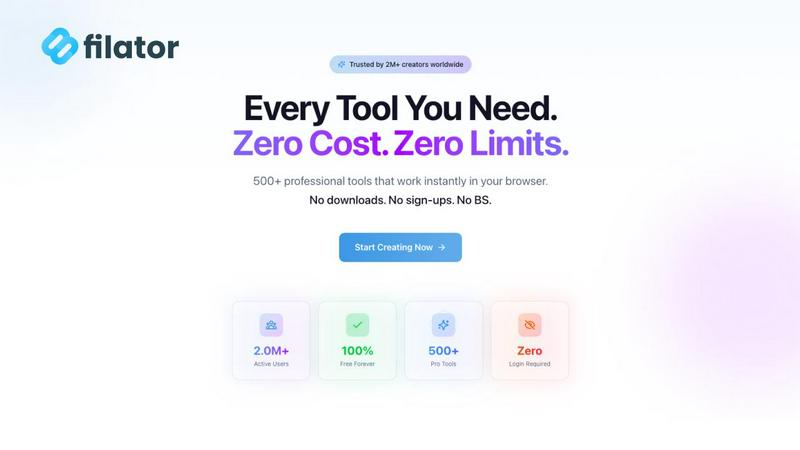
Filator evolves your workflow with 500+ free tools to create, convert, and automate tasks in one place.
Last updated: March 1, 2026

Patrivox
Patrivox transforms your archives into searchable treasures in minutes using advanced AI technology for effortless.
Last updated: March 4, 2026
Visual Comparison
Filator
Patrivox
Feature Comparison
Filator
Expansive, Category-Based Tool Library
Filator organizes its vast collection of over 500 utilities into intuitive categories like AI Tools, PDF Tools, Image Tools, and Social Media Tools, making discovery effortless. This structured evolution from a simple list to a categorized workspace allows users to quickly find the perfect tool for any task, from compressing a PDF and converting an image across 132 format combinations to generating QR codes and formatting JSON. The platform is continuously expanding, ensuring users always have access to the latest professional-grade utilities for any challenge.
Zero-Friction, Instant Access
The platform is built on the principle of removing every barrier to productivity. There is no mandatory signup to start using the core toolkit; you simply open a tool and begin working. This design philosophy eliminates the time wasted on account creation, email verification, and password management. The focus is purely on delivering real-time previews and immediate, high-quality output the moment you need it, embodying a true progression towards frictionless digital work.
AI-Powered Intelligent Assistance
Filator integrates advanced AI to supercharge common tasks, moving beyond basic utilities to intelligent processing. Features like the AI Content Rewriter, AI Chat with Files and Links, and AI Image Generator understand context and deliver sophisticated results in seconds. This layer of smart assistance represents a significant growth stage, transforming the platform from a passive toolkit into an active productivity partner that helps users generate essays, craft emails, summarize content, and create visuals with unprecedented speed.
Powerful Workflow Automation
Recognizing that professionals often chain tasks together, Filator enables powerful workflow automation. Users can seamlessly connect multiple tools to automate repetitive processes, such as converting a batch of images, merging them into a PDF, and then compressing the final document. This feature marks the platform's evolution into a true digital workspace, saving immense time and reducing the cognitive load of switching between disparate websites and applications for multi-step projects.
Patrivox
Automation
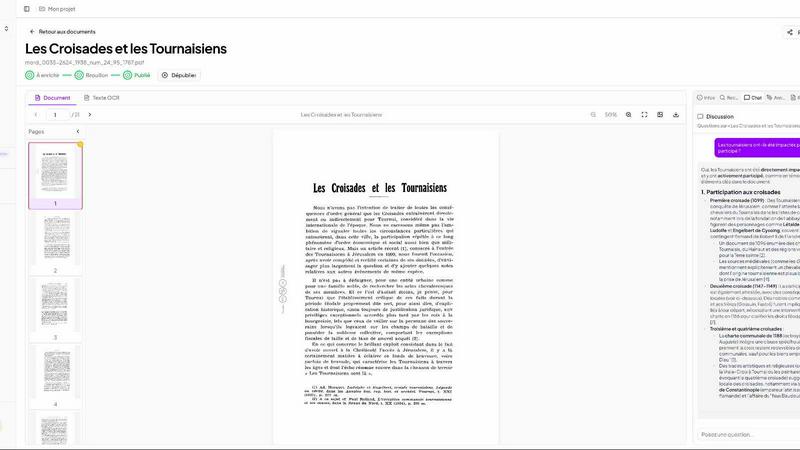
With Patrivox, the process of digitizing documents is simplified to a drag-and-drop action. Users can upload their PDFs in bulk, and within minutes, the Mistral AI reads, classifies, and indexes every page automatically. This means no manual entry or tedious configuration is required, allowing organizations to focus on utilizing their data instead of organizing it.
Next-gen OCR (Mistral AI)
Patrivox employs cutting-edge optical character recognition technology to ensure that text is accurately extracted from documents. This advanced OCR capability not only reads text but also identifies entities such as names, locations, and dates, enriching the metadata of each document and making it significantly easier to search through vast collections.
Smart Search Functionality
Finding information within a large archive can be time-consuming, but Patrivox makes it instantaneous. Users benefit from full-text search across their entire collection, complete with typo tolerance. Additionally, they can apply filters by date, author, or document type, or even ask questions in plain language, with the AI providing sourced answers, making the search experience intuitive and efficient.
Interactive Knowledge Graph
Patrivox offers an innovative knowledge graph that visually represents the connections between entities found within documents. This feature allows users to navigate through a web of relationships between people, places, and organizations, uncovering hidden links and insights that may have been overlooked, thus enriching the research experience.
Use Cases
Filator
Streamlining Content Creation and Marketing
Marketers and social media managers use Filator to accelerate their entire content pipeline. They can generate ideas with AI tools, create fake social media posts (like Instagram or Tweets) for mockups, design thumbnails with the image editor, and generate QR codes for campaigns—all within a single, cohesive platform. This eliminates the need for five different websites, drastically cutting down production time and helping teams move from concept to publishable asset faster.
Enhancing Developer and Technical Workflows
Developers and technical writers rely on Filator for a suite of utilities that integrate smoothly into their daily grind. They can format and validate JSON, generate secure passwords and UUIDs, count words in documentation, and convert files between various formats needed for development. Having these reliable, no-signup tools in one tab boosts efficiency, allowing them to maintain focus on their core coding tasks without disruptive context-switching.
Managing Documents and Administrative Tasks
Students, freelancers, and office professionals utilize Filator to handle routine document work with ease. They can merge, split, compress, and convert PDFs for reports and submissions; resize and convert images for presentations; and generate professional invoices quickly. This turns complex, often frustrating administrative tasks into simple, few-click operations, freeing up time for more meaningful work and personal growth.
Leveraging AI for Personal and Professional Projects
Individuals from all fields use Filator's AI toolkit to augment their capabilities. A student can get a YouTube video summarized for research, an entrepreneur can rewrite website copy, and a designer can remove image backgrounds instantly. This democratizes access to powerful AI, allowing users at any skill level to leverage cutting-edge technology to enhance their projects, learn new things, and improve the quality of their output without a steep learning curve.
Patrivox
Municipal Archives
Patrivox is ideal for municipal services looking to digitize and showcase their deliberations, registers, and correspondence. By making these documents searchable, Patrivox enhances transparency and accessibility for citizens and researchers alike.
Historical Societies
For historical societies, Patrivox provides a platform to digitize and make searchable their bulletins and documentary collections. This not only helps in preserving history but also enables wider public engagement and research opportunities.
Heritage Libraries
Heritage libraries can utilize Patrivox to open their special collections to research and public access. By digitizing rare and valuable documents, these institutions can ensure that knowledge is not locked away but is readily available for academic and personal exploration.
Dioceses and Parishes
Patrivox serves dioceses and parishes by preserving and indexing their parish registers and ecclesiastical archives. This not only aids in maintaining historical records but also facilitates easier access for genealogical research and community inquiries.
Overview
About Filator
Filator represents the evolution of the digital workspace, born from a clear vision: to eliminate the friction that plagues online productivity. It began as a simple collection of utilities for developers and has matured into a comprehensive, unified platform trusted by over 14,000 active users across 150+ countries. This growth stage reflects a deep understanding of the modern professional's need for speed, privacy, and power without compromise. Filator is a revolutionary hub offering over 500 professional-grade online tools, meticulously organized for instant access. It serves a diverse audience including developers, designers, marketers, students, and entrepreneurs who refuse to waste time with signup forms, paywalls, or subpar results. The core value proposition is unmatched efficiency through a seamless, zero-friction experience. Users can create, convert, and automate tasks involving PDFs, images, AI, and workflows entirely in one place, achieving maximum productivity with minimal effort. With a steadfast commitment to continuous improvement and user-centric design, Filator has established itself as the go-to solution for anyone needing reliable, high-quality tools to finish work faster and move their projects forward.
About Patrivox
Patrivox is an innovative European SaaS platform that revolutionizes the way organizations manage their archives. Designed specifically for heritage institutions, municipal services, associations, and enterprises, Patrivox transforms extensive collections of scanned documents into a searchable and interactive knowledge base. By leveraging advanced optical character recognition (OCR) technology powered by Mistral AI, Patrivox allows users to easily drag and drop their PDF files. Within minutes, every word is extracted, and key entities such as people, places, and organizations are identified and connected within an interactive knowledge graph. This powerful tool caters to those seeking quick and efficient access to information, enabling users to conduct instant searches with typo tolerance or pose natural language questions, with AI providing sourced answers. Patrivox’s core value proposition lies in unlocking previously inaccessible knowledge, making it easily searchable and shareable, thus enhancing research capabilities and public access to vital information.
Frequently Asked Questions
Filator FAQ
Is Filator really free to use?
Yes, Filator offers a robust free plan that provides access to over 60 core tools without any cost. This includes many PDF, image, text, and developer utilities. The platform operates on a transparent freemium model; you only need to consider the paid plans if you require extensive usage of the premium AI-powered features, which operate on a credit system, or need advanced capabilities like unlimited dynamic QR codes and API access.
What are AI credits and how do they work?
AI credits are the currency used for Filator's advanced AI features, such as the AI Content Rewriter, AI Image Generator, and AI Chat. Each action within these tools consumes a certain number of credits. For example, generating an image or rewriting a paragraph might use one credit. The Free plan includes a monthly allowance, while paid plans offer substantially higher or unlimited credits, allowing for heavier, professional usage of these intelligent tools.
How does Filator ensure privacy and data security?
Privacy is a foundational principle for Filator. The platform is designed with a strict no-data-collection policy for its core tool usage. Files processed through tools like PDF compressors or image converters are handled securely and are not stored permanently on Filator's servers. The service requires no signup for basic tools, meaning no personal data is tied to your activity. This commitment ensures a private and secure experience for all users.
Can I use Filator on mobile devices?
Absolutely. Filator is built as a responsive web application, meaning it works seamlessly on desktops, tablets, and smartphones. The interface automatically adjusts to fit your screen size, providing an optimized experience whether you're at your desk or on the go. This allows you to quickly convert a document, generate a QR code, or use an AI tool directly from your mobile browser without needing to download a separate app.
Patrivox FAQ
How does Patrivox ensure data security?
Patrivox is 100% hosted in Europe and is GDPR-native, ensuring that all data is handled in compliance with strict European data protection regulations. Additionally, an audit log is maintained for tracking changes and access.
Can I use Patrivox for bulk document uploads?
Yes, Patrivox supports batch importing, allowing users to drag and drop hundreds of PDF files at once. This feature makes it easy to digitize large collections quickly and efficiently.
Is there a free trial available for Patrivox?
Yes, Patrivox offers a free trial that allows users to digitize up to 100 pages with a one-time credit, giving them a chance to explore the platform's features before committing to a paid plan.
What kind of support does Patrivox offer?
Patrivox provides varying levels of support based on the subscription plan. All plans include unlimited readers, while higher-tier plans offer priority email support and additional administrative access for enhanced user management.
Alternatives
Filator Alternatives
Filator is a comprehensive digital workspace in the tech tools category, offering over 500 free utilities for tasks like file conversion, data formatting, and content generation. It's designed for professionals who value speed, privacy, and an ad-free experience without signups or subscriptions. Users often explore alternatives for various reasons. Some may require a toolset tailored to a very specific niche, while others might prioritize deep integrations with existing platforms like Google Drive or Notion. The search can also be driven by a need for advanced collaborative features or a different user interface philosophy that better matches a team's workflow. When evaluating alternatives, consider your core requirements. Key factors include the range and specialization of tools, data privacy policies, platform accessibility (web, desktop, mobile), and the overall user experience. The goal is to find a solution that not only matches your current task list but also supports your productivity evolution.
Patrivox Alternatives
Patrivox is an innovative European SaaS platform that specializes in digitizing and classifying documents, transforming them into a fully searchable knowledge base. It is tailored for organizations such as heritage institutions, municipal services, and enterprises, providing users with advanced tools to manage and access vast collections of scanned documents seamlessly. Users often seek alternatives to Patrivox for various reasons, including pricing, specific feature sets, and compatibility with existing platforms. When evaluating alternatives, it's essential to consider factors such as OCR capabilities, user interface, search functionality, and the ability to integrate with other systems. These aspects will ensure that the chosen solution meets the unique needs of your organization and enhances information accessibility.