
Hush Touch | Voice-to-Text for MacOS vs TrafficClaw
Side-by-side comparison to help you choose the right tool.

Hush Touch | Voice-to-Text for MacOS
Hush Touch evolves your Mac dictation with smarter, on-device voice-to-text that learns your vocabulary.
Last updated: February 28, 2026

TrafficClaw
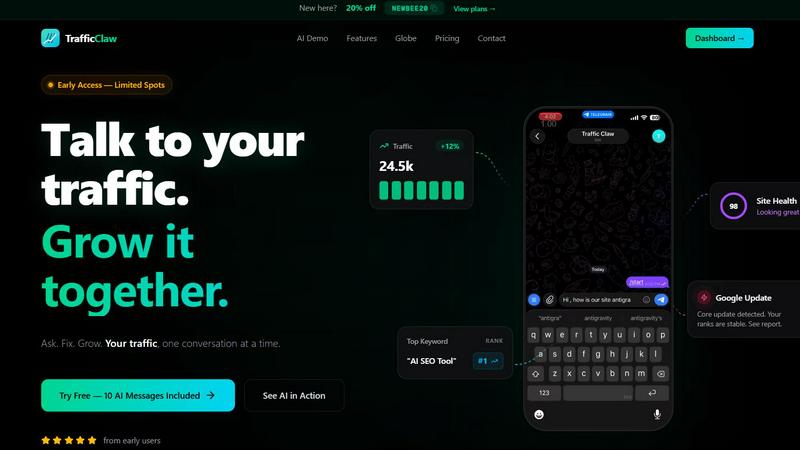
TrafficClaw is your AI analyst that talks to your SEO data to give you actionable growth verdicts.
Last updated: April 13, 2026
Visual Comparison
Hush Touch | Voice-to-Text for MacOS

TrafficClaw
Feature Comparison
Hush Touch | Voice-to-Text for MacOS
Dual-Engine Recognition & AI Polish
Hush Touch leverages a sophisticated dual-engine architecture for unmatched accuracy. It simultaneously uses Apple's DictationTranscriber for natural flow and punctuation and SFSpeechRecognizer to spot custom vocabulary and technical terms. These outputs are then merged and refined with a final Apple Intelligence pass, all processed on your Mac. This multi-stage, on-device approach ensures your transcriptions are not only accurate but also contextually aware and polished, eliminating the lag and privacy concerns of cloud-based alternatives.
Custom Vocabulary with Adaptive Learning
The application evolves with your language. You can manually add up to 500 terms, but the true power lies in its adaptive learning. When you correct a transcription, Hush Touch automatically detects this and adds the right word to your personal vocabulary. It employs frequency-weighted language models and can even create per-app profiles, meaning it learns the specific jargon you use in your email client versus your coding environment, becoming more precise with every use.
Smart Text Processing & Hands-Free Commands
Beyond simple transcription, Hush Touch acts as an intelligent writing assistant. It automatically removes filler words ("um," "like"), applies auto-correction for common slips, and can format numbered lists from your speech. For ultimate workflow integration, it supports fully hands-free operation via Siri and includes customizable voice commands. You can set it to auto-insert text after a pause and use phrases like "okay send message" to execute actions, streamlining your process from thought to final action.
100% On-Device Privacy & Lightweight Design
Privacy isn't a premium feature; it's the foundation. Every aspect of Hush Touch, from voice capture to the final AI polish, happens locally on your Mac. No audio or data ever leaves your device. This commitment is paired with an incredibly lightweight 5.5 MB application that launches instantly and runs efficiently in the background, ensuring robust performance without compromising your system's resources or your personal data security.
TrafficClaw
AI Analyst Chat
This is the heart of TrafficClaw. Move beyond static reports by conversing with an AI trained on your specific website data. Ask complex questions in plain English like, "Which pages lost rankings after the last core update?" or "Find content gaps for my top competitor." The AI digs into your connected GA4 and Search Console data to deliver precise verdicts, supported by evidence and actionable recommendations, all within a conversational interface. It turns analysis from a chore into an intuitive dialogue.
SEO Intelligence Suite
Go beyond basic rank tracking with a suite of advanced SEO tools designed for proactive growth. The platform automatically detects keyword gaps, alerts you to content decay, identifies internal cannibalization issues, and provides optimization strategies for AI search engines (AEO). This feature ensures you are not just maintaining your SEO health but consistently finding and capitalizing on new opportunities to climb the rankings.
Integrated Analytics Dashboard
Stop switching tabs. TrafficClaw unifies your critical metrics into one comprehensive overview. View real-time visitor counts, traffic trends, bounce rates, and conversion funnels alongside your SEO performance data. This holistic dashboard provides the context needed to understand the full story behind your numbers, connecting user behavior directly to search performance.
Embedded Live Visitor Globe
Engage your audience and showcase your reach with a unique, embeddable 3D globe that visualizes your real-time GA4 traffic. With a single line of code, you can add an interactive map to your site showing live visitor locations and an activity feed. This tool requires no additional tracking scripts and serves as both a dynamic marketing asset and a real-time engagement monitor.
Use Cases
Hush Touch | Voice-to-Text for MacOS
Drafting Long-Form Content and Documents
For writers, researchers, and content creators, Hush Touch unlocks a fluid drafting process. Speak your thoughts naturally to overcome writer's block and capture ideas at the speed of speech. The smart punctuation, filler word removal, and adaptive vocabulary learning ensure the initial transcript is remarkably clean, significantly reducing editing time and helping you maintain a clear, consistent tone throughout lengthy documents.
Technical and Medical Documentation
Professionals with specialized lexicons, such as software engineers dictating code snippets with terms like "Kubernetes" or physicians documenting patient notes with complex medical terminology, find immense value. Hush Touch's custom vocabulary and per-app learning profiles ensure niche jargon is recognized accurately from the start, improving documentation efficiency and accuracy where other generic dictation tools fail.
Managing Communication and Email
Transform your inbox management by dictating emails and messages hands-free. The dedicated Email context mode optimizes transcription for correspondence, and the ability to send a message directly with a voice command like "send it" creates a seamless, efficient workflow. This is ideal for busy professionals looking to clear their communication queue quickly without ever touching the keyboard.
Capturing Ideas and Meeting Notes
Use Hush Touch as a digital thought partner. Quickly launch it with a hotkey to capture fleeting ideas, brainstorm project plans, or take real-time notes during meetings. The app's speed and offline capability mean you can rely on it anywhere, ensuring no insight is lost. The Notes context mode helps format these captures cleanly for later review and action.
TrafficClaw
Diagnosing Sudden Traffic Drops
When your analytics show a worrying dip, instead of spending hours cross-referencing data, simply ask the AI Analyst. It will analyze your connected data to pinpoint the cause—whether it's a Google algorithm update impacting specific pages, a technical site error, a spike in competitor activity, or seasonal trends—and provide a prioritized list of fixes to recover your rankings.
Uncovering New Keyword Opportunities
Continuously grow your organic reach by using TrafficClaw to identify untapped keyword gaps. The AI can analyze your current content and search performance against competitor landscapes or industry trends to recommend high-potential, relevant keywords you should target, complete with content suggestions and difficulty assessments.
Automating Technical SEO Audits
Maintain peak site health without manual checks. TrafficClaw's site audit feature runs deep, page-level analyses, monitoring Core Web Vitals, performance scores, and on-page SEO factors. It then generates auto-fix suggestions, allowing you to proactively address issues that could harm user experience and search rankings before they impact traffic.
Generating Optimized Content & Schema
Streamline content creation with AI-powered tools. From generating blog post outlines based on keyword research to creating precise JSON-LD schema markup for rich results, TrafficClaw helps you produce SEO-friendly content faster. The internal linking optimizer also suggests relevant connections within your site to boost authority and crawl efficiency.
Overview
About Hush Touch | Voice-to-Text for MacOS
Hush Touch represents the next stage in the evolution of personal computing: a move away from cloud-dependent services towards powerful, private, and intelligent on-device tools. It is a sophisticated voice-to-text application built exclusively for macOS, designed to transform spoken word into polished written text with remarkable accuracy and speed. At its core, Hush Touch is for anyone who writes—be it emails, messages, notes, documents, or code—and seeks a more natural, efficient, and hands-free workflow. Its primary value proposition is a powerful trifecta: superior AI-driven transcription that learns and adapts to you, complete privacy through 100% on-device processing, and a simple, one-time payment that liberates users from subscription fatigue. By intelligently blending two native Apple transcription engines and applying a final Apple Intelligence pass, Hush Touch delivers cleaner text, learns your unique vocabulary, and removes verbal filler words, all while operating entirely offline. This isn't just another dictation tool; it's a commitment to building a smarter, more private, and more autonomous way of working that grows alongside you.
About TrafficClaw
TrafficClaw is the evolution of website analytics, transforming raw data into a clear, actionable growth conversation. It is built for founders, marketers, and developers who are tired of juggling disconnected tools like Google Analytics and Search Console, only to be left with graphs and no genuine answers. The platform's core value proposition is simple yet revolutionary: you ask questions about your traffic in natural language, and its AI Analyst provides specific, data-backed verdicts and fixes. Instead of generic advice, you get insights rooted in your live Google Analytics 4 and Search Console data. This means you can move directly from asking "Why did my traffic drop?" or "What's my next big keyword opportunity?" to implementing concrete steps that drive growth. TrafficClaw consolidates analytics dashboards, SEO intelligence, site audits, and content tools into a single intelligent command center, making the journey from data to decision to execution seamless and efficient. It represents the next stage in digital growth, where your data doesn't just report history—it actively collaborates with you to build the future.
Frequently Asked Questions
Hush Touch | Voice-to-Text for MacOS FAQ
How does Hush Touch's accuracy compare to cloud-based services?
Hush Touch achieves superior accuracy for many users by leveraging two local Apple engines and an AI final pass, specifically optimized for on-device processing. While cloud services have vast datasets, Hush Touch's strength is its personalized, adaptive learning. It gets smarter the more you use it, learning your voice, accent, and unique vocabulary without ever sending your data to a server, offering a perfect balance of high accuracy and absolute privacy.
Can I use Hush Touch completely offline?
Yes, absolutely. This is a core design principle. Hush Touch requires no internet connection to function. All voice processing, transcription, vocabulary learning, and text polishing occur 100% on your Mac's hardware. This makes it reliable in any situation, from flights to areas with poor connectivity, while guaranteeing your data never traverses the web.
What is included in the one-time $20 license?
The one-time $20 payment grants you a lifetime license for Hush Touch on macOS. This includes all current features—dual-engine transcription, custom vocabulary, adaptive learning, smart text processing, and all privacy guarantees—as well as future updates. There are no subscriptions, monthly fees, or tiered plans, representing a significant long-term saving compared to other dictation software.
How does the adaptive vocabulary learning work?
The learning is automatic and context-aware. When you manually correct a word in the transcribed text, Hush Touch detects this correction and adds the right spelling/term to your personal vocabulary list. It also uses frequency weighting, prioritizing words you use often. You can create different vocabulary profiles for different applications (e.g., Xcode vs. Mail), and the app will boost the relevant terms when you switch to that app.
TrafficClaw FAQ
How does TrafficClaw access my data?
TrafficClaw uses secure, read-only Google OAuth to connect to your Google Analytics 4 and Search Console accounts. This means we can view your data to provide insights, but we cannot edit, delete, or modify anything within your Google accounts. Your data remains yours and is not used to train public AI models.
What makes the AI advice better than generic tips?
The AI Analyst is unique because it grounds every response in your live, first-party data. Instead of offering one-size-fits-all blog advice, it cross-references your specific traffic patterns, keyword rankings, and site performance to deliver personalized verdicts and actionable steps that are relevant to your website's exact situation.
Is there a setup or configuration required?
Setup is designed to be virtually instant. After signing in with Google, TrafficClaw auto-detects your GA4 properties and Search Console sites. Your dashboard and AI insights populate immediately with no manual configuration needed, allowing you to start asking questions within minutes.
Can I try TrafficClaw for free?
Yes, TrafficClaw offers a free trial that includes 10 AI messages. This allows you to connect your data and experience the core conversational analysis functionality firsthand to see the value it provides before committing to a paid plan.
Alternatives
Hush Touch | Voice-to-Text for MacOS Alternatives
Hush Touch | Voice-to-Text for MacOS is a specialized AI assistant that elevates dictation by operating entirely on your device. It represents a significant step forward in personal productivity tools, focusing on privacy and seamless integration into the MacOS writing workflow. Users often seek tools that match their specific stage of growth, whether they are just beginning to explore voice commands or are seasoned professionals needing advanced, offline-capable solutions. The search for alternatives is a natural part of evolving your toolkit. Needs change; perhaps a project demands real-time collaboration features, a different pricing model like a subscription fits a budget better, or support for multiple operating systems becomes essential. The core desire, however, remains constant: to communicate ideas fluidly without being hindered by the keyboard. When evaluating options, consider your current priorities. Key differentiators often include the processing location for privacy, the accuracy and contextual understanding of the transcription, the cost structure, and how intuitively the tool fits into your existing applications. The right choice is the one that aligns with your immediate workflow needs while supporting your next phase of productivity.
TrafficClaw Alternatives
TrafficClaw is an AI assistant for SEO and analytics, designed to help you understand your data through conversation. It connects to platforms like Google Analytics and Search Console, allowing you to ask direct questions about traffic changes and receive actionable answers based on your specific data. Users often explore alternatives for various reasons. This could be due to budget constraints, a need for different integrations beyond GA4 and Search Console, or a desire for more traditional reporting dashboards alongside conversational AI. The specific feature mix and pricing model are common decision points. When evaluating other tools in this category, consider the core value: actionable insight. Look for solutions that move beyond simple data visualization to provide clear explanations and recommended next steps. The ideal tool should save you time on analysis and directly contribute to your growth strategy by turning raw data into a clear roadmap.