
ImaginePro vs SparkPix
Side-by-side comparison to help you choose the right tool.

ImaginePro
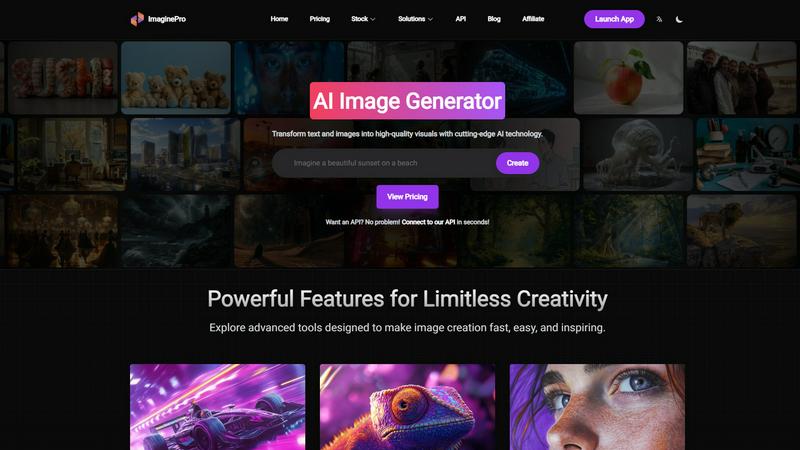
ImaginePro turns your text into stunning, high-quality images in seconds, empowering limitless creativity for all.
Last updated: March 1, 2026

SparkPix
SparkPix evolves your photos from simple edits to AI-powered art with just a text prompt.
Last updated: March 11, 2026
Visual Comparison
ImaginePro
SparkPix

Feature Comparison
ImaginePro
Instant Masterpieces
ImaginePro allows users to create professional-quality images in seconds using top-tier AI models. This feature is perfect for generating visuals for social media content, marketing materials, and much more, making it an essential tool for those needing quick yet high-quality imagery.
Creative Control
With ImaginePro, users can fine-tune their images with precise style references, colors, and effects. This feature enables detailed customization, allowing users to adjust every aspect of their images until they align perfectly with their vision, catering to individual creativity.
High-Quality Images
The platform generates lifelike, high-resolution images that stand out in any context. Whether for commercial use or personal projects, ImaginePro ensures that every image meets a polished standard, ready for immediate application without additional editing requirements.
Background Removal
ImaginePro features a seamless background removal tool, perfect for creating product images for e-commerce, professional headshots, and social media content. This feature simplifies graphic design projects and digital art creation, allowing users to focus on their subject matter.
SparkPix
AI Photo Editor with Text Commands
This is the foundational evolution of SparkPix, transforming the editing process from manual tool selection to intuitive language. You simply upload a reference image and type specific instructions, such as "change the background to a primeval forest" or "remove the little girl and car." The AI interprets your natural language request and applies complex edits in under 30 seconds. This feature marks a significant growth stage for users, enabling them to achieve sophisticated results like object replacement, scene alteration, and stylistic changes without ever learning how to use a layer mask or clone stamp tool.
Comprehensive Photo Restoration & Enhancement
SparkPix empowers users to reclaim and elevate their visual history. The photo restoration tool intelligently repairs old, damaged photos by fixing scratches, tears, and fading while aiming to preserve the original atmosphere. Concurrently, the photo enhancer acts as a one-step quality boost, sharpening details, enhancing colors, reducing noise, and upscaling images to HD resolution. This dual capability supports a narrative of growth, from preserving precious, decaying memories to preparing modern images for professional presentation on high-resolution displays and print materials.
AI-Powered Background and Object Remover
This feature streamlines two of the most common yet tedious editing tasks into instantaneous actions. The background remover delivers one-click, high-precision cuts for portraits and product photos, facilitating easy background changes. The object remover goes further, allowing you to delete unwanted elements like people, watermarks, or photobombs using simple text prompts. Together, they represent a leap in workflow efficiency, freeing users from hours of meticulous manual erasing and selecting, and accelerating projects from concept to final asset.
Creative Style Transfer & Image Generation
SparkPix fosters creative evolution by providing tools for radical transformation and original creation. The style transfer feature can convert any photo into over 15 artistic styles, including anime, oil painting, and pencil sketch, allowing for rapid experimentation and brand-aligned visual storytelling. Furthermore, the integrated AI image generator builds entirely new visuals from text prompts at resolutions up to 4K. This progression from editing existing assets to generating novel ones opens new stages of creative possibility for content creators, designers, and marketers.
Use Cases
ImaginePro
Social Media Content Creation
ImaginePro is ideal for social media managers and marketers looking to produce engaging visuals quickly. Users can create eye-catching graphics tailored to specific campaigns, enhancing their online presence and audience engagement.
E-commerce Product Photography
With its high-resolution image capabilities and background removal feature, ImaginePro is a valuable asset for e-commerce businesses. Users can generate professional product images that attract customers and improve conversion rates effortlessly.
Graphic Design Projects
Designers can utilize ImaginePro to streamline their creative process, producing high-quality visuals that meet client specifications. The platform's customization options allow designers to bring unique concepts to life without extensive manual editing.
Digital Art and Photo Manipulation
Artists and photographers can leverage ImaginePro to create stunning digital art pieces or manipulate existing photos. The ability to place text behind images and adjust every detail empowers creators to push the boundaries of their artistic expression.
SparkPix
E-commerce and Product Photography
Small business owners and online sellers can rapidly generate professional product photos without expensive photoshoots. SparkPix enables the creation of clean, background-free product cutouts, the generation of realistic lifestyle mockups (like a person holding a phone), and the enhancement of image quality for online listings. This use case supports business growth by elevating brand presentation on platforms like Shopify and Amazon with studio-quality visuals created in minutes.
Family History and Photo Archive Restoration
Genealogists and families can embark on a meaningful journey to restore their heritage. SparkPix is ideal for repairing and colorizing cherished but damaged black-and-white or faded vintage photographs. By removing scratches, tears, and adding realistic color, users can breathe new life into historical images, preserving family narratives for future generations and evolving personal archives into a polished, shareable digital collection.
Social Media and Personal Content Creation
Content creators, influencers, and social media managers can consistently produce engaging, high-quality visuals. The platform allows for quick background changes for Instagram Reels, removal of unwanted objects from travel photos, application of trendy artistic filters, and creation of custom thumbnails for YouTube. This use case fuels creative growth by enabling a faster, more professional content pipeline that keeps pace with the demands of digital audiences.
Professional Profile and Formal Photography
Individuals advancing their careers can create polished, compliant headshots and formal photos instantly. SparkPix serves as an online passport photo maker and professional headshot generator. Users can upload a photo and use prompts to generate images with formal attire and correct background colors (e.g., blue for LinkedIn, white for passports), providing a cost-effective and convenient alternative to studio visits for resumes, business profiles, and official documents.
Overview
About ImaginePro
ImaginePro is an innovative AI image generator that empowers users to transform their creative concepts into breathtaking, high-resolution visuals within moments. By harnessing the power of advanced AI technology, ImaginePro caters to a diverse audience, from professional designers to beginners seeking to express their ideas visually. The platform is designed to facilitate the creation of stunning images suitable for various applications, including social media posts, e-commerce product presentations, and design projects. With its user-friendly interface, ImaginePro simplifies the image generation process, making it accessible for anyone to produce professional-quality visuals. The software provides an array of powerful features such as background removal, text placement behind images, and intricate style adjustments, ensuring that users can achieve polished results with minimal effort. ImaginePro is dedicated to enhancing visual storytelling, offering flexible pricing plans and an API integration for developers, thereby unlocking limitless creativity for all users.
About SparkPix
SparkPix represents the next evolutionary stage in digital creativity, moving beyond complex software to a future where your imagination is the only tool you need. It is a web-based AI photo editor that democratizes professional-grade image manipulation by allowing you to edit photos simply by typing what you want to change. This platform is designed for a vast audience in their growth phase: from social media enthusiasts and small business owners seeking polished visuals without a steep learning curve, to genealogists restoring family history and marketers needing rapid, high-quality content. Its core value proposition lies in transforming intention into execution in under 30 seconds, eliminating the traditional barriers of technical skill, expensive software subscriptions, and time-consuming manual editing. By starting with a free tier, SparkPix invites users to begin their creative evolution immediately, providing a low-risk entry point to explore AI-powered enhancements, restorations, and generations that were once exclusive to experts.
Frequently Asked Questions
ImaginePro FAQ
What types of images can I create with ImaginePro?
ImaginePro allows users to create a wide variety of images, including social media graphics, product photos, digital art, and marketing materials, all tailored to meet specific requirements.
Is there a learning curve for using ImaginePro?
No, ImaginePro features an intuitive web interface designed for users of all skill levels. Whether you are a beginner or a seasoned professional, you can easily navigate the platform and start creating images in no time.
Can I integrate ImaginePro into my existing applications?
Yes, ImaginePro offers API integration, allowing developers to connect the platform with their applications. This feature enables automated image generation and enhances workflows in various projects.
What kind of support does ImaginePro provide?
ImaginePro provides comprehensive support through its website, including a blog, tutorials, and customer service. Users can access resources to help them maximize their experience with the platform.
SparkPix FAQ
Is SparkPix really free to start?
Yes, SparkPix is committed to making AI photo editing accessible from the very first step of your creative journey. You can start absolutely free with 5 credits upon sign-up, with no credit card required. This allows you to fully test the platform's core capabilities, like background removal or photo enhancement, and understand its value before considering any paid plan for more extensive projects.
What are credits and how many do I need per edit?
Credits are the unit used to process tasks on SparkPix. The cost varies depending on the complexity of the operation. For example, a standard AI edit based on a text prompt typically costs 5 credits. The free tier provides 5 credits to begin with, allowing for at least one full edit. This system is designed to give users clear control over their usage as their editing needs grow and evolve.
Do I need to download any software to use SparkPix?
No, SparkPix is a fully web-based platform that represents the evolution of software accessibility. It works directly in your web browser on any device, including desktop computers, iPhones, and Android phones. There is no download or installation required, allowing you to start editing immediately and access your projects from anywhere, seamlessly integrating into your workflow.
How does the AI understand my text prompts for editing?
The AI is trained on vast datasets of images and corresponding descriptions. When you type a prompt like "remove the car," it uses advanced machine learning models to identify objects in your uploaded photo, understand the context of your request, and execute the most appropriate editing technique. For best results, the platform encourages being specific and descriptive in your prompts to guide the AI more accurately toward your vision.
Alternatives
ImaginePro Alternatives
ImaginePro is a cutting-edge AI image generator that revolutionizes the way creators transform their text-based ideas into stunning, high-resolution visuals. It falls under the category of image and photo tools, designed to cater to both seasoned designers and novices alike. Users often seek alternatives to ImaginePro for various reasons, such as pricing, specific feature sets, or platform compatibility. As the digital landscape continues to evolve, it's essential to find an alternative that aligns with your creative goals and budgetary considerations. When choosing an alternative to ImaginePro, it's crucial to consider the features that matter most to you, including customization options, image quality, and ease of use. Additionally, evaluating integration capabilities and customer support can help ensure a smooth transition and a tool that truly meets your needs. By thoroughly assessing these factors, you can find an alternative that empowers your creative endeavors and enhances your visual storytelling.
SparkPix Alternatives
SparkPix is an AI-powered online photo editor that simplifies complex image manipulation through text commands. It belongs to the rapidly evolving category of AI-driven creative tools, where users can perform tasks like background removal, photo restoration, and artistic style transfer without needing traditional editing software expertise. Users often explore alternatives for various reasons, such as seeking different pricing structures, needing specific advanced features not available, or preferring a downloadable application over a web-based platform. Others might look for tools with a different user interface, higher credit allowances, or specialized functions tailored to niche creative or professional workflows. When evaluating other options, consider your primary use case, budget, and desired output quality. Key factors include the range of AI editing features, the cost per edit or subscription model, the platform's accessibility across devices, and the overall ease of use. The ideal alternative should align with your growth from basic edits to more sophisticated creative projects, offering a clear path as your skills and needs evolve.