
AI Photo Generator vs poseup
Side-by-side comparison to help you choose the right tool.

AI Photo Generator
Evolve your creative workflow with the most realistic AI photo generator, transforming text and images into stunning, commercial-grade visuals.
Last updated: March 11, 2026

poseup
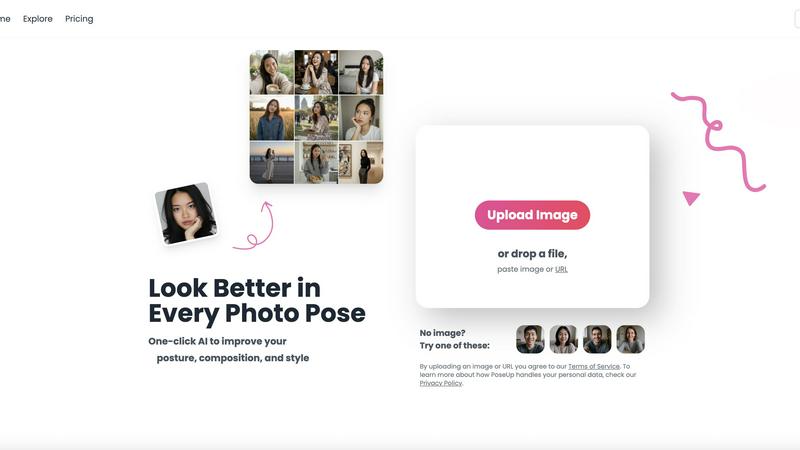
Evolve from amateur to pro with one-click AI that perfects your posture and composition.
Last updated: March 1, 2026
Visual Comparison
AI Photo Generator

poseup
Feature Comparison
AI Photo Generator
Ultra-Fast, Multi-Model Generation Engine
At the heart of the platform is an optimized cloud architecture that delivers image generation in seconds, not minutes. Users can select from a vast library of specialized AI models, including Nano Banana Pro, Flux Kontext Max, Ideogram V3, and Midjourney, each fine-tuned for different outcomes like photorealism, character consistency, or specific artistic styles. This allows for precise control over the speed-versus-detail balance, enabling fast A/B testing and campaign ideation cycles without compromising on output quality.
Prompt-to-Masterpiece Text-to-Image
This feature interprets detailed natural language prompts with high accuracy, turning descriptive ideas into fully realized visuals. It is specifically tuned for commercial workflows, offering model presets for advertising, portrait photography, and ecommerce scenes. The AI pays meticulous attention to lighting, composition, and material details, ensuring generated photos like product shots or campaign visuals are realistic and ready for professional use, all from a simple text description.
Reference-Guided Image-to-Image Editing
Beyond text, the platform excels at transforming existing photos. Users can upload a reference image to preserve core elements like structure, identity, or style, and then apply natural language instructions to edit backgrounds, change composition, adjust mood, or swap props. This workflow is essential for maintaining brand consistency, refreshing old assets, or creating cohesive visual sets without starting from scratch for every new piece of content.
Free-First, Browser-Based Editor
The platform offers a completely free-to-start, browser-based AI photo editor online with no installation required. This lowers the barrier to entry, allowing individuals and teams to experiment with prompt strategies, compare different AI models, and refine concepts before committing resources. It supports high-res exports and commercial use rights, providing a genuine, risk-free path to explore and scale professional visual creation.
poseup
One-Click AI Pose Enhancement
With a single upload, PoseUp's advanced AI engine comprehensively analyzes your photo. It evaluates the subject's posture, body alignment, and positioning within the frame, then automatically applies subtle corrections to suggest a more confident, natural, and aesthetically pleasing pose. This removes the guesswork from posing, transforming stiff or awkward stances into photogenic ones instantly, without any manual editing required from the user.
Intelligent Composition & Lighting Optimization
Beyond posture, the AI examines the overall composition and lighting conditions of your image. It intelligently suggests optimizations to balance the scene, improve the rule-of-thirds alignment, and enhance lighting to highlight the subject appropriately. This feature ensures the technical quality of your photo matches the improved pose, resulting in a holistically professional image suitable for portfolios or social media.
Multi-Scene Adaptability
PoseUp is engineered to deliver professional results across a diverse range of scenarios. Whether it's a casual coffee shop work shot, an outdoor adventure photo, a professional headshot, a fitness snapshot, or a cozy lifestyle moment, the AI adapts its enhancement strategy. This versatility ensures users receive context-aware improvements that look natural and appropriate for the setting, making it a single tool for all your photographic needs.
Broad Format Support & Instant Processing
The platform is designed for effortless integration into any workflow, supporting popular image formats including JPG, PNG, WEBP, and HEIC, with files up to 5MB. Processing is near-instantaneous, delivering professional photographer-level results in seconds. This combination of compatibility and speed allows for rapid iteration and enhancement, perfect for users who need to prepare multiple images quickly.
Use Cases
AI Photo Generator
Content Creation & Social Media Assets
Creators can rapidly generate unique, copyright-free thumbnails, blog graphics, and social media posts. The ability to quickly iterate on visual concepts for platforms like YouTube, Instagram, and TikTok allows for consistent, high-quality content production that stands out in crowded feeds, all without needing a background in graphic design or photography.
Marketing & Advertising Campaigns
Marketing teams and entrepreneurs can produce stunning, on-brand visuals for ads, website banners, email campaigns, and presentations on a budget. The text-to-image flow is perfect for prototyping product scenes and campaign visuals, while the image-editing capability allows for easy adaptation of core assets across multiple formats and channels for cohesive multi-touch campaigns.
Professional Portrait & Brand Imagery
The platform serves as a powerful AI face generator for building profile-ready portraits, team photos, and character-consistent imagery for personal and corporate brands. Users can transform a simple selfie into a professional LinkedIn headshot or create a series of on-brand character visuals, ensuring a polished and cohesive identity across all professional touchpoints.
Product Photography & Ecommerce
Online sellers and businesses can generate hyper-realistic product photos in various settings and styles without the cost of a professional photoshoot. This includes creating lifestyle images, detail shots, and context scenes for product pages. The AI's attention to realistic lighting and material detail makes products look appealing and trustworthy to potential customers.
poseup
Elevating Social Media Presence
Content creators and influencers can use PoseUp to consistently ensure every post meets a high visual standard. By correcting slouches, improving selfie angles, and optimizing group shot compositions, users can maintain a cohesive and professional-looking feed that engages followers and enhances personal branding, all without the cost of a full-time photo editor.
Perfecting Professional & Personal Portraits
Individuals preparing for LinkedIn profile pictures, acting headshots, or even dating app photos can achieve a polished look effortlessly. PoseUp corrects posture to convey confidence, optimizes lighting on the face, and ensures the composition is flattering, helping users make a powerful first impression in both professional and personal spheres.
Rescuing & Enhancing Family & Group Photos
Transform cherished yet imperfect memories. PoseUp can analyze group dynamics in a photo and suggest subtle pose adjustments to create a more harmonious and engaging image. It's ideal for fixing photos where someone blinked, had poor posture, or where the overall composition feels unbalanced, turning a mediocre group shot into a frameworthy masterpiece.
Exploring Creative Pose Ideas
For couples, friends, or solo photographers looking for inspiration, PoseUp serves as a creative assistant. Users can experiment with their own photos to see how different pose enhancements affect the final look, generating beautiful couple pose ideas or dynamic solo shot concepts that they can then replicate or use as inspiration in future photoshoots.
Overview
About AI Photo Generator
AI Photo Generator (aiphotogenerator.dev) represents the next evolution in creative democratization, transforming the journey from abstract idea to polished visual asset. This industry-leading platform harnesses a suite of advanced neural networks to bridge the gap between imagination and execution, allowing anyone to generate professional-grade digital art from simple text descriptions or existing photos. It is built on the foundational belief that high-end design should be accessible, not gated by technical skill or expensive software. The platform caters to a broad spectrum of users, from individual content creators and marketers to fast-moving entrepreneurial teams, by providing a streamlined, powerful workflow. Its core value proposition lies in delivering ultra-fast, commercially viable, and highly realistic imagery through an intuitive interface, effectively removing traditional barriers to visual production and enabling rapid iteration and scaling of creative projects.
About poseup
PoseUp represents a significant evolution in personal photography, moving beyond simple filters to offer intelligent, compositional enhancement. It is an AI-powered platform designed to democratize professional-grade photo quality by automatically improving posture, composition, and style with a single click. This tool is built for a world where every moment is captured and shared, catering to social media influencers seeking a flawless feed, photographers wanting to quickly refine client shots, and everyday individuals who wish their family photos or casual selfies carried more polish and impact. Its core value proposition lies in eliminating the technical barrier to great photography; no professional training, expensive equipment, or hours of editing are required. PoseUp analyzes the fundamental elements of a compelling image—lighting, stance, and framing—and intelligently optimizes them, allowing users to transform ordinary, awkward, or poorly composed shots into stunning visuals that command attention. It's not just about fixing mistakes; it's about accelerating your visual storytelling journey, enabling you to consistently present your best self in every captured scene.
Frequently Asked Questions
AI Photo Generator FAQ
What is AI Photo Generator?
AI Photo Generator is an online creative platform that uses advanced artificial intelligence to create high-quality images from text descriptions or by editing existing photos. It is designed to make professional-grade visual creation accessible to everyone, regardless of their design skills, through a fast, browser-based interface.
Is there a free plan?
Yes, AI Photo Generator offers a free-to-start plan that allows users to explore the platform's core features, test different AI models, and generate images without an initial financial commitment. This free plan is intended for experimentation and learning the workflow before scaling up to paid tiers for higher-volume needs.
Can I use the generated images commercially?
Yes, images generated on the platform are typically cleared for commercial use, meaning you can use them in advertising, on websites, in products, and for other business purposes. It is always recommended to review the specific terms of service for the latest information on usage rights.
How does the Image-to-Image editing work?
The Image-to-Image feature allows you to upload a reference photo (like a portrait or product shot). The AI then uses this image as a structural and stylistic baseline. You provide text instructions on what to change (e.g., "change the background to a beach," "make it a cartoon style"), and the AI generates a new image that incorporates your edits while preserving elements from the original.
poseup FAQ
How does PoseUp's AI work?
PoseUp's AI uses sophisticated computer vision models trained on vast datasets of professional photography. When you upload an image, it analyzes key points related to human posture, body geometry, facial expression, and the image's compositional elements like lighting and balance. It then applies a series of nuanced adjustments to these elements to suggest a more aesthetically optimal version, all while striving to keep the result looking natural and true to the original scene.
What image formats and sizes do you support?
PoseUp supports a wide range of common image formats to ensure compatibility, including JPG, PNG, WEBP, and HEIC (iPhone photos). The current maximum file size for upload is 5MB per image. This ensures quick processing and enhancement while maintaining accessibility for most high-quality photos directly from your phone or camera.
Is my data and privacy protected?
Yes. PoseUp states that by uploading an image, users agree to their Terms of Service, and they provide a Privacy Policy that details how personal data is handled. The platform is designed to process your images for the purpose of enhancement securely. For specific concerns, it is recommended to review their Privacy Policy directly on their website.
Do I need any photography skills to use PoseUp?
Absolutely not. PoseUp is specifically designed to require zero prior photography or editing skills. The entire process is automated: you upload a photo, and the AI provides the enhanced result. The platform's goal is to make professional-looking photo enhancements accessible to everyone, regardless of their technical background or training.
Alternatives
AI Photo Generator Alternatives
AI Photo Generator is a leading platform in the AI image generation category, transforming text prompts and existing photos into professional digital art. It empowers users to create visuals without needing advanced technical skills, making high-end design accessible for a wide range of creative and professional projects. Users often explore alternatives for various reasons, such as seeking different pricing models, specific feature sets like specialized artistic styles, or platforms that integrate better with their existing workflow. The need for a tool that aligns with a particular budget, output quality, or usage frequency is a common driver for comparison. When evaluating other options, consider the core aspects that matter most to your evolution. Look at the quality and accuracy of image generation, the diversity of available styles, processing speed, and the overall user experience. A tool that grows with your creative or business needs, offering both simplicity for beginners and depth for advanced projects, is key to sustained progress.
poseup Alternatives
PoseUp is an AI-powered tool in the image and photo enhancement category, designed to automatically improve posture, composition, and style in photographs with a single click. It simplifies achieving professional-looking results, making it popular among a wide audience from casual users to content creators. Users often explore alternatives for various reasons. Some may seek different pricing models, such as subscription-free options or one-time purchases. Others might need specific features not offered, require integration with certain platforms, or simply want to compare the capabilities of different AI technologies to find their perfect fit. When evaluating an alternative, consider the core value: how effectively it enhances your images. Look at the balance between automation and user control, the quality and realism of the AI edits, and the supported file formats and sizes. Also, assess the overall user experience, from the upload process to the final output, to ensure it aligns with your personal or professional workflow.