
MyImageUpscaler vs poseup
Side-by-side comparison to help you choose the right tool.

MyImageUpscaler
MyImageUpscaler evolves your photos with AI, enhancing and sharpening them in seconds.
Last updated: February 28, 2026

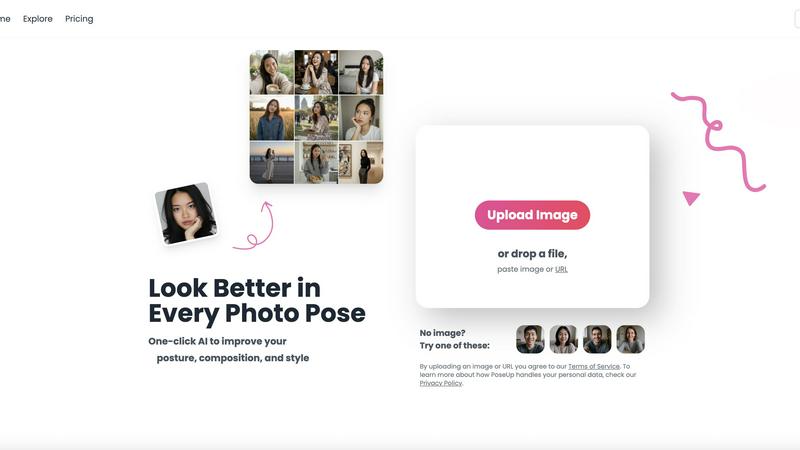
poseup
Evolve from amateur to pro with one-click AI that perfects your posture and composition.
Last updated: March 1, 2026
Visual Comparison
MyImageUpscaler

poseup
Feature Comparison
MyImageUpscaler
Advanced AI Detail Preservation
This is the core intelligence of the platform. The AI doesn't just stretch pixels; it analyzes your image to understand textures, edges, and patterns. It then reconstructs and enhances fine details during the upscaling process, ensuring results are crisp and natural-looking rather than blurry or artificially sharpened. This sophisticated preservation is what separates professional-grade upscaling from basic interpolation, making your enhanced images ready for close inspection.
Rapid Batch Processing
Efficiency evolves with scale. MyImageUpscaler allows you to process up to 500 images in a single batch, with each image typically enhanced in under 10 seconds. This feature is designed for the growth stage where manual editing becomes impossible, perfect for photographers with large shoots, e-commerce stores updating entire catalogs, or agencies preparing comprehensive marketing suites, turning a days-long task into a matter of minutes.
Platform-Optimized Presets
As your content strategy matures and diversifies across channels, MyImageUpscaler provides tailored presets for major platforms like Amazon, Instagram, YouTube, and TikTok. These presets intelligently adjust the enhancement parameters to meet the specific technical and aesthetic requirements of each platform, ensuring your images are optimized for engagement and performance wherever they are published, streamlining your cross-platform workflow.
Flexible & Secure Cloud Workflow
The platform supports your operational evolution with a secure, cloud-based workflow. It offers a generous free tier with 10 credits and no watermarks, allowing you to test and integrate the tool at zero cost. All processed images are auto-deleted after a period (7-30 days depending on your plan), ensuring data privacy and helping you manage your digital assets cleanly as your project volume grows.
poseup
One-Click AI Pose Enhancement
With a single upload, PoseUp's advanced AI engine comprehensively analyzes your photo. It evaluates the subject's posture, body alignment, and positioning within the frame, then automatically applies subtle corrections to suggest a more confident, natural, and aesthetically pleasing pose. This removes the guesswork from posing, transforming stiff or awkward stances into photogenic ones instantly, without any manual editing required from the user.
Intelligent Composition & Lighting Optimization
Beyond posture, the AI examines the overall composition and lighting conditions of your image. It intelligently suggests optimizations to balance the scene, improve the rule-of-thirds alignment, and enhance lighting to highlight the subject appropriately. This feature ensures the technical quality of your photo matches the improved pose, resulting in a holistically professional image suitable for portfolios or social media.
Multi-Scene Adaptability
PoseUp is engineered to deliver professional results across a diverse range of scenarios. Whether it's a casual coffee shop work shot, an outdoor adventure photo, a professional headshot, a fitness snapshot, or a cozy lifestyle moment, the AI adapts its enhancement strategy. This versatility ensures users receive context-aware improvements that look natural and appropriate for the setting, making it a single tool for all your photographic needs.
Broad Format Support & Instant Processing
The platform is designed for effortless integration into any workflow, supporting popular image formats including JPG, PNG, WEBP, and HEIC, with files up to 5MB. Processing is near-instantaneous, delivering professional photographer-level results in seconds. This combination of compatibility and speed allows for rapid iteration and enhancement, perfect for users who need to prepare multiple images quickly.
Use Cases
MyImageUpscaler
E-commerce Catalog Enhancement
Online sellers can evolve their storefronts by upscaling low-resolution supplier images or old product photos. MyImageUpscaler breathes new life into these assets, creating crisp, detailed images that meet modern marketplace standards (like Amazon's requirements), reducing returns from misleading visuals and directly boosting conversion rates with superior presentation that builds customer trust.
Social Media Content Scaling
Content creators and social media managers can repurpose a single high-quality image across multiple platforms without degradation. By upscaling master images, they can create perfect fits for Instagram feeds, YouTube thumbnails, and TikTok videos, maintaining a sharp, professional brand aesthetic consistently. This allows for scalable content creation from a core asset library.
Real Estate Listing Preparation
Real estate agents can elevate their listings by enhancing property photos. The AI can improve details in both interior shots (like textures on countertops or fabrics) and exterior views, making MLS listings and marketing brochures more compelling. This professional presentation can shorten time-on-market by attracting more serious buyer interest from the first click.
Photographic Batch Post-Processing
Photographers handling large volumes of images from events or studio sessions can use batch processing to upscale entire sets efficiently. This is ideal for preparing client galleries for high-resolution printing or creating web-optimized versions from RAW files without lengthy manual editing, allowing them to take on more clients while delivering superior quality.
poseup
Elevating Social Media Presence
Content creators and influencers can use PoseUp to consistently ensure every post meets a high visual standard. By correcting slouches, improving selfie angles, and optimizing group shot compositions, users can maintain a cohesive and professional-looking feed that engages followers and enhances personal branding, all without the cost of a full-time photo editor.
Perfecting Professional & Personal Portraits
Individuals preparing for LinkedIn profile pictures, acting headshots, or even dating app photos can achieve a polished look effortlessly. PoseUp corrects posture to convey confidence, optimizes lighting on the face, and ensures the composition is flattering, helping users make a powerful first impression in both professional and personal spheres.
Rescuing & Enhancing Family & Group Photos
Transform cherished yet imperfect memories. PoseUp can analyze group dynamics in a photo and suggest subtle pose adjustments to create a more harmonious and engaging image. It's ideal for fixing photos where someone blinked, had poor posture, or where the overall composition feels unbalanced, turning a mediocre group shot into a frameworthy masterpiece.
Exploring Creative Pose Ideas
For couples, friends, or solo photographers looking for inspiration, PoseUp serves as a creative assistant. Users can experiment with their own photos to see how different pose enhancements affect the final look, generating beautiful couple pose ideas or dynamic solo shot concepts that they can then replicate or use as inspiration in future photoshoots.
Overview
About MyImageUpscaler
MyImageUpscaler represents the next stage in the evolution of digital content creation, transforming how professionals approach image quality. It's an AI-powered platform designed to intelligently enhance and upscale images by 2x to 4x, moving beyond simple resizing to actively reconstruct and refine details. This tool is built for the growth journey of modern businesses and creators, from the solo entrepreneur launching their first online store to the established marketing team scaling branded content across global platforms. Its core value proposition lies in its ability to future-proof your visual assets, allowing you to rescue low-resolution photos, adapt legacy images for modern high-definition displays, and maintain a consistent, professional standard as your brand expands. By preserving critical sharpness and enhancing fine details where it matters most, MyImageUpscaler ensures your product images, marketing materials, and social media content always present your work in the best possible light, eliminating a common bottleneck in the content production pipeline and enabling you to scale your visual output without compromising on quality.
About poseup
PoseUp represents a significant evolution in personal photography, moving beyond simple filters to offer intelligent, compositional enhancement. It is an AI-powered platform designed to democratize professional-grade photo quality by automatically improving posture, composition, and style with a single click. This tool is built for a world where every moment is captured and shared, catering to social media influencers seeking a flawless feed, photographers wanting to quickly refine client shots, and everyday individuals who wish their family photos or casual selfies carried more polish and impact. Its core value proposition lies in eliminating the technical barrier to great photography; no professional training, expensive equipment, or hours of editing are required. PoseUp analyzes the fundamental elements of a compelling image—lighting, stance, and framing—and intelligently optimizes them, allowing users to transform ordinary, awkward, or poorly composed shots into stunning visuals that command attention. It's not just about fixing mistakes; it's about accelerating your visual storytelling journey, enabling you to consistently present your best self in every captured scene.
Frequently Asked Questions
MyImageUpscaler FAQ
How does MyImageUpscaler's AI differ from simple resizing?
Simple resizing, like in basic photo editors, uses mathematical interpolation to guess new pixels, often resulting in a blurry or pixelated image. MyImageUpscaler's AI is trained on millions of images to understand context and detail. It intelligently reconstructs textures, sharpens edges, and adds plausible details during the upscaling process, producing a result that looks naturally high-resolution.
What does "auto-delete after 7-30 days" mean?
This is a privacy and storage management feature. After you upscale an image, the processed file is stored on our secure servers for a limited time for your convenience. It is automatically and permanently deleted from our systems after this period (7 days for free tier, 30 days for paid plans). You should download your enhanced images to your own device during this window.
Are the upscaled images suitable for professional printing?
Yes, absolutely. The 4x upscaling option, combined with the advanced detail preservation, is specifically designed to increase resolution for print media. It can transform a digital photo into a file suitable for high-quality marketing materials, large-format posters, or product packaging, provided the original image is of reasonable quality to begin with.
Can I use the free tier for commercial projects?
Yes, you can. The free tier, which includes 10 credits with no credit card required, does not place watermarks on your images and imposes no restrictions on commercial use. It's an excellent way to test the platform's capabilities on real projects. For ongoing commercial needs, paid plans offer more credits and longer file retention.
poseup FAQ
How does PoseUp's AI work?
PoseUp's AI uses sophisticated computer vision models trained on vast datasets of professional photography. When you upload an image, it analyzes key points related to human posture, body geometry, facial expression, and the image's compositional elements like lighting and balance. It then applies a series of nuanced adjustments to these elements to suggest a more aesthetically optimal version, all while striving to keep the result looking natural and true to the original scene.
What image formats and sizes do you support?
PoseUp supports a wide range of common image formats to ensure compatibility, including JPG, PNG, WEBP, and HEIC (iPhone photos). The current maximum file size for upload is 5MB per image. This ensures quick processing and enhancement while maintaining accessibility for most high-quality photos directly from your phone or camera.
Is my data and privacy protected?
Yes. PoseUp states that by uploading an image, users agree to their Terms of Service, and they provide a Privacy Policy that details how personal data is handled. The platform is designed to process your images for the purpose of enhancement securely. For specific concerns, it is recommended to review their Privacy Policy directly on their website.
Do I need any photography skills to use PoseUp?
Absolutely not. PoseUp is specifically designed to require zero prior photography or editing skills. The entire process is automated: you upload a photo, and the AI provides the enhanced result. The platform's goal is to make professional-looking photo enhancements accessible to everyone, regardless of their technical background or training.
Alternatives
MyImageUpscaler Alternatives
MyImageUpscaler is a leading AI-powered image enhancement tool in the productivity and management category, designed to intelligently upscale and refine photos for professional use. It represents a significant evolution in how businesses and creators handle visual assets, moving from manual, time-consuming edits to automated, high-quality processing in seconds. Users often explore alternatives at different stages of their growth, seeking solutions that better match their evolving budget, specific feature requirements like unique platform integrations, or different workflow volumes. The search for a new tool is a natural part of scaling any visual content operation. When evaluating other options, consider core needs like output quality consistency, processing speed for your batch sizes, and the true long-term cost. The right tool should not only solve today's problem but also support your next stage of growth, ensuring your image workflow scales seamlessly with your ambitions.
poseup Alternatives
PoseUp is an AI-powered tool in the image and photo enhancement category, designed to automatically improve posture, composition, and style in photographs with a single click. It simplifies achieving professional-looking results, making it popular among a wide audience from casual users to content creators. Users often explore alternatives for various reasons. Some may seek different pricing models, such as subscription-free options or one-time purchases. Others might need specific features not offered, require integration with certain platforms, or simply want to compare the capabilities of different AI technologies to find their perfect fit. When evaluating an alternative, consider the core value: how effectively it enhances your images. Look at the balance between automation and user control, the quality and realism of the AI edits, and the supported file formats and sizes. Also, assess the overall user experience, from the upload process to the final output, to ensure it aligns with your personal or professional workflow.