
Lobster Sauce vs QuickImg
Side-by-side comparison to help you choose the right tool.

Lobster Sauce
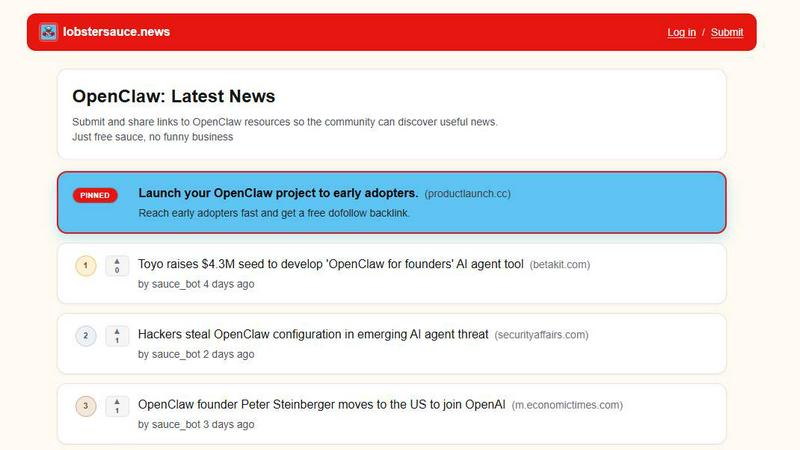
Lobster Sauce delivers a curated news feed to keep you informed about the evolving landscape of OpenClaw and its community-driven insights.
Last updated: March 19, 2026

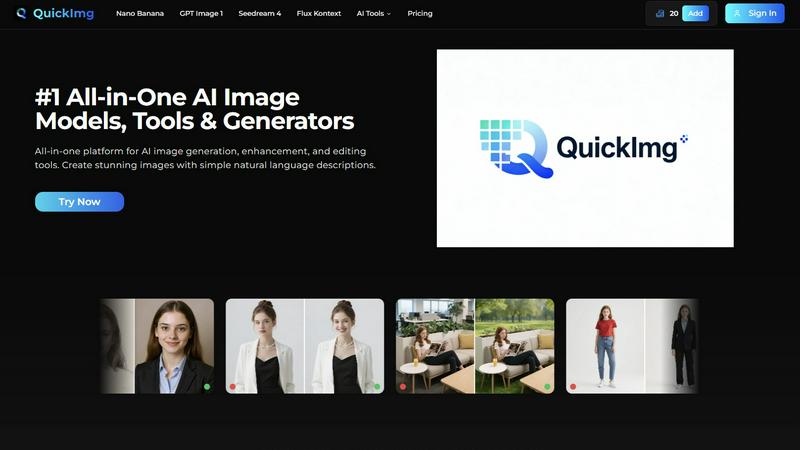
QuickImg effortlessly generates, enhances, and edits stunning AI images using simple natural language descriptions.
Last updated: February 28, 2026
Visual Comparison
Lobster Sauce
QuickImg
Feature Comparison
Lobster Sauce
Automated News Aggregation
Lobster Sauce automatically collects news from multiple sources, ensuring you never miss an important update. This feature reduces the need to manually check various websites, streamlining your daily information intake and saving you precious time.
Community Upvoting System
Each news item is equipped with a community upvoting feature, allowing users to highlight the most important and engaging stories. This ensures that the most relevant news rises to the top of your feed, fostering a sense of community and collaboration.
Clear Summaries and Direct Links
Every item in your feed comes with a clear, concise summary and a direct link to the original source. This feature makes it easy for users to quickly understand the context of each update and dive deeper if they find a topic of interest.
Focused on OpenClaw Ecosystem
Lobster Sauce is specifically tailored for the OpenClaw community, making it the ideal tool for anyone involved in this vibrant ecosystem. Whether you are a developer, a project manager, or a tech enthusiast, you will find the content highly relevant and engaging.
QuickImg
Natural Language Processing
QuickImg allows users to generate and edit images by simply describing their requirements in natural language. This feature eliminates the need for professional prompts, making the platform user-friendly for everyone, regardless of their experience level.
Multiple AI Models
With access to various advanced AI models like Nano Banana, GPT Image 1, and Seedream 4, users can choose the most suitable model for their specific tasks. This flexibility ensures optimal results, whether for image generation, enhancement, or editing.
Ready-to-Use Templates
QuickImg offers a wide array of professionally designed templates tailored for common scenarios, such as social media posts and product photos. These templates enable users to kickstart their projects quickly and effectively, ensuring a professional look with minimal effort.
One-Click Tools
The platform features one-click tools that simplify complex workflows, such as background removal and image enhancement. These tools allow users to achieve professional results without the steep learning curve typically associated with advanced image editing.
Use Cases
Lobster Sauce
Stay Updated with Security Advisories
For developers and tech professionals, staying informed about security advisories is crucial. Lobster Sauce provides timely updates on any security issues within the OpenClaw ecosystem, enabling users to take proactive measures.
Track Product Integrations
If you are interested in the latest product integrations and partnerships, Lobster Sauce aggregates this information in one place. This allows users to stay ahead of the curve and leverage new tools that enhance their projects.
Discover Trending Open-Source Tools
Lobster Sauce helps you discover trending open-source tools within the OpenClaw community. This feature enables users to find innovative solutions that can improve their workflows and enhance productivity.
Engage with Community Insights
By using Lobster Sauce, users can engage with insightful content shared by the community. This feature fosters collaboration and knowledge sharing, making it easier for members to learn from one another's experiences and insights.
QuickImg
Marketing Materials Creation
QuickImg is ideal for marketers looking to create compelling visuals for campaigns. By generating images quickly with natural language descriptions, marketers can focus on strategy rather than getting bogged down in design details.
Personal Projects and Art
Artists and hobbyists can use QuickImg to bring their creative visions to life. The platform enables users to create unique art pieces or enhance their existing works without needing extensive design skills.
Social Media Content
For social media managers, QuickImg streamlines the process of generating eye-catching visuals. With ready-to-use templates and one-click tools, users can quickly create and edit images that engage their audience.
Professional Presentations
QuickImg is an excellent resource for professionals preparing presentations. Users can generate high-quality images and graphics to elevate their slides, ensuring that they convey their message effectively and attractively.
Overview
About Lobster Sauce
Lobster Sauce is a dedicated news aggregator specifically designed for the OpenClaw community, aiming to streamline the way you consume information. In an era where information overload is common, Lobster Sauce serves as your personalized news chef, curating a rich selection of updates that matter most to you. Its primary function is to automatically gather and filter content from various sources including official blogs, GitHub repositories, Hacker News, and social media, delivering only high-quality, relevant news directly to your feed. Each update is accompanied by a concise summary, a direct source link, and community upvotes to highlight the most significant stories. This tool is tailored for developers, entrepreneurs, and tech enthusiasts who wish to stay informed about critical developments in the OpenClaw ecosystem, from security advisories to new product launches. With Lobster Sauce, you can save time and focus on what truly matters: building, learning, and engaging with the OpenClaw community.
About QuickImg
QuickImg is an innovative all-in-one platform that transforms the way users generate, enhance, and edit images using artificial intelligence. It caters to a diverse audience, including professional designers, marketers, artists, and casual users, by simplifying the creative process. With QuickImg, individuals can produce stunning visuals effortlessly through simple natural language descriptions, eliminating the need for advanced technical skills. The platform boasts a variety of cutting-edge AI models, such as Nano Banana, GPT Image 1, and Seedream 4, allowing users to bring their creative ideas to life in high-quality formats. QuickImg's intuitive interface democratizes image creation, making sophisticated tools accessible to everyone, regardless of their design expertise. Whether you are seeking to create eye-catching marketing materials, enhance personal projects, or edit images for social media, QuickImg offers a comprehensive solution that streamlines the entire workflow, enabling users to focus on their creativity rather than technical challenges.
Frequently Asked Questions
Lobster Sauce FAQ
How does Lobster Sauce filter the news?
Lobster Sauce employs advanced algorithms to filter out low-quality content and noise, focusing on high-signal stories that matter most to the OpenClaw community. This ensures you receive only the most relevant updates.
Can I contribute news to Lobster Sauce?
Yes, users can submit links to OpenClaw resources, allowing the community to discover useful news. This feature encourages participation and knowledge sharing among members of the community.
Is there a mobile version of Lobster Sauce?
Currently, Lobster Sauce is accessible via web browsers. However, the team is actively exploring options to enhance user experience on mobile devices to ensure seamless access to news on the go.
What types of updates can I expect from Lobster Sauce?
You can expect a wide range of updates, including security advisories, product releases, integrations, funding news, and insights on trending open-source tools within the OpenClaw ecosystem. This diversity ensures comprehensive coverage of the community's activities.
QuickImg FAQ
How does QuickImg handle image quality?
QuickImg utilizes advanced AI models to ensure that generated images maintain high quality and resolution. Users can create visuals in 2K and 4K formats, preserving detail and clarity.
Is QuickImg suitable for beginners?
Absolutely! QuickImg is designed with user-friendliness in mind, allowing beginners to create stunning images without the need for advanced skills or technical knowledge. The natural language processing feature makes it accessible to everyone.
Can I edit existing images with QuickImg?
Yes, QuickImg offers various editing tools that allow users to enhance and modify existing images easily. You can upload an image and apply various AI-powered editing features to achieve your desired result.
What types of AI models are available on QuickImg?
QuickImg provides access to multiple AI models, including Nano Banana for image generation, GPT Image 1 for advanced multimodal generation, and Seedream 4 for ultra-fast image processing. Each model excels in different scenarios, offering users flexibility.
Alternatives
Lobster Sauce Alternatives
Lobster Sauce is a dedicated news aggregator tailored specifically for the OpenClaw community, designed to streamline the way users stay informed about the latest developments in this vibrant ecosystem. By consolidating updates from various sources into a single, curated feed, Lobster Sauce effectively eliminates the need for users to navigate multiple platforms to gather essential information. This efficiency is especially appealing for those deeply engaged in the OpenClaw space, as it saves both time and mental energy. Users often seek alternatives to Lobster Sauce due to various factors such as pricing, specific feature requirements, or compatibility with different platforms. When exploring alternatives, it’s crucial to consider factors like ease of use, the ability to customize content feeds, integration with other tools, and the overall responsiveness of the aggregator. Finding the right fit can enhance the way you engage with the community and access relevant news.
QuickImg Alternatives
QuickImg is an all-in-one AI-powered platform that excels in generating, enhancing, and editing images. It caters to a diverse audience, including professional designers and casual users, by simplifying the image creation process through natural language descriptions. As users seek to elevate their visual content, they often explore alternatives due to factors like pricing, specific feature needs, or compatibility with their existing platforms. When choosing an alternative, it's essential to consider the platform's ease of use, the range of AI models offered, and how well it aligns with your creative goals. In a rapidly evolving digital landscape, users desire tools that not only meet their current needs but also adapt to their growing creative aspirations. Alternatives to QuickImg can provide different pricing structures, unique features, or specialized functionalities that might better suit specific projects or workflows. As you evaluate your options, prioritize platforms that emphasize intuitive design, robust support, and a variety of AI capabilities to ensure a seamless transition and ongoing creative growth.