
Refbox vs Zovo
Side-by-side comparison to help you choose the right tool.

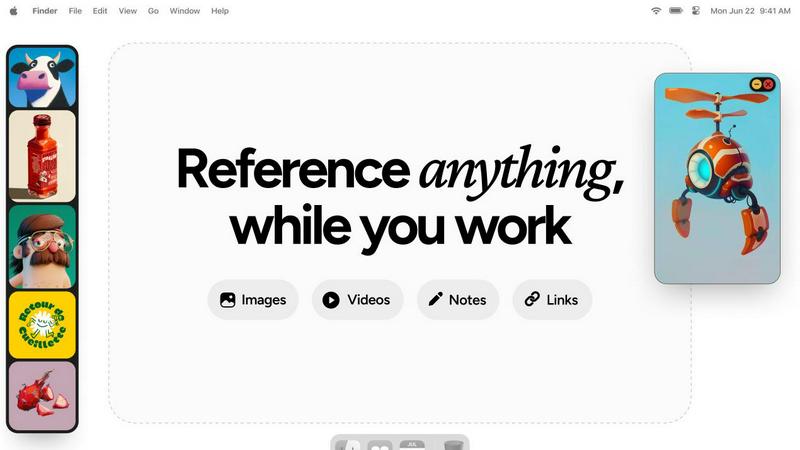
Refbox evolves your workflow by keeping references floating above your workspace for instant access.
Last updated: February 28, 2026

Zovo offers 20 essential privacy-first Chrome extensions for developers and writers with one subscription and no data.
Last updated: February 28, 2026
Visual Comparison
Refbox
Zovo

Feature Comparison
Refbox
Always-on-Top Floating Frames
This foundational feature allows you to pin any reference—images, videos, GIFs, or notes—into individual frames that float above all other application windows. You can resize, reposition, and minimize these frames with ease, ensuring your key sources of inspiration are always visible as you sketch, design, or animate. This eliminates constant window-switching, a major workflow interruption, and keeps your focus locked on creation.
Masonry Mode & Desktop Canvas
Refbox offers a unique, organized sidebar that displays your references in a dynamic Masonry layout. From here, you can drag and drop items directly onto your desktop, creating a customizable, infinite canvas of inspiration. This mode is perfect for building mood boards, arranging storyboards, or simply keeping a collection of related visuals within easy reach and sight, all without leaving your creative environment.
Markdown-Enabled Notes & Checklists
Beyond visual media, Refbox integrates powerful note-taking directly into your reference ecosystem. Create notes with markdown support for styling, and even embed checklists for project to-dos or step-by-step instructions. This consolidates your workflow by removing the need for a separate note-taking app, keeping your creative briefs, ideas, and action items pinned right alongside your visual references.
Advanced Media Controls
Refbox provides deep control over your reference media. Scrub through videos and GIFs frame-by-frame for detailed study, perfect for animators and motion designers. Capture website screenshots by simply pasting a URL, crop images to focus on specific details, pick colors directly from any pinned media, and view SVG files as images. These professional-grade tools save hours of manual work in other applications.
Zovo
Privacy-First Design
Every Zovo extension operates entirely on your device, ensuring that your personal data remains private. There are no tracking mechanisms or data collection practices, allowing users to browse freely without concerns about their activity being monitored or harvested.
User-Driven Development
Zovo thrives on community input, empowering users to directly submit feature requests and vote on upcoming features. This collaborative approach means that the most-requested features get prioritized, ensuring the development aligns with user needs and preferences.
Open Source Transparency
With 12 of its extensions being fully open source, Zovo allows users to review the code behind each tool. This transparency builds trust, as users can verify the privacy policies and functionalities before installation, ensuring they are comfortable with the software they are using.
Seamless Installation and Use
Zovo extensions are designed for immediate usability. Users can install any extension without creating an account and start using core features right away. For those who wish to unlock advanced features, a simple subscription covers all tools, making it easy to upgrade at any time.
Use Cases
Refbox
3D Modeling and Texturing
For 3D artists, maintaining visual consistency is crucial. Refbox allows you to pin reference images for textures, lighting, anatomy, and concept art directly over your 3D viewport. You can scrub through turntable videos frame-by-frame, pick colors from photos for materials, and keep modeling guidelines visible, all without ever leaving your modeling software, accelerating the entire sculpting and texturing process.
UI/UX Design and Development
Designers and developers can use Refbox to pin style guides, component libraries, and competitor screenshots for quick comparison. The floating frames ensure brand colors, spacing rules, and layout references are always in view while designing in Figma or coding in an IDE. Notes can hold hex codes and copy, while the gallery mode on a second monitor is perfect for reviewing full user flow mockups.
Digital Illustration and Concept Art
Illustrators and concept artists can build a dynamic mood board by dragging inspiration images directly onto their desktop canvas around their drawing software. They can lock a frame with a specific anatomical reference to draw over, use the color picker to sample palettes from photos, and keep narrative notes or client feedback pinned and visible throughout the entire sketching and painting phase.
Animation and Motion Graphics
Animators can pin sequential storyboard frames, character turnarounds, or video references in floating frames to study movement. The frame-by-frame scrubbing for GIFs and videos is indispensable for breaking down complex motions. Having these critical motion references always on top of the timeline in After Effects or Blender ensures accuracy and saves immense time otherwise spent switching back and forth.
Zovo
Enhanced Writing with BeLikeNative
For non-native speakers or anyone looking to improve their writing, BeLikeNative offers real-time suggestions to help users write more fluently in over 80 languages. This tool is ideal for professionals, students, and anyone who frequently communicates in a second language.
Efficient Tab Management with Tab Suspender Pro
Users who often work with numerous browser tabs will find Tab Suspender Pro invaluable. This extension automatically suspends inactive tabs, freeing up memory and improving browser speed, making it easier to manage large projects without overwhelming system resources.
Streamlined Data Handling with JSON Formatter Pro
Web developers and data analysts can efficiently format and validate JSON data using JSON Formatter Pro. This tool simplifies the process of working with data, helping users quickly identify errors and improve their workflow.
Organized Clipboard History with Clipboard History Pro
Clipboard History Pro enhances productivity by allowing users to access an extensive history of copied items. This feature is particularly useful for content creators, developers, and anyone who frequently transfers information between applications, as it ensures no valuable data is lost.
Overview
About Refbox
Refbox represents a pivotal evolution in the creative workflow, transforming how professionals access and interact with their source material. It is a floating reference application designed to eliminate the disruptive cycle of alt-tabbing between folders, browsers, and creative software. By allowing users to pin images, GIFs, videos, and notes into always-on-top, resizable frames that hover directly over their workspace, Refbox ensures inspiration and critical information are perpetually in sight but never in the way. This tool is built for a new generation of creatives—graphic designers, 3D artists, animators, UI/UX developers, and photographers—who demand a frictionless process. Its core value proposition is profound: maintain your creative flow state. By removing the administrative friction of managing references, Refbox enables artists to progress from concept to execution with unprecedented speed and focus. It’s more than a utility; it's a digital companion that grows with your project, organizing visual chaos into an accessible, always-available library that sits seamlessly on top of your primary canvas, fostering a smoother, more intuitive, and deeply productive creative journey.
About Zovo
Zovo is a powerful suite of 20 Chrome extensions developed by Michael Lip, a solo developer with over a decade of experience and an impressive track record of $400K earned on Upwork, boasting a 100% success rate. Designed for anyone looking to enhance their browser functionality, Zovo's flagship extension, BeLikeNative, empowers over 3,300 users to write like native speakers with one-keystroke rewrites in 80 languages. The comprehensive suite includes essential tools like Tab Suspender Pro, JSON Formatter Pro, Clipboard History Pro, and more, all crafted with a privacy-first approach—meaning your data never leaves your device. This commitment to user privacy ensures there is no data harvesting or investor influence on development. Users actively participate in shaping the roadmap, voting on features and suggesting improvements. With new extensions launched monthly and many tools available for free at zovo.one, Zovo is the go-to solution for those seeking reliable, user-centric tools without compromises.
Frequently Asked Questions
Refbox FAQ
What types of files can I add to Refbox?
Refbox supports a wide range of media to fuel your creativity. You can directly add images (JPG, PNG, SVG, etc.), video files, and GIFs. You can also create text notes with markdown formatting. Additionally, you can import content by dragging from the web, your local file system, or even by pasting URLs to instantly capture website screenshots.
How does Refbox help with multi-monitor setups?
Refbox excels in multi-monitor environments. You can use the full-screen Gallery mode on a secondary monitor to display an entire collection of references like a digital mood board, leaving your primary screen completely free for your creative software. Floating frames can also be moved and resized across monitors, giving you flexible control over your reference placement.
Can I organize my references into different projects?
Yes, absolutely. Refbox allows you to create multiple, distinct Collections. You might have one collection for a client's branding project, another for a personal illustration, and another for tutorial resources. You can swap between these collections instantly with a single click or a keyboard shortcut, keeping your workspace organized and context-specific.
Is there a way to quickly hide Refbox when I don't need it?
Yes, Refbox is designed to be unobtrusive. You can set your main "Box" sidebar to auto-hide, so it only appears when you need to access your library. Individual floating frames can also be minimized to a small tab or managed with keyboard shortcuts, giving you full control to clear your screen and focus solely on your primary application when necessary.
Zovo FAQ
How does Zovo ensure user privacy?
Zovo prioritizes user privacy by running all extensions locally on your device, meaning no data is transmitted over the internet. There are no tracking, analytics, or data collection practices in place, ensuring that your activity remains confidential.
Can I make feature requests for Zovo extensions?
Absolutely! Zovo encourages user input by allowing you to submit feature requests directly. The most-voted requests are prioritized for development, ensuring that the tools evolve to meet the community's needs.
Are Zovo extensions free to use?
Yes, all core features of Zovo extensions are available for free. Users can install and use them without creating an account. For those who seek advanced features, a paid subscription is available, providing access to additional functionalities.
How often does Zovo release new extensions?
Zovo is committed to continuous improvement and innovation, with new extensions being released monthly. Members receive early access to these new tools, often 1-2 weeks before public release, allowing them to stay ahead of the curve.
Alternatives
Refbox Alternatives
Refbox is a specialized productivity tool designed for creatives, acting as a floating reference manager. It belongs to the category of workflow enhancement software, helping users keep images, videos, and notes visible above their primary workspace to streamline tasks like design and animation. Users often explore alternatives for various reasons. These can include budget constraints, the need for specific features Refbox may not offer, or compatibility requirements with different operating systems or creative suites. The search for the right tool is a natural part of evolving one's digital workspace. When evaluating an alternative, consider your core workflow needs. Key factors include the ability to pin reference windows, support for your primary media types, organizational features like collections or boards, and seamless integration with your existing tools. The goal is to find a solution that supports your creative growth without interrupting your process.
Zovo Alternatives
Zovo is a suite of 20 privacy-first Chrome extensions designed for developers and writers, combining productivity and management tools into one cohesive package. Each extension, crafted by a solo developer with over a decade of experience, prioritizes user privacy and enhances workflows through features like JSON formatting, tab suspending, and clipboard history management. Users often seek alternatives to Zovo for various reasons, including pricing considerations, the need for specific features, or compatibility with different platforms. When exploring options, it’s essential to assess the functionality offered, user feedback, and the overall alignment with your productivity goals. Look for tools that maintain similar privacy standards and provide a user-friendly experience to ensure a smooth transition and continued growth in your work.