
Roast My Web vs Shrinkpad
Side-by-side comparison to help you choose the right tool.

Roast My Web
Roast My Web provides rapid website audits with targeted fixes to enhance sales and boost client satisfaction in.
Last updated: February 28, 2026

Shrinkpad
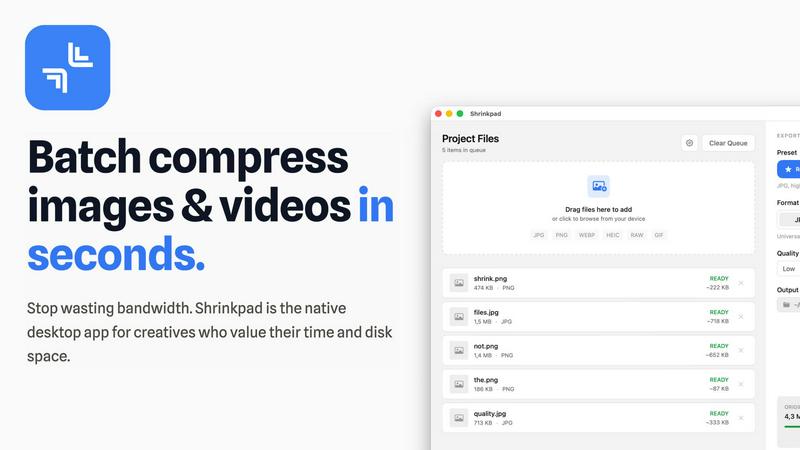
Shrinkpad quickly and effortlessly batch compresses images and videos on Mac, optimizing your assets with precision.
Last updated: February 28, 2026
Visual Comparison
Roast My Web

Shrinkpad
Feature Comparison
Roast My Web
Instant Website Audits
Roast My Web delivers comprehensive website audits in just two minutes, allowing users to quickly identify critical issues that affect conversions and user trust. This feature eliminates the tedious manual analysis typically associated with website evaluations.
Custom-Branded Reports
Users can easily personalize their reports with logos, colors, and text, creating polished client-ready PDFs without needing design skills. This feature ensures that the audits not only provide valuable insights but also reflect the user's brand identity.
Actionable Recommendations
The platform provides specific, section-by-section suggestions tailored to enhance various aspects of the website, including design, UX, and SEO. These actionable insights are prioritized based on their potential impact on revenue, enabling users to focus on high-impact changes first.
Batch Audits
With the ability to analyze multiple URLs simultaneously, Roast My Web allows users to audit over 100 sites in minutes. This feature is particularly beneficial for agencies and professionals managing multiple client websites, streamlining the audit process significantly.
Shrinkpad
Smart Compression
Shrinkpad automatically analyzes the visual complexity of each file, applying the ideal compression ratio to ensure minimal loss of quality. This feature eliminates the guesswork, allowing users to achieve the best results effortlessly.
Unlimited Batching
With the ability to process thousands of files simultaneously, Shrinkpad can handle massive queues without crashing, unlike many web-based tools. Users can batch compress images and videos together, optimizing their workflow efficiently.
One-Drop Import
Users can simply drag and drop entire folders into Shrinkpad. The application automatically detects all supported media files within the folder, streamlining the process and saving time by avoiding manual file selection.
Privacy-First Approach
Shrinkpad prioritizes user privacy by performing all processing locally on the machine. This means that no files are uploaded to the cloud, ensuring that sensitive assets remain secure and under the user's control throughout the compression process.
Use Cases
Roast My Web
Freelancers and Agencies
Freelancers and agencies can utilize Roast My Web to deliver professional-grade website audits to their clients, helping them identify and rectify issues quickly. This boosts client satisfaction and enhances the freelancer's reputation as a knowledgeable expert.
Startup Founders
Startup founders can leverage the tool to conduct quick audits of their websites, identifying critical areas for improvement without the need for extensive design experience. This enables them to optimize their sites for conversions early in their business journey.
E-commerce Businesses
E-commerce businesses can use Roast My Web to pinpoint issues that may be affecting their sales funnel. By receiving actionable insights, they can enhance their websites to improve user experience and ultimately drive more sales.
Digital Marketers
Digital marketers can employ the platform to analyze client websites as part of their strategy development. The detailed reports provide a clear understanding of where improvements can be made, allowing marketers to craft targeted campaigns based on data-driven insights.
Shrinkpad
Photographers
Professional photographers can utilize Shrinkpad to batch compress large collections of images from shoots, significantly reducing file sizes for easier storage and faster uploads to galleries or websites.
Designers
Graphic designers can benefit from Shrinkpad by quickly optimizing assets exported from software like Figma or Photoshop. This allows them to maintain high visual quality while minimizing the impact on disk space and loading times.
Content Creators
Content creators, including vloggers and social media influencers, can use Shrinkpad to compress videos for faster uploads and improved website performance. This tool helps in managing large multimedia files efficiently.
Marketing Teams
Marketing teams can leverage Shrinkpad to ensure that all digital assets, from promotional videos to product images, are optimized for web use. This enhances user experience by reducing website load times and improving engagement metrics.
Overview
About Roast My Web
Roast My Web is an innovative AI-driven tool that revolutionizes the website audit process for digital professionals. It transforms any URL into a detailed, client-ready report in approximately two minutes, making it an essential resource for agencies, freelancers, and startup founders. By automating the audit process, Roast My Web saves users countless hours that would otherwise be spent on manual analysis. The platform is designed to swiftly identify specific issues that may hinder conversions and damage user trust. Its main value proposition lies in its ability to provide rapid, in-depth feedback across critical areas such as user experience (UX), conversion optimization, and search engine optimization (SEO). Unlike generic website checkers, Roast My Web offers actionable recommendations presented in a polished, brandable format. This empowers users to move from diagnosis to execution with confidence, providing a prioritized roadmap for growth. With features such as batch audits and competitor comparisons, Roast My Web supports businesses at every stage, ensuring their online presence is optimized for lead generation and sales.
About Shrinkpad
Shrinkpad is an innovative desktop application tailored for macOS users seeking to efficiently batch compress images and videos. This powerful tool empowers photographers, designers, content creators, and anyone handling large media files to streamline their workflows. By allowing users to drop hundreds of files or entire folders, Shrinkpad simplifies the compression process, enabling significant reductions in file sizes within seconds. With a focus on privacy, all processing occurs locally on the user's device, eliminating the need for internet connections and safeguarding sensitive files. Supporting over 50 file formats, including JPG, PNG, MP4, and MOV, Shrinkpad integrates seamlessly into diverse workflows, offering both preset quality options and customizable settings for optimal results. In a world where disk space and loading times are increasingly critical, Shrinkpad becomes an indispensable asset for those looking to optimize their digital content without compromising quality.
Frequently Asked Questions
Roast My Web FAQ
How long does it take to generate a report?
Roast My Web generates a comprehensive website audit report in approximately two minutes, allowing you to quickly identify critical issues.
Can I customize the reports I generate?
Yes, Roast My Web allows you to customize reports by adding your logo, colors, and text, ensuring that they are polished and align with your brand identity.
How does Roast My Web help with SEO?
The platform combines technical SEO checks with on-page UX tips, providing actionable insights to boost your website's traffic and conversion rates.
Is there a money-back guarantee?
Yes, Roast My Web offers a 30-day money-back guarantee, allowing users to try the service risk-free and ensuring satisfaction with the product.
Shrinkpad FAQ
Can I use Shrinkpad for free?
Yes, Shrinkpad offers a Free Starter plan that includes essential tools for casual use, allowing users to batch compress images with limitations on file counts and formats.
What file formats does Shrinkpad support?
Shrinkpad supports over 50 file formats, including common image formats like JPG and PNG, as well as video formats such as MP4 and MOV, ensuring versatility for various media types.
Does Shrinkpad support video compression?
Absolutely, Shrinkpad includes robust video compression features, allowing users to efficiently reduce the file sizes of videos alongside images in a single batch process.
How many files can I process at once?
With Shrinkpad, users can batch process thousands of files at once, making it a powerful tool for handling large media libraries without compromising performance.
Alternatives
Roast My Web Alternatives
Roast My Web is a powerful AI-driven tool that automates the website audit process, delivering a detailed, client-ready report in just two minutes. It falls under the category of website optimization tools, focusing on improving user experience, conversion rates, and SEO performance. Users often seek alternatives due to various factors, including pricing structures, specific feature sets that align with their unique needs, or compatibility with other platforms they are already using. When selecting an alternative to Roast My Web, it's essential to consider the tool's speed and depth of analysis, the ability to produce professional reports, and the level of customization available. Additionally, evaluating how well the alternative can grow with your business needs and support ongoing optimization is crucial for ensuring long-term success in digital presence management.
Shrinkpad Alternatives
Shrinkpad is a powerful desktop application designed specifically for macOS users, allowing them to batch compress images and videos quickly and efficiently. As an essential tool for photographers, designers, and content creators, it optimizes large media files, ensuring significant file size reductions without compromising visual quality. Users often seek alternatives to Shrinkpad for various reasons, such as pricing, feature sets, or compatibility with different operating systems. When searching for alternatives, it's important to consider several factors. Look for user-friendly interfaces, robust batch processing capabilities, customizable settings for compression, and local processing to maintain privacy. Additionally, ensure that the alternative supports a wide range of file formats to seamlessly integrate into your existing workflow.