
Shrinkpad vs Sketch To
Side-by-side comparison to help you choose the right tool.

Shrinkpad
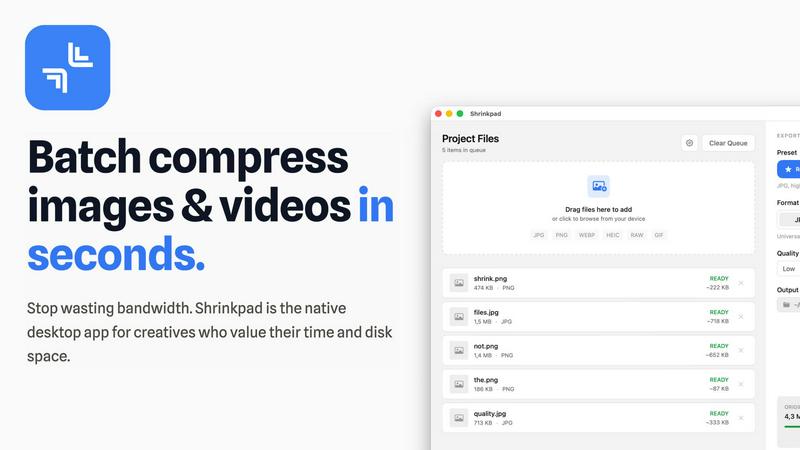
Shrinkpad quickly and effortlessly batch compresses images and videos on Mac, optimizing your assets with precision.
Last updated: February 28, 2026
Sketch To
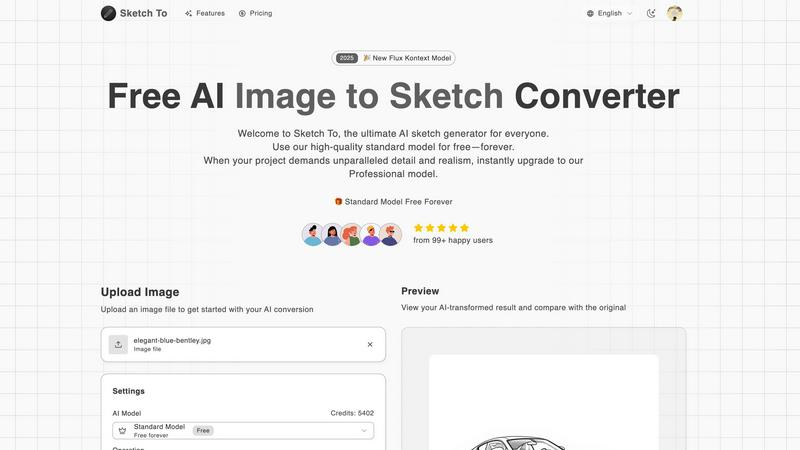
Sketch To transforms your images into stunning sketches with AI, catering to both hobbyists and professionals alike.
Last updated: February 28, 2026
Visual Comparison
Shrinkpad
Sketch To
Feature Comparison
Shrinkpad
Smart Compression
Shrinkpad automatically analyzes the visual complexity of each file, applying the ideal compression ratio to ensure minimal loss of quality. This feature eliminates the guesswork, allowing users to achieve the best results effortlessly.
Unlimited Batching
With the ability to process thousands of files simultaneously, Shrinkpad can handle massive queues without crashing, unlike many web-based tools. Users can batch compress images and videos together, optimizing their workflow efficiently.
One-Drop Import
Users can simply drag and drop entire folders into Shrinkpad. The application automatically detects all supported media files within the folder, streamlining the process and saving time by avoiding manual file selection.
Privacy-First Approach
Shrinkpad prioritizes user privacy by performing all processing locally on the machine. This means that no files are uploaded to the cloud, ensuring that sensitive assets remain secure and under the user's control throughout the compression process.
Sketch To
Image to Sketch Conversion
Sketch To provides an advanced AI-powered feature that allows users to convert images into beautiful pencil sketches. This tool is designed for artists and designers, enabling them to create artistic interpretations of their photographs effortlessly and with stunning detail. The process is quick and user-friendly, making it perfect for anyone looking to add an artistic touch to their visual projects.
Sketch to Image AI
One of the standout features of Sketch To is its ability to transform sketches into photorealistic images, particularly when utilizing the Professional Model. This feature empowers artists to elevate their hand-drawn sketches into lifelike representations, enhancing their work with incredible detail and texture. This transformation is ideal for professional projects, ensuring that artists can achieve the highest quality results.
Trial Credits Model
New users of Sketch To are welcomed with trial credits, allowing them to explore the platform's capabilities without any financial commitment. The Standard Model is equipped with these credits, making it an excellent choice for hobbyists and casual creators who want to experiment and learn the nuances of digital art. This introductory model fosters a supportive environment for creativity and growth.
Instant Processing
Sketch To prides itself on its powerful AI processing engine, which delivers instant results. Users can upload their images or sketches and receive their transformed creations in just seconds. This feature is crucial for those who need quick turnaround times for projects, whether for social media, presentations, or artistic showcases.
Use Cases
Shrinkpad
Photographers
Professional photographers can utilize Shrinkpad to batch compress large collections of images from shoots, significantly reducing file sizes for easier storage and faster uploads to galleries or websites.
Designers
Graphic designers can benefit from Shrinkpad by quickly optimizing assets exported from software like Figma or Photoshop. This allows them to maintain high visual quality while minimizing the impact on disk space and loading times.
Content Creators
Content creators, including vloggers and social media influencers, can use Shrinkpad to compress videos for faster uploads and improved website performance. This tool helps in managing large multimedia files efficiently.
Marketing Teams
Marketing teams can leverage Shrinkpad to ensure that all digital assets, from promotional videos to product images, are optimized for web use. This enhances user experience by reducing website load times and improving engagement metrics.
Sketch To
Creative Social Media Posts
Artists and content creators can utilize Sketch To to generate eye-catching social media posts that stand out. By transforming photos into artistic sketches or enhancing sketches into polished images, users can create unique content that engages their audience and showcases their artistic flair.
Educational Projects
Students and educators can leverage Sketch To for school projects that require visual components. Whether creating artistic representations of historical events or illustrating concepts in a visually appealing manner, the tool allows for creativity while ensuring high-quality outputs that enhance learning materials.
Professional Design Work
Graphic designers and professionals can use Sketch To to produce commercial-grade assets. The Professional Model provides the level of detail and realism needed for high-stakes projects, enabling designers to deliver exceptional work that meets client expectations and industry standards.
Personal Artistic Development
For hobbyists and aspiring artists, Sketch To serves as a valuable tool for personal growth in digital art. Users can experiment with different styles and techniques, learning through trial and error while enjoying the creative process. The platform supports artistic exploration, helping individuals develop their unique artistic voice.
Overview
About Shrinkpad
Shrinkpad is an innovative desktop application tailored for macOS users seeking to efficiently batch compress images and videos. This powerful tool empowers photographers, designers, content creators, and anyone handling large media files to streamline their workflows. By allowing users to drop hundreds of files or entire folders, Shrinkpad simplifies the compression process, enabling significant reductions in file sizes within seconds. With a focus on privacy, all processing occurs locally on the user's device, eliminating the need for internet connections and safeguarding sensitive files. Supporting over 50 file formats, including JPG, PNG, MP4, and MOV, Shrinkpad integrates seamlessly into diverse workflows, offering both preset quality options and customizable settings for optimal results. In a world where disk space and loading times are increasingly critical, Shrinkpad becomes an indispensable asset for those looking to optimize their digital content without compromising quality.
About Sketch To
Sketch To represents a groundbreaking advancement in the realm of creative AI tools, providing an intuitive platform that connects the world of imagination with tangible artistic outputs. This web-based AI solution caters to a diverse audience ranging from budding hobbyists to seasoned professionals, enabling users to transform their creative visions into stunning visual representations. At its core, Sketch To specializes in a unique dual-direction transformation: it can convert photographs into intricate artistic sketches and, conversely, breathe life into simple sketches by generating photorealistic images. With a community of over 500,000 users, Sketch To is designed to be accessible and progression-friendly, allowing newcomers to embark on their artistic journey with a robust, free Standard Model that offers trial credits for exploration. As users advance their skills and require more sophisticated results, they can easily transition to the Professional Model, which unlocks unparalleled detail and realism. This tiered approach ensures that Sketch To evolves alongside its users, supporting their creative growth from initial sketches to polished masterpieces without the burden of complex software or restrictive subscriptions.
Frequently Asked Questions
Shrinkpad FAQ
Can I use Shrinkpad for free?
Yes, Shrinkpad offers a Free Starter plan that includes essential tools for casual use, allowing users to batch compress images with limitations on file counts and formats.
What file formats does Shrinkpad support?
Shrinkpad supports over 50 file formats, including common image formats like JPG and PNG, as well as video formats such as MP4 and MOV, ensuring versatility for various media types.
Does Shrinkpad support video compression?
Absolutely, Shrinkpad includes robust video compression features, allowing users to efficiently reduce the file sizes of videos alongside images in a single batch process.
How many files can I process at once?
With Shrinkpad, users can batch process thousands of files at once, making it a powerful tool for handling large media libraries without compromising performance.
Sketch To FAQ
What kind of images can I convert with Sketch To?
Sketch To supports various image formats, allowing users to upload photos and sketches for conversion. This flexibility ensures that you can work with the files you already have, making the creative process seamless.
How does the trial credits model work?
New users receive trial credits upon signing up, which they can use to explore the features of the Standard Model. This allows you to test the platform's capabilities without any initial investment, making it accessible for everyone.
Is the Professional Model worth the upgrade?
Yes, the Professional Model unlocks advanced features, including photorealistic sketch transformations, which are crucial for commercial work and professional projects. If you need high-quality results with exceptional detail, upgrading is highly beneficial.
Can I use Sketch To for commercial projects?
Absolutely! Sketch To's Professional Model is designed specifically for commercial use, providing the quality and detail necessary for professional projects. You can confidently create assets for your clients or businesses using this tool.
Alternatives
Shrinkpad Alternatives
Shrinkpad is a powerful desktop application designed specifically for macOS users, allowing them to batch compress images and videos quickly and efficiently. As an essential tool for photographers, designers, and content creators, it optimizes large media files, ensuring significant file size reductions without compromising visual quality. Users often seek alternatives to Shrinkpad for various reasons, such as pricing, feature sets, or compatibility with different operating systems. When searching for alternatives, it's important to consider several factors. Look for user-friendly interfaces, robust batch processing capabilities, customizable settings for compression, and local processing to maintain privacy. Additionally, ensure that the alternative supports a wide range of file formats to seamlessly integrate into your existing workflow.
Sketch To Alternatives
Sketch To is an innovative web-based AI platform that specializes in transforming images into professional sketches and vice versa. It caters to a diverse user base ranging from hobbyists to professional artists, making it a versatile tool in the creative AI category. Users often seek alternatives to Sketch To for various reasons, including pricing structures, specific feature sets, or compatibility with different devices and operating systems. When searching for an alternative, it's essential to consider factors such as ease of use, the quality of output, and whether the platform supports the creative process at various skill levels. Additionally, potential users should evaluate the flexibility of pricing models, availability of free trials, and the community support surrounding the platform. A tool's ability to adapt to the evolving needs of artists—whether they are just starting or looking to enhance their professional portfolio—can be a critical element in making the right choice. The right alternative should not only meet immediate creative needs but also encourage growth and exploration in the artistic journey.