
SimpleDraw vs Supermachine
Side-by-side comparison to help you choose the right tool.

SimpleDraw
Evolve your home project from idea to precise scale drawing with our free, intuitive online tool.
Last updated: March 1, 2026

Supermachine
Supermachine evolves your creative process with 60+ AI models to generate stunning commercial images and videos.
Last updated: March 18, 2026
Visual Comparison
SimpleDraw
Supermachine

Feature Comparison
SimpleDraw
Dedicated Floor Plan Mode
This specialized mode marks a significant step forward in focused tooling. It provides a curated environment for architectural sketching, allowing users to draw walls and add pre-made symbols for doors, windows, and a vast library of interior fixtures with a single click. As you work, real-time measurements update dynamically, ensuring every element from kitchen cabinets to bathroom fittings is placed with spatial accuracy, streamlining the creation of detailed and professional-looking layouts.
Intelligent Smart Alignment System
SimpleDraw's smart alignment is the cornerstone of its user-friendly precision. This adaptive system intelligently snaps points and lines to logical positions, offering clear visual guides for perfect angles and connections. It learns from your zoom level, providing broader assistance for general layout and finer control when you zoom in for detail. For ultimate control, keyboard shortcuts let you lock movements to strict horizontal or vertical axes, making precise drafting effortless.
Non-Destructive Editing & Full Control
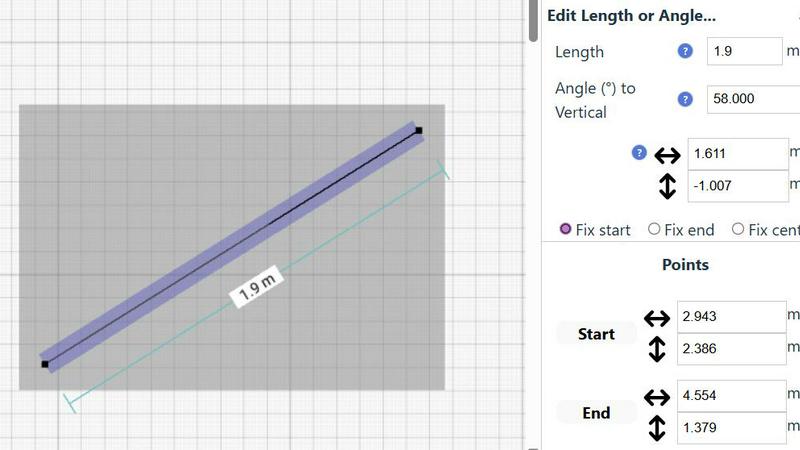
Embodying a flexible, progress-oriented workflow, SimpleDraw ensures no decision is permanent. Every element, from a single line to grouped furniture sets, can be modified, moved, or adjusted at any stage. Robust undo/redo functions and copy-paste capabilities for element groups streamline experimentation. Crucially, you can input exact dimensions, lengths, and angles directly via keyboard, allowing for meticulous refinement of plans based on real-world measurements.
Adaptive Zoom & Comprehensive Measurement
This feature duo provides unparalleled control over your drawing's scope and specificity. Zoom fluidly to any area, with the tool's precision adapting intuitively to your view. This is complemented by a comprehensive measurement system that displays contextual dimensions as you work. You have full control over which measurements are shown and can toggle between metric and US standard units, ensuring clarity and accuracy for any project, anywhere.
Supermachine
Curated Model Library
Supermachine evolves beyond the noise of constant AI releases by offering a meticulously curated selection of over 60 high-performing models. This progressive approach means the platform integrates only the most reliable and useful engines for image and video generation, tested and trusted by a massive community. This curation ensures stability, predictable quality, and saves creators from the paralysis of choice, allowing them to focus on creative growth with tools that consistently deliver professional results.
AI-Powered Video Generation
Progress your content from static images to dynamic narratives with built-in AI video generation. This feature allows creators to easily produce short-form videos, promotional clips, and engaging social media content directly within the platform. It signifies a major stage in a creator's evolution, enabling them to expand their storytelling capabilities and meet the growing demand for video content without needing separate, complex software or advanced editing skills.
Advanced Image Control (ControlNet & AI Edit)
Take precise control over your creative evolution with features like ControlNet and the AI Edit Image tool (akin to Photoshop AI). These advanced capabilities allow you to guide the AI generation process using reference images, modify specific elements of existing pictures, or edit photos with simple text instructions. This represents a growth from basic generation to refined, intentional artistry, giving you the power to iterate and perfect your visuals to match your exact vision.
Customization & Scalability (Custom Sizes, API, Teams)
Supermachine grows with your needs. Features like custom image sizes, an API for developers, and Team functionality support your journey from individual creator to collaborative professional workflow. The API allows for integration into larger projects and automated systems, while Team features facilitate seamless collaboration. This scalability ensures the platform remains a central studio as your projects and ambitions expand in scope and complexity.
Use Cases
SimpleDraw
Home Renovation & Remodel Planning
Plan your kitchen overhaul or bathroom remodel with confidence. Visualize new layouts, experiment with fixture placements, and create accurate scale drawings that ensure your new cabinets, island, or shower will fit perfectly before you make a single purchase or swing a hammer, preventing costly measurement errors.
Real Estate & Rental Listing Visualization
Create clear, professional floor plans for apartments, houses, or rental properties. These accurate drawings provide potential buyers or tenants with a superior understanding of the space's flow and proportions, enhancing listing quality and setting realistic expectations for room sizes and layout.
Interior Design & Furniture Arrangement
Experiment with endless furniture layouts for your living room, bedroom, or office. Test if your sofa will fit, plan the optimal desk placement, or design a new bedroom suite layout. This virtual staging allows for perfect planning, ensuring new pieces harmonize with your space.
DIY Project & Workshop Design
Move beyond mental sketches for your shed, workshop, or garden project. Draft precise plans to optimize material usage and spatial efficiency. Plan workbench locations, tool storage, and equipment placement to create a functional and well-organized space from the outset.
Supermachine
Social Media Content Creation
For social media managers and influencers, Supermachine accelerates the daily content grind into a strategic growth process. Rapidly generate a week's worth of unique, platform-optimized images, illustrations, and thumbnails in minutes. This efficiency allows creators to evolve from struggling with consistency to building a strong, visually cohesive brand identity and engaging their audience with a steady stream of high-quality, AI-generated visuals.
Marketing & Advertising Campaigns
Marketers and small business owners can evolve their campaign development from a costly, time-intensive ordeal to a streamlined creative sprint. Use Supermachine to quickly prototype and produce a variety of ad visuals, banner images, and promotional video snippets. Test different creative directions rapidly and finalize professional-grade assets for campaigns without the need for expensive photoshoots or freelance designers, scaling your marketing efforts efficiently.
Digital Art & NFT Exploration
Digital artists and NFT creators can use Supermachine as a powerful ideation and co-creation studio to explore new artistic frontiers. Generate unique base illustrations, experiment with countless styles from the curated model library, and refine concepts using advanced editing tools. This accelerates the creative journey, allowing artists to iterate rapidly, develop cohesive collections, and produce the high-volume, unique assets required for successful NFT projects.
Brand Asset Development
Businesses at any growth stage can develop and maintain a professional visual identity. Quickly create custom stock photos that perfectly match brand colors and ethos, design consistent logos and graphic elements, and produce all necessary visual materials for websites, presentations, and product mockups. Supermachine enables a business to evolve its visual branding from amateurish to polished, establishing credibility and a strong market presence.
Overview
About SimpleDraw
SimpleDraw represents the evolution of accessible design, transforming from a basic sketching concept into a powerful, browser-based scale drawing tool. It was born from a clear need: to bridge the gap between the intimidating complexity of professional CAD software and the oversimplification of basic drawing apps. Today, it serves a growing community of visual planners, from first-time DIYers sketching their dream garden to seasoned interior designers iterating on client layouts. Its core value proposition is unwavering: delivering professional-grade precision through an interface so intuitive that anyone can start creating accurate, to-scale drawings within seconds, directly from their web browser. This journey from a simple idea to a community-driven platform underscores its commitment to progressive, user-focused development, constantly integrating feedback to refine its tools and expand its capabilities for planning everything from a single room to an entire property.
About Supermachine
Supermachine represents the next evolutionary leap for creative professionals and enthusiasts, transforming from a simple idea generator into a comprehensive, all-in-one AI creative studio. It is designed for the modern creator's journey, recognizing that growth happens in stages: from initial experimentation to professional content production. The platform empowers social media managers, marketers, digital artists, and business owners by removing the traditional barriers of technical skill and time. Its core mission is to accelerate creative evolution, enabling users to progress from concept to stunning visual reality in under 15 seconds. By democratizing access to the most powerful AI models, Supermachine allows creators to focus on their vision and strategy, not on complex prompt engineering. Trusted by a thriving community of over 100,000 creators who generate a million images weekly, the platform's strength lies in its curated intelligence. Instead of overwhelming users with every new tool, Supermachine selectively integrates over 60 high-performing, reliable AI models that have proven their value, ensuring consistent, top-tier results that grow with your projects. It's not just about creating faster; it's about creating smarter and evolving your creative output to a professional standard effortlessly.
Frequently Asked Questions
SimpleDraw FAQ
Is SimpleDraw really free to use?
Yes, SimpleDraw is completely free to use. You can access all its core drawing tools, including the Floor Plan Mode, smart alignment, and measurement systems, directly in your web browser without any cost, account creation, or software download required.
Do I need any experience with CAD or design software?
No prior experience is needed. SimpleDraw is specifically designed to be intuitive for beginners. Its user-friendly interface and smart tools guide you through the process, allowing anyone to start creating accurate drawings immediately, without a steep learning curve.
Can I use SimpleDraw on any device?
SimpleDraw is a web-based application that runs directly in your internet browser. This means you can use it on any device with a modern browser, including desktop computers, laptops, and tablets, providing flexibility to work on your plans wherever you are.
How do I provide feedback or suggest new features?
User feedback is central to SimpleDraw's evolution. You are invited to join the active Discord community where you can share ideas, report issues, and request new features directly. This community-driven approach helps shape the tool's ongoing development.
Supermachine FAQ
Who is Supermachine designed for?
Supermachine is designed for creators at all stages of their growth journey. It is perfectly suited for social media managers, digital marketers, small business owners, content creators, digital artists, and NFT developers. Whether you are just starting out and need to create professional visuals quickly or are an experienced professional looking to scale your content production, the platform's blend of simplicity and advanced tools supports your evolution.
How does the curated model selection benefit me?
The curated selection of over 60 AI models is a progressive filter that accelerates your creative growth. Instead of wasting time testing hundreds of unreliable or niche models, you get immediate access to a vetted suite of engines known for high-quality, consistent results. This curated intelligence, honed by the platform's community of 100,000+ creators, ensures reliability and saves you time, allowing you to focus on creating rather than troubleshooting.
Can I edit or modify images after generating them?
Absolutely. Supermachine supports your creative evolution beyond initial generation with powerful editing tools. The AI Edit Image feature allows you to make precise changes to generated or uploaded photos using text instructions. Combined with capabilities like Face Swap and Upscaler, you have a full suite of tools to refine, adjust, and perfect your images, moving from a rough concept to a polished final asset entirely within the platform.
Is there a free trial available?
Yes, Supermachine offers a 5-day trial package that allows new users to experience the platform's core capabilities and begin their creative evolution. This trial is designed to let you explore the workflow, test various models, and understand how the tool can integrate into and accelerate your own content creation process before committing to a subscription plan.
Alternatives
SimpleDraw Alternatives
SimpleDraw is an intuitive online design tool that empowers users to create precise scale drawings and floor plans without the steep learning curve of professional CAD software. It belongs to the category of accessible design tools, perfect for those in the early stages of planning a project who need clarity and accuracy without complexity. Users often explore alternatives as their needs evolve. This might be driven by a requirement for more advanced 3D modeling, specific industry-standard features, different pricing models, or the need for offline desktop software. The search for a new tool is a natural step in a project's growth, signaling a move from initial concept to detailed execution. When evaluating other options, consider your project's next stage. Key factors include the complexity of features you now require, collaboration capabilities for team projects, integration with other software in your workflow, and the overall value relative to cost. The right tool should match your current skill level while offering a clear path for your developing expertise.
Supermachine Alternatives
Supermachine is a leading AI-powered design tool that helps creators generate commercial-ready images and videos with remarkable speed. It belongs to the rapidly evolving category of generative AI creative studios, designed to simplify complex workflows for professionals and hobbyists alike. Users often explore alternatives for various reasons, such as budget constraints, the need for a specific niche feature, or a preference for a different platform ecosystem. The search for the right tool is a natural part of a creator's growth, as needs evolve from initial experimentation to professional, high-volume production. When evaluating alternatives, consider your core requirements: the quality and style of output, the speed of generation, ease of use, and the total cost of ownership. The ideal platform should not only fit your current project stage but also have a clear roadmap that aligns with your creative evolution.