
SupaSidebar vs Zovo
Side-by-side comparison to help you choose the right tool.

SupaSidebar
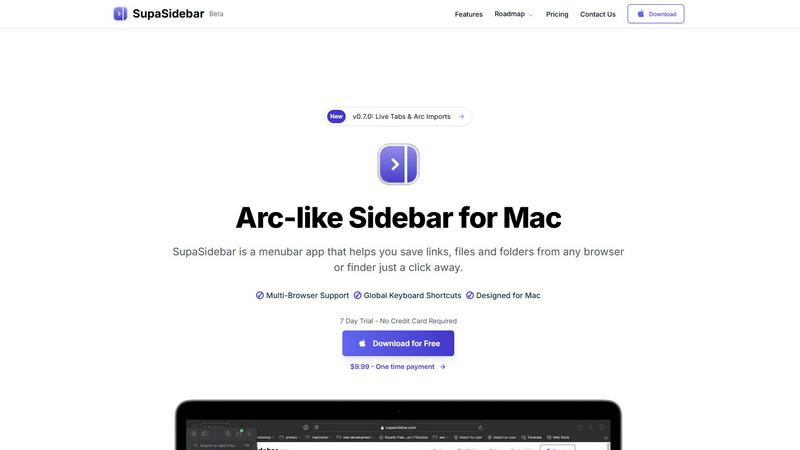
SupaSidebar streamlines your Mac experience with quick access to links, files, and folders from any browser or app.
Last updated: February 28, 2026

Zovo offers 20 essential privacy-first Chrome extensions for developers and writers with one subscription and no data.
Last updated: February 28, 2026
Visual Comparison
SupaSidebar
Zovo

Feature Comparison
SupaSidebar
Seamless Browser Integration
SupaSidebar is designed to work flawlessly with all major browsers, including Safari, Chrome, Firefox, Arc, and Brave. This integration ensures that users can save and access their favorite links and files from any browsing environment, providing a unified experience across platforms.
Global Keyboard Shortcuts
The application features customizable global keyboard shortcuts that facilitate quick actions. Users can save URLs or copy links with simple keystrokes, such as ⌘ + ⌃ + S for saving and ⌘ + ⌃ + C for copying. This feature significantly enhances productivity by reducing the time spent navigating through menus.
Recents Tracking
SupaSidebar automatically tracks and displays recently visited websites for up to 48 hours. This feature allows users to easily revisit sites they have accessed in the recent past, eliminating the hassle of searching through bookmarks or browser history.
Favorites and Organization
Users can pin their most important links and files at the top of the sidebar for quick access. This organization feature makes it easy to prioritize frequently used resources, ensuring that essential information is always just a click away.
Zovo
Privacy-First Design
Every Zovo extension operates entirely on your device, ensuring that your personal data remains private. There are no tracking mechanisms or data collection practices, allowing users to browse freely without concerns about their activity being monitored or harvested.
User-Driven Development
Zovo thrives on community input, empowering users to directly submit feature requests and vote on upcoming features. This collaborative approach means that the most-requested features get prioritized, ensuring the development aligns with user needs and preferences.
Open Source Transparency
With 12 of its extensions being fully open source, Zovo allows users to review the code behind each tool. This transparency builds trust, as users can verify the privacy policies and functionalities before installation, ensuring they are comfortable with the software they are using.
Seamless Installation and Use
Zovo extensions are designed for immediate usability. Users can install any extension without creating an account and start using core features right away. For those who wish to unlock advanced features, a simple subscription covers all tools, making it easy to upgrade at any time.
Use Cases
SupaSidebar
Efficient Resource Management
For busy professionals juggling multiple projects, SupaSidebar serves as a central hub for managing links, files, and folders. By organizing resources in one place, users can enhance their workflow and focus on their tasks without the distraction of a cluttered desktop.
Academic Research
Students conducting research can utilize SupaSidebar to save and organize links to academic articles, study materials, and important resources. The ability to quickly access these materials facilitates a more efficient study process, allowing students to concentrate on learning rather than searching.
Creative Projects
Content creators and designers can leverage SupaSidebar to manage inspiration sources, such as design references, articles, and tutorials. By keeping these resources organized, they can streamline their creative process and boost productivity when working on projects.
Collaborative Work
In team environments, SupaSidebar can be used to share links and resources among team members. By centralizing project-related materials, teams can improve communication and collaboration, ensuring everyone has access to the necessary information.
Zovo
Enhanced Writing with BeLikeNative
For non-native speakers or anyone looking to improve their writing, BeLikeNative offers real-time suggestions to help users write more fluently in over 80 languages. This tool is ideal for professionals, students, and anyone who frequently communicates in a second language.
Efficient Tab Management with Tab Suspender Pro
Users who often work with numerous browser tabs will find Tab Suspender Pro invaluable. This extension automatically suspends inactive tabs, freeing up memory and improving browser speed, making it easier to manage large projects without overwhelming system resources.
Streamlined Data Handling with JSON Formatter Pro
Web developers and data analysts can efficiently format and validate JSON data using JSON Formatter Pro. This tool simplifies the process of working with data, helping users quickly identify errors and improve their workflow.
Organized Clipboard History with Clipboard History Pro
Clipboard History Pro enhances productivity by allowing users to access an extensive history of copied items. This feature is particularly useful for content creators, developers, and anyone who frequently transfers information between applications, as it ensures no valuable data is lost.
Overview
About SupaSidebar
SupaSidebar is an innovative sidebar application designed specifically for Mac users, drawing inspiration from the Arc browser to deliver a powerful productivity tool. Its primary purpose is to enhance organization, streamline browsing speed, and foster a seamless user experience. Ideal for professionals, students, and anyone managing a plethora of links, files, and folders, SupaSidebar simplifies the digital landscape by providing quick access to essential resources. With support for all major browsers—including Safari, Chrome, Arc, Firefox, and Brave—users can effortlessly save URLs and manage their online content. The application boasts an intuitive interface complemented by global keyboard shortcuts, empowering users to navigate their workspace effortlessly. For instance, with just a simple press of ⌘ + ⌃ + S, users can save their current webpage, while ⌘ + ⌃ + C allows for quick copying of links. SupaSidebar not only keeps crucial links at your fingertips but also helps maintain focus, making it an invaluable asset for anyone looking to optimize their productivity and workflow.
About Zovo
Zovo is a powerful suite of 20 Chrome extensions developed by Michael Lip, a solo developer with over a decade of experience and an impressive track record of $400K earned on Upwork, boasting a 100% success rate. Designed for anyone looking to enhance their browser functionality, Zovo's flagship extension, BeLikeNative, empowers over 3,300 users to write like native speakers with one-keystroke rewrites in 80 languages. The comprehensive suite includes essential tools like Tab Suspender Pro, JSON Formatter Pro, Clipboard History Pro, and more, all crafted with a privacy-first approach—meaning your data never leaves your device. This commitment to user privacy ensures there is no data harvesting or investor influence on development. Users actively participate in shaping the roadmap, voting on features and suggesting improvements. With new extensions launched monthly and many tools available for free at zovo.one, Zovo is the go-to solution for those seeking reliable, user-centric tools without compromises.
Frequently Asked Questions
SupaSidebar FAQ
Is SupaSidebar a browser extension?
No, SupaSidebar is a standalone menubar application designed specifically for Mac users. It integrates seamlessly with multiple browsers but operates independently from them.
Which browsers does SupaSidebar work with?
SupaSidebar supports all major browsers, including Safari, Chrome, Firefox, Arc, and Brave, enabling users to save and access links from any of these platforms.
What macOS version do I need?
SupaSidebar requires macOS 13 or later to function effectively. Ensure your system meets this requirement for the best experience.
Where is my data stored?
All data managed by SupaSidebar remains on your Mac, ensuring privacy and security. The application does not store your information on external servers, providing peace of mind to users concerned about data privacy.
Zovo FAQ
How does Zovo ensure user privacy?
Zovo prioritizes user privacy by running all extensions locally on your device, meaning no data is transmitted over the internet. There are no tracking, analytics, or data collection practices in place, ensuring that your activity remains confidential.
Can I make feature requests for Zovo extensions?
Absolutely! Zovo encourages user input by allowing you to submit feature requests directly. The most-voted requests are prioritized for development, ensuring that the tools evolve to meet the community's needs.
Are Zovo extensions free to use?
Yes, all core features of Zovo extensions are available for free. Users can install and use them without creating an account. For those who seek advanced features, a paid subscription is available, providing access to additional functionalities.
How often does Zovo release new extensions?
Zovo is committed to continuous improvement and innovation, with new extensions being released monthly. Members receive early access to these new tools, often 1-2 weeks before public release, allowing them to stay ahead of the curve.
Alternatives
SupaSidebar Alternatives
SupaSidebar is a sophisticated sidebar application designed for Mac users, enhancing their digital experience by providing quick access to links, files, and folders from any browser. As a productivity and management tool, it helps streamline workflows, especially for professionals and students who juggle multiple resources and need to maintain focus while browsing. Users often seek alternatives to SupaSidebar for various reasons, such as pricing, specific feature sets, or compatibility with different platforms. When searching for an alternative, it’s essential to consider factors like user interface, ease of integration with existing workflows, and the extent of features offered, ensuring that the new tool aligns with individual productivity needs and preferences.
Zovo Alternatives
Zovo is a suite of 20 privacy-first Chrome extensions designed for developers and writers, combining productivity and management tools into one cohesive package. Each extension, crafted by a solo developer with over a decade of experience, prioritizes user privacy and enhances workflows through features like JSON formatting, tab suspending, and clipboard history management. Users often seek alternatives to Zovo for various reasons, including pricing considerations, the need for specific features, or compatibility with different platforms. When exploring options, it’s essential to assess the functionality offered, user feedback, and the overall alignment with your productivity goals. Look for tools that maintain similar privacy standards and provide a user-friendly experience to ensure a smooth transition and continued growth in your work.