
SVG to 3D vs TrafficClaw
Side-by-side comparison to help you choose the right tool.

SVG to 3D
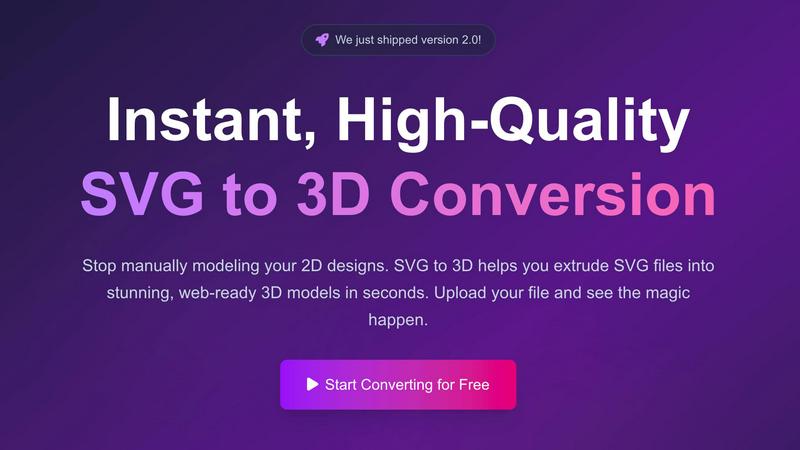
Evolve your 2D SVG designs into professional 3D models instantly and for free.
Last updated: February 28, 2026

TrafficClaw
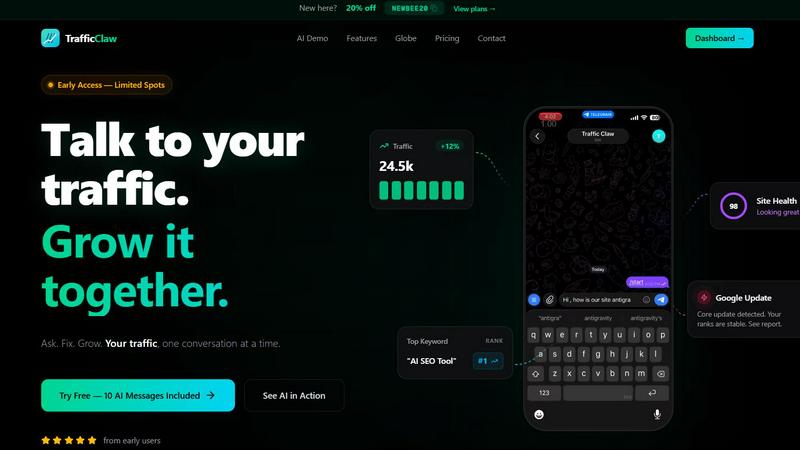
TrafficClaw is your AI analyst that talks to your SEO data to give you actionable growth verdicts.
Last updated: April 13, 2026
Visual Comparison
SVG to 3D
TrafficClaw
Feature Comparison
SVG to 3D
Browser-Based Modeling Studio
This feature eliminates the need for software installation, representing a leap forward in accessibility. You can perform complex 3D modeling directly in your web browser with a real-time preview. It goes beyond simple extrusion, allowing for fine-tuned control over critical parameters like model thickness, bevel depth and complexity, and the application of advanced PBR (Physically-Based Rendering) materials. This evolution from a basic converter to an in-browser studio enables professional-grade detailing without ever leaving your workflow.
Web-Optimized GLB/GLTF Export
Specializing in outputs for modern web development, this tool generates lightweight, high-performance GLB and GLTF files. These exports are meticulously optimized to be dropped directly into projects using popular frameworks like Three.js or React Three Fiber. This feature is designed for developers in their growth phase, who need to quickly integrate 3D models without dealing with bloated files or complex optimization steps, making the path from Figma to an interactive 3D web element seamless.
3D-Print Ready STL Generation
Catering to the growth of maker culture, SVG to 3D produces clean, watertight STL files ready for 3D printing. The tool ensures the geometry is optimized for fabrication, avoiding the messy and non-manifold edges common in basic converters. This allows designers and creators to progress from a digital 2D asset to a physical 3D object without requiring intermediate, complex CAD software, streamlining the entire prototyping and creation pipeline.
Privacy-First Local Processing
In an era of growing data sensitivity, this feature represents a mature step in user-centric design. When possible, your SVG files are processed entirely locally within your browser, with no upload to external servers. This ensures complete privacy and security for your proprietary designs and logos, allowing professionals and companies to use the tool with confidence at any stage of their project development.
TrafficClaw
AI Analyst Chat
This is the heart of TrafficClaw. Move beyond static reports by conversing with an AI trained on your specific website data. Ask complex questions in plain English like, "Which pages lost rankings after the last core update?" or "Find content gaps for my top competitor." The AI digs into your connected GA4 and Search Console data to deliver precise verdicts, supported by evidence and actionable recommendations, all within a conversational interface. It turns analysis from a chore into an intuitive dialogue.
SEO Intelligence Suite
Go beyond basic rank tracking with a suite of advanced SEO tools designed for proactive growth. The platform automatically detects keyword gaps, alerts you to content decay, identifies internal cannibalization issues, and provides optimization strategies for AI search engines (AEO). This feature ensures you are not just maintaining your SEO health but consistently finding and capitalizing on new opportunities to climb the rankings.
Integrated Analytics Dashboard
Stop switching tabs. TrafficClaw unifies your critical metrics into one comprehensive overview. View real-time visitor counts, traffic trends, bounce rates, and conversion funnels alongside your SEO performance data. This holistic dashboard provides the context needed to understand the full story behind your numbers, connecting user behavior directly to search performance.
Embedded Live Visitor Globe
Engage your audience and showcase your reach with a unique, embeddable 3D globe that visualizes your real-time GA4 traffic. With a single line of code, you can add an interactive map to your site showing live visitor locations and an activity feed. This tool requires no additional tracking scripts and serves as both a dynamic marketing asset and a real-time engagement monitor.
Use Cases
SVG to 3D
Creating Interactive Web Graphics
Web developers and digital designers use SVG to 3D to rapidly evolve static website elements into engaging 3D experiences. Converting logos, icons, and UI components from SVG to GLB allows for the creation of interactive models that enhance user engagement and visual appeal, seamlessly integrating with JavaScript libraries to bring a new dimension of professionalism to online portfolios, product showcases, and landing pages.
Prototyping for 3D Printing
This use case accelerates the journey from concept to physical object. Hobbyists, engineers, and artists can transform 2D vector drawings, logos, or custom text into printable 3D models. By exporting a clean STL file, users bypass the steep learning curve of traditional CAD modeling, enabling faster iteration and prototyping for custom parts, artistic pieces, or personalized gifts directly from their initial designs.
Enhancing UI/UX Design Presentations
UI/UX designers leverage this tool to add depth and realism to their mockups and presentations. By converting interface elements from tools like Figma into 3D models, they can create more compelling and realistic prototypes. This evolution in presentation style helps stakeholders better visualize the final product, effectively communicating concepts for buttons, cards, and other components with realistic lighting and materials.
Developing Game Assets and Visualizations
Indie game developers and data visualization specialists find value in quickly generating base 3D meshes from vector art. Simple icons, environment markers, or stylized text can be converted and extruded into 3D models that serve as starting points for more detailed game assets or as clean, performant models for real-time data visualizations and infographics, speeding up the initial asset creation phase.
TrafficClaw
Diagnosing Sudden Traffic Drops
When your analytics show a worrying dip, instead of spending hours cross-referencing data, simply ask the AI Analyst. It will analyze your connected data to pinpoint the cause—whether it's a Google algorithm update impacting specific pages, a technical site error, a spike in competitor activity, or seasonal trends—and provide a prioritized list of fixes to recover your rankings.
Uncovering New Keyword Opportunities
Continuously grow your organic reach by using TrafficClaw to identify untapped keyword gaps. The AI can analyze your current content and search performance against competitor landscapes or industry trends to recommend high-potential, relevant keywords you should target, complete with content suggestions and difficulty assessments.
Automating Technical SEO Audits
Maintain peak site health without manual checks. TrafficClaw's site audit feature runs deep, page-level analyses, monitoring Core Web Vitals, performance scores, and on-page SEO factors. It then generates auto-fix suggestions, allowing you to proactively address issues that could harm user experience and search rankings before they impact traffic.
Generating Optimized Content & Schema
Streamline content creation with AI-powered tools. From generating blog post outlines based on keyword research to creating precise JSON-LD schema markup for rich results, TrafficClaw helps you produce SEO-friendly content faster. The internal linking optimizer also suggests relevant connections within your site to boost authority and crawl efficiency.
Overview
About SVG to 3D
SVG to 3D represents a significant evolution in the democratization of 3D content creation. Born from the frustration of needing heavyweight, complex software for simple tasks, this tool marks a pivotal stage in the growth of digital design workflows. It is a browser-based platform engineered to instantly transform 2D SVG vector graphics into high-quality, production-ready 3D models. The product's core mission is to streamline and accelerate the process, eliminating the traditional barrier of specialized 3D modeling knowledge. It serves a diverse community of professionals in their growth journey: web developers seeking to add interactive 3D elements to sites, UI/UX designers wanting to present concepts with depth, and 3D printing enthusiasts looking to bring digital art into the physical world. By focusing on a single, powerful transformation—SVG to 3D—it provides a faster, more accessible, and more efficient solution, empowering users to progress from a flat design to a tangible, three-dimensional asset in a matter of seconds, entirely within their browser.
About TrafficClaw
TrafficClaw is the evolution of website analytics, transforming raw data into a clear, actionable growth conversation. It is built for founders, marketers, and developers who are tired of juggling disconnected tools like Google Analytics and Search Console, only to be left with graphs and no genuine answers. The platform's core value proposition is simple yet revolutionary: you ask questions about your traffic in natural language, and its AI Analyst provides specific, data-backed verdicts and fixes. Instead of generic advice, you get insights rooted in your live Google Analytics 4 and Search Console data. This means you can move directly from asking "Why did my traffic drop?" or "What's my next big keyword opportunity?" to implementing concrete steps that drive growth. TrafficClaw consolidates analytics dashboards, SEO intelligence, site audits, and content tools into a single intelligent command center, making the journey from data to decision to execution seamless and efficient. It represents the next stage in digital growth, where your data doesn't just report history—it actively collaborates with you to build the future.
Frequently Asked Questions
SVG to 3D FAQ
What file formats can I export my 3D model to?
SVG to 3D supports exporting your creations in multiple industry-standard formats to fit your project's growth stage. You can download your model as a GLB or GLTF file for web and real-time applications, as an OBJ file for broader 3D software compatibility, or as an STL file ready for 3D printing. This flexibility ensures your asset can progress into any pipeline.
Is there a file size limit for the SVG upload?
Yes, to ensure fast processing and a smooth experience for all users, there is a maximum file size limit. Currently, you can upload SVG files up to 5 MB. For complex designs, we recommend optimizing your SVG file beforehand to ensure the best and quickest conversion results as you scale your projects.
Do I need to create an account to use the tool?
No, you do not. SVG to 3D is committed to removing barriers to entry. You can start converting your files immediately without any registration or sign-up process. This allows for instant experimentation and growth in your 3D modeling capabilities, completely free and with no commitment required.
How does the tool handle the privacy of my designs?
Privacy is a core principle. The tool is designed to process your files locally within your browser whenever possible. This means your SVG data and the resulting 3D model are never sent to our servers unless necessary for complex processing, ensuring your proprietary designs and work-in-progress concepts remain secure and confidential throughout your creative evolution.
TrafficClaw FAQ
How does TrafficClaw access my data?
TrafficClaw uses secure, read-only Google OAuth to connect to your Google Analytics 4 and Search Console accounts. This means we can view your data to provide insights, but we cannot edit, delete, or modify anything within your Google accounts. Your data remains yours and is not used to train public AI models.
What makes the AI advice better than generic tips?
The AI Analyst is unique because it grounds every response in your live, first-party data. Instead of offering one-size-fits-all blog advice, it cross-references your specific traffic patterns, keyword rankings, and site performance to deliver personalized verdicts and actionable steps that are relevant to your website's exact situation.
Is there a setup or configuration required?
Setup is designed to be virtually instant. After signing in with Google, TrafficClaw auto-detects your GA4 properties and Search Console sites. Your dashboard and AI insights populate immediately with no manual configuration needed, allowing you to start asking questions within minutes.
Can I try TrafficClaw for free?
Yes, TrafficClaw offers a free trial that includes 10 AI messages. This allows you to connect your data and experience the core conversational analysis functionality firsthand to see the value it provides before committing to a paid plan.
Alternatives
SVG to 3D Alternatives
SVG to 3D is a specialized AI assistant designed to streamline the creative workflow by instantly converting 2D vector graphics into 3D models. It belongs to the category of design automation tools, helping users bypass the steep learning curve of traditional 3D software for simple tasks like extruding logos or icons. Users often explore alternatives for various reasons. Some may seek different pricing models, require more advanced modeling features, or need integration with specific platforms beyond web development and 3D printing. Others might be looking for offline capabilities or a different balance between simplicity and control. When evaluating other tools, consider your primary goal. Is it for rapid web prototyping, creating detailed models for animation, or preparing files for manufacturing? The ideal alternative should match your technical skill level, output format needs, and the complexity of the 3D effects you wish to achieve, ensuring it supports your project's growth stage.
TrafficClaw Alternatives
TrafficClaw is an AI assistant for SEO and analytics, designed to help you understand your data through conversation. It connects to platforms like Google Analytics and Search Console, allowing you to ask direct questions about traffic changes and receive actionable answers based on your specific data. Users often explore alternatives for various reasons. This could be due to budget constraints, a need for different integrations beyond GA4 and Search Console, or a desire for more traditional reporting dashboards alongside conversational AI. The specific feature mix and pricing model are common decision points. When evaluating other tools in this category, consider the core value: actionable insight. Look for solutions that move beyond simple data visualization to provide clear explanations and recommended next steps. The ideal tool should save you time on analysis and directly contribute to your growth strategy by turning raw data into a clear roadmap.