
documentorium vs Vibrantsnap
Side-by-side comparison to help you choose the right tool.

documentorium
Evolve from quoting to closing with guided forms that create professional contractor documents and PDFs in seconds.
Last updated: March 26, 2026

Vibrantsnap
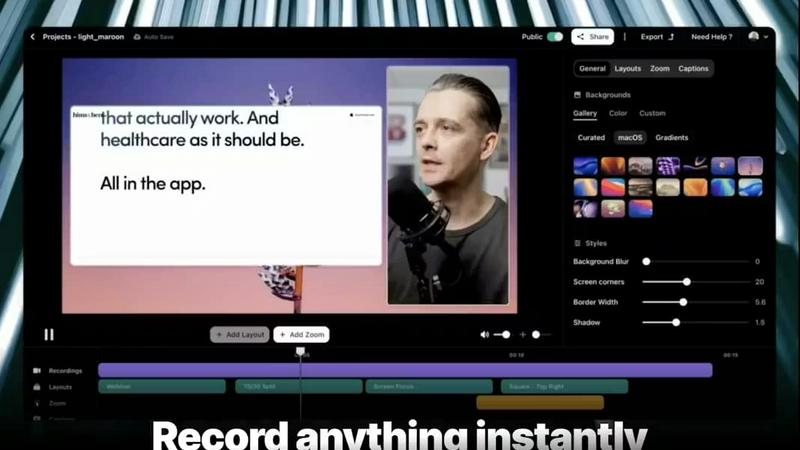
Vibrantsnap turns screen recordings into polished, high-converting videos in minutes with AI.
Last updated: February 28, 2026
Visual Comparison
documentorium

Vibrantsnap
Feature Comparison
documentorium
Trade-Specific Guided Templates
documentorium offers over 200 templates meticulously organized across 26 trade categories. This is not a one-size-fits-all solution; each form, whether for a quote, inspection report, or warranty, contains fields built specifically for your trade. An electrician's template includes fields for circuit amperage and NEC code references, while a roofer's form accounts for square footage of shingles and underlayment type. This guided approach eliminates guesswork, ensures all necessary information is captured, and accelerates the document creation process dramatically.
Instant, Professional PDF Generation
The platform is engineered for speed and polish. Once you complete the intuitive form, documentorium's engine takes over, transforming your inputs into a clean, well-formatted, and brand-consistent PDF document in seconds. There is no need for manual layout adjustments, font sizing, or table formatting. This feature ensures that every document you send to a client or site manager reflects the high quality of your workmanship, elevating your professional image at the critical moment of proposal and reporting.
Complete Document History & Prefill
Every document you create is automatically saved in your personal history within the platform. This creates a powerful, searchable archive of all your client interactions and jobs. More importantly, it enables intelligent pre-filling for future documents. Returning client details, project addresses, and standard service descriptions can be populated with a click, turning repeat business and follow-up work from a chore into a task that takes mere moments, showcasing the platform's evolution into a true business memory system.
Comprehensive Trade Document Library
documentorium serves as a single, authoritative source for every business document a tradesperson might need throughout a project's lifecycle. From the initial quote and formal proposal to the work order, change order, service report, and final invoice, every stage is supported. This end-to-end coverage prevents the need to switch between different tools or recreate information, creating a cohesive and professional paper trail that supports business growth, accountability, and streamlined operations.
Vibrantsnap
Magic Edit (Auto-Cut + Auto-Layout)
This core AI feature automates the entire editing process. After you record, it intelligently removes silences and filler words, trims unnecessary pauses, and automatically applies professional, clean layouts to your footage. This transforms a raw, unedited screen capture into a polished and engaging video ready for sharing, all with just a couple of clicks and zero manual editing skills required.
Built-in Video Analytics
Go beyond simple view counts. Vibrantsnap provides detailed analytics that show you exactly who watched your video, how many times they viewed it, and, crucially, where their attention drops. These insights are available with no setup, giving you actionable data to understand what resonates with your audience and where to tighten your message for better conversion rates in future videos.
Interactive Call-to-Action Buttons
Convert viewers directly from the video player. You can embed interactive buttons like "Book a Call," "Buy Now," or "Visit Website" directly onto your video. This feature turns passive viewing into immediate action, seamlessly guiding your audience to the next step in your funnel while allowing you to track clicks and engagement in real time alongside your view analytics.
Professional AI Voiceover & Captions
Enhance your video's credibility and accessibility effortlessly. Vibrantsnap can generate a clear, professional AI voiceover to narrate your demo, ensuring a consistent and polished audio presentation. It also automatically generates accurate captions for your videos, improving comprehension, engagement, and accessibility for all viewers in different watching environments.
Use Cases
documentorium
Creating a Winning Service Proposal
A solar installer needs to present a detailed, compelling proposal to a homeowner. Using documentorium, they select a solar-specific proposal template. The guided form prompts them for system size, panel specifications, energy output estimates, financing options, and warranty details. Within minutes, they generate a polished PDF proposal that clearly outlines the project's value, building client confidence and significantly increasing the likelihood of closing the sale compared to a handwritten estimate or a generic document.
Streamlining Job Site Documentation
An HVAC technician completing a complex repair needs to provide a thorough service report to the building manager and for their own records. They open the HVAC service report template, which includes fields for equipment model numbers, diagnostics performed, parts replaced, pressure readings, and safety checks. The technician fills in the details on their mobile device at the job site and generates a professional report on the spot, ensuring accuracy and providing immediate, trustworthy documentation to the client.
Managing Project Changes with Change Orders
A general contractor encounters an unforeseen issue during a kitchen remodel that requires additional cabinetry work. To formally communicate this scope change and associated costs to the client, they use documentorium's change order template. The form guides them to detail the original scope, the reason for the change, the new work required, and the updated price and timeline. The resulting clear, professional document prevents misunderstandings, secures client approval, and maintains a healthy project workflow.
Issuing Fast, Accurate Quotes and Invoices
A plumber on an emergency call fixes a burst pipe. Before leaving, they need to provide a quote for the completed work. They open the plumbing invoice/quote template, which includes line items for service call fees, materials like pipes and fittings, and labor. The form calculates totals automatically. In seconds, they present a clean, itemized invoice to the homeowner, enabling immediate payment and eliminating the delay of "I'll send you the bill later," which improves cash flow and client satisfaction.
Vibrantsnap
Product Demos and Website Explainer Videos
Founders and product teams can quickly create concise, compelling demo videos that showcase their software's core value proposition. These videos placed on landing pages or product tours help visitors understand the product faster than text or screenshots, reducing bounce rates and directly increasing trial sign-ups and conversions.
Sales and Outreach Sequences
Sales professionals can personalize their outreach by embedding short, polished video explanations directly into emails or LinkedIn messages. A quick video demo tailored to a prospect's needs is far more engaging than text, helping to build trust, demonstrate value quickly, and increase reply and meeting booking rates.
Customer Onboarding and Tutorials
Customer success and support teams can produce clear, step-by-step tutorial videos to guide new users through key features. These automated, polished videos provide a superior onboarding experience compared to text guides, leading to faster user activation, reduced support tickets, and higher product adoption.
Investor Updates and Internal Communications
Founders can use Vibrantsnap to create professional update videos for stakeholders or internal team communications. The auto-editing ensures a crisp, focused presentation, saving hours of editing time while effectively communicating progress, roadmap updates, or quarterly results in a more engaging format.
Pricing Comparison
documentorium
documentorium operates on a straightforward, all-inclusive annual subscription model. For $99 per year, users gain full access to the entire library of over 200 trade-specific templates across all document types. There are no tiers, no per-document fees, and no feature restrictions. This simple pricing provides predictable costs and allows tradespeople to use every tool the platform offers to streamline their business operations. A one-month free trial is available to explore the platform fully, requiring no credit card to start.
Vibrantsnap
Vibrantsnap offers tiered pricing plans to scale with your needs. Opting for an annual subscription saves 20% compared to monthly billing.
Starter Plan ($7/month per user): Designed for solo founders and casual creators. It includes core auto-editing features, automatic captions, instant sharing and embedding, professional AI voiceovers, and export quality up to 2K at 60fps.
Pro Plan ($16/month per user): This is the most popular plan for growing creators and founders. It includes everything in the Starter plan, along with additional advanced features and capabilities for higher-volume, professional use.
Overview
About documentorium
documentorium represents a pivotal evolution in how skilled tradespeople manage the business side of their craft. It is a specialized document engine designed to move service professionals beyond the frustrating, time-consuming stage of starting every quote, invoice, or report from a blank page. Built explicitly for electricians, plumbers, contractors, HVAC technicians, roofers, and dozens of other trades, it replaces generic templates and manual formatting with a system that understands the unique language and requirements of field service work. The core value proposition is profound efficiency and professionalism: users fill out simple, guided forms with fields tailored to their specific trade and instantly receive a clean, print-ready PDF. This transition from administrative burden to streamlined workflow allows tradespeople to focus on growth and mastery of their trade, not on wrestling with document software. It's the tool that supports the journey from a solo operator juggling paperwork to a smoothly run business that wins trust with every professional document sent.
About Vibrantsnap
Vibrantsnap is an AI-powered video creation platform designed to transform raw screen recordings into high-converting, professional product videos and tutorials. It directly addresses the critical growth-stage challenge where founders lose potential customers because their product's value isn't communicated quickly and clearly. Instead of relying on static screenshots or lengthy feature lists that create friction, Vibrantsnap enables you to create short, engaging videos that guide viewers to take action. The platform is built for founders, creators, and growing teams who need to demonstrate their software's value, onboard users, or drive sales without investing hours into complex video editing. Its core value proposition is evolution from manual, time-consuming production to an automated, insight-driven workflow. You simply record your screen, and Vibrantsnap's AI handles the polishing—trimming silences, applying clean layouts, and enhancing audio—delivering a polished video in minutes. This progression from recording to analytics allows you to not only create content faster but also to understand viewer behavior with built-in analytics, turning every video into a tool for growth and continuous improvement.
Frequently Asked Questions
documentorium FAQ
Can I cancel my subscription anytime?
Yes, you have complete control. You can cancel your annual subscription at any time directly from your account settings. Your access to the platform and all its features will remain active until the end of your current billing period. There are no penalties or lock-in contracts, allowing your business to evolve its toolset as needed without friction.
What happens to my documents when the free trial ends?
All documents you create during your free trial remain securely stored in your account. You can view, download, and print these existing PDFs at any time, even after the trial expires. To create or edit new documents, you would need to activate a paid subscription. No data or document history is ever deleted due to a trial expiration.
Do I lose my documents if I don't subscribe after the trial?
No, you do not lose access to your documents. Your created documents are yours and remain in your account history for viewing and downloading. The subscription is required for the ongoing creation and editing of new documents. This model ensures you never lose your valuable work history, even if you pause active use of the platform for new document generation.
Does documentorium provide legal advice for contracts?
No, documentorium is a document generation tool, not a legal service. The platform provides professionally designed templates and tools to create, format, and manage your business documents efficiently. It is always recommended that you have any legal contracts, such as service agreements or warranties, reviewed by a qualified legal professional to ensure they meet the specific requirements of your jurisdiction and business.
Vibrantsnap FAQ
How does the AI auto-editing work?
Vibrantsnap's AI analyzes your raw screen recording as soon as you finish. It automatically detects and removes long silences, ums, ahs, and other filler words to create a tighter narrative. Simultaneously, it applies a professional visual layout to your footage, ensuring a clean and engaging final product without any manual timeline editing or design work from you.
Can I track how well my videos are performing?
Yes, absolutely. Every video comes with built-in analytics. You can see total views, unique viewers, watch time, and detailed engagement graphs that show exactly where viewers stop watching. Most importantly, you can track clicks on your embedded Call-to-Action buttons, giving you clear insight into which videos are driving real conversions.
Do I need any video editing experience to use Vibrantsnap?
No, you do not need any prior editing experience. Vibrantsnap is specifically designed for founders and creators who want professional results without the learning curve of traditional video software. The process is streamlined: you record your screen, and the platform's AI handles the editing and polishing with one click.
What kind of videos can I create with Vibrantsnap?
Vibrantsnap is optimized for any video that involves screen recording. This includes software product demos, tutorial and how-to guides, sales pitch videos, customer onboarding walkthroughs, bug report clips, internal training materials, and investor update presentations. It's ideal for any scenario where you need to explain or showcase something on your screen quickly and effectively.
Alternatives
documentorium Alternatives
documentorium is a specialized document engine for tradespeople, designed to streamline the creation of professional PDFs like quotes, invoices, and work orders. It falls into the productivity and business management software category, helping service professionals save time and present a polished image. Users often explore alternatives for various reasons. Some may need different pricing models or more advanced features as their business grows, while others might seek integration with specific accounting or scheduling platforms they already use. The search for the right tool is a natural part of scaling a service business. When evaluating other options, key considerations include the depth of trade-specific templates, the ease of generating and sending documents, and overall value for money. The goal is to find a solution that not only creates documents but also supports the professional evolution of your trade business.
Vibrantsnap Alternatives
Vibrantsnap is a screen recording and demo creation tool designed for founders and product teams. It automates the editing process, adding voiceovers and captions to quickly transform raw footage into polished, conversion-focused videos. This places it squarely in the productivity and management software category, aimed at accelerating product understanding and user onboarding. Users often explore alternatives for several practical reasons. Needs evolve, and a tool that was perfect at launch might later lack specific integrations, advanced editing controls, or a pricing model that scales with a growing team. Some may require collaboration features for larger teams, while others prioritize different platforms or more granular control over the final video output beyond fully automated edits. When evaluating other options, focus on your team's current growth stage and the specific friction you need to remove. Consider the balance between automation and manual control, the importance of built-in analytics for measuring video performance, and how the tool integrates into your existing workflow. The right choice aligns with your need for speed, polish, and the ability to turn viewer curiosity into confident action.