
Vibrantsnap vs WA Reminders
Side-by-side comparison to help you choose the right tool.

Vibrantsnap
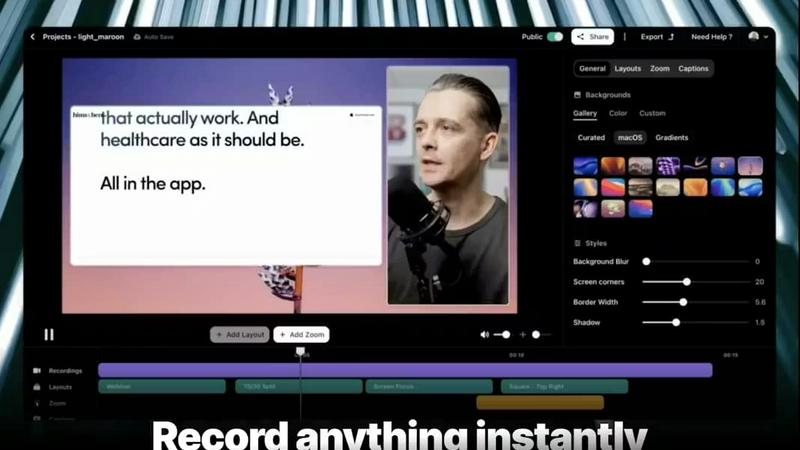
Vibrantsnap turns screen recordings into polished, high-converting videos in minutes with AI.
Last updated: February 28, 2026

WA Reminders
WA Reminders evolves your workflow by scheduling WhatsApp messages from your calendar to save time and ensure timely client communication.
Last updated: April 4, 2026
Visual Comparison
Vibrantsnap
WA Reminders

Feature Comparison
Vibrantsnap
Magic Edit (Auto-Cut + Auto-Layout)
This core AI feature automates the entire editing process. After you record, it intelligently removes silences and filler words, trims unnecessary pauses, and automatically applies professional, clean layouts to your footage. This transforms a raw, unedited screen capture into a polished and engaging video ready for sharing, all with just a couple of clicks and zero manual editing skills required.
Built-in Video Analytics
Go beyond simple view counts. Vibrantsnap provides detailed analytics that show you exactly who watched your video, how many times they viewed it, and, crucially, where their attention drops. These insights are available with no setup, giving you actionable data to understand what resonates with your audience and where to tighten your message for better conversion rates in future videos.
Interactive Call-to-Action Buttons
Convert viewers directly from the video player. You can embed interactive buttons like "Book a Call," "Buy Now," or "Visit Website" directly onto your video. This feature turns passive viewing into immediate action, seamlessly guiding your audience to the next step in your funnel while allowing you to track clicks and engagement in real time alongside your view analytics.
Professional AI Voiceover & Captions
Enhance your video's credibility and accessibility effortlessly. Vibrantsnap can generate a clear, professional AI voiceover to narrate your demo, ensuring a consistent and polished audio presentation. It also automatically generates accurate captions for your videos, improving comprehension, engagement, and accessibility for all viewers in different watching environments.
WA Reminders
Seamless WhatsApp Integration
Link your existing WhatsApp account in seconds by scanning a secure QR code, similar to WhatsApp Web. This foundational feature ensures all scheduled messages are sent directly from your own phone number or your company's official WhatsApp Business account. It maintains the personal touch and trust of your brand, and because the conversation originates from your number, you can seamlessly continue any dialogue with clients right from your primary WhatsApp app, keeping communication unified and simple.
Dual Scheduling Platforms
Schedule reminders with flexibility through two powerful methods. First, schedule directly from the intuitive WA Reminders app, which automatically imports your full phone contact list to eliminate manual entry errors. Second, schedule effortlessly from Google Calendar by simply adding an internationally formatted phone number to any event's title or description. This dual approach adapts to your preferred workflow, allowing you to manage communications from the center of your operations or directly within your existing calendar ecosystem.
Automated Contact Syncing
Eliminate the tedious and error-prone process of manually typing phone numbers. When scheduling from the WA Reminders app, your device's full contact list is automatically and securely synced. This feature is crucial for efficiency, ensuring you can quickly select clients for reminders without switching between apps or copying data. It supports business growth by removing a significant administrative barrier, allowing you to focus on service delivery rather than data management.
Recurring & Calendar Sync Support
Automate ongoing client engagement with support for recurring messages, scheduled directly from the app or via recurring events in Google Calendar. This is ideal for weekly appointment reminders, monthly payment notifications, or regular follow-ups. The deep integration with Google Calendar also means it works seamlessly with tools like Calendly, creating a powerful, automated scheduling and reminder pipeline that scales effortlessly as your client volume increases.
Use Cases
Vibrantsnap
Product Demos and Website Explainer Videos
Founders and product teams can quickly create concise, compelling demo videos that showcase their software's core value proposition. These videos placed on landing pages or product tours help visitors understand the product faster than text or screenshots, reducing bounce rates and directly increasing trial sign-ups and conversions.
Sales and Outreach Sequences
Sales professionals can personalize their outreach by embedding short, polished video explanations directly into emails or LinkedIn messages. A quick video demo tailored to a prospect's needs is far more engaging than text, helping to build trust, demonstrate value quickly, and increase reply and meeting booking rates.
Customer Onboarding and Tutorials
Customer success and support teams can produce clear, step-by-step tutorial videos to guide new users through key features. These automated, polished videos provide a superior onboarding experience compared to text guides, leading to faster user activation, reduced support tickets, and higher product adoption.
Investor Updates and Internal Communications
Founders can use Vibrantsnap to create professional update videos for stakeholders or internal team communications. The auto-editing ensures a crisp, focused presentation, saving hours of editing time while effectively communicating progress, roadmap updates, or quarterly results in a more engaging format.
WA Reminders
Reducing Clinic No-Shows
Medical and wellness clinics can drastically reduce patient no-shows by automating appointment reminders. By scheduling a WhatsApp message to go out 24 hours before an appointment, clinics give patients a convenient, high-open-rate reminder they can instantly confirm or reschedule. This use case recovers lost revenue, optimizes practitioner schedules, and improves patient satisfaction through proactive communication, all managed from the clinic's familiar Google Calendar.
Automating Payment Follow-Ups
Freelancers, coaches, and small service businesses can automate payment reminder sequences. After an invoice is sent, WA Reminders can schedule a polite follow-up message a few days later, ensuring timely payments without awkward manual chasing. This professionalizes cash flow management, saves administrative time, and improves client relationships by providing clear, automated nudges directly through a preferred communication channel.
Managing Small Shop Appointments
Retail shops offering services like repairs, fittings, or consultations can manage bookings and reminders from one place. By integrating with their booking calendar, they can automatically send confirmation and pre-appointment reminder messages via WhatsApp. This reduces missed appointments, improves customer experience, and allows shop staff to focus on in-person service rather than administrative phone calls.
Streamlining Team Client Communication
For small teams, such as in a physiotherapy clinic or a small agency, WA Reminders centralizes client communication. Staff can manage reminders from a shared Google Calendar, ensuring consistent, timely messages are sent from the business's main WhatsApp number. This prevents confusion, ensures brand consistency, and allows any team member to continue conversations, making client management collaborative and efficient.
Pricing Comparison
Vibrantsnap
Vibrantsnap offers tiered pricing plans to scale with your needs. Opting for an annual subscription saves 20% compared to monthly billing.
Starter Plan ($7/month per user): Designed for solo founders and casual creators. It includes core auto-editing features, automatic captions, instant sharing and embedding, professional AI voiceovers, and export quality up to 2K at 60fps.
Pro Plan ($16/month per user): This is the most popular plan for growing creators and founders. It includes everything in the Starter plan, along with additional advanced features and capabilities for higher-volume, professional use.
WA Reminders
WA Reminders offers tiered pricing plans designed to support businesses at different stages of growth, from solo professionals to scaling organizations.
Basic Plan - $19 per month
Perfect for solo entrepreneurs and one-person businesses. This plan includes sending up to 200 WhatsApp messages per month from your own number, contact import from your phone, and full sync with Google Calendar including support for recurring events.
Startup Plan - $29 per month
Ideal for small teams or companies with higher communication volume. It includes everything in the Basic plan, with an increased limit of 500 messages per month to support more comprehensive follow-up sequences and campaign management.
Business Plan - $39 per month
Built for medium-sized companies needing to scale reminders across departments. It includes all Startup features with a capacity of 1,000 messages per month, supporting organization-wide client communication and engagement strategies.
All prices are in US dollars and include a 14-day money-back guarantee.
Overview
About Vibrantsnap
Vibrantsnap is an AI-powered video creation platform designed to transform raw screen recordings into high-converting, professional product videos and tutorials. It directly addresses the critical growth-stage challenge where founders lose potential customers because their product's value isn't communicated quickly and clearly. Instead of relying on static screenshots or lengthy feature lists that create friction, Vibrantsnap enables you to create short, engaging videos that guide viewers to take action. The platform is built for founders, creators, and growing teams who need to demonstrate their software's value, onboard users, or drive sales without investing hours into complex video editing. Its core value proposition is evolution from manual, time-consuming production to an automated, insight-driven workflow. You simply record your screen, and Vibrantsnap's AI handles the polishing—trimming silences, applying clean layouts, and enhancing audio—delivering a polished video in minutes. This progression from recording to analytics allows you to not only create content faster but also to understand viewer behavior with built-in analytics, turning every video into a tool for growth and continuous improvement.
About WA Reminders
WA Reminders is the definitive scheduling solution designed to transform how independent professionals, clinics, and small businesses manage their client communication. It directly addresses the costly problem of missed appointments and inefficient follow-ups by automating WhatsApp messaging. The core value proposition is reclaiming valuable time and boosting revenue by systematically reducing no-shows. The platform evolves with your business, starting with simple one-off reminders and scaling to support complex, recurring communication campaigns. It seamlessly bridges the gap between your scheduling tools and the world's most popular messaging app. By linking directly to your WhatsApp account—either Business or personal—it ensures all messages are delivered from your authentic number, maintaining trust and enabling natural conversation continuation. Whether you are a solo practitioner just establishing your client base or a growing clinic streamlining team workflows, WA Reminders provides the reliable, integrated reminder system essential for professional growth and operational excellence.
Frequently Asked Questions
Vibrantsnap FAQ
How does the AI auto-editing work?
Vibrantsnap's AI analyzes your raw screen recording as soon as you finish. It automatically detects and removes long silences, ums, ahs, and other filler words to create a tighter narrative. Simultaneously, it applies a professional visual layout to your footage, ensuring a clean and engaging final product without any manual timeline editing or design work from you.
Can I track how well my videos are performing?
Yes, absolutely. Every video comes with built-in analytics. You can see total views, unique viewers, watch time, and detailed engagement graphs that show exactly where viewers stop watching. Most importantly, you can track clicks on your embedded Call-to-Action buttons, giving you clear insight into which videos are driving real conversions.
Do I need any video editing experience to use Vibrantsnap?
No, you do not need any prior editing experience. Vibrantsnap is specifically designed for founders and creators who want professional results without the learning curve of traditional video software. The process is streamlined: you record your screen, and the platform's AI handles the editing and polishing with one click.
What kind of videos can I create with Vibrantsnap?
Vibrantsnap is optimized for any video that involves screen recording. This includes software product demos, tutorial and how-to guides, sales pitch videos, customer onboarding walkthroughs, bug report clips, internal training materials, and investor update presentations. It's ideal for any scenario where you need to explain or showcase something on your screen quickly and effectively.
WA Reminders FAQ
Do you offer a free plan?
We do not offer an unlimited free plan due to the significant server costs required to reliably send messages. However, we provide full transparency and confidence with a 14-day money-back guarantee on all paid plans. If WA Reminders is not the right fit for your business within the first two weeks, you can request a full refund, no questions asked.
Can I import or use the contacts from my phone?
Yes, absolutely. When you schedule a message directly from the WA Reminders application, your device's full contact list is automatically and securely imported. This allows you to quickly and easily select recipients without any manual typing, ensuring you never miss a client due to a typo in a phone number.
Can I send reminders directly from Google Calendar?
Yes, this is a core feature. You can schedule a WhatsApp reminder by simply adding an internationally formatted phone number to the title or description of any Google Calendar event. WA Reminders will detect this and automatically send a message at the time you specify, seamlessly integrating reminders into your existing scheduling workflow.
Do you have a Calendly integration?
Yes, WA Reminders integrates with Calendly through Google Calendar. When a client books an appointment via Calendly, it creates an event in your connected Google Calendar. As long as the phone number is included in the event details, WA Reminders will automatically send the scheduled WhatsApp reminder, creating a perfect automated booking-to-reminder system.
Alternatives
Vibrantsnap Alternatives
Vibrantsnap is a screen recording and demo creation tool designed for founders and product teams. It automates the editing process, adding voiceovers and captions to quickly transform raw footage into polished, conversion-focused videos. This places it squarely in the productivity and management software category, aimed at accelerating product understanding and user onboarding. Users often explore alternatives for several practical reasons. Needs evolve, and a tool that was perfect at launch might later lack specific integrations, advanced editing controls, or a pricing model that scales with a growing team. Some may require collaboration features for larger teams, while others prioritize different platforms or more granular control over the final video output beyond fully automated edits. When evaluating other options, focus on your team's current growth stage and the specific friction you need to remove. Consider the balance between automation and manual control, the importance of built-in analytics for measuring video performance, and how the tool integrates into your existing workflow. The right choice aligns with your need for speed, polish, and the ability to turn viewer curiosity into confident action.
WA Reminders Alternatives
WA Reminders is a productivity tool designed for appointment-based businesses, allowing them to automate WhatsApp message scheduling to reduce no-shows. As businesses grow, their needs evolve, and users often explore alternatives for various reasons. This could be due to budget constraints, a need for more advanced features like multi-platform messaging, or simply a requirement for a different user interface that better fits their operational workflow. When evaluating other solutions, it's crucial to consider your business's current stage and future trajectory. Look for a tool that not only handles core scheduling reliably but also scales with you. Key factors include integration capabilities with your existing calendar system, the security of client data, and whether the platform supports the communication channels your customers prefer. The right choice should streamline your reminders, not complicate them.