Easymotion - AI Motion Graphic Generator
Easymotion evolves your static ideas into professional motion graphics and map animations in minutes, not hours.
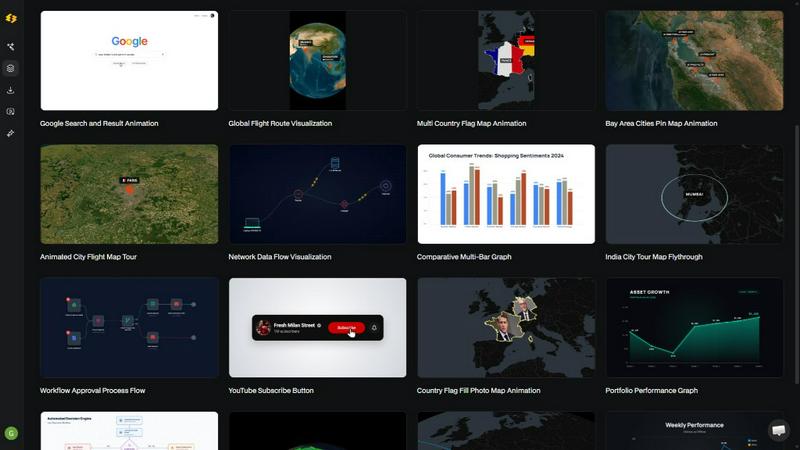
About Easymotion - AI Motion Graphic Generator
Easymotion is an AI-powered motion graphics generator and map animation platform designed to transform how content creators, video editors, founders, marketers, and data storytellers produce professional animated videos. Instead of wrestling with complex timeline editing software like After Effects, users can simply describe their vision in plain English and let the AI bring it to life. The platform turns ideas, static images, spreadsheets, and PDFs into polished animated scenes ready for YouTube, TikTok, Instagram, presentations, and client deliverables. Whether you need a SaaS product promo, an animated flowchart, a data-driven chart, a UI explainer, or a geographic flight route map, Easymotion handles the heavy lifting. After generating an animation, you can refine every detail by chatting with the AI to adjust colors, pacing, labels, layout, and visual style. A premium template library offers proven motion graphics layouts that you can customize for your brand or campaign. Export options include MP4 and MOV with transparent backgrounds, supporting aspect ratios from 16:9 for YouTube to 9:16 for TikTok and Instagram Reels. Built entirely in the browser, Easymotion empowers creators who need to move fast, produce more content, and grow their audience without waiting on designers or mastering complex tools.
Features
AI-Powered Motion Graphics from Prompts
Describe any animation concept in plain English, and Easymotion’s AI instantly generates a professional motion graphic video. This feature eliminates the need for manual keyframing, timeline editing, or design skills. You can create SaaS product promos, animated flowcharts, UI explainers, quizzes, and other visual storytelling formats simply by typing what you want to see. The AI interprets your intent and produces an animation-ready scene that you can further refine through chat commands.
Image to Animation Conversion
Upload a static image, and the AI brings it to life with stunning motion effects. This feature is perfect for transforming product screenshots, infographics, logos, or any visual asset into an engaging animated video. The AI analyzes the image’s composition and applies intelligent motion paths, transitions, and visual enhancements. You no longer need to manually animate each element; the platform handles the entire animation process from a single upload.
Data to Animated Visualizations
Easymotion turns boring spreadsheets and CSV or XLSX files into beautiful animated data visualizations. Upload your data, and the AI creates animated bar charts, line graphs, pie charts, and other visual formats that stop the scroll. This feature is ideal for data storytellers, analysts, and marketers who want to present insights in a more engaging way. The AI handles the chart design, animation timing, and data mapping so you can focus on the story behind the numbers.
Map Animation Maker
Create stunning geographic animations effortlessly with the map animation feature. You can generate flight route animations, location pin drops, flag fill highlights, and other geographic storytelling visuals. This is especially powerful for travel content, global business presentations, logistics updates, and social media reels. The AI handles map styling, route plotting, and camera movements, delivering professional map animations in minutes rather than hours.
Use Cases
Social Media Content Creation
Creators and marketers can rapidly produce platform-optimized videos for TikTok, Instagram Reels, YouTube Shorts, and Facebook. By simply describing a concept or uploading an image, they generate eye-catching motion graphics that drive engagement. The ability to export in 9:16, 16:9, 1:1, or 4:5 ensures every video fits perfectly on the intended platform. This use case helps brands maintain a consistent posting schedule without relying on expensive freelancers or complex editing software.
Data Storytelling for Reports and Presentations
Data analysts, consultants, and business leaders can transform static charts and spreadsheets into animated data stories that captivate audiences. Instead of presenting a static bar chart in a slide deck, they upload their CSV file and let Easymotion create an animated visualization that highlights key trends and insights. These animated graphics are perfect for board meetings, investor pitches, and social media posts that require data-driven narratives with high visual impact.
Product Marketing and SaaS Demos
Founders and product marketers use Easymotion to create polished product promos, UI explainers, and feature highlight videos without needing a design team. They can upload a screenshot of their software interface and animate it to demonstrate workflows, clicks, and user interactions. The resulting videos are ideal for landing pages, email campaigns, and social ads. This use case enables startups to ship professional product videos the same day they launch a new feature.
Travel and Geographic Storytelling
Travel bloggers, tourism boards, and logistics companies create captivating map animations that tell geographic stories. They can animate flight routes between cities, show location pins dropping on a map, or highlight countries with flag fills. These visuals are perfect for travel reels on social media, destination marketing videos, or supply chain overview presentations. The map animation maker turns complex geographic data into a compelling visual narrative that viewers can follow easily.
Frequently Asked Questions
What is Easymotion and who is it for?
Easymotion is an AI-powered motion graphics generator that lets anyone create professional animated videos by simply chatting. It is designed for content creators, video editors, marketers, founders, and data storytellers who need to produce motion graphics, map animations, and social media videos quickly without using complex software like After Effects. The platform works entirely in the browser and requires no design skills or timeline editing experience.
How does the AI motion graphics generation process work?
The process works in three simple steps. First, you describe the animation you want in plain English, or upload an image, spreadsheet, or PDF. Second, the AI generates an animation-ready scene that you can refine using chat commands to adjust colors, timing, map styles, labels, and layout. Finally, you export your completed video as an MP4 or MOV file with optional transparent background. The AI handles all keyframes, animation curves, and visual effects.
What types of videos can I create with Easymotion?
You can create a wide variety of motion graphics including SaaS product promos, animated flowcharts, data visualizations like bar charts and line graphs, UI explainers, quizzes, and map animations such as flight routes, location pins, and flag fill highlights. The platform also supports social media videos for YouTube, TikTok, Instagram, and Facebook in multiple aspect ratios. A premium template library provides proven layouts for maps, charts, interfaces, and social media content.
What export formats and aspect ratios are supported?
Easymotion supports export as MP4 or MOV files, including videos with transparent backgrounds (alpha channel) for use in editing software like Premiere Pro or Final Cut Pro. The platform supports 16:9 for YouTube and landscape content, 9:16 for TikTok and Instagram Reels, 1:1 for square social posts, and 4:5 for feed-friendly vertical formats. This ensures your videos are ready to post anywhere without additional resizing or cropping.
Similar to Easymotion - AI Motion Graphic Generator

RemoveObjectFromPhoto
Remove unwanted objects, people, and text from photos with AI for clean, natural-looking results in seconds.
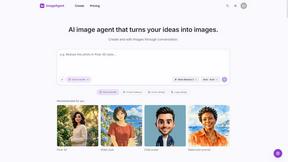
ImageAgent
Create and edit AI images through conversation, using text or reference images and refining results in chat.

CloneWebsite
Clone any webpage pixel-perfect, export HTML/CSS/ZIP or React/Vue components.

GenX
All-in-one AI workspace to generate images, videos, and audio with multiple leading AI models.
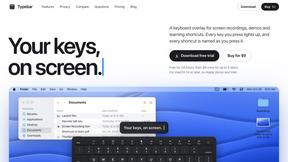
Typebar
Every key you press lights up on an on-screen keyboard, and each shortcut is named as you press it.

Bloom
An adaptive AI tutor that turns topics or your materials into courses, lessons, and answers tailored to how you learn.

AppIconGenerator
Generate iOS and Android app icons from any image and export all platform sizes for free.