

invoice Sonic
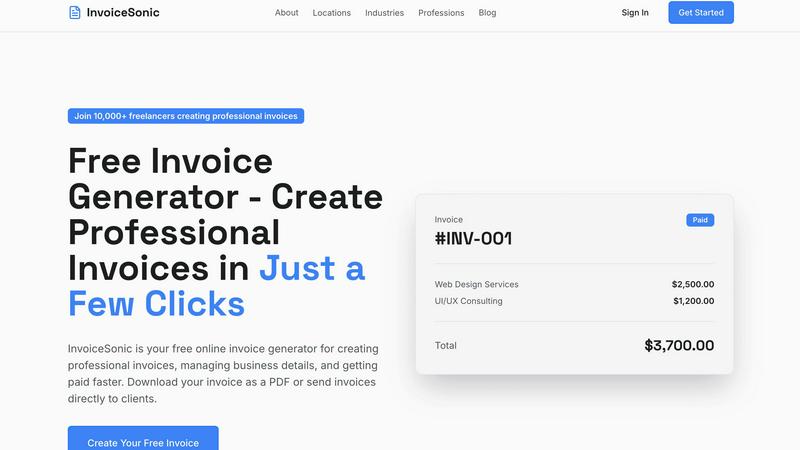
InvoiceSonic lets you create professional invoices in seconds, empowering freelancers and small businesses to thrive.
tool Details
About invoice Sonic
InvoiceSonic is an innovative, free invoice generator tailored for freelancers, small businesses, and startups looking to simplify their invoicing process. By providing a user-friendly interface, InvoiceSonic enables users to create polished and professional invoices in mere minutes. This eliminates the hassles associated with outdated software and clunky spreadsheets. The platform boasts a diverse library of beautifully designed invoice templates that cater to various industries, allowing businesses to reflect their unique brand identity while maintaining professionalism. With no hidden fees or subscription requirements, InvoiceSonic empowers thousands of users to manage their invoicing with ease. Whether you require a standard invoice, a proforma invoice, or a customized template featuring your logo, InvoiceSonic streamlines the process, helping you get paid faster and more efficiently. Join the growing community of over 10,000 freelancers and business owners who trust InvoiceSonic to handle their invoicing needs effortlessly.
Features
Unlimited Free Invoices
InvoiceSonic offers users the ability to create unlimited free invoices, making it accessible for freelancers and small businesses. Users can generate up to 5 invoices per month without any hidden fees or credit card requirements, allowing them to manage their invoicing without financial commitments.
Professional Invoice Templates
The platform features a wide selection of professionally designed invoice templates suitable for various industries and business types. Users can select templates that align with their brand identity, ensuring that each invoice is not only functional but also visually appealing.
Instant PDF Download
With InvoiceSonic, users can download their invoices as PDF files instantly. This feature enhances efficiency by allowing businesses to send invoices directly to clients without delay, ensuring prompt payments and a streamlined invoicing process.
Automatic Calculations
InvoiceSonic automatically calculates totals, taxes, and balances as users input their data. This feature reduces the risk of errors in financial calculations and saves time, enabling users to focus on their core business activities.
Use Cases
Freelancers Managing Multiple Clients
Freelancers can utilize InvoiceSonic to create customized invoices for each of their clients. The ability to personalize invoices with business logos and specific service descriptions ensures that each client receives a professional document that reflects the freelancer's brand.
Startups Handling Initial Financial Transactions
Startups often face the challenge of establishing a professional image while managing budgets. InvoiceSonic allows new businesses to generate professional invoices quickly, helping them maintain a credible presence in the market without incurring additional costs.
Small Businesses Automating Billing Processes
Small businesses can streamline their billing processes by using InvoiceSonic to generate and send invoices automatically. The platform supports recurring billing, making it easier for businesses to manage subscriptions and ongoing services without manual intervention.
Consultants Providing Proposals and Invoices
Consultants can use InvoiceSonic to create proforma invoices that serve as quotes for potential clients. This feature allows consultants to present estimates in a professional format, enhancing their chances of securing contracts while maintaining clear communication about costs.
Frequently Asked Questions
Is InvoiceSonic really free to use?
Yes, InvoiceSonic offers a free tier that allows users to create up to 5 invoices per month without any hidden fees or credit card requirements. This makes it a cost-effective solution for freelancers and small businesses.
Can I customize my invoices with my logo?
Absolutely! InvoiceSonic allows users to add their business details and logo to invoices, ensuring that each document reflects their unique brand identity and maintains a professional appearance.
How do I download my invoices?
Once you create an invoice using InvoiceSonic, you can instantly download it as a PDF file. This feature enables you to send invoices directly to clients without any delays.
What types of invoices can I create with InvoiceSonic?
InvoiceSonic allows users to create various types of invoices, including standard invoices, proforma invoices, and customizable invoice templates. This versatility ensures that users can meet their specific invoicing needs effectively.
Similar to invoice Sonic
Egmatic
No-code 2D game editor: visual node logic, drag-and-drop scenes, live preview. Exports to Windows, macOS, Linux, Android, iOS, Web.

Product Launch Checklist
A free launch checklist for SaaS, apps, AI tools and more. Every step says why it matters and when you can skip it.
Kody Tools
Free collection of online developer utilities, code formatters, and digital converters designed to streamline your daily workflow.
Forms Plugin
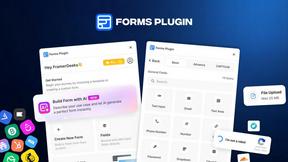
The #1 Native Form Builder Plugin for Framer - No Code, No Embeds, No External Platforms.



