
Blueberry vs diffray
Side-by-side comparison to help you choose the right tool.

Blueberry
Blueberry is an AI-native workspace that unites your editor, terminal, and browser for seamless product development.
Last updated: February 28, 2026

diffray
Diffray's AI evolves code review to catch real bugs with far fewer false positives.
Last updated: February 28, 2026
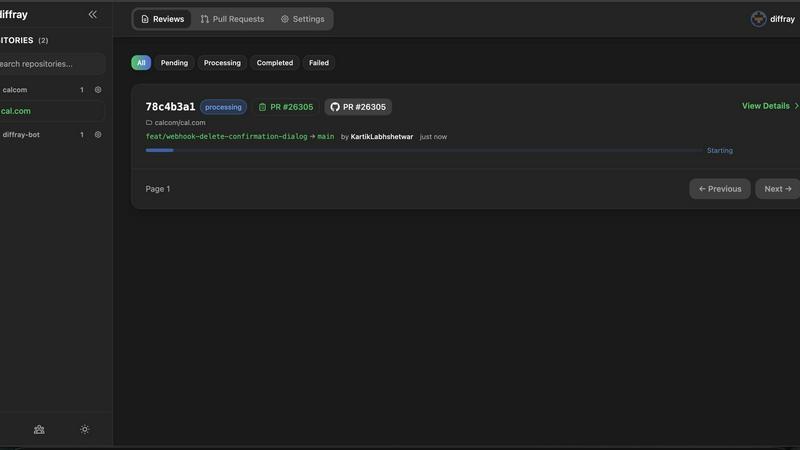
Visual Comparison
Blueberry

diffray
Feature Comparison
Blueberry
Unified AI-Native Workspace
Blueberry consolidates your essential development tools—editor, terminal, and browser—into a single, managed window. This foundational feature eliminates the cognitive load and time wasted on manually arranging and switching between disparate applications. The workspace is designed from the ground up to be AI-aware, ensuring that every component is accessible and contextual for integrated AI assistants, creating a seamless and focused development environment that feels intuitive and powerful.
Built-in MCP Server for Full AI Context
This is the engine of Blueberry's intelligence. The integrated Model Context Protocol (MCP) server acts as a bridge, giving your connected AI model (like Claude or Gemini) a live, real-time view of your entire project. The AI can see your code changes as you type, read terminal output, inspect the state of your preview browser, and interact with pinned apps. This means you can ask complex, contextual questions without ever copying a snippet of code or a screenshot manually.
Pinned Apps with Shared Context
Blueberry allows you to dock and pin essential web applications like GitHub, Linear, Figma, or PostHog directly within your workspace. These apps load with your project and, crucially, share the same live context with your AI via the MCP server. This transforms your task management, design review, and analytics tools from isolated silos into integrated parts of your development flow, keeping all relevant information at your fingertips.
Visual Context with Screenshot & Element Select
Beyond code, Blueberry empowers your AI with visual understanding. You can directly capture screenshots of your live application preview or use an element selector to highlight specific UI components. This visual context is fed directly to your AI assistant, enabling it to provide feedback on design, debug layout issues, or suggest changes based on exactly what you're seeing, bridging the gap between code and its visual outcome.
diffray
Multi-Agent Specialized Architecture
Unlike monolithic AI tools, diffray employs a team of over 30 specialized AI agents, each trained for a specific domain like security, performance, or bug detection. This ensures expert-level analysis in every category, moving beyond the generalized and often shallow feedback of single-model systems to provide deeply insightful, context-aware reviews.
Full Codebase Context Awareness
diffray progresses beyond simply analyzing the changed lines of code. Its agents intelligently examine the pull request within the full context of your repository, understanding how new code interacts with existing structures, dependencies, and patterns. This prevents misleading out-of-context suggestions and drastically reduces false positives.
Noise Reduction & High-Signal Feedback
By leveraging domain-specific agents and deep context, diffray filters out the irrelevant "noise" that plagues other AI reviewers. It focuses developer attention exclusively on genuine, actionable issues—from critical security flaws to subtle performance anti-patterns—fostering trust and ensuring reviews are acted upon.
Integrated Best Practices & SEO Analysis
diffray's expertise extends beyond bugs to include code quality and business impact. Specialized agents enforce language and framework-specific best practices for maintainability, while unique SEO-focused agents can analyze web-centric code for common issues that might impact search engine visibility, covering a complete quality spectrum.
Use Cases
Blueberry
Rapid Prototyping and Iteration
When building a new feature or prototyping an idea, developers can code in the editor, see instant updates in the live browser preview, and use the terminal to run servers or commands—all without leaving the window. The AI can suggest code, explain errors from the terminal, and critique the UI live, dramatically speeding up the iterative build-measure-learn cycle.
AI-Powered Debugging and Problem Solving
Instead of manually correlating error messages, code, and browser state, a developer can simply ask their AI assistant, "Why is this button not working?" The AI, with full context from the terminal logs, the relevant code file, and the current browser DOM, can diagnose the issue, suggest a fix, and even implement the correction directly, turning debugging from a scavenger hunt into a guided conversation.
Streamlined Code Reviews and Onboarding
A senior developer or team lead can use Blueberry to review a pull request. With the code, the running application, and the terminal output visible simultaneously, they can comprehensively understand the changes. They can ask the AI to explain complex logic, generate tests, or assess performance implications based on the full system context, making reviews more thorough and efficient.
Context-Rich AI Collaboration
Whether you're pair programming with an AI or using it as a brainstorming partner, Blueberry provides the shared context necessary for high-level collaboration. You can ask, "How can we improve the user flow from this page?" and the AI can analyze the current component code, the live UI, and any pinned design documents to provide a coherent, actionable suggestion that considers the entire product picture.
diffray
Accelerating Pull Request Workflows for Engineering Teams
Development teams use diffray to automate the initial, labor-intensive pass of code review. By providing immediate, high-quality feedback as soon as a PR is opened, it allows human reviewers to focus on higher-level architecture and logic, significantly speeding up merge times and increasing overall team productivity.
Enforcing Security and Compliance Standards
Security-conscious organizations integrate diffray into their CI/CD pipeline to act as a first-line automated defense. Its dedicated security agents continuously scan every commit for vulnerabilities like injection flaws, insecure dependencies, and secret leakage, helping teams maintain robust security postures and comply with internal policies.
Onboarding and Upskilling Junior Developers
diffray serves as an always-available mentor for junior developers or engineers new to a codebase. By providing instant, educational feedback on best practices, common pitfalls, and project-specific patterns, it accelerates the learning curve and helps cultivate higher code quality standards across the entire team.
Maintaining Code Quality in Legacy or Large-Scale Projects
For teams managing large, complex, or legacy repositories, diffray provides consistent, context-aware analysis that is difficult for humans to maintain. It helps identify brittle code, performance degradation, and deviations from established patterns during refactoring or feature addition, ensuring long-term health.
Overview
About Blueberry
Blueberry represents a pivotal evolution in the product development workflow, moving beyond the fragmented toolset of the past into a unified, AI-native workspace. It is a macOS application designed for modern product builders—developers, engineers, and creators—who are focused on shipping delightful web applications. The core value proposition is profound yet simple: stop juggling windows and start building in a single, focused environment. Blueberry seamlessly integrates the three core pillars of development—a full-featured code editor, a powerful terminal, and a live preview browser—into one cohesive interface. This integration is supercharged by its native AI capabilities. By connecting to models like Claude, Gemini, or Codex via its built-in MCP (Model Context Protocol) server, Blueberry grants your AI assistant live, omnipresent context over your entire workspace. It can see your open files, terminal output, browser state, and even pinned apps like Figma or Linear. This eliminates the tedious cycle of copying, pasting, and switching contexts, allowing builders to maintain flow state and accelerate from idea to execution. Currently in a free beta, Blueberry is not just another editor; it's the next-stage platform where your tools and your intelligence work in concert.
About diffray
diffray marks the next evolutionary stage in AI-powered code review, moving teams beyond the foundational but often frustrating phase of generic, single-model tools. It is engineered for development teams who have experienced the growing pains of early AI reviewers—tools that generate excessive noise, miss critical context, and ultimately erode developer trust. Recognizing that code quality is a multi-faceted challenge, diffray introduces a sophisticated multi-agent architecture. This system deploys a dedicated team of over 30 specialized AI agents, each an expert in a critical domain such as security vulnerability detection, performance optimization, bug prediction, language-specific best practices, and even SEO for relevant codebases. This division of labor allows for a depth of analysis previously unattainable. Instead of a superficial glance at the diff, these agents work in concert to understand the full context of your pull request within the broader codebase. The result is a transformative leap in precision: a dramatic reduction in false-positive alerts and a substantial increase in catching genuine, high-priority issues. diffray evolves code review from a manual, time-consuming chore into a powerful, automated asset. It empowers developers to ship with confidence, elevates overall code quality, and accelerates team velocity by turning review time into saved time.
Frequently Asked Questions
Blueberry FAQ
What is MCP and why is it important?
MCP stands for Model Context Protocol. It is a standard that allows AI models to securely connect to and interact with external tools and data sources. In Blueberry, the built-in MCP server is crucial because it safely exposes your live workspace—your files, browser, terminal, and pinned apps—to AI models like Claude. This gives the AI a deep, real-time understanding of your project, enabling it to provide relevant, contextual assistance without you manually feeding it information.
Is Blueberry just a code editor with a terminal split?
No, it is fundamentally different. While it includes a powerful editor and terminal, Blueberry is an integrated AI-native platform. The key difference is that all components are designed to work together and feed a central AI context. The editor, terminal, and browser are not just panels side-by-side; they are interconnected nodes that your AI assistant can see and interact with simultaneously, creating a unified intelligence layer over your entire development process.
Can I use my own AI models with Blueberry?
Yes. While Blueberry showcases integrations with popular models like Claude, Gemini, and Codex, its MCP server is designed to be compatible with any AI model that supports the Model Context Protocol. This open approach allows you to connect the AI tool of your choice, giving you flexibility while still benefiting from Blueberry's unified workspace and deep context-sharing capabilities.
What does "100% FREE DURING BETA" mean?
It means that while Blueberry is in its beta testing phase, all features and functionality are completely free to use. There is no cost to download, install, or use the application. This allows the development team to gather widespread feedback and refine the product. A pricing model for the stable, production version will likely be introduced after the beta period concludes, but beta users will have ample notice.
diffray FAQ
How is diffray different from other AI code review tools?
diffray moves beyond the one-size-fits-all model. Instead of a single AI making all judgments, it uses a multi-agent system where over 30 specialized experts (for security, performance, etc.) analyze your code independently. This, combined with full codebase context, leads to far more accurate, relevant, and actionable feedback with fewer false alarms.
Does diffray integrate with our existing development tools?
Yes, diffray is designed to integrate seamlessly into modern development workflows. It typically connects with popular platforms like GitHub, GitLab, and Bitbucket, operating directly within your pull request interface. It can also be incorporated into CI/CD pipelines for automated gating and quality checks.
How does diffray handle the privacy and security of our code?
diffray is built with enterprise-grade security in mind. Reputable tools in this space operate under strict data handling policies, often processing code in a secure, isolated environment and not storing your source code permanently. You should review diffray's specific security documentation and compliance certifications for detailed assurances.
Can we customize the rules or focus areas for our projects?
Advanced AI review platforms like diffray often provide configuration options to tailor their focus. This can include enabling/disabling specific agent categories (e.g., tuning down SEO for a backend service), defining custom rules, or adjusting severity thresholds to match your team's specific standards and risk tolerance.
Alternatives
Blueberry Alternatives
Blueberry is a macOS application designed for developers, creating a unified workspace that integrates the essential tools of an editor, terminal, and browser. This category of all-in-one development environments aims to streamline workflows by reducing context switching and window management overhead, allowing for a more focused and efficient coding process. Developers often explore alternatives to such tools for several practical reasons. These can include platform compatibility needs, as Blueberry is currently exclusive to macOS, or specific feature requirements not yet present. Others may seek different pricing models as a product evolves from a free beta, or simply prefer a different approach to UI and workflow integration that better matches their personal habits. When evaluating alternatives, consider the core promise of a cohesive workspace. Key factors include the depth and seamlessness of integration between your code, command line, and live preview, as well as the flexibility to connect with the AI models and tools that power your specific development cycle. The goal is to find a solution that minimizes friction and maximizes your focus, allowing you to progress from idea to execution with fewer interruptions.
diffray Alternatives
diffray is a specialized AI code review tool designed for development teams. It belongs to the category of advanced developer tools that aim to automate and enhance the code quality process, moving beyond basic linting to provide deep, contextual analysis. Users often explore alternatives for various reasons, including budget constraints, specific integration needs with their existing tech stack, or a desire for different feature sets like real-time collaboration or support for niche programming languages. The search for the right tool is a natural part of a team's growth as their codebase complexity and quality standards evolve. When evaluating options, it's crucial to look beyond surface-level claims. Key considerations should include the tool's underlying analysis methodology, its ability to understand your project's full context to reduce false alarms, and the specialization of its feedback. The goal is to find a solution that developers trust and that genuinely accelerates development velocity by catching real issues.