
Cosy vs documentorium
Side-by-side comparison to help you choose the right tool.

Cosy automates Slack community growth with smart onboarding and member connections.
Last updated: February 28, 2026

documentorium
Evolve from quoting to closing with guided forms that create professional contractor documents and PDFs in seconds.
Last updated: March 26, 2026
Visual Comparison
Cosy
documentorium

Feature Comparison
Cosy
Automated Onboarding Sequences
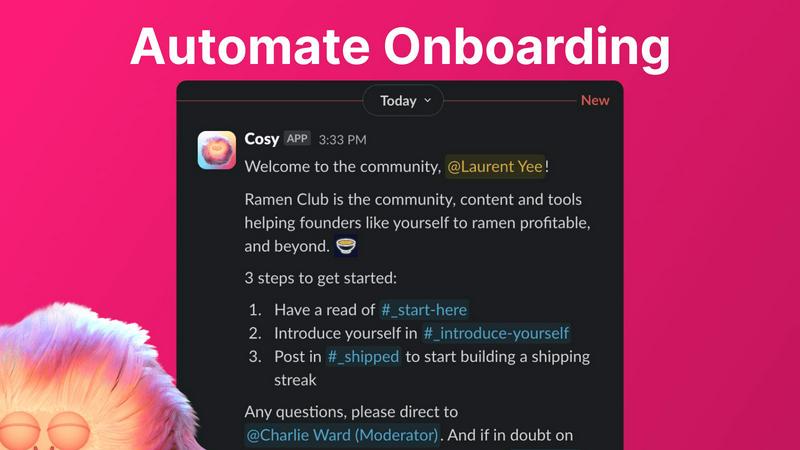
Create and automate up to 10 distinct welcome DM sequences to greet new members, triggered the moment they join your Slack. Fully customize messages with member names, links, and emojis, and schedule them to send immediately or on a delay of minutes, hours, or even months. This ensures every new member feels personally welcomed, even outside of business hours, saving you countless hours of manual outreach and follow-up while ensuring no one slips through the cracks.
Member Introductions & Connections
Grow engagement by automatically introducing opted-in community members to each other via direct messages on a regular cadence you set. Introductions happen in a 3-person DM with the Cosy bot, and you can customize the intro message, frequency (every 1-4 weeks), and timing. This feature fosters serendipitous connections, randomly matching members while avoiding recent matches, to build a highly engaged network where relationships form on autopilot.
Searchable Member Directory
Build a rich, searchable directory of all your community members without anyone ever leaving Slack. Create custom profile fields for members to fill out, then notify everyone to build their profiles. Members can search by keywords and filter for completed profiles using a slash command or the Cosy app. This transforms your Slack into a powerful networking hub, helping members find the right people and resources effortlessly.
Content Highlights & Moderation
Instantly surface the most valuable conversations and identify potential issues with powerful slash commands. Discover the top 10 most engaged posts in a specific channel or across all public channels. Alternatively, quickly find all public messages that have gone unreplied to, allowing you to jump in and re-engage the discussion or spot members who may need support, ensuring your community's content remains vibrant and inclusive.
documentorium
Trade-Specific Guided Templates
documentorium offers over 200 templates meticulously organized across 26 trade categories. This is not a one-size-fits-all solution; each form, whether for a quote, inspection report, or warranty, contains fields built specifically for your trade. An electrician's template includes fields for circuit amperage and NEC code references, while a roofer's form accounts for square footage of shingles and underlayment type. This guided approach eliminates guesswork, ensures all necessary information is captured, and accelerates the document creation process dramatically.
Instant, Professional PDF Generation
The platform is engineered for speed and polish. Once you complete the intuitive form, documentorium's engine takes over, transforming your inputs into a clean, well-formatted, and brand-consistent PDF document in seconds. There is no need for manual layout adjustments, font sizing, or table formatting. This feature ensures that every document you send to a client or site manager reflects the high quality of your workmanship, elevating your professional image at the critical moment of proposal and reporting.
Complete Document History & Prefill
Every document you create is automatically saved in your personal history within the platform. This creates a powerful, searchable archive of all your client interactions and jobs. More importantly, it enables intelligent pre-filling for future documents. Returning client details, project addresses, and standard service descriptions can be populated with a click, turning repeat business and follow-up work from a chore into a task that takes mere moments, showcasing the platform's evolution into a true business memory system.
Comprehensive Trade Document Library
documentorium serves as a single, authoritative source for every business document a tradesperson might need throughout a project's lifecycle. From the initial quote and formal proposal to the work order, change order, service report, and final invoice, every stage is supported. This end-to-end coverage prevents the need to switch between different tools or recreate information, creating a cohesive and professional paper trail that supports business growth, accountability, and streamlined operations.
Use Cases
Cosy
Scaling a New Community from Day One
For founders and new community managers, Cosy automates the foundational work of welcoming and integrating every new member from the moment they join. By setting up automated onboarding DMs, you ensure consistent, warm first impressions that scale effortlessly with your growth, freeing you to focus on strategy and content instead of manual greetings.
Reigniting Engagement in a Stagnant Community
If your Slack workspace has grown quiet, Cosy's automated member introductions and content highlighting tools can jumpstart activity. By systematically connecting members and surfacing past high-value conversations, you create new discussion points and relationships, moving the community from a passive information channel back to an active, engaging hub.
Building a Professional Network within a Company or Group
For internal teams or professional groups, the searchable Member Directory turns Slack into a powerful internal knowledge and networking platform. Members can easily find colleagues with specific skills, interests, or experience, fostering cross-functional collaboration and making the collective expertise of the community transparent and accessible.
Proactive Community Health Monitoring
Community managers can use the content highlight and unreplied message features to proactively monitor the health of the community. Quickly identifying highly engaged content allows you to recognize and reward active contributors, while spotting unreplied messages helps you intervene to support isolated members or spark conversation in dormant threads, maintaining a positive and inclusive environment.
documentorium
Creating a Winning Service Proposal
A solar installer needs to present a detailed, compelling proposal to a homeowner. Using documentorium, they select a solar-specific proposal template. The guided form prompts them for system size, panel specifications, energy output estimates, financing options, and warranty details. Within minutes, they generate a polished PDF proposal that clearly outlines the project's value, building client confidence and significantly increasing the likelihood of closing the sale compared to a handwritten estimate or a generic document.
Streamlining Job Site Documentation
An HVAC technician completing a complex repair needs to provide a thorough service report to the building manager and for their own records. They open the HVAC service report template, which includes fields for equipment model numbers, diagnostics performed, parts replaced, pressure readings, and safety checks. The technician fills in the details on their mobile device at the job site and generates a professional report on the spot, ensuring accuracy and providing immediate, trustworthy documentation to the client.
Managing Project Changes with Change Orders
A general contractor encounters an unforeseen issue during a kitchen remodel that requires additional cabinetry work. To formally communicate this scope change and associated costs to the client, they use documentorium's change order template. The form guides them to detail the original scope, the reason for the change, the new work required, and the updated price and timeline. The resulting clear, professional document prevents misunderstandings, secures client approval, and maintains a healthy project workflow.
Issuing Fast, Accurate Quotes and Invoices
A plumber on an emergency call fixes a burst pipe. Before leaving, they need to provide a quote for the completed work. They open the plumbing invoice/quote template, which includes line items for service call fees, materials like pipes and fittings, and labor. The form calculates totals automatically. In seconds, they present a clean, itemized invoice to the homeowner, enabling immediate payment and eliminating the delay of "I'll send you the bill later," which improves cash flow and client satisfaction.
Overview
About Cosy
Cosy is a powerful, Slack-native automation platform designed to transform your Slack workspace from a simple communication tool into a thriving, self-sustaining community. It is built for community managers, founders, and team leaders who understand that growth hinges on engagement, connection, and member experience, but who are constrained by limited time and resources. Cosy directly addresses this by automating the most time-consuming and critical aspects of community management directly within the environment where your members already are: Slack. Its core value proposition is to save you hours of manual effort every week while systematically fostering a more connected, engaged, and valuable community. By automating personalized onboarding sequences, facilitating meaningful 1:1 introductions between members, building a searchable member directory without ever leaving Slack, and instantly surfacing top content or potential issues, Cosy empowers you to scale your community's warmth and value. It allows you to progress from manually herding conversations to strategically nurturing a vibrant ecosystem that grows and engages on autopilot, turning your Slack into the central, lively hub your community deserves.
About documentorium
documentorium represents a pivotal evolution in how skilled tradespeople manage the business side of their craft. It is a specialized document engine designed to move service professionals beyond the frustrating, time-consuming stage of starting every quote, invoice, or report from a blank page. Built explicitly for electricians, plumbers, contractors, HVAC technicians, roofers, and dozens of other trades, it replaces generic templates and manual formatting with a system that understands the unique language and requirements of field service work. The core value proposition is profound efficiency and professionalism: users fill out simple, guided forms with fields tailored to their specific trade and instantly receive a clean, print-ready PDF. This transition from administrative burden to streamlined workflow allows tradespeople to focus on growth and mastery of their trade, not on wrestling with document software. It's the tool that supports the journey from a solo operator juggling paperwork to a smoothly run business that wins trust with every professional document sent.
Frequently Asked Questions
Cosy FAQ
How does the automated onboarding work?
When a new member joins your Slack workspace, Cosy can automatically send them a sequence of up to 10 welcome direct messages. You fully control the message content, including personalization with the member's name, and the timing—messages can be sent immediately or scheduled with delays of minutes, hours, or months. This happens reliably, 24/7, ensuring every member is welcomed.
Are member introductions opt-in?
Yes, member introductions are completely opt-in. Community members must choose to participate in the connection program. For those who opt-in, Cosy will randomly introduce them to another opted-in member on the cadence you configure (e.g., every week), while avoiding matching the same people together in a short timeframe.
How do members access the Member Directory?
Members can access the searchable directory in two ways: by opening the Cosy app within Slack, or by using the /member-directory slash command in any public channel, which provides a quick link. They can then search by keywords and filter to find other members based on the profile information shared.
What does Cosy cost?
Cosy offers a free plan for communities with up to 250 members. For unlimited members, a 30-day free trial is available for the paid plan. After the trial, you can continue with a paid subscription to access all features for communities of any size. Specific pricing tiers for the paid plan are available on the Cosy website.
documentorium FAQ
Can I cancel my subscription anytime?
Yes, you have complete control. You can cancel your annual subscription at any time directly from your account settings. Your access to the platform and all its features will remain active until the end of your current billing period. There are no penalties or lock-in contracts, allowing your business to evolve its toolset as needed without friction.
What happens to my documents when the free trial ends?
All documents you create during your free trial remain securely stored in your account. You can view, download, and print these existing PDFs at any time, even after the trial expires. To create or edit new documents, you would need to activate a paid subscription. No data or document history is ever deleted due to a trial expiration.
Do I lose my documents if I don't subscribe after the trial?
No, you do not lose access to your documents. Your created documents are yours and remain in your account history for viewing and downloading. The subscription is required for the ongoing creation and editing of new documents. This model ensures you never lose your valuable work history, even if you pause active use of the platform for new document generation.
Does documentorium provide legal advice for contracts?
No, documentorium is a document generation tool, not a legal service. The platform provides professionally designed templates and tools to create, format, and manage your business documents efficiently. It is always recommended that you have any legal contracts, such as service agreements or warranties, reviewed by a qualified legal professional to ensure they meet the specific requirements of your jurisdiction and business.
Alternatives
Cosy Alternatives
Cosy is a Slack-native automation platform in the productivity and management category, designed to automate community growth through smart onboarding and member connections. It transforms a Slack workspace from a basic chat tool into a self-sustaining, engaged community hub. Users often explore alternatives for various reasons, such as budget constraints, the need for features beyond Slack integration, or a desire for different automation capabilities. The search for the right tool is a natural step in evolving your community management strategy from manual effort to scalable systems. When evaluating options, consider your community's current growth stage and future goals. Look for solutions that align with your core needs: automating repetitive tasks, fostering genuine connections, and providing actionable insights, all while fitting seamlessly into your existing workflow.
documentorium Alternatives
documentorium is a specialized document engine for tradespeople, designed to streamline the creation of professional PDFs like quotes, invoices, and work orders. It falls into the productivity and business management software category, helping service professionals save time and present a polished image. Users often explore alternatives for various reasons. Some may need different pricing models or more advanced features as their business grows, while others might seek integration with specific accounting or scheduling platforms they already use. The search for the right tool is a natural part of scaling a service business. When evaluating other options, key considerations include the depth of trade-specific templates, the ease of generating and sending documents, and overall value for money. The goal is to find a solution that not only creates documents but also supports the professional evolution of your trade business.