
Dokta vs invoice Sonic
Side-by-side comparison to help you choose the right tool.

Dokta automates document management for SMBs and freelancers, streamlining invoicing, cash flow, and client interactions effortlessly.
Last updated: April 4, 2026

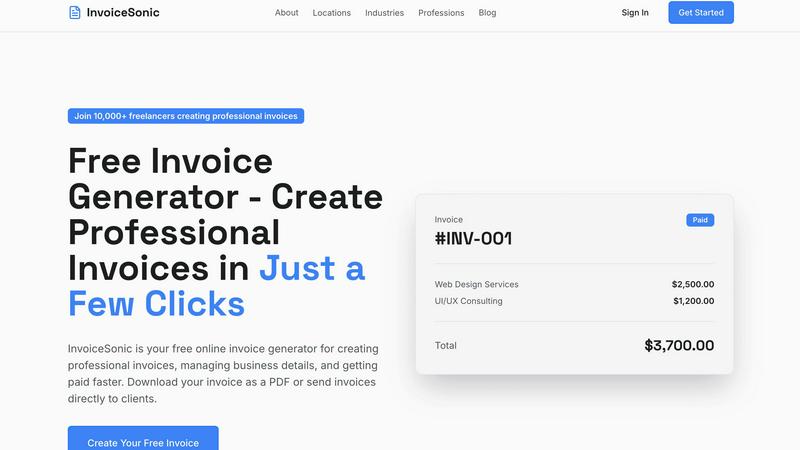
InvoiceSonic lets you create professional invoices in seconds, empowering freelancers and small businesses to thrive.
Last updated: February 28, 2026
Visual Comparison
Dokta

invoice Sonic
Feature Comparison
Dokta
Automated Invoice Management
Dokta automates the entire invoice management process in just three simple steps. Users can upload a document via photo, scan, or PDF, and within 60 seconds, Dokta's AI analyzes the document, extracting vital information like type, amount, and deadlines. This feature saves time and minimizes manual entry errors.
Real-Time Cash Flow Tracking
Dokta provides users with a comprehensive overview of their financial status through real-time cash flow tracking. You can monitor invoiced amounts, collected payments, outstanding invoices, and VAT in an easy-to-read graphical format. This feature allows for better financial decision-making and helps users stay on top of their business health.
Client and Supplier Management
Dokta enriches your client and supplier database by automatically integrating SIRET numbers, providing payment scoring, and maintaining a complete historical record for each entity. This feature ensures that you have all necessary information at your fingertips, simplifying the management of business relationships.
Anomaly Detection
Dokta offers a robust anomaly detection feature that safeguards your documents against common errors. It detects issues such as modified IBANs, duplicates, inconsistent VAT numbers, and missing document numbering. This feature enhances your document security and ensures compliance with financial regulations.
invoice Sonic
Unlimited Free Invoices
InvoiceSonic offers users the ability to create unlimited free invoices, making it accessible for freelancers and small businesses. Users can generate up to 5 invoices per month without any hidden fees or credit card requirements, allowing them to manage their invoicing without financial commitments.
Professional Invoice Templates
The platform features a wide selection of professionally designed invoice templates suitable for various industries and business types. Users can select templates that align with their brand identity, ensuring that each invoice is not only functional but also visually appealing.
Instant PDF Download
With InvoiceSonic, users can download their invoices as PDF files instantly. This feature enhances efficiency by allowing businesses to send invoices directly to clients without delay, ensuring prompt payments and a streamlined invoicing process.
Automatic Calculations
InvoiceSonic automatically calculates totals, taxes, and balances as users input their data. This feature reduces the risk of errors in financial calculations and saves time, enabling users to focus on their core business activities.
Use Cases
Dokta
Freelance Developer
As a freelance developer, managing contracts and invoices can be overwhelming. With Dokta, you can automatically generate monthly invoices from time-based contracts (TJM), track payments, and receive reminders for overdue invoices. This allows you to focus on coding rather than administrative tasks.
Creative Freelancers
For creative freelancers, the ability to send quotes with online acceptance links streamlines the project workflow. Dokta enables the seamless conversion of accepted quotes into invoices with just one click, simplifying the financial management of creative projects from start to finish.
Auto-Entrepreneurs
Auto-entrepreneurs often face challenges in adhering to compliance and tracking payments. With Dokta, you can create compliant invoices, monitor cash flow, and receive alerts for URSSAF deadlines, making it easier to manage your business without unnecessary stress.
Small and Medium-Sized Businesses
SMBs benefit from Dokta's comprehensive document management capabilities, which include automating reminders for unpaid invoices and managing contracts. The platform provides real-time insights into financial health, enabling business owners to make informed decisions and drive growth.
invoice Sonic
Freelancers Managing Multiple Clients
Freelancers can utilize InvoiceSonic to create customized invoices for each of their clients. The ability to personalize invoices with business logos and specific service descriptions ensures that each client receives a professional document that reflects the freelancer's brand.
Startups Handling Initial Financial Transactions
Startups often face the challenge of establishing a professional image while managing budgets. InvoiceSonic allows new businesses to generate professional invoices quickly, helping them maintain a credible presence in the market without incurring additional costs.
Small Businesses Automating Billing Processes
Small businesses can streamline their billing processes by using InvoiceSonic to generate and send invoices automatically. The platform supports recurring billing, making it easier for businesses to manage subscriptions and ongoing services without manual intervention.
Consultants Providing Proposals and Invoices
Consultants can use InvoiceSonic to create proforma invoices that serve as quotes for potential clients. This feature allows consultants to present estimates in a professional format, enhancing their chances of securing contracts while maintaining clear communication about costs.
Overview
About Dokta
Dokta is an innovative AI-powered document management platform designed specifically for freelancers, solo entrepreneurs, auto-entrepreneurs, and small to medium-sized businesses (SMBs). This cutting-edge tool streamlines the document management process, allowing users to effortlessly drop any document type—be it an invoice, quote, or contract—into the platform. Within 60 seconds, Dokta's advanced AI engine reads, classifies, and extracts key data, eliminating the need for manual entry and reducing the risk of errors. The platform effectively manages the entire document lifecycle, enabling users to create professional invoices and quotes, track payments, automate reminders for overdue invoices, and manage contracts and deadlines. By turning documents into actionable tasks, Dokta ensures you never lose files, miss deadlines, or spend your weekends on administrative work. With features that build a client database from your documents and track cash flow in real-time, Dokta is an essential tool for anyone looking to enhance their productivity and focus on what truly matters—growing their business. The platform is GDPR compliant and hosted in Europe, ensuring your data is secure and accessible.
About invoice Sonic
InvoiceSonic is an innovative, free invoice generator tailored for freelancers, small businesses, and startups looking to simplify their invoicing process. By providing a user-friendly interface, InvoiceSonic enables users to create polished and professional invoices in mere minutes. This eliminates the hassles associated with outdated software and clunky spreadsheets. The platform boasts a diverse library of beautifully designed invoice templates that cater to various industries, allowing businesses to reflect their unique brand identity while maintaining professionalism. With no hidden fees or subscription requirements, InvoiceSonic empowers thousands of users to manage their invoicing with ease. Whether you require a standard invoice, a proforma invoice, or a customized template featuring your logo, InvoiceSonic streamlines the process, helping you get paid faster and more efficiently. Join the growing community of over 10,000 freelancers and business owners who trust InvoiceSonic to handle their invoicing needs effortlessly.
Frequently Asked Questions
Dokta FAQ
How does Dokta ensure data security?
Dokta is 100% GDPR compliant and hosts its data in Europe via AWS. It employs AES-256 encryption to protect your sensitive information, ensuring that your documents are secure and compliant with privacy regulations.
Can I use Dokta for free?
Yes! Dokta offers a free tier that allows you to manage up to 15 documents per month. This plan provides access to essential features, enabling you to experience the benefits of automated document management without any cost.
What types of documents can I upload to Dokta?
Dokta supports various document types, including invoices, quotes, and contracts. You can upload documents as photographs, scans, or PDFs, making it easy to digitize and manage your paperwork.
What is the typical analysis time for a document in Dokta?
Dokta's AI engine analyzes documents in under 60 seconds. This rapid processing time allows you to quickly access key data and take necessary actions without delay, improving your overall productivity.
invoice Sonic FAQ
Is InvoiceSonic really free to use?
Yes, InvoiceSonic offers a free tier that allows users to create up to 5 invoices per month without any hidden fees or credit card requirements. This makes it a cost-effective solution for freelancers and small businesses.
Can I customize my invoices with my logo?
Absolutely! InvoiceSonic allows users to add their business details and logo to invoices, ensuring that each document reflects their unique brand identity and maintains a professional appearance.
How do I download my invoices?
Once you create an invoice using InvoiceSonic, you can instantly download it as a PDF file. This feature enables you to send invoices directly to clients without any delays.
What types of invoices can I create with InvoiceSonic?
InvoiceSonic allows users to create various types of invoices, including standard invoices, proforma invoices, and customizable invoice templates. This versatility ensures that users can meet their specific invoicing needs effectively.
Alternatives
Dokta Alternatives
Dokta is an innovative AI-powered document management platform designed specifically for freelancers, solo entrepreneurs, auto-entrepreneurs, and small to medium-sized businesses (SMBs). It automates the handling of various business documents, such as invoices, quotes, and contracts, allowing users to streamline their administrative tasks and maintain a focus on growth. Users often seek alternatives to Dokta due to factors like pricing, specific features, or compatibility with their preferred platforms, as each business has unique needs that may not be fully met by a single solution. When choosing an alternative to Dokta, it is essential to consider several key aspects. Look for platforms that offer similar automation capabilities and document management features, as well as flexibility in pricing to suit your budget. Additionally, ensure that the alternative supports your specific document types and integrates seamlessly with the tools you already use, helping you maintain efficiency as your business evolves.
invoice Sonic Alternatives
Invoice Sonic is a powerful, free invoice generator tailored for freelancers, small businesses, and startups. By simplifying the invoicing process, it allows users to create stunning, professional invoices in just a few clicks. As a productivity and management tool, Invoice Sonic has gained popularity for its user-friendly interface and diverse template options. Despite its strengths, users often seek alternatives due to various reasons, including pricing, specific feature requirements, or the need for integration with other platforms. When choosing an alternative, it's essential to consider factors such as ease of use, customization options, and the ability to meet the unique invoicing needs of your business. A good alternative should also maintain the same level of professionalism in invoice presentation while offering flexibility in features and pricing.