
Fond vs SupaSidebar
Side-by-side comparison to help you choose the right tool.

Fond is your AI cooking companion that evolves with you, managing recipes and teaching technique to build your culinary confidence.
Last updated: March 19, 2026

SupaSidebar
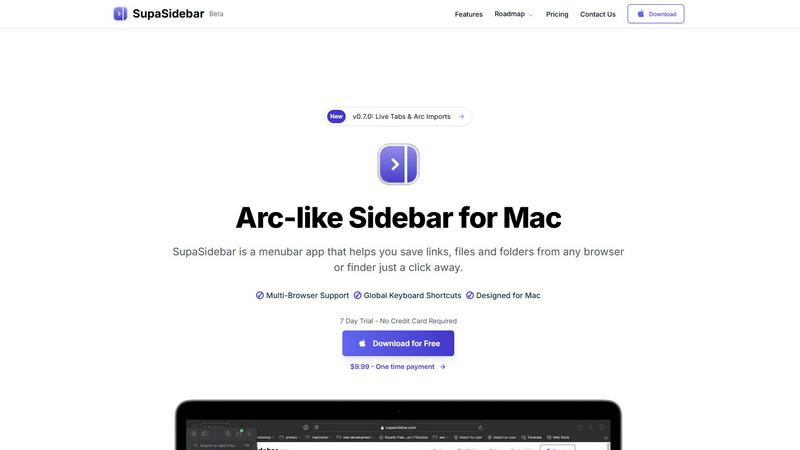
SupaSidebar streamlines your Mac experience with quick access to links, files, and folders from any browser or app.
Last updated: February 28, 2026
Visual Comparison
Fond

SupaSidebar
Feature Comparison
Fond
AI Cooking Agent (August)
August is your personal culinary guide that evolves with you. This intelligent assistant learns from your cooking habits, skill level, and goals. During meal prep, you can ask it real-time questions about ingredient substitutions, cooking techniques, or how to salvage a dish. Unlike static help, August's guidance becomes more personalized and insightful the more you cook, ensuring your culinary growth is continuously supported.
AI Recipe Import
Transform any recipe source into a clean, usable format instantly. Simply paste a URL, upload a photo, or copy text. Fond's AI meticulously extracts the ingredients, steps, and key metadata, automatically removing intrusive ads and lengthy blog stories. This turns your scattered digital collection into a pristine, searchable personal cookbook, saving you time and frustration.
Smart Meal Planner & Shopping List
Plan your culinary week with a simple drag-and-drop interface. As you assign recipes to days, Fond automatically generates a consolidated shopping list. This list is intelligently organized by grocery store aisle, merges duplicate items, and syncs across your household devices. It also accounts for leftovers, reducing food waste and eliminating last-minute store runs.
Specialized Craft Modules
For cooks ready to advance beyond recipes, Fond offers deep-dive Modules. Starting with the Pizza Workshop, these provide professional-grade tools like dough calculators with baker's percentages, fermentation trackers, and oven guides. Future modules like the Bread Lab and Coffee Lab are designed to support your evolution into specific culinary arts, providing structured frameworks for mastery.
SupaSidebar
Seamless Browser Integration
SupaSidebar is designed to work flawlessly with all major browsers, including Safari, Chrome, Firefox, Arc, and Brave. This integration ensures that users can save and access their favorite links and files from any browsing environment, providing a unified experience across platforms.
Global Keyboard Shortcuts
The application features customizable global keyboard shortcuts that facilitate quick actions. Users can save URLs or copy links with simple keystrokes, such as ⌘ + ⌃ + S for saving and ⌘ + ⌃ + C for copying. This feature significantly enhances productivity by reducing the time spent navigating through menus.
Recents Tracking
SupaSidebar automatically tracks and displays recently visited websites for up to 48 hours. This feature allows users to easily revisit sites they have accessed in the recent past, eliminating the hassle of searching through bookmarks or browser history.
Favorites and Organization
Users can pin their most important links and files at the top of the sidebar for quick access. This organization feature makes it easy to prioritize frequently used resources, ensuring that essential information is always just a click away.
Use Cases
Fond
The Aspiring Home Chef
A cook tired of recipe blogs and seeking to build foundational skills uses Fond to organize saved recipes. They rely on August for real-time technique explanations and substitution advice during cooking, turning each meal into a learning opportunity that builds their confidence and culinary intuition over time.
The Busy Household Manager
A parent managing a family's meals uses Fond's drag-and-down meal planner to map out a balanced week. The automatically generated, aisle-sorted shopping list is shared with a partner, streamlining grocery trips. The system's ability to account for leftovers and carry ingredients forward reduces decision fatigue and food waste.
The Culinary Hobbyist
A pizza enthusiast utilizes the dedicated Pizza Workshop module to move from following recipes to understanding the craft. They use the dough calculator, track fermentation precisely, and follow tailored oven guides to consistently improve their crust, documenting their progress within the app.
The Digital Recipe Collector
Someone with hundreds of bookmarked recipes and screenshots scattered across devices uses Fond's AI import to centralize their entire collection into one clean, searchable library. This transforms their chaotic digital pantry into a reliable resource, finally making their saved recipes easy to find and use.
SupaSidebar
Efficient Resource Management
For busy professionals juggling multiple projects, SupaSidebar serves as a central hub for managing links, files, and folders. By organizing resources in one place, users can enhance their workflow and focus on their tasks without the distraction of a cluttered desktop.
Academic Research
Students conducting research can utilize SupaSidebar to save and organize links to academic articles, study materials, and important resources. The ability to quickly access these materials facilitates a more efficient study process, allowing students to concentrate on learning rather than searching.
Creative Projects
Content creators and designers can leverage SupaSidebar to manage inspiration sources, such as design references, articles, and tutorials. By keeping these resources organized, they can streamline their creative process and boost productivity when working on projects.
Collaborative Work
In team environments, SupaSidebar can be used to share links and resources among team members. By centralizing project-related materials, teams can improve communication and collaboration, ensuring everyone has access to the necessary information.
Overview
About Fond
Fond is the intelligent kitchen companion designed to evolve your cooking journey from scattered chore to joyful craft. It's built for home cooks who feel overwhelmed by the chaos of bookmarks, cluttered notes, and last-minute grocery runs, and who aspire to grow their skills. At its core, Fond consolidates your entire cooking workflow into one seamless, synced platform. It begins by intelligently importing recipes from any website, photo, or text, stripping away the clutter to leave you with pure instructions. The heart of the experience is August, your built-in AI cooking assistant that learns your preferences and skill level over time, offering real-time guidance on techniques and substitutions. Fond then helps you progress to strategic meal planning, generating personalized weekly plans and automated, aisle-sorted shopping lists. For those ready to dive deeper, specialized Modules like the Pizza Workshop provide master-class tools for specific crafts. By bringing order, knowledge, and confidence to your kitchen, Fond transforms cooking from a daily task into a progressive and rewarding skill, helping you improve with every meal.
About SupaSidebar
SupaSidebar is an innovative sidebar application designed specifically for Mac users, drawing inspiration from the Arc browser to deliver a powerful productivity tool. Its primary purpose is to enhance organization, streamline browsing speed, and foster a seamless user experience. Ideal for professionals, students, and anyone managing a plethora of links, files, and folders, SupaSidebar simplifies the digital landscape by providing quick access to essential resources. With support for all major browsers—including Safari, Chrome, Arc, Firefox, and Brave—users can effortlessly save URLs and manage their online content. The application boasts an intuitive interface complemented by global keyboard shortcuts, empowering users to navigate their workspace effortlessly. For instance, with just a simple press of ⌘ + ⌃ + S, users can save their current webpage, while ⌘ + ⌃ + C allows for quick copying of links. SupaSidebar not only keeps crucial links at your fingertips but also helps maintain focus, making it an invaluable asset for anyone looking to optimize their productivity and workflow.
Frequently Asked Questions
Fond FAQ
What is August, the AI Cooking Agent?
August is Fond's built-in intelligent assistant designed to be your personal cooking guide. It helps you during meal preparation by answering questions about techniques, ingredient substitutions, and recipe adjustments in real-time. Crucially, August is designed to learn from your interactions and cooking habits, meaning the advice and support it provides become more tailored and useful as you use Fond more.
How does the AI Recipe Import work?
The AI Recipe Import allows you to capture recipes from virtually anywhere. You can paste a URL from any cooking website, upload a photo of a recipe from a cookbook, or even copy and paste plain text. Fond's AI then analyzes the content, intelligently identifies and extracts the structured recipe data (ingredients, steps, cook time, servings), and saves it in a clean, standardized format within your Fond library, removing all non-essential clutter.
What are Fond's "Modules"?
Modules are specialized, in-depth workshops within Fond focused on specific culinary crafts, going beyond standard recipe management. The first available module is the Pizza Workshop, which includes tools like a dough calculator, fermentation tracker, and oven guides. These are designed for enthusiasts who want to progress from following instructions to understanding the underlying science and technique of their craft, with more modules like Bread and Coffee coming soon.
Is Fond available on mobile devices?
Yes, Fond is designed to be a fully synced companion across all your devices. While currently in early access, native applications for iOS and Android are in development and coming soon. This ensures your recipe library, meal plans, and shopping lists are always accessible whether you're planning at your computer or cooking in the kitchen.
SupaSidebar FAQ
Is SupaSidebar a browser extension?
No, SupaSidebar is a standalone menubar application designed specifically for Mac users. It integrates seamlessly with multiple browsers but operates independently from them.
Which browsers does SupaSidebar work with?
SupaSidebar supports all major browsers, including Safari, Chrome, Firefox, Arc, and Brave, enabling users to save and access links from any of these platforms.
What macOS version do I need?
SupaSidebar requires macOS 13 or later to function effectively. Ensure your system meets this requirement for the best experience.
Where is my data stored?
All data managed by SupaSidebar remains on your Mac, ensuring privacy and security. The application does not store your information on external servers, providing peace of mind to users concerned about data privacy.
Alternatives
Fond Alternatives
Fond is an intelligent kitchen management platform in the productivity and management category. It consolidates recipes, meal planning, and grocery shopping into one AI-powered app, aiming to bring order and confidence to home cooking. Users often explore alternatives for various reasons. Some may seek different pricing models or specific feature sets not covered by their current tool. Others might need compatibility with different platforms or ecosystems, or simply prefer a different approach to organizing their culinary workflow. When evaluating an alternative, consider your core needs. Look at how the platform handles recipe capture and organization, the depth of its meal planning capabilities, and the utility of its shopping list features. The integration of AI or smart assistance, cross-device sync, and the overall design philosophy are also key factors in finding a tool that evolves with your cooking journey.
SupaSidebar Alternatives
SupaSidebar is a sophisticated sidebar application designed for Mac users, enhancing their digital experience by providing quick access to links, files, and folders from any browser. As a productivity and management tool, it helps streamline workflows, especially for professionals and students who juggle multiple resources and need to maintain focus while browsing. Users often seek alternatives to SupaSidebar for various reasons, such as pricing, specific feature sets, or compatibility with different platforms. When searching for an alternative, it’s essential to consider factors like user interface, ease of integration with existing workflows, and the extent of features offered, ensuring that the new tool aligns with individual productivity needs and preferences.